

LeakSpot: Finding the Water a City Can't See
Building meters notice water going missing, citizens confirm it with a phone photo checked by Amazon Bedrock, one fixed score picks which leak to fix first, and a repair only counts when the meters agree. How I built it solo on serverless AWS, and the five things that broke on the way.

Building meters notice water going missing. Citizens confirm it with a phone photo. One fixed score picks the leak to fix first. And a repair only counts when the meters agree. This is how I built LeakSpot on AWS, solo, and everything that broke on the way.
Somewhere under a road in your city, clean drinking water is leaking into the ground right now. Nobody has complained about it. Nobody can see it.
In one of the city of India, Aurangabad, a 2014 World Bank review found that about 44 million litres of treated water was lost in the distribution pipes every day. In the same years, many homes got water for about 45 minutes, every second day. That lost water is roughly 4,400 tanker-loads. Every single day.
The leaks people can see get reported. A burst pipe on a busy road gets a hundred phone calls. The slow leak under a building gets zero, and it can run for months.
So for the WeMakeDevs × AWS Bharat Builds hackathon (Heat and Water track), I picked one question: can a city find the leaks nobody reports, fix the worst one first, and prove the fix actually worked?
LeakSpot is my answer. It is live on AWS, and you can open it on your phone and report a leak in under a minute. The city in the demo is simulated. Your phone report, and the AI that checks your photo, are real.
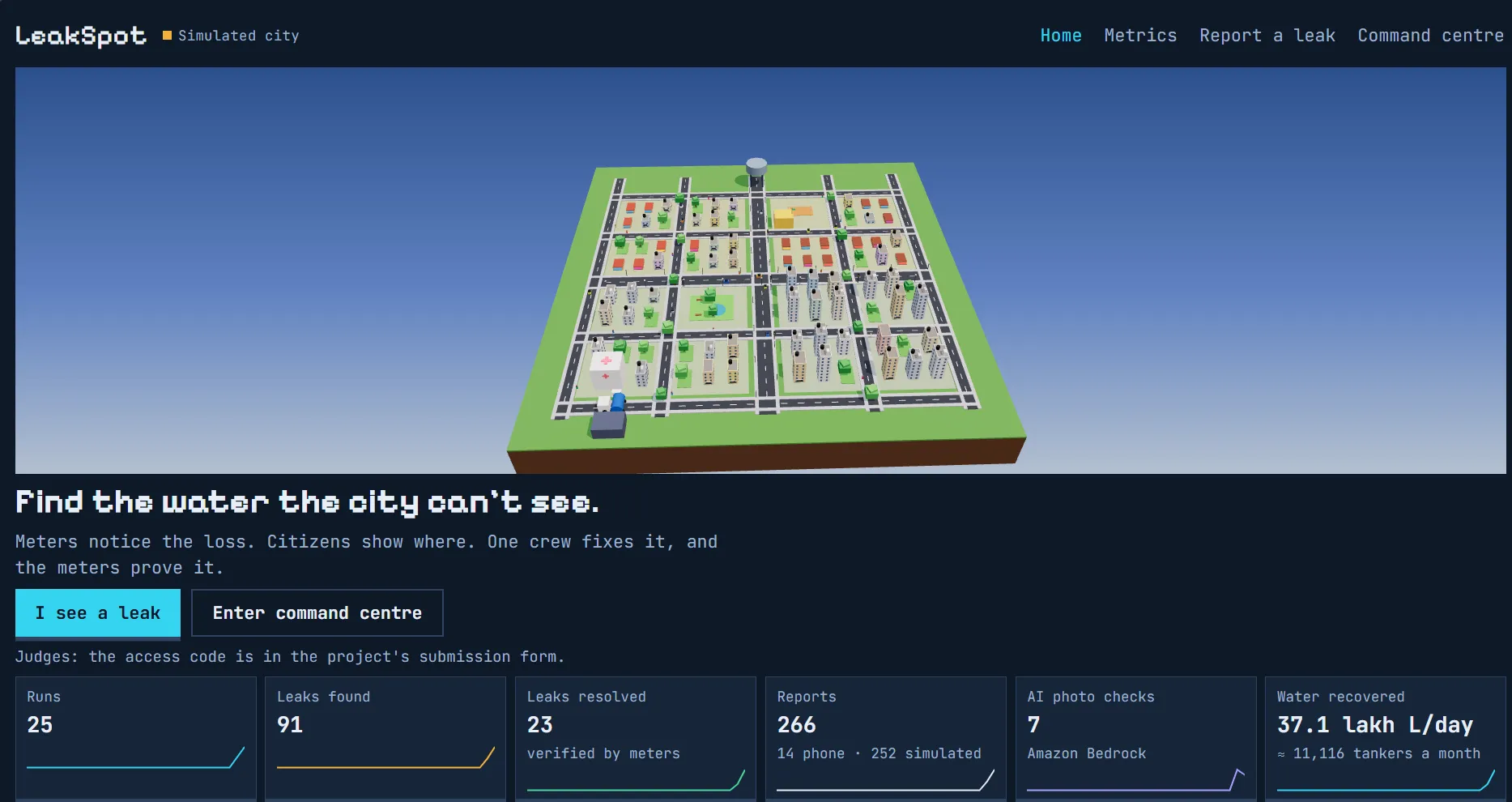
The landing page. Jaldhara is a small simulated city, and every number on it comes from the real API.
Part one: the leak nobody reports
Indian cities don't lose water because nobody cares. They lose it because the system is blind in four places.
A 2022 CEEW study found that several major Indian cities cannot account for 40 to 65% of the water they produce. Many of those cities supply water for only two or three hours a day. Here is why the leaks stay unfixed:
- Underground leaks are invisible. A cracked main under a road can run for weeks. No citizen sees it, so no complaint is ever filed.
- Complaints are vague and repeated. "Water leaking near the temple" arrives by phone, WhatsApp and in person, from ten people, with no photo and no location.
- Repairs go first-come-first-served. A dripping tap can sit ahead of a burst main next to a hospital.
- Nobody checks whether a repair worked. A job is "closed" when the crew leaves, not when the water stops disappearing.
There is a fifth problem that makes this scary, not just wasteful. When pipes sit empty between supply hours, dirty water can get sucked in through the same cracks. A leak is a health risk too.
So LeakSpot does not try to fix all of urban water. It answers three narrow questions: which leak should the city fix first, where should the crew go, and did the fix work?
Part two: two eyes on one network
LeakSpot looks at the same pipes from two sides. The meters see the loss from above. Citizens see the street from below. Neither is enough alone.
- The meters know that water is going missing in a sector, but not where on the street.
- Citizens know where the water is on the road, but they can't see a pipe cracking under a building.
Put them together and you get one loop. Meters notice, citizens confirm, a fixed score ranks, one crew fixes, and the meters verify. If the meters don't agree the leak stopped, the job reopens by itself.

To show it working, I built Jaldhara, a small simulated city: 16 sectors, a water tower, a hospital, a school, a meter on every building and one repair truck. One demo day runs from 06:00 to 20:00, and two leaks start at dawn. One is a burst on the street that people photograph. The other is hidden underground, and only the meters can catch it.
Part three: how the meters notice
The meters work like checking your wallet. If ₹500 went in and you spent ₹400, you should have ₹100 left. If you only have ₹70, ₹30 leaked somewhere, even if you never saw it fall out.
Every sector in Jaldhara has one meter where water enters, and every building has its own meter. Every 15 minutes, LeakSpot does this subtraction:
Plain text
unaccounted water = water into the sector − water used by all its buildings
Here is the catch that took me a while to accept: unaccounted water is not the same as leakage. Some of it is theft, some is old meters reading wrong, some is taps nobody metered. Every sector has its own "normal" gap.
So LeakSpot never compares a sector with a fixed number. It compares each sector with its own past:
- For each 15-minute slot of the day, it looks at the same slot over the previous 14 days and takes the middle value (the median), plus how much it usually wobbles.
- A slot is unusual when the gap jumps well above that normal (three times the usual wobble) and the extra loss is at least 8%.
- Two unusual slots in a row turn the sector amber: leak suspected. One bad reading alone never sends a crew.
The screen never says "X litres are leaking." It says "X litres a day unaccounted" and "leak suspected." That one wording choice is the most honest thing in the project.
And one rule I'm proud of: the detector never sees where the simulator hid the leaks. It only reads meter numbers and citizen reports, exactly like it would in a real city. A test even checks that no hidden leak position ever reaches the browser.
Part four: citizens show where
Meters can say "something is wrong in sector B2." They can't say "it's next to the tea stall on the second lane." People can.
So anyone can open
/report on a phone, or scan the QR code on the Command Centre screen. No app, no login, and it works in English, Hindi and Marathi. There are two big buttons:- I see a leak: take a photo, pick what you see, tap the spot on the map, send.
- Low / no water: no photo needed. This one matters more than it looks. Homes downstream of a burst lose pressure first, so a cluster of "no water" reports points at a leak nobody can see.
Before the photo leaves the phone, LeakSpot shrinks it under 400 KB for slow networks and strips the location data hidden inside the file.
Then Amazon Bedrock looks at it. I use the Nova 2 Lite model, which can read images, and ask it for one label and a confidence score:
Label | What happens next |
|---|---|
Burst | Strongest evidence, fast-tracked |
Major leak | Normal scoring |
Small drip | Normal scoring, low weight |
Sewage in supply | Health emergency, score never below 80 |
Not a leak | Kept away from the crew's list |
That last row is quietly useful. Plenty of citizen photos will be blurry, or a car wash, or someone's garden hose. Filtering those out saves a real crew a real trip.
While this happens, the phone doesn't show a spinning circle. It shows each step as it actually happens, like a small progress log: photo received, location matched, AI check, merged with nearby reports, scored. When it finishes, you get a result card, for example "AI: small drip, 90% sure", plus a ticket you can track.
And if Bedrock is down? The report is kept as self-reported and still counts. The AI is a helper, never a gate.
Part five: one score, no black box
A city has few crews and many complaints. Someone has to decide the order. I didn't want that someone to be an AI model.
Reports close to each other merge into one incident, and every incident gets the same simple score out of 100:
Plain text
P = 40·W + 25·E + 20·C + 15·K
Letter | Stands for | Where it comes from |
|---|---|---|
W (40) | Water lost | The meters: extra litres a day, capped at 2 lakh |
E (25) | Evidence | Photo label and number of reports |
C (20) | Critical site | Hospital, school, trunk main, connections served |
K (15) | Signals agree | Meters, reports and a confident photo, all pointing the same way |
The AI only feeds one ingredient, the evidence. It never decides the order. Every incident card also prints a "why" line in plain words, so an engineer can check the maths in five seconds.
Here is how the demo day ranks:
Incident | Score | Why |
|---|---|---|
C3, burst next to the hospital | 96 | All four signals strong |
B2, hidden leak | 39 | Real water loss, but no reports yet |
A1, local leak | 31 | Photos, but the sector's meters look normal |
D4, small drip | 25 | Minor evidence |
Look at B2. Nobody has reported it. A complaint-based system would never see it at all. LeakSpot puts it on the list from the meters alone, ranks it honestly below a burst at a hospital, and tells the crew where to look next.
Part six: "closed" means the meters agree
This is my favourite part of LeakSpot, and it is only a few lines of logic.
The crew goes to the highest score first. The truck drives from the depot along the street grid, and the engineer presses Mark repaired. In most systems, that's the end. In LeakSpot, that's when the real check starts.
The incident moves to Verifying. LeakSpot watches the next three 15-minute slots. If the extra loss falls back to within 3% of normal in all three, the repair is verified and the recovered litres are logged. If not, the incident reopens on its own. No one has to remember to check.
Here is the whole demo day:
- 06:15: B2 turns amber. The meters see a loss that nobody has reported.
- 06:45: Citizen photos confirm a burst in C3, right next to the hospital.
- 07:00: The crew leaves the depot for C3, the top of the list.
- 08:15: Three clean slots later, the meters agree. C3 is verified.
That one repair recovers about 1.8 lakh litres a day. With a 10,000-litre tanker, that's around 540 tanker-loads a month (simulated numbers, of course).
The one sentence I want people to remember: LeakSpot found a leak nobody reported, and proved the repair worked.
Part seven: what I threw away from my own plan
My first idea for LeakSpot was wrong, and a review of it said so in one line.
Version one was: citizen takes a photo, AI looks at it, AI estimates how many litres are leaking. The review asked the obvious question: how do you estimate litres a day from one photo? You can't. Nobody can.
That question changed the whole design. The meters now measure the loss, and the AI only gives evidence: what is in the photo and how sure it is. Making the AI do less made the product more believable.
The second big change came from the calendar. My idea doc "eventually" became project plan for a team of four with a long build. In reality, I was one person, and the clock was tight. So I cut hard:
In the idea doc | What actually shipped | Why |
|---|---|---|
11 AWS services (Amplify, API Gateway, Step Functions, Cognito, EventBridge, SNS and more) | 8 services, one Lambda for the whole API | Fewer moving parts to break before the demo |
Six DynamoDB tables | One DynamoDB item per demo run | The whole run fits in one place and saves safely |
A Step Functions pipeline for each report | One synchronous Bedrock call | Short enough that the phone can show each step live |
SMS alerts | A ticket page | One less thing to configure |
Water checked per supply window | Water checked every 15 minutes | Smoother lines and faster alerts in a one-day demo |
The rule I set for myself was simple: never cut the core loop.
Meters notice, citizens confirm, score, fix, verify. Everything else could go.
And the very first thing I built was not a feature. It was an empty page, deployed on AWS through the whole stack: CloudFront, S3, Lambda and DynamoDB, 28 resources in all. Deploying is the riskiest step in a hackathon, so I got it out of the way while I was still fresh. The page only said "LeakSpot", but
/api/health answered ok , and that felt like a "win".Part eight: what fought back
The engine worked mostly as planned. The interesting parts were the five times reality disagreed with me.
1. The AI that failed politely
I took a photo of a running tap, sent a report, and LeakSpot said: self-reported. Not "small drip." Not "burst." Just self-reported.
The logs showed the Bedrock call taking about a second, then nothing. No error line at all. My fallback was doing exactly what I designed it to do: if the AI fails, keep the report and move on. It was so polite that it hid the failure from me completely.
My first guess was model access. But the Bedrock "Model access" page I remembered had been retired. Models now switch on automatically the first time you call them. Then I checked the IAM permissions. They were fine. Then the parsing. Also fine.
The real cause was a
ThrottlingException: Too many tokens per day . The brand-new AWS account I was using had a small daily token limit for Bedrock, and my testing had used it up. No code change could fix that before the deadline, so I moved the whole stack to another account in the same region and redeployed. The new site was live in about ten minutes, because everything was already code.The lesson was bigger than the bug. Now every fallback logs why it fell back, the API returns the reason, and a small probe script calls Bedrock with the exact same code the Lambda uses. A fallback that doesn't log is a silent failure wearing a nice shirt.
2. C3 or 03?
I wanted a game-like look, so I picked a pixel font. It looked great. Then I looked at my own screenshots and caught myself reading sector C3 as "03".
In that font, C3 looked like 03, B2 looked like 82, and 538.6 tanker-loads read as 838.6. In an app whose whole job is to send a crew to the right sector, that is not a style problem. It is a bug.
The fix: the pixel font is now allowed only on the logo and on headings with no digits. Every id, score, clock and litre value uses JetBrains Mono with fixed-width numbers, so they don't jump around while counting.
3. "Looks like a broken simulation"
To save time, I first cut the 3D city and drew a flat, isometric SVG map. When I tested it myself, my notes were blunt: weird boxes, pipes don't reach the buildings, looks like a broken simulation.
They were right. If the pipes in a water app don't visibly reach the houses, nobody trusts the numbers. So the 3D city came back, built with three.js and react-three-fiber. The first render was a disaster: every building came out almost black, because of a missing colour setting and light levels far too low for how three.js measures light.
After fixing that, the pipes finally connect all the way: water tower, trunk main, street main, sector meter, and a small pipe into every single building. Press X and the city fades away to show the glowing pipe network underneath. The 3D part loads lazily, so the citizen's phone page stays light, and the old flat map is still there as a backup if a device can't do WebGL.
4. The judge who kept losing their run
On the live site, reloading the Command Centre showed the access-code screen again. Typing the code always started a brand-new run. So anyone who refreshed the page lost their whole simulated day.
Now the run id lives in the URL, the code is remembered for that browser tab, and a reload drops you straight back into the same run. Starting a new run needs a button press and a confirm. A test makes sure that no error, not a 429, not a 500, not a dropped network, ever creates a new run by itself.
Part nine: built on AWS, kept boring on purpose
The whole backend is one Lambda function, one DynamoDB table and two S3 buckets behind one CloudFront domain. Boring is good when a judge might open your site at 2 a.m.

Every request enters through CloudFront; anything under
/api/* goes to the single Lambda, which is the only thing that talks to the data and the AI. AWS CDK creates all of it as one CloudFormation stack in ap-south-1 (Mumbai).Why each service is there
Service | Its one job in LeakSpot |
|---|---|
Amazon CloudFront | Serves the website and sends every /api/* call to Lambda, all on one domain, so there is no CORS to fight |
Amazon S3 | One bucket hosts the web app; a private bucket keeps citizen photos, which delete themselves after 30 days |
AWS Lambda | The entire API: reports, AI checks, the simulation clock, crew actions. Node.js 22 on arm64 |
Amazon DynamoDB | Holds each demo run, plus a small summary of every run for the metrics page; pay-per-request, nothing to size |
Amazon Bedrock | Nova 2 Lite labels each citizen photo |
AWS IAM | Lambda can touch only its own table, the photos folder and the Nova model |
Amazon CloudWatch Logs | Logs kept for 7 days, which is how I caught the silent Bedrock failure |
AWS CDK (CloudFormation) | Creates the whole stack from TypeScript code. Nothing was clicked together by hand |
The neat trick: a Lambda with no memory
The Lambda remembers nothing between requests. Everything about a run (the clock, the sectors, the incidents, the crew) lives in one DynamoDB item. The simulated city itself is rebuilt from a fixed seed on every request, so the same seed always draws the same city.
Every save carries a version number. Think of it as saying "I read version 7, please save my change as version 8." If someone else already saved version 8, my write is rejected and retried with fresh data. So two clicks at the same moment can never overwrite each other.
One citizen photo, end to end
- The phone shrinks the photo under 400 KB and strips its location data.
- Lambda stores it in the private S3 bucket and adds the report to the run (limit: 20 reports per 10 minutes per IP).
- Lambda sends the photo to Bedrock through the Converse API and gets back a label and a confidence. If that fails, the report is marked self-reported.
- The engine merges it with nearby reports, re-scores the incident and saves the run.
- The Command Centre shows the new pin within 3 seconds. Photos are shown only there, through links that expire in 5 minutes.
What it costs
With no traffic, it costs close to nothing. There is no server waiting around, no database instance, no NAT gateway. A demo day is a few hundred Lambda calls and DynamoDB requests. The only real per-use cost is the Bedrock call for each photo.
Part ten: what's real and what's not
A demo city makes it easy to oversell. So I tried to claim less than I could.
Simulated: Jaldhara, its 16 sectors, the meter readings, the leaks and the scripted citizen reports. A "Simulated city" label stays on screen the whole time. The cars and people walking the streets are decoration, not data.
Real: your phone report, the Bedrock photo check, the scoring, the version-checked saves, and the whole AWS stack.
What LeakSpot does not do yet:
- It runs one simulated day with one crew. Several crews and multi-day runs are next.
- The meters are simulated. A real city would feed in smart-meter readings per metered area, and many Indian cities still meter only part of their connections.
- It narrows a leak to a sector and a street pin. It does not find the exact pipe; a crew with listening gear still confirms on site.
- The score weights are fixed so they stay explainable. A real utility would want to tune them, with a record of every change.
- The report limit is kept in the Lambda's memory, so it works more like a speed bump than a wall.
While writing the README, I also found two claims I had made that the code didn't back up: a daily cap on AI calls, and old runs cleaning themselves up. Neither was true, so both came out. I'd rather have a smaller README that is all true.
Four things I'd tell myself on day one
Let the meters measure and the AI testify. The moment I stopped asking AI to guess litres from a photo, the whole idea became believable. Give AI the job it's actually good at, and let plain arithmetic do the rest.
A fallback without a log is a bug in disguise. Graceful failure is great for users. It is terrible for the builder if nothing records that it happened. Log the reason every single time.
Deploy the empty page first. My most stressful problems were account limits and deploy scripts, not code. Getting a blank page live on AWS on day one meant those problems hit a working site, not an empty folder.
If the numbers are hard to read, the product is broken. A font that turns C3 into 03 or pipes that don't reach the houses are not cosmetic issues. In a tool that sends crews to places, what people read is the product.
Try it yourself
The Command Centre is the city's control room, so it stays locked with an access code for the hackathon judges. Everything built for the public is open to you:
- Report a leak from your phone. Open /report , pick English, हिंदी or मराठी, photograph any running tap, tap the spot and send. You'll see each step tick by, then a real Nova 2 Lite verdict and a ticket. Every photo is a real Bedrock call, so one or two is plenty.
- Visit the website. The landing page shows Jaldhara as a slowly turning 3D city, with the live numbers underneath.
- Open the metrics. /metrics charts what every simulated run adds up to: leaks found, leaks fixed and how fast the meters proved each fix.
Somewhere under a street tonight, a pipe is quietly leaking. LeakSpot can't fix it for you. But it can make sure somebody finally knows it's there, sends the right crew first, and doesn't close the ticket until the water actually stops.
Hakuna Matata... :)
Enjoyed reading this content? Let the author know!
Your likes, comments, shares, and saves help creators reach more builders.

Loading recommendations
Loading article