
Building VayuDrishti: Turning an AQI Number into a Decision on AWS in Four Days
How I built VayuDrishti, an air-quality app for schools and families, on AWS: AQI vs PM2.5 pitfalls, inhaled-dose math, Bedrock, SNS, Amplify gotchas and mistakes.


I am developer who love building and shipping
Building VayuDrishti: Turning an AQI Number into a Decision, on AWS, in Four Days
By Anurag. Built for WeMakeDevs × AWS Environmental Hacks 2026, Track 01: Air.
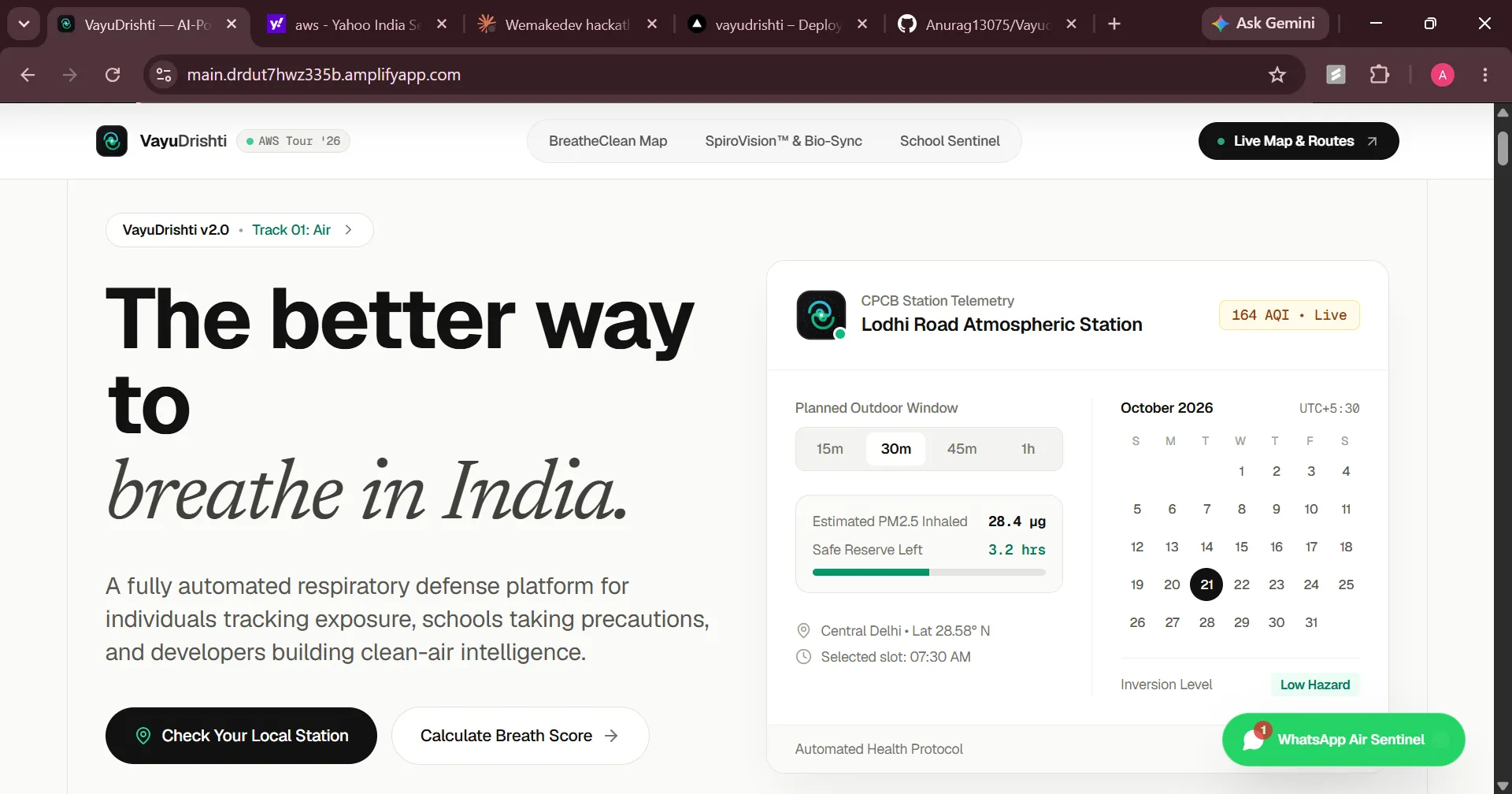
Open any air-quality app in Delhi on a bad October morning and you get a number. 164, maybe with a color next to it. What you don't get is an answer to the questions people actually have. Can my kid play outside at 7:30? Was my run a bad idea? Should the school move assembly indoors?
That gap between a number and a decision is what I tried to close with VayuDrishti. I built it solo over the four days of the hackathon, and this post is the technical write-up I wish I'd had on day one: the architecture, the math, the code, and the mistakes. I'll also be clear about which parts are solid and which are experiments.
What it does (and what it doesn't)
VayuDrishti has three parts:
- School Sentinel. Pick a school, read the air quality at its nearest station, turn that into an action tier (for example: normal day, move sports indoors, keep everyone inside), and send a short plain-language directive to parents and staff.
- Personal Breath Score. Estimates how much fine particulate (PM2.5) you have actually breathed in today. It depends on the air around you and on how hard you were breathing.
- SpiroVision (experimental). A browser-microphone lung screening. I'll explain why this one carries a big asterisk.
What it is not: a medical device. Nothing here diagnoses anything, and I tried to make the interface say so.
Architecture
Here's the simplified picture:
text
Browser (Next.js 14 App Router, TypeScript, Tailwind, Recharts, Leaflet)||-- /api/air -> Open-Meteo Air Quality (no key) or WAQI (token)|-- /api/bedrock -> Amazon Bedrock: advisories and guidance|-- /api/alert -> Amazon SNS: school directive to subscribers|-- /api/reports -> Amazon DynamoDB: crowd-sourced reportsHosting: AWS Amplify (Next.js SSR)
The AWS pieces and what each one is for:
- Amazon Bedrock turns structured facts into readable guidance. It never measures anything.
- Amazon SNS delivers the alert. I used an email subscription for the demo.
- Amazon DynamoDB stores [crowd-sourced pollution reports / alert history: keep only what's true].
- AWS Amplify hosts the app and rebuilds on every push to GitHub.
The design rule that kept this sane: deterministic code decides, the model explains. More on that below.
Lesson 1: AQI is an index, not a concentration
This one bit me early. The number on every air-quality app is an AQI, which is a score computed from a pollutant concentration using a table of breakpoints. And there is no single table. The US EPA scale and India's CPCB scale map the same concentration to different AQI values. If you take an AQI from one scale and plug it into a formula built for the other, everything downstream is wrong, quietly.
For PM2.5 the CPCB table (24-hour average, µg/m³) is roughly:
CPCB AQI | PM2.5 range | Category |
|---|---|---|
0 to 50 | 0 to 30 | Good |
51 to 100 | 31 to 60 | Satisfactory |
101 to 200 | 61 to 90 | Moderate |
201 to 300 | 91 to 120 | Poor |
301 to 400 | 121 to 250 | Very poor |
401 to 500 | 250+ | Severe |
(Double-check these against CPCB's current documentation before relying on them. Breakpoint tables get revised.)
If you do need to convert, it's linear interpolation inside each band:
ts
type Band = { aqiLo: number; aqiHi: number; cLo: number; cHi: number };const CPCB_PM25: Band[] = [{ aqiLo: 0, aqiHi: 50, cLo: 0, cHi: 30 },{ aqiLo: 51, aqiHi: 100, cLo: 31, cHi: 60 },{ aqiLo: 101, aqiHi: 200, cLo: 61, cHi: 90 },{ aqiLo: 201, aqiHi: 300, cLo: 91, cHi: 120 },{ aqiLo: 301, aqiHi: 400, cLo: 121, cHi: 250 },{ aqiLo: 401, aqiHi: 500, cLo: 250, cHi: 500 },];export function aqiToPm25(aqi: number, bands = CPCB_PM25): number {const b = bands.find(x => aqi >= x.aqiLo && aqi <= x.aqiHi) ?? bands[bands.length - 1];const t = (aqi - b.aqiLo) / (b.aqiHi - b.aqiLo);return b.cLo + t * (b.cHi - b.cLo);}
But the better lesson is to avoid the conversion entirely. Open-Meteo's air quality API returns raw
pm2_5 in µg/m³ at hourly resolution, so for anything dose-related I read the concentration directly and use AQI only for display. AQI is also built on long averages, which makes it a poor input for a 30-minute exposure estimate.Lesson 2: Dose is concentration × breathing rate × time
The idea behind the Breath Score is simple. The air around you matters, but so does how much of it you move through your lungs:
text
inhaled mass (µg) = concentration (µg/m³) × ventilation (m³/min) × minutes
Ventilation (how much air you breathe per minute) changes a lot with effort. Roughly: about 6 to 8 L/min sitting, around 15 to 25 walking briskly, 40 or more jogging, and 60+ hard exercise. These are population-level ballparks and vary a lot between people.
That's why a jog in bad air is not the same as a commute in the same air, and why a plain AQI can't capture it. A minimal version:
ts
// Rough population-level anchors: [heart rate bpm, ventilation L/min]const ANCHORS: [number, number][] = [[60, 6], [100, 20], [140, 45], [170, 70]];export function ventilationFromHr(bpm: number): number {if (bpm <= ANCHORS[0][0]) return ANCHORS[0][1];for (let i = 1; i < ANCHORS.length; i++) {const [h1, v1] = ANCHORS[i];const [h0, v0] = ANCHORS[i - 1];if (bpm <= h1) return v0 + ((bpm - h0) / (h1 - h0)) * (v1 - v0);}return ANCHORS[ANCHORS.length - 1][1];}export function inhaledMicrograms(pm25: number, bpm: number, minutes: number): number {const m3PerMin = ventilationFromHr(bpm) / 1000; // L -> m³return pm25 * m3PerMin * minutes;}
Be honest about what this is. Heart rate is a crude proxy for ventilation, nothing is calibrated to the individual, and this is mass inhaled, not mass deposited in the lungs, which depends on particle size and breathing pattern. Treat the result as an estimate good enough to compare scenarios (walk vs jog, this route vs that one), not as a measurement.
Two UI decisions I'd flag:
- The daily progress bar uses a reference budget I chose. It's a way to make the number legible, not a clinical limit. [Explain how you picked yours, or relabel it.]
- I dropped the 'cigarettes per day' comparison from my first version. A popular rule of thumb equates roughly 22 µg/m³ of PM2.5 over a day to one cigarette. It's a communication device, not a physiological conversion, and presenting it as a precise equivalent oversells it.
Lesson 3: Let the model explain, never measure
The advisory text comes from Amazon Bedrock, but the decision does not. The flow is:
- Fetch the latest reading and timestamp for the school's station.
- A plain function maps the reading to an action tier. No model involved, so it's testable and predictable.
- Pass the facts (tier, reading, time, school profile) to the model and ask it to write the directive.
- If the model call fails or times out, fall back to a template.
The Converse API gives one request shape across models:
ts
import { BedrockRuntimeClient, ConverseCommand } from '@aws-sdk/client-bedrock-runtime';const client = new BedrockRuntimeClient({ region: process.env.APP_AWS_REGION });export async function writeDirective(facts: {school: string; tier: string; pm25: number; observedAt: string;}) {const system = [{ text:'You write short safety notices for school staff. Use only the facts provided. ' +'Do not invent readings, do not give medical diagnoses. Max 3 sentences, plain language.' }];const out = await client.send(new ConverseCommand({modelId: process.env.APP_BEDROCK_MODEL_ID!,system,messages: [{ role: 'user', content: [{ text: JSON.stringify(facts) }] }],inferenceConfig: { maxTokens: 200, temperature: 0.2 },}));return out.output?.message?.content?.[0]?.text ?? null;}
Gotchas I ran into or would check on any Bedrock project:
- Model access. Anthropic models may ask you to submit a short use-case form before they work in your account.
- Model IDs age. Older model IDs get retired, so an ID copied from a tutorial can quietly stop working. Copy the ID from the console's model catalog.
- Inference profiles. In some regions you must call a cross-region inference profile ID instead of the plain model ID.
- Always have a fallback. A deterministic template means the alert still goes out when the model call fails, and it makes the app testable without AWS credentials.
- Measure your own latency. [Add the number you observed. Don't guess.]
I keep temperature low and the system prompt strict because the failure I care about isn't a boring sentence. It's a confident, invented number.
Lesson 4: SNS is the easy part, until it isn't
Publishing is a few lines:
ts
import { SNSClient, PublishCommand } from '@aws-sdk/client-sns';const sns = new SNSClient({ region: process.env.APP_AWS_REGION });export async function sendDirective(subject: string, message: string) {await sns.send(new PublishCommand({TopicArn: process.env.APP_SNS_TOPIC_ARN,Subject: subject.slice(0, 100),Message: message,}));}
The setup is where the time went:
- Confirm the subscription. An email subscription stays pending until the recipient clicks the confirmation link, and unconfirmed subscribers receive nothing. Easy to miss when you're testing.
- SMS in India needs extra registration. Sending SMS to Indian numbers generally requires DLT registration, which is not something you sort out in a weekend. I used email for the demo and treat SMS as the production path.
- A confusing error. When I created the subscription I got
InvalidParameter: MaximumMessageSize greater than 262144 bytes is not supported for the following protocol: [email]. SNS had recently added a higher topic payload limit option, and the email protocol only supports 256 KiB. Setting the topic's maximum message size back to 262144 fixed it.
Lesson 5: Amplify and Next.js SSR have sharp edges
Amplify made deployment painless (connect the repo, push, get a URL), but a few things cost me time:
- Reserved variable names. Amplify doesn't let you define environment variables whose names start with
AWS. That's why my code readsAPP_-prefixed names likeAPP_AWS_REGIONinstead of the usualAWS_REGION.
- Server code doesn't automatically see console variables. For Next.js SSR on Amplify, the common pattern is to write the variables you need into
.env.productionduring the build:
YAML
version: 1frontend:phases:preBuild:commands:- npm cibuild:commands:- env | grep -e APP_ >> .env.production- npm run buildartifacts:baseDirectory: .nextfiles:- '**/*'cache:paths:- node_modules/**/*- .next/cache/**/*
-
NEXT_PUBLIC_values are baked in at build time, and they ship to every visitor's browser. Anything secret must never use that prefix.
- Prefer a role over keys. Long-lived access keys in environment variables work for a hackathon, but attaching an IAM role to the SSR compute is the right move. [If you stayed with keys, say so honestly, and say what you'd change.]
Check the current Amplify docs for your Next.js version, because this area changes.
The sensors: what's real and what's an experiment
Heart rate over Bluetooth. The browser's Web Bluetooth API can read any device exposing the standard Heart Rate service (0x180D). The measurement characteristic (0x2A37) starts with a flags byte, and its lowest bit tells you whether the value is 8-bit or 16-bit:
ts
const HR_SERVICE = 0x180d;const HR_MEASUREMENT = 0x2a37;export async function connectHeartRate(onBpm: (bpm: number) => void) {const device = await navigator.bluetooth.requestDevice({filters: [{ services: [HR_SERVICE] }],});const server = await device.gatt!.connect();const service = await server.getPrimaryService(HR_SERVICE);const ch = await service.getCharacteristic(HR_MEASUREMENT);await ch.startNotifications();ch.addEventListener('characteristicvaluechanged', (e: any) => {const dv: DataView = e.target.value;const is16 = dv.getUint8(0) & 0x01;onBpm(is16 ? dv.getUint16(1, true) : dv.getUint8(1));});return device;}
The limits are real: it needs HTTPS and a user gesture, it works in Chrome and Edge but not in Safari or on iOS, and as far as I know an Apple Watch doesn't expose the standard heart-rate service to a random web page. Chest straps and some Android or fitness watches do. Test with the hardware you actually have before claiming support.
Phone camera pulse (PPG). With a fingertip covering the lens and the torch on, the average red value of each video frame pulses with blood flow. Peak detection on that signal gives a heart rate. It works in good conditions and fails with movement, so I treat it as a fallback.
SpiroVision. Real spirometry measures airflow with calibrated sensors. A phone microphone doesn't measure airflow. It measures sound, and the relationship between breath noise and flow depends on distance, angle, the microphone, and the device's audio processing. The first thing to do is turn that processing off, because it will flatten exactly the signal you care about:
ts
const stream = await navigator.mediaDevices.getUserMedia({audio: { echoCancellation: false, noiseSuppression: false, autoGainControl: false },});
From the amplitude envelope you can extract things like how quickly the blast peaks and how long it lasts. [Describe what your implementation actually computes and how you map it to the numbers you display.] What you can't claim is a clinically validated FEV1. I've labelled it an experimental screening estimate, and I'd want comparison against a real spirometer before it's called anything more.
What went wrong
I committed secrets. My example env file contained real credentials, and I committed it twice. GitHub's push protection caught it and rejected the push, which is the only reason it didn't become a public leak. I rotated the keys anyway, replaced the file with placeholders, and rewrote the unpushed commits (
git reset --soft origin/main , then one clean commit). Lesson: .env.example holds fake values only, real ones live in an ignored .env.local , and a key that has touched a commit gets rotated regardless.My copy overclaimed. The first version of the landing page said things like medical-grade. After studying other submissions I rewrote it. If you can't point to a validation, don't use the word.
I built too much. Routes, sensors, schools, WhatsApp, maps. Reading other Air-track projects showed me how many people were building school alerts, and the ones that stood out had one loop that visibly worked end to end. I narrowed my demo to that loop.
'Optional' isn't a test. My env template labelled things optional and described fallbacks. The air-quality fallback is real, but AWS services have no substitute, so test the app without the keys instead of assuming what happens.
What I'd do next
- Replace long-lived keys with a proper IAM role and scoped policies.
- Add a forecast-versus-actual check so the app reports how often its own advice was right.
- Validate SpiroVision against real spirometry before claiming anything.
- Move alerts from email to a registered SMS or WhatsApp channel.
- Write tests for the tier and dose functions, since they're pure and deserve them.
Try it
The live app is at https://main.drdut7hwz335b.amplifyapp.com/ and the code is at https://github.com/Anurag13075/Vayudrishti . If you're building something similar, I'm happy to compare notes. You can find me on X at https://x.com/AnuragShar74342 .
Enjoyed reading this content? Let the author know!
Your likes, comments, shares, and saves help creators reach more builders.

Loading recommendations
Loading article