
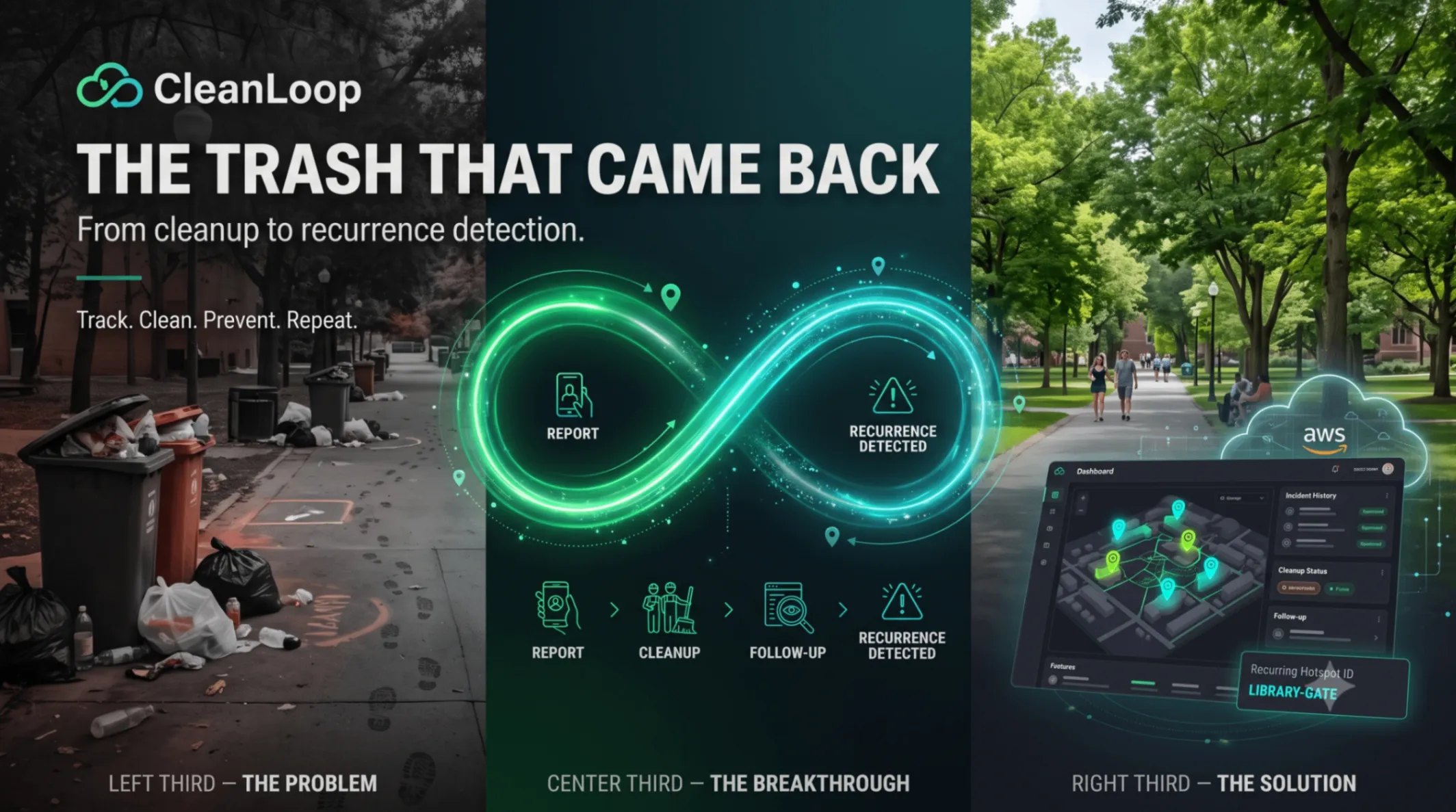
The Trash That Came Back: Building CleanLoop with AWS Serverless Architecture
What happens when waste returns after cleanup? ♻️ Meet CleanLoop, a project exploring how AWS serverless architecture can connect waste reports, cleanup records, follow-ups, and recurring hotspots. Discover the problem, technical decisions, and MVP validation plan—and help me build it better! 🚀 I'm open to feedback, alternative approaches, and constructive criticism from experienced engineers. How would you solve this problem differently?

The Trash That Came Back: Building CleanLoop to Track Waste Beyond Cleanup
A serverless AWS approach to connecting waste reports, cleanup activity, follow-up observations, and recurring environmental hotspots.
A waste problem can look solved when the area is clean.
A student reports an overflowing bin. A cleanup team removes the waste. The incident is marked as complete.
But what happens when the same problem appears again a few days later?
Was the cleanup temporary? Is the location repeatedly accumulating waste? Are we recording what happens after cleanup, or only the initial report?
These questions inspired CleanLoop, an environmental incident-tracking project designed to connect waste reporting, cleanup records, follow-up observations, and recurrence tracking in one workflow.
The idea is simple: instead of treating every waste report as an isolated task, preserve the history of what happened at a location and make repeated incidents easier to identify.
The goal is to move beyond recording that waste was cleaned and build a system that helps teams understand where waste keeps returning.
Track. Clean. Prevent. Repeat.

1. The Problem: Cleaning Is Not the End of the Story
Imagine a cafeteria area where plastic packaging and food waste regularly accumulate.
On Monday, a student reports the problem. The cleanup team removes the waste, updates the status, and moves on to the next task.
On Thursday, another report arrives from the same location.
If the system only records individual reports and whether each task was completed, the repeated pattern can be difficult to identify. The latest report may look like an unrelated incident rather than part of a recurring problem.
This reveals an important gap.
Recording a cleanup is not the same as understanding what happened afterward.
A completed task confirms that a cleanup action was recorded. It does not guarantee that the area remained clean or that the same problem will not return.
A useful system should preserve three connected parts of the story:
- Before cleanup: What was reported, where did it happen, and when?
- During cleanup: Who performed the work, when was it completed, and what evidence was recorded?
- After cleanup: Was the area clean, was waste still present, or did another incident occur later?
Without these connections, reviewing the history of a hotspot becomes harder.
CleanLoop is being developed to address this problem through a structured, traceable workflow.
2. Why Does This Problem Matter?
Waste management involves more than collecting individual reports and marking tasks complete. Teams also need a way to review previous incidents and understand whether the same locations continue to be reported.
Consider the difference between these two records:
Record A: Waste reported → Cleanup completed.
Record B: Waste reported → Cleanup completed → Follow-up recorded → Another incident reported at the same hotspot.
The first record tells us what action was taken. The second gives us a more complete history.
That history can help administrators identify locations that may deserve further investigation or more attention. It can also help them distinguish between an isolated incident, an unresolved issue, and repeated reports over time.
CleanLoop does not attempt to determine why waste returned. Instead, it makes repeated observations easier to see and review.
The real problem is not just finding waste. It is connecting what happened before, during, and after cleanup.
3. The Idea Behind CleanLoop
CleanLoop follows five stages:
Report → Cleanup → Follow-up → Recurrence → Dashboard
Each stage has a distinct responsibility.
Report
A student records a waste incident at a predefined location, such as a library gate, cafeteria, science block, main entrance, or parking area.
The report can include a waste category, description, timestamp, hotspot reference, and optional photograph.
Cleanup
A cleanup team member records the action taken, completion time, notes, and optional photographic evidence.
The incident status is updated to reflect the recorded work.
Follow-up
A separate observation records the condition of the location after cleanup.
The supported conditions are:
-
CLEAN
-
WASTE_PRESENT
-
PARTIALLY_CLEAN
-
UNKNOWN
This distinction is important because a cleanup can be marked complete even when a later observation shows that waste remains.
Recurrence
CleanLoop connects incidents to their predefined hotspot identifiers and timestamps. It can calculate incident counts and identify subsequent incidents associated with the same location.
Dashboard
Administrators can review incident histories, cleanup records, follow-up observations, and locations with repeated reports.

The central design decision is that cleanup completion and post-cleanup condition must remain separate records.
This separation gives the system a clearer history instead of treating every completed task as proof that the problem has permanently disappeared.
4. Designing the AWS Architecture
CleanLoop's planned MVP uses AWS managed services to separate the web interface, authentication, backend processing, storage, and monitoring.
The objective is not to use as many cloud services as possible. It is to select a focused set of services that supports the core workflow and can be deployed and maintained consistently.
Planned Technology Stack
Component | Technology | Responsibility |
|---|---|---|
Frontend | Next.js, TypeScript, Tailwind CSS | Responsive reporting and administration interface |
Hosting | AWS Amplify Hosting | Host the web application |
Authentication | Amazon Cognito | User registration, login, and identity |
API layer | Amazon API Gateway | Expose backend endpoints |
Application logic | AWS Lambda | Validate requests and execute workflow operations |
Database | Amazon DynamoDB | Store incidents, cleanup records, follow-ups, and hotspot data |
Image storage | Amazon S3 | Store report and cleanup photographs privately |
Monitoring | Amazon CloudWatch | Capture logs and support troubleshooting |
Infrastructure as code | AWS CDK or AWS SAM | Define repeatable infrastructure deployment |
How the Components Work Together
A student or cleanup team member uses the Next.js web application.
Amazon Cognito provides the authentication foundation. Authenticated requests reach the backend through API Gateway, where Lambda functions validate inputs and execute application logic.
DynamoDB stores the structured workflow records. Photographs are stored separately in S3, with their object references associated with the relevant database records.
CloudWatch provides logs that help developers investigate failed requests, validation errors, and backend execution problems.
Infrastructure as code using AWS CDK or AWS SAM is intended to make the environment reproducible instead of relying entirely on manual configuration through the AWS Console.

The architecture follows a straightforward principle: each service should have a clear responsibility, and every connection should support a real application requirement.
5. How the Workflow Is Intended to Work
The most important engineering question is whether CleanLoop can reliably connect an incident, its cleanup, the subsequent observation, and a later incident at the same hotspot.
Here is the intended end-to-end workflow.
Step 1: Create a Waste Incident
A student selects a predefined hotspot, chooses a waste category, adds a description, and optionally uploads a photograph.
The backend validates the request and creates a uniquely identified incident containing the hotspot reference, timestamp, and initial status.
The record is stored in DynamoDB.
Step 2: Record the Cleanup
A cleanup team member opens the incident and records the work performed.
The cleanup record references the original incident and captures details such as the responsible team member, completion time, notes, and optional supporting photograph.
When the cleanup is completed, the incident status can be updated to
CLEANED .However, that status does not establish that the location will remain clean.
Step 3: Record a Follow-up Observation
A separate follow-up record captures the observed condition after cleanup.
For example:
-
CLEAN: No waste is observed during the follow-up.
-
WASTE_PRESENT: Waste is observed.
-
PARTIALLY_CLEAN: Some waste remains.
-
UNKNOWN: The condition could not be assessed.
Keeping these observations separate makes the record more informative than a single completed-status field.
Step 4: Link a Subsequent Incident
Suppose the library gate is reported, cleaned, and later observed to be clean.
Several days afterward, another report is created at the same hotspot.
CleanLoop's intended logic uses the hotspot identifier and event timestamps to connect the new report with the location's previous history.
The system can then identify that a subsequent incident occurred after the recorded cleanup.
This does not prove why the waste returned, but it makes the repeated observation visible.
Step 5: Review the Hotspot History
The administrator dashboard is intended to show summary metrics and allow administrators to inspect a hotspot's linked history.
That history should bring together the original incident, cleanup record, follow-up observations, and subsequent incidents.
The dashboard is useful because it presents the history behind the numbers. An incident count alone is less informative than understanding which incidents occurred, which cleanups were recorded, and what the follow-up observations showed.
6. The Recurrence Logic: Start With Deterministic Rules
CleanLoop does not need machine learning to implement its first version of recurrence tracking.
The MVP is designed around deterministic calculations based on recorded incidents, hotspot identifiers, and timestamps.
For a selected period, the system can count distinct incidents associated with a hotspot.
The planned classification is:
Distinct incidents | Classification |
|---|---|
1 | Normal |
2 | Monitor |
3 or more | Recurring |
These thresholds should be configurable as the project evolves.
There is also an important distinction between a hotspot's total incident count and post-cleanup recurrence. They are related, but they answer different questions.
A hotspot may have several historical incidents. An administrator may specifically want to know whether another incident was reported after a cleanup and a subsequent observation.
For that reason, the data model and recurrence calculations need to preserve the relationship between events rather than relying only on a single counter.

An Illustrative Example
Consider the following synthetic history:
- October 1: Waste is reported at the library gate.
- October 1: The cleanup is recorded as complete.
- October 2: A follow-up observation records
CLEAN.
- October 6: A new incident is reported at the same hotspot.
The October 6 incident can be connected to the hotspot's earlier history. The dashboard can show the sequence and help an administrator recognize that the location has been reported again.

One limitation must remain clear: recurrence identifies repeated observations, not their cause.
A repeated report does not prove that a cleanup failed or explain why waste returned. It provides evidence that the same location has been reported again and may deserve further investigation.
This is why a transparent, deterministic approach is a sensible starting point for the MVP.
7. Engineering Decisions That Matter
A useful architecture is more than a diagram of cloud services. The implementation must also address authorization, image handling, database access patterns, and debugging.
Authentication Is Not Authorization
CleanLoop has three planned user roles.
- Student: Submit and review permitted waste reports.
- Cleanup Team: Access assigned work and record cleanup activity.
- Admin: Review broader incident histories, recurrence information, and dashboard metrics.
Amazon Cognito provides the authentication foundation, but backend authorization must enforce role-specific permissions.
For example, hiding a cleanup button from a student is not sufficient protection. The backend must reject unauthorized attempts to modify cleanup records, even if someone calls the endpoint directly.
Store Photographs Privately
Incident and cleanup photographs can provide useful evidence, but they should not require a publicly accessible S3 bucket.
The planned upload approach uses a backend-generated presigned URL. The application requests an upload URL, receives temporary permission to upload an object, and sends the photograph directly to S3.
The implementation should validate file types and sizes, restrict upload permissions, and associate each stored object with the correct database record.
Design DynamoDB Around Access Patterns
The application needs to support operations such as:
- Creating an incident.
- Listing reports for authorized users.
- Retrieving incidents associated with a hotspot.
- Viewing cleanup and follow-up histories.
- Calculating dashboard metrics.
Partition keys, sort keys, and secondary indexes should be selected around these actual access patterns. Adding indexes without a defined query requirement increases complexity without necessarily improving the application.
Make Failures Diagnosable
When a backend request fails, developers need enough information to investigate what happened.
CloudWatch logging should help trace validation failures, application errors, and important workflow events while avoiding passwords, access tokens, credentials, and other sensitive information.
These decisions are part of the planned implementation and validation work; they should not be presented as verified capabilities until tested.
8. What Makes CleanLoop Different?
CleanLoop is not intended to be just another interface for submitting waste reports.
Its central idea is to preserve the relationship between an incident, the cleanup that followed, the observed condition afterward, and any subsequent incident at the same hotspot.
That relationship supports three useful capabilities.
Traceability: Administrators can review the recorded history of a hotspot instead of viewing reports only as isolated tasks.
Accountability: Cleanup activity and follow-up observations can be associated with specific incidents.
Recurrence visibility: Locations with repeated reports can be identified and prioritized for further investigation.
The project deliberately starts with a narrow workflow. Predictive analytics, automated root-cause analysis, a dedicated mobile application, and advanced notification systems are possible future directions—not requirements for the first version.
The goal is to validate the core workflow before expanding the scope.
9. What I Want to Validate Next
The next milestone is to demonstrate the complete workflow using working application logic, real database operations, and a reproducible deployment.
The most important acceptance scenario is:
- Create an incident at a predefined hotspot.
- Record a completed cleanup.
- Submit a follow-up observation.
- Create a subsequent incident at the same hotspot.
- Verify the recurrence calculation.
- Open the administrator dashboard and inspect the hotspot's history.
The implementation also needs tests for authentication and authorization, input validation, image uploads, database operations, and failure handling.
Synthetic data can be useful during development, but it must be labelled clearly and kept separate from real environmental observations.

The key milestone is not simply making each screen work independently. It is verifying that the records remain correctly connected across the complete workflow.
10. What Comes Next?
The immediate priority is to complete and validate the core workflow before expanding the scope.
Once the MVP works reliably, potential improvements include richer hotspot visualization, reminders for pending follow-ups, more detailed trend analysis, and additional reporting capabilities.
These additions should be guided by what the core workflow demonstrates and by the quality of the recorded data.
The project should first establish that it can reliably record what happened, preserve what happened afterward, and connect subsequent incidents to the right hotspot.
11. An Open Invitation to Learn, Improve, and Build Better
CleanLoop is not just an opportunity for me to build a project using AWS serverless technologies. It is also an opportunity to learn how experienced engineers approach real-world problems, evaluate trade-offs, and design systems that can evolve over time.
I believe there is rarely just one way to solve a problem.
Different engineers bring different experiences, perspectives, and approaches. A solution that works well in one environment may need a completely different approach in another.
That is why I am genuinely open to feedback—whether positive or negative—from industry experts, experienced developers, cloud engineers, architects, and anyone who has valuable insights to share.
If you see a weakness in my architecture, a better way to model the data, a security risk I have overlooked, or a simpler and more scalable approach to the workflow, I would appreciate hearing about it.
I do not see constructive criticism as a failure. I see it as an opportunity to question my assumptions, understand the reasoning behind alternative solutions, and improve the quality of what I am building.
My goal is not to prove that my current design is perfect. My goal is to understand how it can become better.
I would especially value feedback on three areas:
- Architecture and scalability: How could the AWS architecture evolve as the number of users, incidents, and hotspots increases?
- Data modeling and recurrence logic: How would you design the data model to maintain reliable incident histories and distinguish recurring reports from unresolved cleanup tasks?
- Security and production readiness: What important security controls, failure scenarios, or operational considerations should I address before deploying this beyond an MVP?
If you have a different perspective on the problem or would approach the solution differently, I would love to learn from it. Even a small suggestion could help me rethink a design decision or discover something I have not considered.
I am sharing CleanLoop not as a finished solution, but as a work in progress—and an invitation to learn from people who have solved similar problems in the real world.
If you were designing CleanLoop, what would you do differently, and why?
I welcome both positive and critical feedback. Let's use different perspectives to build something more reliable, secure, and genuinely useful.
Final Thoughts
A cleanup record tells us that an action was recorded.
A follow-up observation tells us what was seen afterward.
A linked history helps us identify when the same problem appears again.
That is the idea behind CleanLoop.
By combining a focused incident-tracking workflow with AWS serverless services, the project aims to make waste incidents more traceable and recurring hotspots easier to identify.
The goal is not to claim that a dashboard can solve waste management by itself. It is to build a dependable foundation for recording events, reviewing the evidence, and making better-informed decisions from the available data.
This is also part of my learning journey: taking an engineering problem, making deliberate design decisions, testing assumptions, and improving the solution through feedback and iteration.
Track. Clean. Prevent. Repeat. Learn. Improve.
CleanLoop is currently under development. The next milestone is to validate the complete workflow with working application logic, real database operations, and a reproducible AWS deployment.
I welcome your feedback, alternative approaches, and lessons from real-world experience. Let's build better solutions by learning from one another.
Enjoyed reading this content? Let the author know!
Your likes, comments, shares, and saves help creators reach more builders.

Loading recommendations
Loading article