
Docker on AWS: How to Optimize, Scale, and Reduce Application Costs
A practical guide to building efficient Docker images, deploying containers with Amazon ECS and AWS Fargate, scaling applications automatically, and optimizing cloud infrastructure costs.

Cloud Data Engineer
Docker has changed how developers build, package, and deploy applications. Instead of configuring every server with the same dependencies, we can package an application and its runtime requirements into a container image and run it consistently across different environments.
But building a Docker image is only the beginning.
When an application moves to AWS, new questions arise:
- How do we deploy containers without managing every server?
- How can an application handle sudden traffic increases?
- How do we avoid wasting compute resources during quiet periods?
- How can we improve deployment speed without compromising security?
- Which AWS services should we choose for a production workload?
In this article, we'll explore a practical approach to optimizing and scaling a Dockerized application on AWS.
The goal is not simply to run containers in the cloud. It is to build an architecture that balances performance, scalability, reliability, security, and cost.
1. Understanding the Architecture
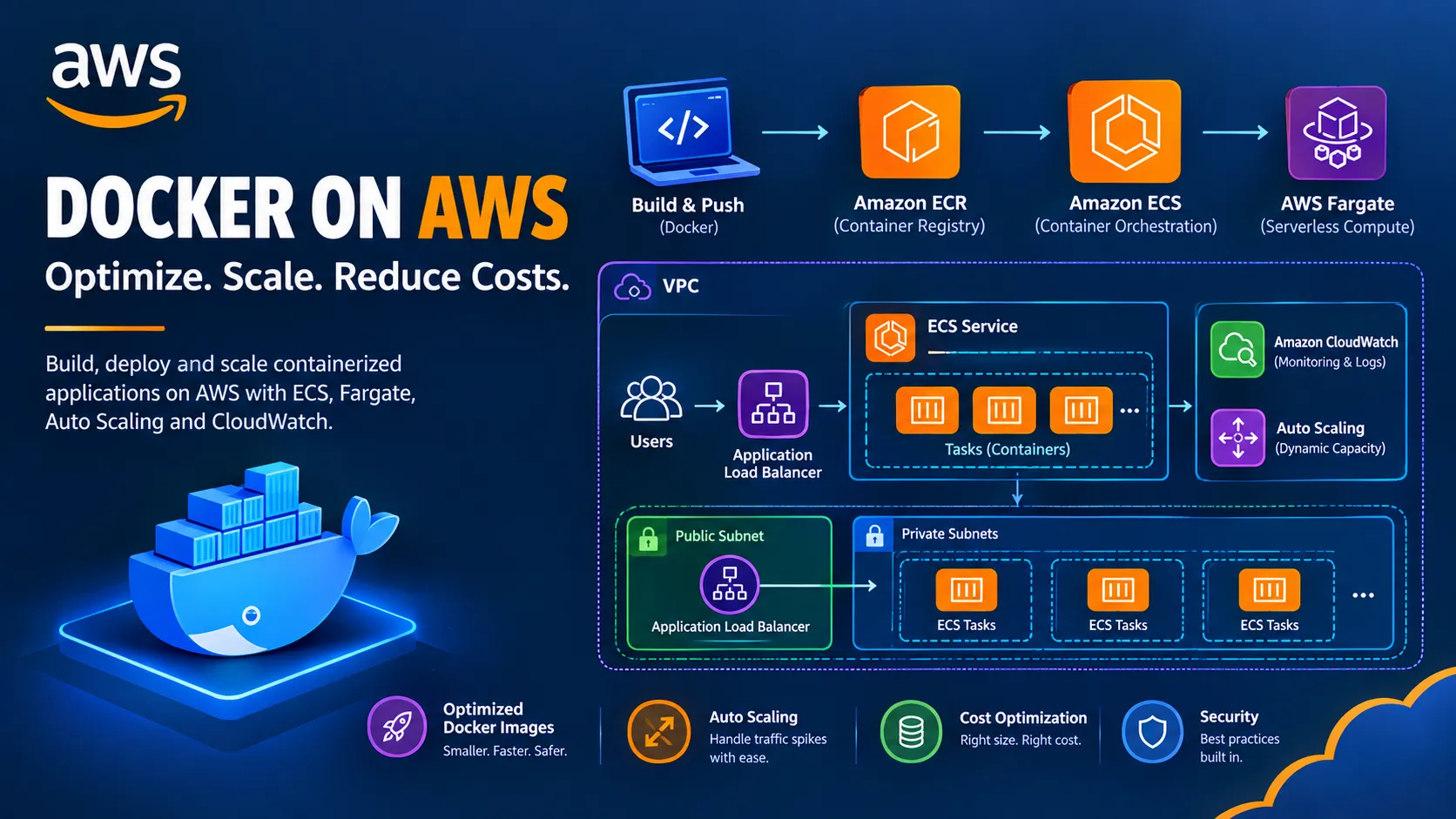
A common AWS architecture for a containerized web application uses Amazon Elastic Container Registry (Amazon ECR) to store Docker images, Amazon Elastic Container Service (Amazon ECS) to manage containers, and AWS Fargate to run containers without managing the underlying EC2 instances.
An Application Load Balancer distributes incoming requests across healthy application tasks.
Amazon CloudWatch provides monitoring and logging, while AWS Auto Scaling adjusts the number of running tasks based on workload demand.
[IMAGE 1 — Insert the AWS Docker Architecture Diagram Here]
Figure 1: Docker application architecture using Amazon ECR, Amazon ECS, AWS Fargate, an Application Load Balancer, and CloudWatch.
How the architecture works
- A developer builds a Docker image and pushes it to Amazon ECR.
- Amazon ECS deploys the image as a task using an ECS service.
- AWS Fargate runs the containers without requiring us to manage EC2 worker instances.
- The Application Load Balancer distributes requests across healthy tasks.
- CloudWatch collects metrics and logs to help identify performance issues.
- ECS Service Auto Scaling increases or decreases the desired number of tasks according to configured scaling policies.
The application can run in private subnets, while the load balancer is placed in public subnets when public internet access is required.
This separation reduces direct exposure of application containers and creates a foundation for controlled scaling.
2. Optimize Docker Images Before Deploying
One of the easiest ways to improve container performance is to optimize the Docker image itself.
Large images take longer to download, transfer, and deploy. They can also increase storage usage and slow down application rollouts.
Consider a Python application that needs dependencies for its runtime but does not need development tools or build dependencies after installation.
A basic Dockerfile might look like this:
FROM python:3.12
WORKDIR /app
COPY requirements.txt .RUN pip install -r requirements.txt
COPY . .
CMD ["python", "app.py"]
This can work, but it leaves room for improvement.
Use a smaller base image
Choose an appropriate slim or minimal base image when your application and dependencies support it.
For example:
FROM python:3.12-slim
WORKDIR /app
COPY requirements.txt .RUN pip install --no-cache-dir -r requirements.txt
COPY app.py .
CMD ["python", "app.py"]
This example assumes
app.py is the complete application entry point and that the required dependencies are installed from requirements.txt .For applications with native dependencies, compile-time requirements, or more complex builds, a multi-stage Dockerfile can separate build tools from the final runtime image.
Apply additional image optimization techniques
- Use
.dockerignore: Exclude.git, local virtual environments, test artifacts, and unnecessary files from the build context.
- Optimize layer caching: Copy dependency manifests before frequently changing application files.
- Avoid unnecessary packages: Install only what the application needs at runtime.
- Pin and update dependencies: Use controlled dependency versions and a regular security-update process.
- Scan images: Use Amazon ECR image scanning or an appropriate vulnerability-scanning workflow.
- Run as a non-root user: Avoid unnecessary container privileges.
- Use multi-stage builds: Keep compilers and other build-only dependencies out of the production image.
A smaller image can reduce deployment overhead, but it does not automatically make the application faster. Runtime performance still depends on code, dependencies, CPU, memory, networking, and workload characteristics.
3. Store and Version Images in Amazon ECR
Once the Docker image is ready, push it to Amazon Elastic Container Registry (Amazon ECR).
ECR is a managed container image registry that integrates with AWS container services.
A typical workflow looks like this:
docker build -t my-web-app:v1 .
aws ecr get-login-password --region us-east-1 \  | docker login \      --username AWS \      --password-stdin ACCOUNT_ID.dkr.ecr.us-east-1.amazonaws.com
docker tag my-web-app:v1 \  ACCOUNT_ID.dkr.ecr.us-east-1.amazonaws.com/my-web-app:v1
docker push \  ACCOUNT_ID.dkr.ecr.us-east-1.amazonaws.com/my-web-app:v1
Replace
ACCOUNT_ID with your AWS account ID and create the ECR repository before pushing the image.For repeatable deployments, use unique image tags or immutable image digests instead of relying on a mutable
latest tag. This makes it easier to identify exactly which image version is running.Optimize the image delivery workflow
Use these practices to improve reliability and reduce unnecessary work:
- Build images once and promote the same tested artifact between environments.
- Use ECR lifecycle policies to remove obsolete images according to your retention requirements.
- Scan images for vulnerabilities.
- Keep repository permissions restricted to authorized build and deployment roles.
- Use CI/CD automation to build, test, scan, and publish images consistently.
Image optimization helps with deployment speed, while a disciplined image pipeline improves traceability and security.
4. Run Containers with Amazon ECS and AWS Fargate
After publishing the image, we need a service to run and manage the containers.
Amazon ECS provides task definitions, tasks, and services for managing containerized applications.
AWS Fargate is a serverless compute option for ECS that removes the need to provision and maintain the underlying container hosts.
A simplified deployment involves:
- Creating an ECS cluster.
- Defining a task definition with the ECR image, CPU, memory, port mappings, and logging configuration.
- Configuring the appropriate task execution and task IAM roles.
- Creating an ECS service with a desired task count.
- Connecting the service to a target group behind an Application Load Balancer.
- Configuring health checks and deployment settings.
Why use Fargate?
Fargate can be useful when a team wants to focus on the application rather than managing the EC2 instances that run containers.
However, Fargate is not automatically the cheapest option for every workload.
For stable, continuously running workloads with high utilization, ECS on EC2 may provide better cost efficiency, especially when instances are right-sized and capacity is efficiently shared. Fargate can be attractive for variable workloads and teams that value reduced infrastructure management.
The right choice depends on utilization, workload patterns, operational requirements, and pricing.
5. Scale Applications Automatically
Suppose your application normally handles 100 requests per minute, but traffic increases to 2,000 requests per minute during a campaign.
If the service runs too few tasks, response times may increase and requests may fail. If it always runs enough capacity for peak traffic, you may pay for resources that remain underused for much of the day.
This is where ECS Service Auto Scaling becomes useful.
You can configure the service to adjust its desired task count based on metrics such as average CPU utilization, average memory utilization, or Application Load Balancer request count per target.
For example, a target-tracking policy could aim to maintain average CPU utilization near 50%.
The precise target should be chosen through testing rather than treated as a universal recommendation.
Example scaling configuration
Assume a web application uses these initial settings:
- Minimum tasks: 2
- Desired tasks: 2
- Maximum tasks: 10
- Scaling metric: Average CPU utilization
- Example target: 50%
When load increases and CPU utilization remains above the target, Auto Scaling can increase the task count. When demand decreases, it can reduce the number of tasks toward the minimum.
The actual response depends on metric evaluation, scaling cooldowns, task startup time, and available capacity.
[IMAGE 2 — Insert the Auto Scaling Diagram Here]
Figure 2: ECS Service Auto Scaling adds application tasks during high demand and scales them down when demand falls.
Important scaling considerations
Set realistic minimum and maximum capacity. The minimum should reflect availability requirements, while the maximum should account for quotas, downstream capacity, and budget limits.
Configure health checks correctly. The load balancer should send traffic only to healthy targets.
Allow time for new tasks to become ready. Container startup, image downloads, initialization, and health checks can introduce delays.
Test scale-in behavior. Applications should handle requests gracefully when tasks are removed.
Watch downstream services. Scaling the frontend does not automatically scale a database or external API. More application tasks can actually overwhelm a bottleneck if the rest of the architecture is not prepared.
Auto Scaling is most effective when combined with realistic load testing and application-level performance monitoring.
6. Improve Performance Beyond Container Scaling
Adding more containers is only one part of application optimization. Sometimes, the better solution is to reduce the amount of work each request requires.
Use Amazon CloudFront for cacheable content
For static assets and suitable cacheable responses, Amazon CloudFront can reduce latency and lower repeated requests to the origin.
This can help reduce load on the application service, although caching must respect authentication, authorization, and data freshness requirements.
Use Amazon ElastiCache when appropriate
Applications that repeatedly perform expensive database queries may benefit from caching frequently accessed data.
Amazon ElastiCache can reduce repeated database work when the data access pattern and consistency requirements make caching appropriate.
Optimize database access
If a database is the bottleneck, adding application tasks may not improve performance.
Review query execution, connection pooling, indexing, transaction duration, and database capacity before increasing application concurrency.
Use asynchronous processing
Long-running tasks such as report generation, media processing, and bulk operations may be better handled asynchronously.
Amazon SQS can decouple request handling from background processing. A separate ECS service can process queued jobs and scale according to queue depth or other workload metrics.
The key idea is to identify the bottleneck first, then choose the optimization that addresses it.
7. Monitor the Application with Amazon CloudWatch
An application can appear healthy at the infrastructure level while still delivering a poor user experience.
For example, CPU utilization might remain moderate while requests become slow because of database latency or exhausted connection pools.
Amazon CloudWatch helps collect metrics, logs, and alarms that support operational visibility.
Useful signals include:
- ECS task count and service deployment status.
- Container CPU and memory utilization.
- Application Load Balancer request count.
- Target response time and unhealthy target count.
- HTTP 4xx and 5xx responses.
- Application errors and latency from logs or application instrumentation.
- Queue depth and processing delays for asynchronous workloads.
Create alarms for meaningful conditions rather than every metric fluctuation. Combine infrastructure metrics with application-level indicators such as latency and error rates.
For production systems, also define service-level objectives and test whether scaling policies maintain them during load spikes.
[IMAGE 3 — Insert the Monitoring Dashboard Here]
Figure 3: A CloudWatch dashboard can bring together container utilization, request latency, error rates, and scaling behavior.
8. Reduce AWS Costs Without Sacrificing Reliability
Cost optimization should begin with measurement. A low-cost architecture that cannot handle traffic or recover from failures is not a good optimization.
Here are several practical approaches.
Right-size CPU and memory
Start with reasonable task CPU and memory settings, then measure actual utilization under realistic load.
Oversized tasks waste capacity. Undersized tasks can cause throttling, memory pressure, restarts, and poor response times.
Scale with demand
Configure appropriate scaling policies and a minimum capacity that meets availability requirements.
For workloads that tolerate interruption, consider ECS on EC2 with Spot capacity, or other supported Spot-based designs. Use graceful shutdown and sufficient fallback capacity where reliability requirements demand it.
Choose Fargate or ECS on EC2 deliberately
Fargate reduces host management overhead. ECS on EC2 can provide more control over compute utilization and instance selection.
Compare the total cost of the actual workload, including compute, storage, networking, logging, and operational effort.
Review networking costs
Data transfer, NAT Gateway usage, load balancers, and cross-Availability Zone traffic can contribute to the bill.
For example, private workloads that download large amounts of data from AWS services may benefit from evaluating appropriate VPC endpoints. Gateway endpoints for Amazon S3 and DynamoDB have no additional endpoint usage charge, although other applicable data transfer and service charges may still apply.
Control logging and image storage
Set sensible CloudWatch log retention policies and ECR lifecycle policies. Retain the data needed for troubleshooting, security, and compliance without storing everything indefinitely.
Use purchase commitments for predictable workloads
For stable usage, evaluate applicable AWS Savings Plans or other pricing commitments after understanding your baseline demand. Avoid committing to capacity before you have reliable usage data.
The best cost optimization strategy is to remove waste while preserving the performance, availability, and security the application requires.
9. Secure the Container Deployment
Optimization and scaling should never come at the expense of security.
For an AWS container deployment, consider the following controls:
- Run application tasks in private subnets when they do not need direct inbound internet access.
- Use IAM roles for ECS tasks rather than embedding AWS credentials in images or source code.
- Separate the task execution role from the application task role, granting each only the permissions it needs.
- Store sensitive configuration in AWS Secrets Manager or AWS Systems Manager Parameter Store as appropriate.
- Restrict security groups so that only intended sources can reach application ports.
- Scan images and patch vulnerable dependencies.
- Use non-root container users and avoid unnecessary Linux capabilities.
- Enable appropriate logging and audit trails.
- Use HTTPS at the public entry point and manage certificates appropriately.
- Test deployment rollback and graceful shutdown behavior.
For sensitive applications, consider additional controls such as AWS WAF, private service connectivity, and stronger supply-chain security practices according to the threat model.
10. A Practical Optimization Workflow
Rather than changing every setting at once, follow a repeatable process.
- Establish a baseline: Measure response time, error rates, CPU, memory, task count, and cost.
- Optimize the image: Remove unnecessary files, improve layer caching, and scan dependencies
Enjoyed reading this content? Let the author know!
Your likes, comments, shares, and saves help creators reach more builders.

Loading recommendations
Loading article