
DrainGuard: Building a Flood-Prevention Triage Platform with AWS Serverless Services
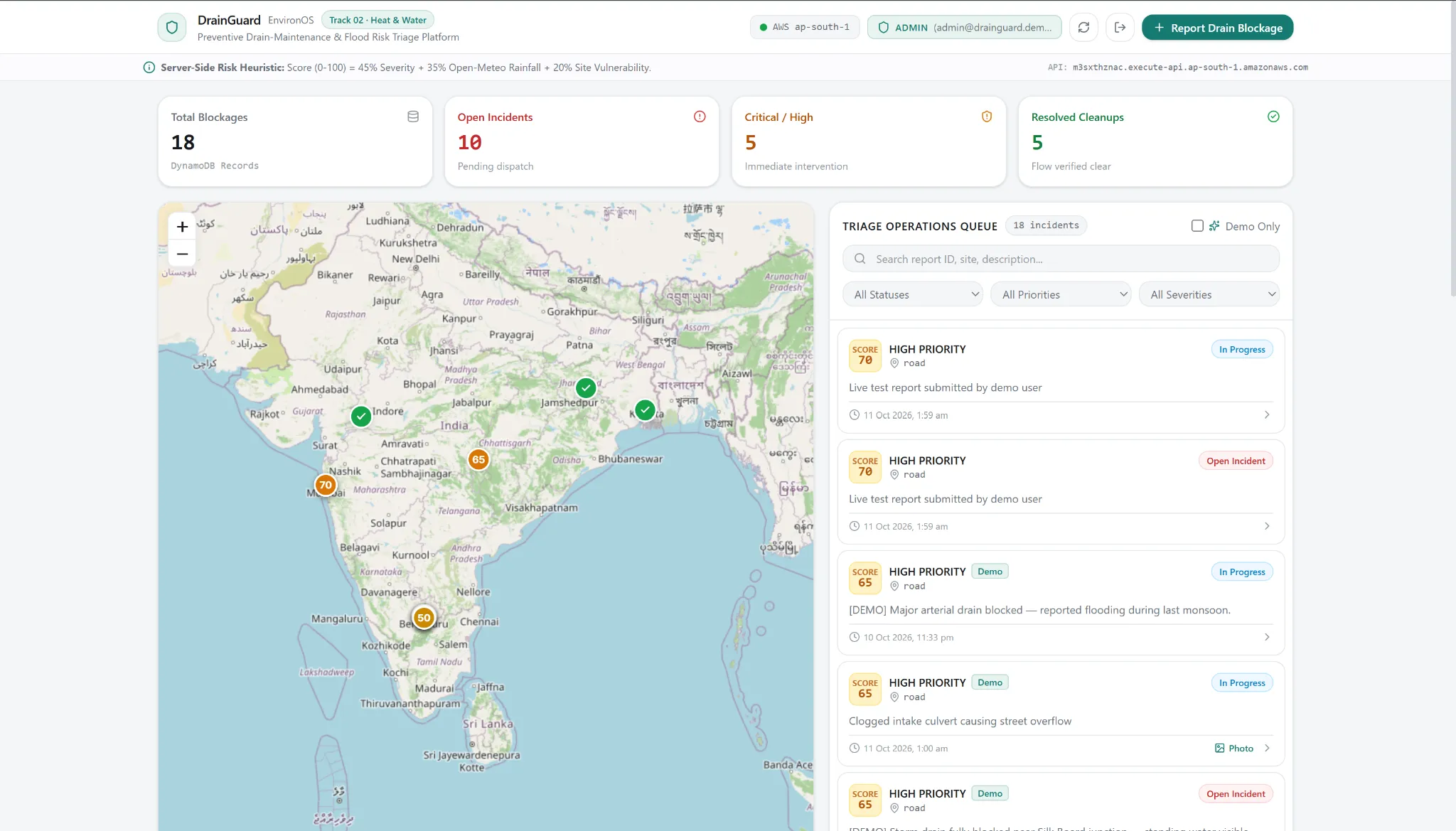
DrainGuard helps communities report blocked drains and enables cleanup teams to prioritize incidents using rainfall data, site exposure, and explainable risk scoring. Built with AWS serverless services, it connects citizen reporting, secure photo uploads, and role-based incident management in one deployable platform.

I am a final year student.
DrainGuard: Building a Flood-Prevention Triage Platform with AWS Serverless Services
How we built an environmental incident-reporting system using AWS Lambda, API Gateway, DynamoDB, S3, Cognito, and Amplify during Amazon Environmental Hacks 2026.
The problem: Acting before waterlogging happens
Every monsoon, urban areas across India face waterlogging that disrupts commutes, damages property, and creates risks for residents. Blocked storm drains and unmanaged solid waste can contribute to the problem, yet identifying which locations need attention before heavy rainfall remains a practical challenge.
We wanted to build something that could help address this gap. Rather than creating another environmental dashboard filled with charts, we set out to build a system that connects community reporting with actionable maintenance decisions.
That idea became DrainGuard, a preventive drain-maintenance and flood-risk triage platform built for Track 02: Heat and Water at Amazon Environmental Hacks 2026.
The premise is simple: let residents report blocked drains with photographs and location data, assess the urgency of each report using rainfall and site exposure information, and help cleanup operators prioritize incidents through a single interface.
Our objective was to build a complete working system, from a resident's browser to persistent cloud storage and back, rather than stop at a frontend prototype.
What does DrainGuard do?
DrainGuard supports two primary roles: community reporters and operations administrators.
A community user can view incident locations, submit a report, attach photographic evidence, and inspect the report's status and risk assessment. An administrator can advance reports through the cleanup workflow, from Open to In Progress and then to Resolved.
Each report contains location coordinates, blockage severity, site type, a description, timestamps, and an optional photograph. The backend calculates a priority score and stores the result so that the map and operations queue can present incidents in a consistent order.
The application also incorporates rainfall data from Open-Meteo, helping the system consider weather conditions when assessing urgency.
The goal is to support preventive maintenance and better prioritization. DrainGuard does not claim to predict floods with validated accuracy. Its score is an initial triage heuristic that would require field observations and further evaluation before being used for real municipal decisions.
Architecture: From a browser to AWS
We chose a serverless architecture to keep the deployment manageable within a short hackathon timeline. It allowed us to focus on the application workflow without managing servers or maintaining a separate database host.
Our frontend is built with React, Vite, TypeScript, and Tailwind CSS. Leaflet powers the interactive map, allowing users to inspect reported locations and select coordinates when creating an incident.
The frontend is hosted on AWS Amplify and communicates with an Amazon API Gateway HTTP API. API requests invoke Python-based AWS Lambda functions, which handle validation, persistence, image-upload authorization, weather enrichment, risk scoring, and status transitions.
We use Amazon DynamoDB to store report records and workflow metadata. Amazon S3 stores photographic evidence in a private bucket. Rather than expose AWS credentials to the browser, the backend generates presigned URLs that permit the intended upload or retrieval operation.
Amazon Cognito provides authentication through a user pool, with separate
user and admin groups. API Gateway JWT authorization protects the report and upload endpoints, while backend checks enforce administrator-only status changes.Finally, we use AWS SAM CLI and CloudFormation to define and deploy the infrastructure. Amazon CloudWatch provides logs for debugging deployed Lambda functions.
The architecture can be summarized as:
Plain text
Resident or Administrator|vReact + TypeScript FrontendAWS Amplify|vAmazon API Gateway HTTP APIJWT Authorization|vPython AWS Lambda Functions| | |v v vDynamoDB S3 Open-MeteoReports Photos Rainfall Data
This separation gives each component a clear responsibility. The frontend manages interaction, Lambda applies application rules, DynamoDB persists reports, S3 stores images, and Cognito establishes identity.
Making the risk score explainable
We wanted incident ranking to be understandable to an operator instead of relying on an opaque model or an LLM-generated recommendation.
DrainGuard calculates an initial score from three normalized factors, each between 0 and 100:
- Blockage severity: 45% of the score.
- Rainfall risk: 35%.
- Site exposure: 20%.
The calculation is:
[
R = 0.45S + 0.35W + 0.20E
]
Here, (S) represents blockage severity, (W) represents rainfall risk, and (E) represents site exposure. The final score is bounded between 0 and 100.
The system maps the score to priority categories: Critical, High, Moderate, or Low. It also returns the component breakdown and an explanation alongside the result.
For example, a report might receive a higher score because it describes a severe blockage at an exposed site while significant rainfall is forecast. The operator can inspect the factors behind the score rather than receiving only a number.
The scoring formula is deterministic, and the backend remains authoritative. The browser cannot simply submit an arbitrary score and have it accepted as the system's assessment.
These weights and thresholds are provisional design choices, not empirically validated flood-risk parameters. Evaluating their usefulness would require historical rainfall, drainage observations, and actual waterlogging outcomes.
A practical challenge: Debugging presigned S3 uploads
One of our most instructive integration bugs appeared during photographic evidence uploads.
The backend successfully generated a presigned S3 POST request, but the browser returned
Failed to fetch .The issue was related to an S3 regional endpoint redirect. The initial upload URL used a nonregional endpoint, while the bucket was located in the Asia Pacific (Mumbai) region,
ap-south-1 . S3 responded with an HTTP 307 redirect to the regional endpoint, and the browser's cross-origin POST flow failed.The solution was to generate presigned URLs using the correct regional S3 endpoint and to verify that the frontend used the returned URL and form fields exactly as expected.
We then tested the entire operation, not just URL generation. The workflow requests the upload policy, uploads the photograph, submits the report with its object key, retrieves the incident, and displays the image through a presigned viewing URL.
This was an important lesson: a successful backend response does not guarantee that a browser-based workflow works. Regional endpoints, CORS configuration, request methods, and response handling must all be tested together.
Another challenge: Preserving state during map selection
The report form needed to support a location picker without losing the user's draft.
Initially, entering map-selection mode closed the modal and discarded the description and selected photograph. Existing report markers could also intercept map clicks and prevent the picker from registering a coordinate.
We decoupled map-picking mode from modal dismissal, kept the form mounted while temporarily hidden, and disabled marker interaction during location selection. A user can now select a point on the map, return to the form, and continue with the existing report details intact.
This feature taught us to treat UI state as part of the workflow's correctness. The map, modal, uploaded file, and report draft are connected parts of a single operation, not isolated components.
Authentication that is enforced beyond the UI
A role badge or a hidden button is not an authorization system. A user could still attempt a direct API request.
We therefore integrated Cognito with API Gateway JWT authorization and enforced role restrictions on the backend.
Both roles can view reports and submit incidents. Only administrators can advance a report from Open to In Progress and then to Resolved. Invalid backward transitions are rejected, and status updates record attribution and timestamps.
In our documented live verification, unauthenticated requests to protected endpoints returned HTTP 401, a normal user's status-update attempt returned HTTP 403, and an administrator could perform permitted transitions. We also tested that the updated status remained after refreshing the application.
The important design principle is that authorization belongs at the API and backend boundaries. The frontend improves usability by showing the appropriate controls, but it does not serve as the security boundary.
For the hackathon, we use shared demonstration accounts with intentionally public credentials. These are suitable only for a disposable demo environment and must not be treated as production identities.
What we tested
We tested both the application logic and its deployed integrations.
The documented test runs reported:
- 74 passing Python backend tests.
- 22 passing frontend tests.
- A successful TypeScript and Vite production build.
- Live API verification for authentication, report creation, retrieval, and status transitions.
- S3 presigned-upload verification.
- Persistence of changes in DynamoDB.
- Responsive layout checks on a mobile-sized viewport.
These results represent software and integration verification, not proof of environmental impact. DrainGuard still needs field validation to establish whether its rankings improve cleanup decisions or reduce waterlogging.
The deployed frontend is available at:
The source code and infrastructure definitions are available at:
What we learned from building on AWS
The most valuable part of this project was connecting individual cloud services into a coherent, usable application.
AWS SAM and CloudFormation made infrastructure deployment repeatable. Lambda and API Gateway gave us a serverless application layer. DynamoDB provided persistent report storage, and S3 presigned URLs allowed browser uploads without embedding AWS credentials in the frontend. Cognito and JWT authorization helped establish distinct roles, while Amplify provided a path from Git-based development to a public application.
At the same time, integrating these services required us to understand their boundaries. Authentication, authorization, CORS, regional endpoints, browser state, and database persistence all interact. Debugging an end-to-end workflow required inspecting the actual request and response at each layer.
We learned to test the deployed application as a system rather than assume that passing unit tests or building successfully meant every user journey would work.
What's next?
DrainGuard is a working prototype, not a finished flood-prevention solution.
The next stage would involve collaboration with local communities or municipal teams, collecting real observations, evaluating the triage formula against historical incidents, and measuring whether prioritization leads to faster cleanup. We would also strengthen account management, monitoring, abuse prevention, and the operational safeguards required for a production deployment.
Environmental technology is useful only when it helps people make better decisions. DrainGuard is our attempt to connect early reporting, explainable prioritization, and accountable cleanup into one practical workflow.
Building it with AWS gave us the infrastructure to turn that idea into a deployed, testable application and a foundation we can continue to validate and improve.
Project: DrainGuard: Preventive Drain-Maintenance and Flood Risk Triage Platform
Hackathon: Amazon Environmental Hacks 2026, Track 02: Heat and Water
Built with: AWS Amplify, Amazon API Gateway, AWS Lambda, Amazon DynamoDB, Amazon S3, Amazon Cognito, AWS SAM, CloudFormation, and Amazon CloudWatch
External data: Open-Meteo
Source code: https://github.com/Dishan18/EnvironOS
Live demo: https://main.d2mwn41m5zowww.amplifyapp.com/
Enjoyed reading this content? Let the author know!
Your likes, comments, shares, and saves help creators reach more builders.

Loading recommendations
Loading article