
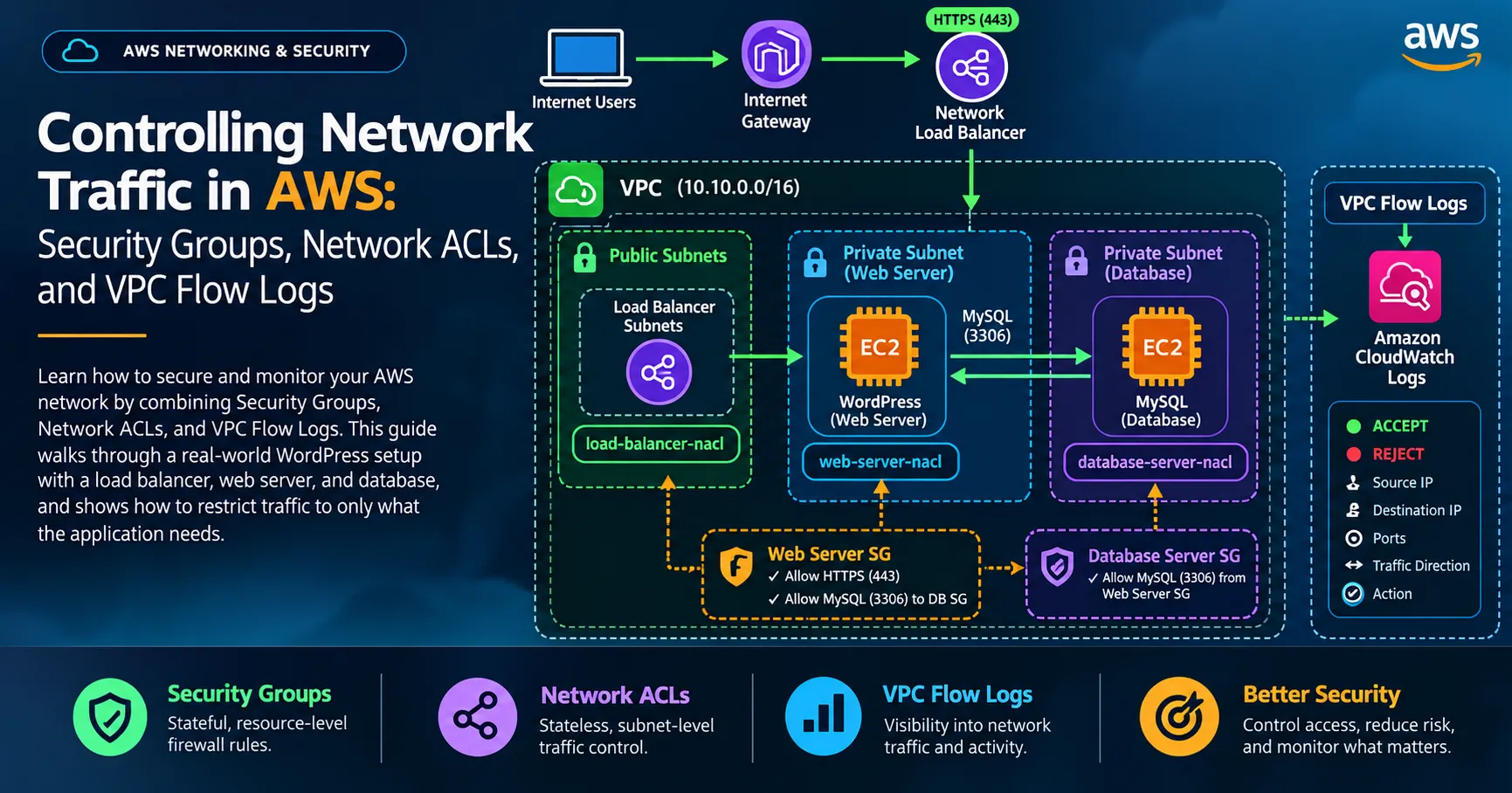
Controlling Network Traffic in AWS: Security Groups, Network ACLs, and VPC Flow Logs
Security groups control inbound and outbound traffic using rules that specify protocols, ports, and permitted sources or destinations. They are stateful, meaning that response traffic for an allowed connection is automatically permitted.


Network security is not just about keeping unwanted users out. It is also about controlling how different components of an application communicate, allowing only the traffic they need, and having enough visibility to investigate what happens across the network.
In one of my recent AWS Builder Labs, Controlling the Network, I worked on securing a web application hosted inside an Amazon Virtual Private Cloud (VPC). The lab focused on three important AWS networking and security features: Security Groups, Network Access Control Lists (Network ACLs), and VPC Flow Logs.
The scenario involved a WordPress website hosted on an EC2 web server, with its database running on a separate EC2 instance in a private subnet. A load balancer handled incoming HTTPS traffic. The objective was to restrict network communication to what the application required and then inspect the traffic to confirm that the controls were working as expected.
This exercise helped me understand how network segmentation, traffic filtering, and network monitoring work together in an AWS environment.
Understanding the Network Architecture
Before changing the network rules, it was important to understand how the application components communicated.
The lab environment used a VPC divided into separate network zones:
- Load balancer subnets: Public subnets containing the network load balancer that receives incoming connections.
- Web server subnet: A private subnet containing the EC2 instance hosting the web application.
- Database server subnet: A separate private subnet containing the database used by WordPress.
The application depended on communication between these components. External users needed to reach the website through HTTPS, the web server needed to communicate with the database over MySQL, and the network needed to allow the return traffic required to complete those connections.
The challenge was to permit these necessary connections without leaving unnecessary network access open.
This is an important principle in cloud security: network access should be based on what a resource needs to do, not simply on what is convenient to allow.
1. Controlling Traffic with Security Groups
The first part of the lab focused on security groups, which act as virtual firewalls for resources such as EC2 instances.
Security groups control inbound and outbound traffic using rules that specify protocols, ports, and permitted sources or destinations. They are stateful, meaning that response traffic for an allowed connection is automatically permitted.
I began by testing the web server before making any changes. When I attempted to access the Apache test page, the connection timed out. This was expected because the existing security group configuration did not permit the required traffic from the load balancer to the web server.
Allowing HTTPS to the web server
To restore access, I added an inbound rule to the Web Server SG security group:
- Protocol: TCP
- Port: 443 (HTTPS)
- Source:
0.0.0.0/0
This allowed HTTPS traffic from any IPv4 address to resources associated with the security group.
After saving the rule, I revisited the Apache test page. The page loaded successfully, confirming that the required HTTPS path was now available.
The rule was specific to HTTPS rather than allowing every port. Although the source range was broad, the permitted service was limited to TCP port 443. In a production environment, the source restriction should be as narrow as the architecture permits. In this lab, the Network Load Balancer setup required the web server to accept HTTPS connections from any source.
Allowing the web server to reach the database
Next, I attempted to open the WordPress website. This time, the connection failed because the web server could not communicate with the database server.
WordPress relies on its database to retrieve and store application data. Even when the web server is accessible, the site may fail to load correctly if the required database connection is blocked.
To resolve this, I configured two related security group rules.
First, I updated the outbound rules of the Web Server SG security group to allow MySQL traffic to the DatabaseServerSG security group:
- Protocol: TCP
- Port: 3306
- Destination:
DatabaseServerSG
Then, I added an inbound rule to the Database Server SG security group:
- Protocol: TCP
- Port: 3306
- Source:
WebServerSg
Using a security group as the source or destination is useful because it identifies the intended group of resources instead of relying only on a fixed IP address range.
This configuration allowed the web server to initiate database connections without opening the MySQL port to every device on the internet.
After saving the rules, I revisited the WordPress URL, and the welcome page loaded. I completed the WordPress setup and accessed its dashboard.
This part of the exercise demonstrated why network rules must reflect application dependencies. The web server needed HTTPS access for incoming requests and MySQL connectivity to retrieve application data, but the database did not need to be exposed directly to external users.
2. Restricting Subnet Traffic with Network ACLs
Security groups control traffic associated with resources. Network ACLs provide another layer of control at the subnet level.
Unlike security groups, Network ACLs are stateless. This means that inbound and outbound traffic must be evaluated separately. If a connection is allowed in one direction, the return traffic is not automatically allowed by that rule; the appropriate rule must also exist in the opposite direction.
This distinction became particularly important when I began restricting traffic across the lab's public and private subnets.
Creating a Network ACL for the load balancer subnets
I created a network ACL named
load-balancer-nacl and associated it with both public subnets used by the load balancer.The new ACL initially denied all inbound and outbound traffic. As expected, the Apache test page became inaccessible after the ACL was associated with the subnets.
I then added rules to permit the required traffic.
The inbound rules allowed:
- HTTPS traffic on TCP port 443 from
0.0.0.0/0. - TCP traffic on ephemeral ports
1024–65535from the VPC CIDR range10.10.0.0/16.
The outbound rules allowed:
- HTTPS traffic on TCP port 443 to the web server subnet.
- TCP traffic on ephemeral ports
1024–65535to0.0.0.0/0.
Ephemeral ports are temporary ports used by clients and servers during network communication. A connection may begin on a known service port, such as HTTPS port 443, while the return traffic uses a temporary port on the other side.
Because network ACLs are stateless, allowing only the service port may not be enough to support the complete exchange. The required return traffic must also be considered.
After saving the rules, I continued configuring ACLs for the other subnets.
Securing the web server subnet
For the web server subnet, I created
web-server-nacl and associated it with the private web server subnet.The inbound rules permitted:
- HTTPS traffic on port 443 from
0.0.0.0/0. - TCP traffic on ephemeral ports
1024–65535from10.10.0.0/16.
The outbound rules permitted:
- MySQL traffic on port 3306 to the database server subnet.
- TCP traffic on ephemeral ports
1024–65535to0.0.0.0/0.
These rules allowed the web server to receive the required HTTPS traffic and communicate with the database while accounting for return traffic.
The database connection was restricted to the database subnet rather than allowing MySQL traffic to reach arbitrary destinations.
Securing the database server subnet
The final network ACL was named
database-server-nacl and associated with the private database subnet.Its inbound rules allowed:
- MySQL traffic on port 3306 from the web server subnet.
- TCP traffic on ephemeral ports
1024–65535from the VPC CIDR range10.10.0.0/16.
Its outbound rules allowed TCP traffic on ephemeral ports
1024–65535 to the VPC CIDR range 10.10.0.0/16.This reflected the database server's role in the architecture: it needed to communicate with the web application, not serve as a publicly accessible endpoint.
After configuring the network ACLs, I tested the Apache page and WordPress site again. Both loaded successfully, confirming that the rules permitted the traffic required by the application.
Why use both security groups and Network ACLs?
These controls serve different purposes.
Security groups provide stateful filtering at the resource level, while network ACLs provide stateless filtering at the subnet level. Used together, they provide multiple layers of network access control.
For example, a security group can restrict MySQL connections to resources in the web server security group, while a network ACL can limit the traffic entering or leaving the database subnet.
However, using both controls effectively requires careful rule design. A valid connection must be permitted by the relevant security group rules and by the applicable network ACL rules in both directions.
3. Monitoring Network Traffic with VPC Flow Logs
Configuring network controls is only part of securing an environment. It is also important to understand what traffic is actually flowing through the network and whether unwanted connections are being rejected.
For the final part of the lab, I used VPC Flow Logs to capture information about IP traffic associated with the lab VPC.
VPC Flow Logs provide network traffic metadata, including source and destination IP addresses, ports, traffic direction, and whether the traffic was accepted or rejected by the applicable network controls.
They do not capture the contents of network packets. Instead, they provide records that help administrators understand traffic patterns and investigate connectivity issues.
Creating the CloudWatch log group
I first created a CloudWatch Logs log group named:
blog-access-logsFor the lab, I configured a retention period of one day. This was sufficient for the exercise because the logs were only needed temporarily.
In a production environment, log retention should be based on operational requirements, security policies, compliance obligations, and the organization's investigation needs.
Configuring VPC Flow Logs
Next, I returned to the VPC console and created a flow log for
Lab VPC.I used the following configuration:
- Name:
vpc-flow-logs-for-blog - Filter: All
- Maximum aggregation interval: 1 minute
- Destination: Amazon CloudWatch Logs
- Destination log group:
blog-access-logs - Service role:
VpcFlowLogsRole - Log record format: Custom
The custom format included these fields:
1
${account-id} ${interface-id} ${srcaddr} ${srcport} ${dstaddr} ${dstport} ${subnet-id} ${flow-direction} ${action}
Each field contributed useful information to the investigation.
For example,
srcaddr and dstaddr identified the source and destination IP addresses, while srcport and dstport helped identify which ports were involved. The flow-direction field indicated whether the traffic was inbound or outbound, and the action field showed whether the recorded traffic was accepted or rejected.The one-minute aggregation interval was selected to reduce the waiting time before records became available during the lab. In a real environment, the appropriate interval should be selected according to monitoring and operational needs.
Generating and inspecting traffic
Once the flow log was configured, I revisited the WordPress website and refreshed the page several times to generate traffic.
I then attempted to access the website using HTTP instead of HTTPS.
Because the configured network controls allowed the required HTTPS traffic but did not permit the same web access over HTTP, the request timed out. This was expected and provided a useful test of the restrictions.
I returned to CloudWatch Logs and searched the
blog-access-logs log group to inspect the recorded traffic.The lab provided examples of both accepted and rejected traffic:
| Destination port | Action | Interpretation |
|---|---|---|
| 443 | ACCEPT | The recorded HTTPS traffic was accepted. |
| 80 | REJECT | The recorded HTTP traffic was rejected. |
The records also contained traffic involving other ports. Such entries may relate to ephemeral ports used for return traffic or other network activity in the environment. Their meaning should be determined by examining the source, destination, direction, action, and surrounding records rather than assuming that every unfamiliar port represents malicious activity.
This was an important part of the exercise. The network configuration established the intended rules, while the flow logs provided evidence of how traffic was being handled.
Why VPC Flow Logs matter for security
VPC Flow Logs can help with several operational and security tasks:
- Troubleshooting connectivity: Determine whether traffic is being accepted or rejected.
- Validating network controls: Check whether observed traffic aligns with the intended access rules.
- Investigating unusual activity: Identify unexpected communication patterns that may need further investigation.
- Supporting incident response: Provide network metadata that can be correlated with other security logs.
- Improving visibility: Help teams understand communication between resources across a VPC.
Flow Logs are not a complete security monitoring solution on their own. They do not show application payloads or explain the full context behind every connection. For stronger investigations, their records can be correlated with other sources, such as application logs, CloudTrail events, and relevant security monitoring tools.
Key Lessons from the Lab
This lab reinforced several important principles of cloud network security.
1. Apply least privilege to network access.
Resources should only receive the network access required for their roles. The web server needed HTTPS connectivity, while the database needed MySQL access from the web server rather than unrestricted external access.
2. Understand the difference between security groups and network ACLs.
Security groups are stateful and apply to resources, while network ACLs are stateless and apply at the subnet level. Their different behaviours affect how inbound and outbound rules must be designed.
3. Account for return traffic.
A network ACL must permit the necessary traffic in both directions. Ephemeral ports are particularly important when configuring stateless filtering for connections initiated by clients or other resources.
4. Test changes instead of assuming they work.
Testing the Apache page and WordPress application before and after changing the rules helped identify missing network permissions and confirm that the final configuration supported the application.
5. Use logs to verify security controls.
VPC Flow Logs made it possible to inspect accepted and rejected traffic. This provided evidence that the network restrictions were working as intended.
6. Treat network security as a layered process.
Security groups, network ACLs, subnet separation, and traffic logging serve complementary purposes. A secure network requires appropriate configuration, validation, and ongoing monitoring.
Final Thoughts
The Controlling the Network AWS Builder Lab provided a practical way to understand how network security works inside an AWS VPC.
By configuring security groups, creating network ACLs for the load balancer, web server, and database subnets, and inspecting VPC Flow Logs in CloudWatch, I worked through the process of restricting network access while keeping an application functional.
One of the biggest lessons was that securing a cloud environment does not mean blocking everything. It means understanding how the application works, identifying the communication it genuinely requires, permitting that traffic deliberately, and monitoring the network to verify the outcome.
These concepts are relevant to cloud security, infrastructure hardening, network troubleshooting, and incident response. They also provide a useful foundation for designing AWS environments where access is controlled, network boundaries are clearly defined, and traffic activity can be investigated when something does not behave as expected.
As I continue learning cloud security, exercises like this help connect AWS networking concepts to practical security decisions.qNetwork security is not just about keeping unwanted users out. It is also about controlling how different components of an application communicate, allowing only the traffic they need, and having enough visibility to investigate what happens across the network.
In one of my recent AWS Builder Labs, Controlling the Network, I worked on securing a web application hosted inside an Amazon Virtual Private Cloud (VPC). The lab focused on three important AWS networking and security features: Security Groups, Network Access Control Lists (Network ACLs), and VPC Flow Logs.
The scenario involved a WordPress website hosted on an EC2 web server, with its database running on a separate EC2 instance in a private subnet. A load balancer handled incoming HTTPS traffic. The objective was to restrict network communication to what the application required and then inspect the traffic to confirm that the controls were working as expected.
This exercise helped me understand how network segmentation, traffic filtering, and network monitoring work together in an AWS environment.
Understanding the Network Architecture
Before changing the network rules, it was important to understand how the application components communicated.
The lab environment used a VPC divided into separate network zones:
- Load balancer subnets: Public subnets containing the network load balancer that receives incoming connections.
- Web server subnet: A private subnet containing the EC2 instance hosting the web application.
- Database server subnet: A separate private subnet containing the database used by WordPress.
The application depended on communication between these components. External users needed to reach the website through HTTPS, the web server needed to communicate with the database over MySQL, and the network needed to allow the return traffic required to complete those connections.
The challenge was to permit these necessary connections without leaving unnecessary network access open.
This is an important principle in cloud security: network access should be based on what a resource needs to do, not simply on what is convenient to allow.
1. Controlling Traffic with Security Groups
The first part of the lab focused on security groups, which act as virtual firewalls for resources such as EC2 instances.
Security groups control inbound and outbound traffic using rules that specify protocols, ports, and permitted sources or destinations. They are stateful, meaning that response traffic for an allowed connection is automatically permitted.
I began by testing the web server before making any changes. When I attempted to access the Apache test page, the connection timed out. This was expected because the existing security group configuration did not permit the required traffic from the load balancer to the web server.
Allowing HTTPS to the web server
To restore access, I added an inbound rule to the Web Server SG security group:
- Protocol: TCP
- Port: 443 (HTTPS)
- Source:
0.0.0.0/0
This allowed HTTPS traffic from any IPv4 address to resources associated with the security group.
After saving the rule, I revisited the Apache test page. The page loaded successfully, confirming that the required HTTPS path was now available.
The rule was specific to HTTPS rather than allowing every port. Although the source range was broad, the permitted service was limited to TCP port 443. In a production environment, the source restriction should be as narrow as the architecture permits. In this lab, the Network Load Balancer setup required the web server to accept HTTPS connections from any source.
Allowing the web server to reach the database
Next, I attempted to open the WordPress website. This time, the connection failed because the web server could not communicate with the database server.
WordPress relies on its database to retrieve and store application data. Even when the web server is accessible, the site may fail to load correctly if the required database connection is blocked.
To resolve this, I configured two related security group rules.
First, I updated the outbound rules of the Web Server SG security group to allow MySQL traffic to the DatabaseServerSG security group:
- Protocol: TCP
- Port: 3306
- Destination:
DatabaseServerSG
Then, I added an inbound rule to the Database Server SG security group:
- Protocol: TCP
- Port: 3306
- Source:
WebServerSg
Using a security group as the source or destination is useful because it identifies the intended group of resources instead of relying only on a fixed IP address range.
This configuration allowed the web server to initiate database connections without opening the MySQL port to every device on the internet.
After saving the rules, I revisited the WordPress URL, and the welcome page loaded. I completed the WordPress setup and accessed its dashboard.
This part of the exercise demonstrated why network rules must reflect application dependencies. The web server needed HTTPS access for incoming requests and MySQL connectivity to retrieve application data, but the database did not need to be exposed directly to external users.
2. Restricting Subnet Traffic with Network ACLs
Security groups control traffic associated with resources. Network ACLs provide another layer of control at the subnet level.
Unlike security groups, Network ACLs are stateless. This means that inbound and outbound traffic must be evaluated separately. If a connection is allowed in one direction, the return traffic is not automatically allowed by that rule; the appropriate rule must also exist in the opposite direction.
This distinction became particularly important when I began restricting traffic across the lab's public and private subnets.
Creating a Network ACL for the load balancer subnets
I created a network ACL named
load-balancer-nacl and associated it with both public subnets used by the load balancer.The new ACL initially denied all inbound and outbound traffic. As expected, the Apache test page became inaccessible after the ACL was associated with the subnets.
I then added rules to permit the required traffic.
The inbound rules allowed:
- HTTPS traffic on TCP port 443 from
0.0.0.0/0. - TCP traffic on ephemeral ports
1024–65535from the VPC CIDR range10.10.0.0/16.
The outbound rules allowed:
- HTTPS traffic on TCP port 443 to the web server subnet.
- TCP traffic on ephemeral ports
1024–65535to0.0.0.0/0.
Ephemeral ports are temporary ports used by clients and servers during network communication. A connection may begin on a known service port, such as HTTPS port 443, while the return traffic uses a temporary port on the other side.
Because network ACLs are stateless, allowing only the service port may not be enough to support the complete exchange. The required return traffic must also be considered.
After saving the rules, I continued configuring ACLs for the other subnets.
Securing the web server subnet
For the web server subnet, I created
web-server-nacl and associated it with the private web server subnet.The inbound rules permitted:
- HTTPS traffic on port 443 from
0.0.0.0/0. - TCP traffic on ephemeral ports
1024–65535from10.10.0.0/16.
The outbound rules permitted:
- MySQL traffic on port 3306 to the database server subnet.
- TCP traffic on ephemeral ports
1024–65535to0.0.0.0/0.
These rules allowed the web server to receive the required HTTPS traffic and communicate with the database while accounting for return traffic.
The database connection was restricted to the database subnet rather than allowing MySQL traffic to reach arbitrary destinations.
Securing the database server subnet
The final network ACL was named
database-server-nacl and associated with the private database subnet.Its inbound rules allowed:
- MySQL traffic on port 3306 from the web server subnet.
- TCP traffic on ephemeral ports
1024–65535from the VPC CIDR range10.10.0.0/16.
Its outbound rules allowed TCP traffic on ephemeral ports
1024–65535 to the VPC CIDR range 10.10.0.0/16.This reflected the database server's role in the architecture: it needed to communicate with the web application, not serve as a publicly accessible endpoint.
After configuring the network ACLs, I tested the Apache page and WordPress site again. Both loaded successfully, confirming that the rules permitted the traffic required by the application.
Why use both security groups and Network ACLs?
These controls serve different purposes.
Security groups provide stateful filtering at the resource level, while network ACLs provide stateless filtering at the subnet level. Used together, they provide multiple layers of network access control.
For example, a security group can restrict MySQL connections to resources in the web server security group, while a network ACL can limit the traffic entering or leaving the database subnet.
However, using both controls effectively requires careful rule design. A valid connection must be permitted by the relevant security group rules and by the applicable network ACL rules in both directions.
3. Monitoring Network Traffic with VPC Flow Logs
Configuring network controls is only part of securing an environment. It is also important to understand what traffic is actually flowing through the network and whether unwanted connections are being rejected.
For the final part of the lab, I used VPC Flow Logs to capture information about IP traffic associated with the lab VPC.
VPC Flow Logs provide network traffic metadata, including source and destination IP addresses, ports, traffic direction, and whether the traffic was accepted or rejected by the applicable network controls.
They do not capture the contents of network packets. Instead, they provide records that help administrators understand traffic patterns and investigate connectivity issues.
Creating the CloudWatch log group
I first created a CloudWatch Logs log group named:
blog-access-logsFor the lab, I configured a retention period of one day. This was sufficient for the exercise because the logs were only needed temporarily.
In a production environment, log retention should be based on operational requirements, security policies, compliance obligations, and the organization's investigation needs.
Configuring VPC Flow Logs
Next, I returned to the VPC console and created a flow log for
Lab VPC.I used the following configuration:
- Name:
vpc-flow-logs-for-blog - Filter: All
- Maximum aggregation interval: 1 minute
- Destination: Amazon CloudWatch Logs
- Destination log group:
blog-access-logs - Service role:
VpcFlowLogsRole - Log record format: Custom
The custom format included these fields:
1
${account-id} ${interface-id} ${srcaddr} ${srcport} ${dstaddr} ${dstport} ${subnet-id} ${flow-direction} ${action}
Each field contributed useful information to the investigation.
For example,
srcaddr and dstaddr identified the source and destination IP addresses, while srcport and dstport helped identify which ports were involved. The flow-direction field indicated whether the traffic was inbound or outbound, and the action field showed whether the recorded traffic was accepted or rejected.The one-minute aggregation interval was selected to reduce the waiting time before records became available during the lab. In a real environment, the appropriate interval should be selected according to monitoring and operational needs.
Generating and inspecting traffic
Once the flow log was configured, I revisited the WordPress website and refreshed the page several times to generate traffic.
I then attempted to access the website using HTTP instead of HTTPS.
Because the configured network controls allowed the required HTTPS traffic but did not permit the same web access over HTTP, the request timed out. This was expected and provided a useful test of the restrictions.
I returned to CloudWatch Logs and searched the
blog-access-logs log group to inspect the recorded traffic.The lab provided examples of both accepted and rejected traffic:
| Destination port | Action | Interpretation |
|---|---|---|
| 443 | ACCEPT | The recorded HTTPS traffic was accepted. |
| 80 | REJECT | The recorded HTTP traffic was rejected. |
The records also contained traffic involving other ports. Such entries may relate to ephemeral ports used for return traffic or other network activity in the environment. Their meaning should be determined by examining the source, destination, direction, action, and surrounding records rather than assuming that every unfamiliar port represents malicious activity.
This was an important part of the exercise. The network configuration established the intended rules, while the flow logs provided evidence of how traffic was being handled.
Why VPC Flow Logs matter for security
VPC Flow Logs can help with several operational and security tasks:
- Troubleshooting connectivity: Determine whether traffic is being accepted or rejected.
- Validating network controls: Check whether observed traffic aligns with the intended access rules.
- Investigating unusual activity: Identify unexpected communication patterns that may need further investigation.
- Supporting incident response: Provide network metadata that can be correlated with other security logs.
- Improving visibility: Help teams understand communication between resources across a VPC.
Flow Logs are not a complete security monitoring solution on their own. They do not show application payloads or explain the full context behind every connection. For stronger investigations, their records can be correlated with other sources, such as application logs, CloudTrail events, and relevant security monitoring tools.
Key Lessons from the Lab
This lab reinforced several important principles of cloud network security.
1. Apply least privilege to network access.
Resources should only receive the network access required for their roles. The web server needed HTTPS connectivity, while the database needed MySQL access from the web server rather than unrestricted external access.
2. Understand the difference between security groups and network ACLs.
Security groups are stateful and apply to resources, while network ACLs are stateless and apply at the subnet level. Their different behaviours affect how inbound and outbound rules must be designed.
3. Account for return traffic.
A network ACL must permit the necessary traffic in both directions. Ephemeral ports are particularly important when configuring stateless filtering for connections initiated by clients or other resources.
4. Test changes instead of assuming they work.
Testing the Apache page and WordPress application before and after changing the rules helped identify missing network permissions and confirm that the final configuration supported the application.
5. Use logs to verify security controls.
VPC Flow Logs made it possible to inspect accepted and rejected traffic. This provided evidence that the network restrictions were working as intended.
6. Treat network security as a layered process.
Security groups, network ACLs, subnet separation, and traffic logging serve complementary purposes. A secure network requires appropriate configuration, validation, and ongoing monitoring.
The Controlling the Network AWS Builder Lab provided a practical way to understand how network security works inside an AWS VPC.
By configuring security groups, creating network ACLs for the load balancer, web server, and database subnets, and inspecting VPC Flow Logs in CloudWatch, I worked through the process of restricting network access while keeping an application functional.
One of the biggest lessons was that securing a cloud environment does not mean blocking everything. It means understanding how the application works, identifying the communication it genuinely requires, permitting that traffic deliberately, and monitoring the network to verify the outcome.
These concepts are relevant to cloud security, infrastructure hardening, network troubleshooting, and incident response. They also provide a useful foundation for designing AWS environments where access is controlled, network boundaries are clearly defined, and traffic activity can be investigated when something does not behave as expected.
As I continue learning cloud security, exercises like this help connect AWS networking concepts to practical security decisions.
Enjoyed reading this content? Let the author know!
Your likes, comments, shares, and saves help creators reach more builders.

Loading recommendations
Loading article