
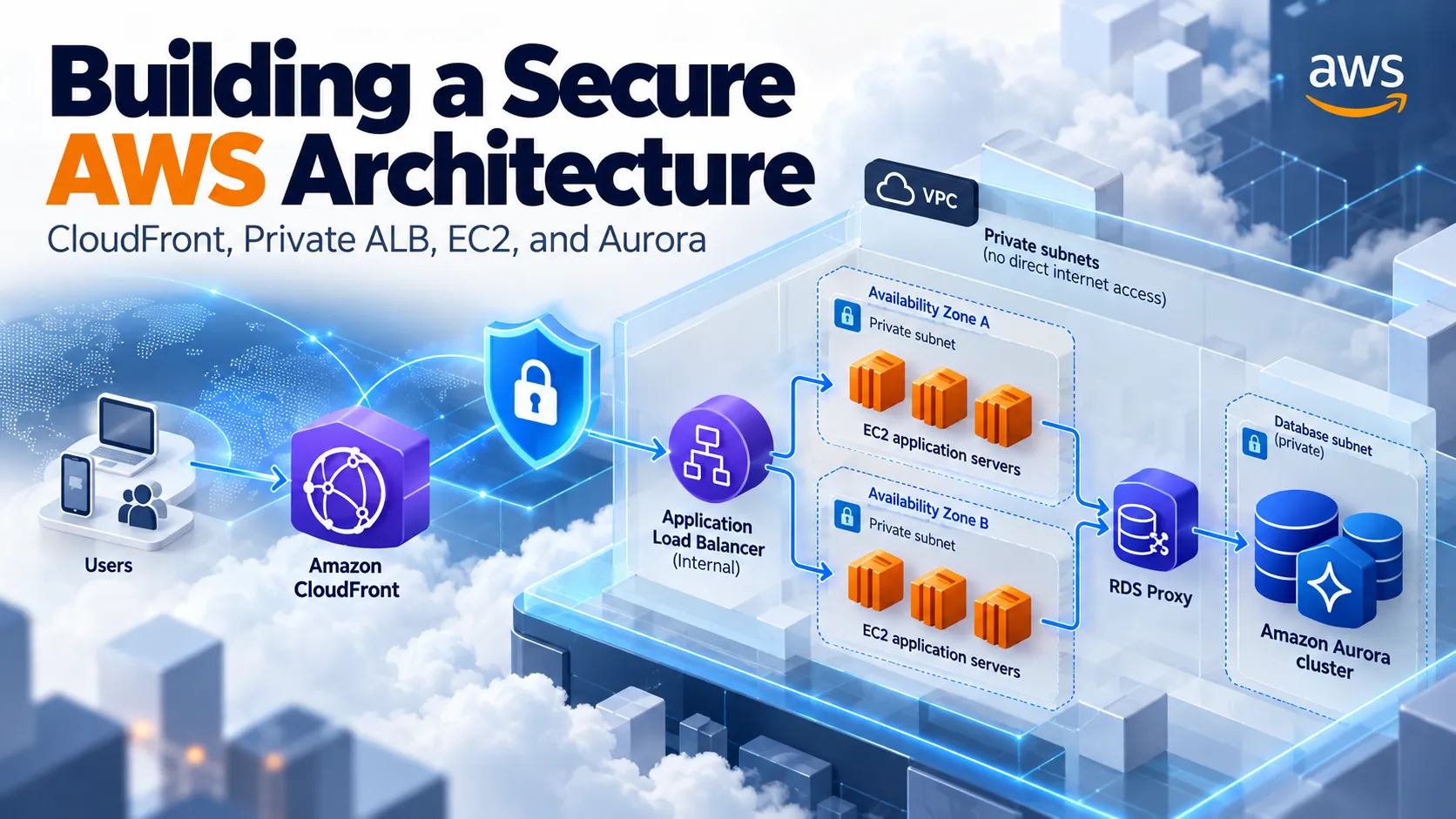
Building a Secure AWS Architecture: CloudFront, Private ALB, EC2, and Aurora
Why a highly available application doesn't need publicly exposed servers or load balancers.

Introduction
When deploying a web application on AWS, one of the first architectural decisions is determining which resources actually need to be accessible from the internet.
A common beginner architecture exposes an EC2 instance through a public IP address and connects it directly to a database.
It works. But what happens when traffic increases, the instance fails, or someone starts probing the application's infrastructure?
A more mature architecture separates public access from private application resources.
Let's explore how we can combine Amazon CloudFront, VPC Origins, an internal Application Load Balancer, Amazon EC2, and Amazon Aurora to build a secure, scalable, and resilient application.
1. Understanding the Architecture

Our request flow will look like this:
User → Amazon CloudFront → Internal ALB → EC2 → RDS Proxy → Amazon Aurora
Each component has a specific responsibility:
- CloudFront: Provides the public entry point, edge caching, and content delivery.
- VPC Origins: Enables CloudFront to connect to supported resources in private VPC subnets.
- Application Load Balancer: Distributes HTTP/HTTPS requests across application instances.
- Amazon EC2: Runs the application backend in private subnets.
- Amazon RDS Proxy: Manages database connections and improves resilience during failovers.
- Amazon Aurora: Stores application data in a managed relational database.
The important design principle is that the public-facing layer is separated from the application and database layers.
2. Why Use a Private Application Load Balancer?
Traditionally, an internet-facing ALB can receive requests from CloudFront. However, this requires additional controls to prevent users from bypassing CloudFront and contacting the ALB directly.
CloudFront VPC Origins provides another option.
We can configure an internal ALB as a VPC origin, allowing CloudFront to communicate with the load balancer without exposing it directly to the public internet.
Our application becomes accessible through CloudFront while the load balancer and EC2 instances remain private.
This helps reduce the externally exposed attack surface.
There is an important distinction here: private networking doesn't automatically make an application secure. Authentication, authorization, input validation, patching, and monitoring remain essential.
3. High Availability Across Multiple Availability Zones
Now imagine our application receives thousands of requests and one EC2 instance suddenly becomes unhealthy.

If the architecture depends on a single instance, users may experience downtime.
Instead, we can deploy an EC2 Auto Scaling group across two Availability Zones.
The Application Load Balancer performs health checks and distributes requests among healthy instances.
When an instance becomes unhealthy, the ALB stops routing traffic to it after detecting the failure. Auto Scaling can replace unhealthy instances according to its configuration.
But there's another consideration: application state.
If user sessions or uploaded files are stored only on an individual instance, replacing that instance could lead to data loss or interrupted sessions.
For scalable applications, we should consider external session storage, shared object storage such as Amazon S3, and stateless application design.
High availability is not just about having multiple servers. It's about removing dependencies on individual servers.
4. Protecting the Database with Amazon Aurora and RDS Proxy
The database is often one of the most sensitive components in the architecture.
Amazon Aurora should remain in private database subnets, with access restricted through security groups.
Our application connects through Amazon RDS Proxy instead of creating a completely independent set of database connections directly against Aurora.
Why?
Because database connections consume resources.
As the number of EC2 instances grows, connection demand can increase significantly.
RDS Proxy can pool and reuse database connections, reducing connection overhead.
It can also improve application recovery when an Aurora writer fails.
With Aurora replicas deployed across Availability Zones, Aurora can promote a reader to become the new writer after a failure.
RDS Proxy helps clients continue using a stable proxy endpoint while routing new work toward the available database writer.
However, transactions interrupted during failover may still fail and require application-level retries.
Resilience requires both infrastructure mechanisms and properly designed application behavior.
5. What Happens When Traffic Suddenly Increases?
Let's say our application typically handles 200 requests per second but suddenly receives 3,000.
Several components respond differently:
CloudFront can serve eligible cached responses from edge locations, reducing requests reaching the origin.
Application Load Balancer distributes incoming requests across healthy targets.
EC2 Auto Scaling can add application instances based on configured scaling policies and metrics.
RDS Proxy helps manage database connection demand.
Aurora handles the underlying database workload, subject to its provisioned or configured capacity.
But there's a catch.
Auto Scaling doesn't guarantee that the application or database can handle unlimited traffic.
A poorly optimized SQL query can remain expensive regardless of how many EC2 instances are deployed.
That's why load testing, query optimization, connection management, caching, and observability are critical parts of architecture design.
6. Security Beyond Private Subnets
A strong network design is only one layer of protection.
We should also consider:
- AWS WAF: Filter malicious HTTP requests at the CloudFront layer.
- AWS Secrets Manager: Manage database credentials without hardcoding passwords.
- IAM roles: Allow EC2 workloads to access permitted AWS services without embedding static access keys.
- Security groups: Restrict communication between ALB, application, proxy, and database layers.
- Amazon CloudWatch: Monitor application health, performance, and infrastructure metrics.
- Encryption: Protect traffic in transit and sensitive data at rest.

A useful principle is to grant each component only the permissions and network access it actually needs.
7. The Trade-Off: Architecture vs. Complexity
Would I recommend this complete architecture for every application?
Not necessarily.
For a small prototype with minimal traffic, multiple EC2 instances, an ALB, RDS Proxy, and Aurora might introduce more cost and operational complexity than the project requires.
For a production application with higher availability requirements, sensitive data, and growing traffic, these components can become much more valuable.
The goal isn't to use the largest number of AWS services.
The goal is to choose the architecture that meets the application's requirements with an acceptable balance of cost, security, performance, and reliability.
Final Thoughts
A well-designed AWS architecture is more than a collection of connected services.
It's a set of engineering decisions.
Why should the application servers be private?
What happens when an Availability Zone fails?
Can the database handle a sudden increase in connections?
What happens to user sessions when an instance is replaced?
How do we prevent someone from bypassing our security controls?
These are the questions that turn a simple cloud deployment into an actual architecture.
And understanding the answers is far more valuable than simply memorizing AWS service names.
References
Enjoyed reading this content? Let the author know!
Your likes, comments, shares, and saves help creators reach more builders.

Loading recommendations
Loading article