
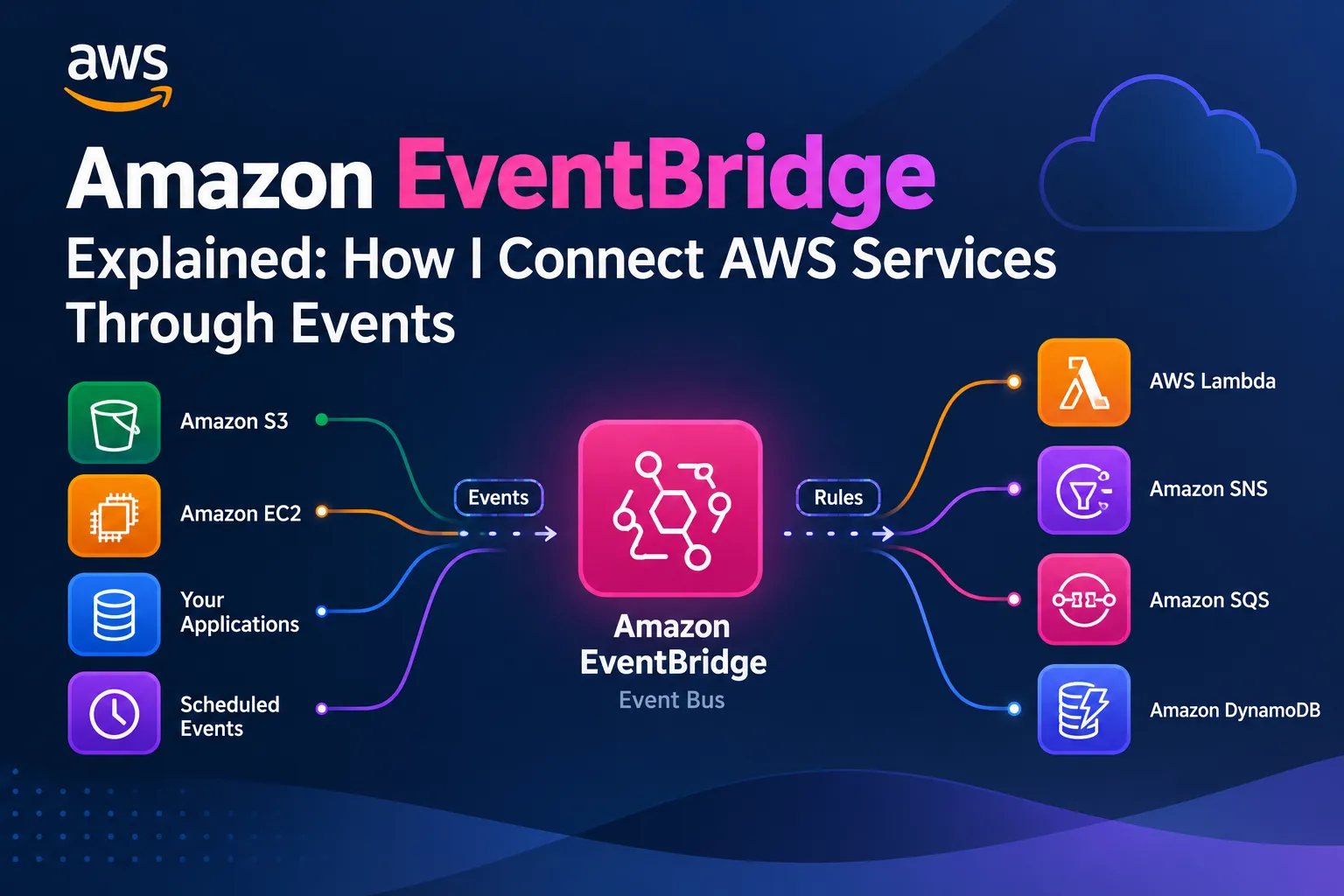
⚡ Amazon EventBridge Explained: Building Event-Driven Applications That React Automatically
Learn how Amazon EventBridge connects AWS services and applications through events. This beginner-friendly guide explains event buses, rules, event patterns, targets, scheduled events, and how to build scalable event-driven architectures using AWS Lambda, SQS, SNS, and other services.


⚡ Amazon EventBridge Explained: How I Connect AWS Services Through Events
While learning AWS, I started noticing a common pattern.
Applications constantly generate events.
A file is uploaded to Amazon S3.
A new order is created.
A payment is completed.
An EC2 instance changes state.
A scheduled task needs to run.
But how can I make other parts of my application react automatically when these things happen?
I don't want every service to constantly check whether something has changed.
I want services to communicate through events.
That's where Amazon EventBridge becomes useful.
🧠 What Is Amazon EventBridge?
Amazon EventBridge is a serverless event bus service that helps route events from AWS services, your own applications, and supported third-party sources to targets that can process them.
My simple mental model is:
1
2
3
4
5
6
7
8
9
10
11
12
13
Something Happens
       │
       ▼
      Event
       │
       ▼
 Amazon EventBridge
       │
       ▼
 Matching Rule
       │
       ▼
     Target
For example, when an order is created, EventBridge can route a matching event to a Lambda function that starts the next step of the process.
This allows different components to react to events without requiring every component to call every other component directly.
🌍 What Is an Event?
An event is a record describing something that happened.
For example:
1
2
3
4
5
Order Created
Payment Completed
File Uploaded
Instance Stopped
User Registered
An event might contain information such as:
- The source of the event
- The type of event
- When it occurred
- Details about the event
A simplified custom event could look like this:
1
2
3
4
5
6
7
8
{
  "source": "my.store",
  "detail-type": "Order Created",
  "detail": {
    "orderId": "ORD-1001",
    "status": "CREATED"
  }
}
This example represents an event generated by an application. It is illustrative JSON rather than a complete API request.
The important idea is that the event describes what happened, allowing other components to decide whether they need to respond.
🚌 What Is an Event Bus?
An event bus receives events and makes them available for routing through configured rules.
EventBridge supports different event buses for different purposes, including the default event bus, custom event buses, and partner event buses.
For example:
1
2
3
4
5
6
7
8
9
AWS Services ──────┐
                   │
My Application ────┼──► Event Bus
                   │
Partner Sources ───┘
                         │
                ┌────────┼────────┐
                ▼        ▼        ▼
              Rule A   Rule B   Rule C
A custom event bus can be useful when I want to organize events for a particular application or business domain.
For example, an online store might use a custom event bus for order-related events.
🎯 What Are EventBridge Rules?
Rules determine which events should be routed to which targets.
Imagine my application produces three events:
1
2
3
Order Created
Payment Completed
Order Cancelled
I can configure rules to match different event types.
1
2
3
4
5
6
7
8
                 Event Bus
                     │
          ┌──────────┼──────────┐
          ▼          ▼          ▼
      Order Rule  Payment Rule  Cancel Rule
          │          │          │
          ▼          ▼          ▼
        Lambda       SNS        SQS
Each rule can use an event pattern to match the events relevant to its purpose.
This is one of the most useful parts of EventBridge: I can route events based on their content rather than hard-coding every connection between services.
🛒 A Real Example: Online Shopping
Imagine I'm building an online shopping application.
When a customer places an order, the application emits an event:
1
2
3
4
5
6
7
Customer Places Order
          │
          ▼
     Order Created
          │
          ▼
    Amazon EventBridge
Different components can react to the same event:
1
2
3
4
5
6
7
8
9
10
11
                 Order Created
                       │
                       ▼
                 EventBridge
                       │
              ┌────────┼────────┐
              ▼        ▼        ▼
           Lambda      SQS      SNS
              │        │        │
              ▼        ▼        ▼
         Update Order  Worker  Notify Team
For example:
- Lambda can validate or enrich order information.
- SQS can buffer work for a separate consumer.
- SNS can distribute notifications to subscribers.
These are possible architectural choices; each target must be configured with the appropriate permissions and event-routing setup.
The key lesson is that one event can support several independent reactions.
⚡ EventBridge + AWS Lambda
One of the most useful combinations is EventBridge and Lambda.
1
2
3
4
5
6
7
8
9
10
11
12
13
Event
  │
  ▼
EventBridge
  │
  ▼
Matching Rule
  │
  ▼
Lambda Function
  │
  ▼
Business Logic
Suppose I want to process an order whenever an order-created event arrives.
Instead of having the order service directly invoke a specific Lambda function, it can publish an event to EventBridge.
A matching rule routes the event to the function.
This reduces direct dependencies between application components.
It also allows additional consumers to be added later without redesigning the original producer.
📦 EventBridge + Amazon S3
Amazon S3 can generate events when objects are created or other supported changes occur.
For example, imagine users upload documents to an S3 bucket.
1
2
3
4
5
6
7
8
9
10
11
12
13
14
15
16
User Uploads File
        │
        ▼
     Amazon S3
        │
        ▼
   Object Event
        │
        ▼
 Amazon EventBridge
        │
        ▼
      Lambda
        │
        ▼
 Process Uploaded File
This pattern can be useful for image processing, document workflows, data ingestion, and automated file processing.
S3 event notifications can also be delivered directly to supported destinations. EventBridge is particularly useful when I want to apply event patterns and route events to multiple targets.
⏰ Scheduled Events
EventBridge can also start tasks on a schedule.
For example, I might want a task to run periodically:
1
2
3
4
5
6
7
8
9
10
Scheduled Time
      │
      ▼
EventBridge Scheduler
      │
      ▼
Lambda Function
      │
      ▼
Perform Task
Potential use cases include:
- Running a daily report
- Starting a periodic data-processing task
- Triggering a cleanup workflow
- Executing a recurring business process
For new scheduling designs, Amazon EventBridge Scheduler is the dedicated scheduling capability to learn.
It supports one-time and recurring schedules, including cron and rate expressions.
A schedule can target supported AWS services without requiring me to keep a server running just to manage a timer.
🔍 Understanding Event Patterns
An event pattern tells a rule which events it should match.
For example, suppose I only want to process completed payments.
Conceptually, my matching condition is:
1
2
3
4
5
6
7
8
9
10
Event Type = Payment Completed
          │
          ▼
      Match Found?
       /       \
     Yes        No
      │          │
      ▼          ▼
   Process      Ignore
   Payment
This lets me avoid triggering the same action for unrelated events.
In a real EventBridge configuration, event patterns use JSON and must match the structure and values of incoming events.
The exact pattern depends on the event source and the event format.
🔗 EventBridge vs Amazon SQS
I previously learned about SQS, so I wanted to understand how these services differ.
Amazon EventBridge focuses on receiving events, matching rules, and routing events to targets.
Amazon SQS focuses on storing messages in a queue so consumers can process them.
A simple comparison:
| Feature | EventBridge | Amazon SQS |
|---|---|---|
| Primary purpose | Event routing | Message queuing |
| Main concept | Events and rules | Messages and queues |
| Filtering | Event patterns | Consumer-side filtering or supported filtering mechanisms |
| Typical use | React to events | Buffer work for consumers |
| Can work together? | Yes | Yes |
For example:
1
2
3
4
5
6
7
8
9
10
Application
    │
    ▼
EventBridge
    │
    ▼
SQS Queue
    │
    ▼
Worker
EventBridge routes the matching event to SQS, and the worker processes queued messages independently.
This is useful when I want event-driven routing combined with queue-based buffering.
📣 EventBridge vs Amazon SNS
SNS is designed for pub/sub messaging and message distribution to subscribers.
EventBridge focuses on event routing based on event patterns and rules.
For example:
1
2
3
4
5
6
7
8
9
10
11
12
13
14
Business Event
      │
      ▼
EventBridge
      │
      ▼
Matching Rule
      │
      ▼
SNS Topic
      │
  ┌───┴────┐
  ▼        ▼
Subscriber Subscriber
I can use EventBridge to decide which events should be sent to an SNS topic, then use SNS to distribute notifications.
The services complement each other rather than serving exactly the same purpose.
🛡️ Reliability and Error Handling
Event-driven architectures are powerful, but I still need to plan for failure.
What happens if a target cannot process an event?
I should consider:
- Appropriate retry behavior
- Dead-letter queues where supported and configured
- Monitoring and alarms
- Idempotent processing
- Permissions for event delivery
For example:
1
2
3
4
5
6
7
8
9
10
11
12
13
EventBridge
     │
     ▼
Matching Rule
     │
     ▼
    Target
     │
     ▼
Delivery Failure
     │
     ▼
Configured Recovery
EventBridge retries delivery to supported targets according to its delivery policy. A configured dead-letter queue can help retain certain events that could not be delivered successfully.
I should also design consumers to handle duplicate processing safely when the application requires it.
Important lesson: Event-driven does not automatically mean failure-proof. Reliability must be designed deliberately.
🔐 Security and IAM
EventBridge needs appropriate permissions to deliver events to many targets.
For example:
1
2
3
4
5
6
7
EventBridge Rule
       │
       ▼
IAM Role / Resource Policy
       │
       ▼
Authorized Target
The exact permission mechanism depends on the target service.
For Lambda, the function's resource-based policy commonly grants EventBridge permission to invoke it.
For other targets, the required role or resource policy can differ.
I should follow the principle of least privilege and grant only the permissions required for the intended event flow.
📊 Monitoring EventBridge With CloudWatch
I recently explored Amazon CloudWatch, and now I can connect the two services.
CloudWatch can help me monitor EventBridge activity and investigate problems.
Depending on the service and configuration, I can examine metrics related to event activity, failed invocations, and delivery behavior.
1
2
3
4
5
6
7
8
EventBridge
     │
     ▼
 CloudWatch
     │
     ├── Metrics
     ├── Alarms
     └── Monitoring
For example, if a target starts failing, monitoring can help me detect the issue and investigate the underlying cause.
This demonstrates why understanding AWS services together is more useful than memorizing each service independently.
🏗️ A Complete Event-Driven AWS Architecture
Now I can combine several services into a more realistic design.
1
2
3
4
5
6
7
8
9
10
11
12
13
14
15
16
17
18
19
                    Customer
                       │
                       ▼
                  Application
                       │
                       ▼
                 EventBridge
                       │
             ┌─────────┼─────────┐
             ▼         ▼         ▼
          Lambda      SQS        SNS
             │         │          │
             ▼         ▼          ▼
          DynamoDB   Worker    Notifications

                 CloudWatch
                      │
                      ▼
              Monitoring & Alarms
In this architecture:
- EventBridge routes business events.
- Lambda performs event-driven processing.
- SQS buffers work for independent consumers.
- SNS distributes notifications.
- DynamoDB stores application data.
- CloudWatch supports monitoring and troubleshooting.
Each service has a clear responsibility.
That is one of the main benefits of designing an application as a set of loosely coupled components.
⚠️ Common Beginner Mistakes
Mistake 1: Thinking EventBridge is just another message queue
EventBridge routes events using rules. SQS is designed to hold messages until consumers process them.
Mistake 2: Creating overly broad event patterns
Rules should match the events needed for a specific task.
Mistake 3: Ignoring permissions
A rule cannot successfully deliver events to a target if the required permissions are missing.
Mistake 4: Assuming every event is processed exactly once
Consumers should be designed with duplicate handling and idempotency in mind where appropriate.
Mistake 5: Forgetting monitoring
Event-driven workflows still need visibility into delivery failures and application behavior.
Mistake 6: Using EventBridge for every communication problem
Sometimes direct service integration, SQS, SNS, or another service is a better fit. The right choice depends on the requirements.
🧠 My Biggest Lesson
Before learning EventBridge, I mainly thought about applications as services calling one another directly.
Now I can think in terms of events:
1
2
3
4
5
6
7
8
9
10
11
12
13
Something Happens
       │
       ▼
An Event Is Published
       │
       ▼
EventBridge Evaluates Rules
       │
       ▼
Matching Targets Receive Events
       │
       ▼
Independent Actions Begin
This makes it easier to add new functionality without tightly connecting every component to every other component.
For example, when an order is created today, I might update the order database.
Tomorrow, I might also want to generate analytics or notify another application.
An event-driven design can make these additions easier because each new consumer can subscribe to the relevant event flow.
🚀 Final Takeaway
Amazon EventBridge taught me an important cloud architecture principle:
Applications become more flexible when components can react to events instead of depending on direct connections everywhere.
My mental model is:
1
2
3
4
5
6
7
8
9
10
11
12
13
Event Source
     │
     ▼
EventBridge
     │
     ▼
Matching Rule
     │
     ▼
Target Service
     │
     ▼
Automated Action
EventBridge is not just about moving data between AWS services.
It is about designing systems that respond to changes, automate workflows, and keep application components loosely coupled.
As I continue learning AWS, I'm realizing that the real skill isn't simply knowing what each service does.
It's knowing how to combine the right services to solve a real problem. ⚡☁️
Enjoyed reading this content? Let the author know!
Your likes, comments, shares, and saves help creators reach more builders.

Loading recommendations
Loading article