
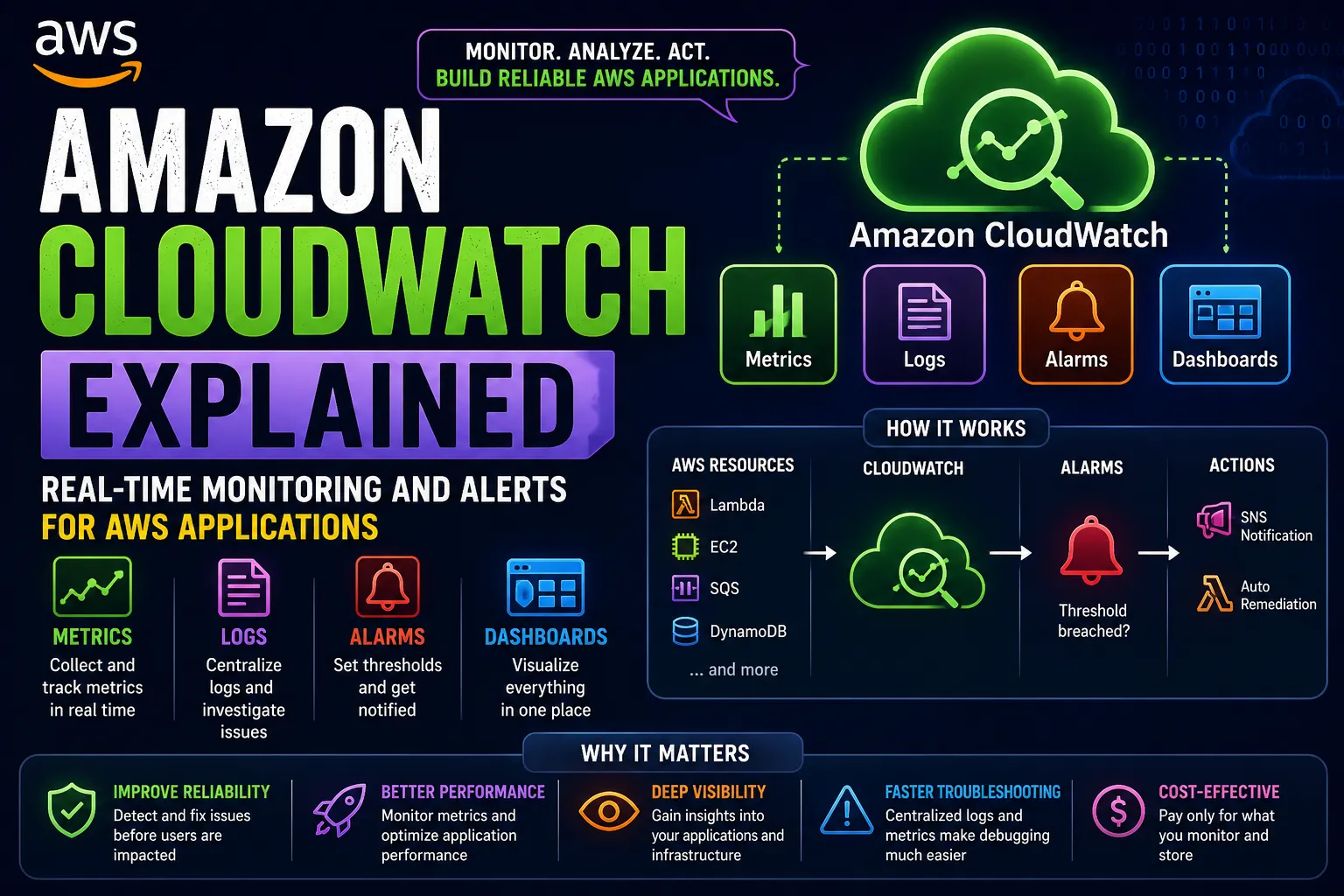
📊 Amazon CloudWatch Explained: Building Real-Time Monitoring and Alerts for AWS Applications
Learn how Amazon CloudWatch helps monitor AWS resources, collect metrics and logs, create alarms, and respond to application problems. This beginner-friendly guide explains how to use CloudWatch to improve visibility, troubleshoot failures, and build more reliable cloud applications.


📊 Amazon CloudWatch Explained: How I Monitor AWS Applications Like a Cloud Engineer
While learning AWS, I realized something important:
Deploying an application is only half the job. Knowing whether it is working correctly is just as important.
Imagine I deploy an application using Amazon EC2. Everything works perfectly at first.
But a few hours later:
- CPU utilization suddenly increases.
- The application starts responding slowly.
- An API begins returning errors.
- Disk space becomes limited.
- Users start reporting problems.
How would I know something was wrong before the situation became serious?
I need monitoring, logs, metrics, and alerts.
That's where I started exploring Amazon CloudWatch.
🧠 What Is Amazon CloudWatch?
Amazon CloudWatch is an AWS monitoring and observability service that helps collect and analyze operational data from applications and infrastructure.
My simple mental model is:
1
2
3
4
5
6
7
8
9
AWS Resources
     │
     ▼
CloudWatch
     │
     ├── Metrics
     ├── Logs
     ├── Alarms
     └── Dashboards
Instead of guessing what is happening inside my cloud environment, I can use monitoring data to understand its behavior.
📈 1. What Are CloudWatch Metrics?
Metrics are numerical measurements collected over time.
For example, an EC2 instance can have metrics related to:
- CPU utilization
- Network traffic
- Disk activity
- Instance status checks
Imagine my application's CPU utilization changes throughout the day.
1
2
3
Morning       20%
Afternoon     45%
Evening       85%
That increase might indicate higher traffic or an application problem.
CloudWatch metrics help me observe these changes and investigate when necessary.
Important lesson: A metric tells me what is happening, but I may need logs and additional investigation to understand why.
📝 2. What Are CloudWatch Logs?
Metrics show measurements. Logs help explain individual events.
For example, my application might produce:
1
2
3
4
10:00:01 Request received
10:00:02 Database connection successful
10:00:05 Payment processing started
10:00:07 Payment processing failed
These events can help me investigate application behavior.
CloudWatch Logs can collect and store logs from supported AWS services and applications configured to send them.
For example:
1
2
3
4
5
6
7
AWS Lambda
    │
    ▼
CloudWatch Logs
    │
    ▼
Investigate Errors
This is especially useful when debugging serverless applications, where I don't manage the underlying server directly.
🚨 3. What Are CloudWatch Alarms?
Imagine my EC2 instance normally uses around 30% CPU.
Suddenly, utilization remains above 85%.
I don't want to keep checking a dashboard manually.
I can configure a CloudWatch alarm to evaluate a metric against a threshold.
1
2
3
4
5
6
7
8
9
10
CPU Utilization
      │
      ▼
Above Configured Threshold?
      │
      ▼
CloudWatch Alarm
      │
      ▼
Notification
Depending on its configuration, an alarm can notify an Amazon SNS topic or trigger other supported actions.
For example, an alarm could notify my team when CPU utilization stays unusually high.
The key idea is simple:
Monitoring tells me what is happening. Alarms help me respond when something needs attention.
📊 4. Building a CloudWatch Dashboard
Suppose I have an application using:
- Amazon EC2
- AWS Lambda
- Amazon SQS
- Amazon DynamoDB
Checking each service separately can make monitoring difficult.
A CloudWatch dashboard lets me bring selected metrics together into one view.
1
2
3
4
5
6
7
8
9
┌───────────────────────────────┐
│      Application Dashboard    │
├───────────────┬───────────────┤
│ EC2 CPU       │ Lambda Errors │
├───────────────┼───────────────┤
│ SQS Queue     │ API Latency   │
├───────────────┴───────────────┤
│       Application Health      │
└───────────────────────────────┘
This gives me a more complete view of application health.
The exact metrics available depend on the service and the monitoring configuration.
⚡ 5. CloudWatch + AWS Lambda
Lambda is a service I want to understand deeply.
Consider this architecture:
1
2
3
4
5
6
7
8
9
10
User
 │
 ▼
API Gateway
 │
 ▼
Lambda
 │
 ▼
DynamoDB
What happens if Lambda starts returning errors?
CloudWatch can help me investigate through metrics and logs.
I can look for:
- Invocation errors
- Duration increases
- Throttling
- Unexpected application exceptions
This makes it easier to determine whether the problem is related to application code, capacity, permissions, or a downstream dependency.
📨 6. CloudWatch + Amazon SQS
I previously explored Amazon SQS and learned how queues buffer messages between applications.
But how do I know whether my consumers are keeping up?
Consider:
1
2
3
4
5
6
7
Producer
   │
   ▼
SQS Queue
   │
   ▼
Consumer
If messages arrive faster than they are processed, the queue can grow.
CloudWatch provides SQS metrics that help me investigate this behavior, including the number of messages waiting and the age of the oldest available message.
1
2
3
4
5
6
7
Queue Size
    │
    ▼
Increasing Continuously?
    │
    ▼
Investigate Consumers
Possible causes include slow processing, consumer failures, or a sudden increase in incoming traffic.
This is a good example of why monitoring must reflect the actual architecture.
🔔 7. CloudWatch + Amazon SNS
Monitoring becomes much more useful when the right person is notified.
For example:
1
2
3
4
5
6
7
CloudWatch Alarm
       │
       ▼
      SNS
       │
       ▼
Notification
I can configure an alarm to publish to an SNS topic when its configured conditions are met.
Subscribers can then receive notifications through supported delivery mechanisms.
This helps reduce the need to watch dashboards continuously.
🔐 8. Monitoring Is Also a Security Practice
CloudWatch is not only about performance.
Logs can also help investigate unexpected activity and application failures.
For example, I might want to understand:
- Why an API request failed
- Whether an application repeatedly encountered authorization errors
- When a service started behaving unexpectedly
- Whether an unusual pattern appeared in application logs
However, I must avoid logging passwords, API keys, access tokens, and other sensitive information.
Monitoring data should be designed with appropriate permissions, retention, and privacy considerations.
🏗️ 9. A Realistic Monitoring Architecture
Now I can combine several AWS services into one design.
1
2
3
4
5
6
7
8
9
10
11
12
13
14
15
16
17
18
19
20
21
22
23
24
25
26
                  Users
                    │
                    ▼
               API Gateway
                    │
                    ▼
                  Lambda
                    │
             ┌──────┴──────┐
             ▼             ▼
            SQS         DynamoDB
             │
             ▼
          Worker

       CloudWatch
             │
       ┌─────┼─────┐
       ▼     ▼     ▼
     Metrics Logs Alarms
                    │
                    ▼
                   SNS
                    │
                    ▼
                Notification
This architecture shows how monitoring can support the application without replacing its core business logic.
⚠️ 10. Common Beginner Mistakes
Mistake 1: Monitoring only CPU utilization
An application can fail even when CPU usage is low. Monitor the metrics that reflect actual application health.
Mistake 2: Ignoring logs
Metrics may show that something went wrong, while logs can provide useful clues about the cause.
Mistake 3: Creating alarms without meaningful thresholds
Thresholds should reflect the workload and operational requirements rather than arbitrary numbers.
Mistake 4: Ignoring alarm notifications
An alarm is less useful if nobody receives or acts on its notifications.
Mistake 5: Assuming every metric is available automatically
Some metrics require additional configuration or instrumentation. For example, collecting memory utilization from EC2 generally requires the CloudWatch agent.
Mistake 6: Logging sensitive data
Never treat logs as a safe place to store passwords or secret credentials.
🧠 My Biggest Lesson
Before exploring CloudWatch, I mostly thought about building and deploying applications.
Now I also ask:
- Is the application healthy?
- Is performance degrading?
- Are errors increasing?
- Are messages accumulating?
- Can I detect a problem before users report it?
- Do I know where to investigate when something fails?
These questions are important for operating real cloud applications.
🚀 Final Takeaway
Amazon CloudWatch helps turn an AWS environment from something I simply deploy into something I can observe, investigate, and operate.
My mental model is:
1
2
3
4
5
6
7
8
9
AWS Resources
      │
      ▼
   CloudWatch
      │
      ├── Metrics → Measure behavior
      ├── Logs    → Investigate events
      ├── Alarms  → Detect conditions
      └── Dashboards → Visualize health
The goal isn't to collect every possible metric.
The goal is to collect the right information, recognize meaningful problems, and respond effectively.
Build it. Monitor it. Understand it. Improve it.
That's another important step in my journey toward becoming a better AWS cloud engineer. ☁️📊
Enjoyed reading this content? Let the author know!
Your likes, comments, shares, and saves help creators reach more builders.

Loading recommendations
Loading article