
Zero-Downtime Secret Rotation Using AWS Secrets Manager and AWS Lambda
Learn how to configure automatic, zero-downtime secret rotation using AWS Secrets Manager and AWS Lambda with alternating user strategies.

Hardcoded or static credentials are one of the most common security vulnerabilities in modern applications. AWS Secrets Manager enables automatic credential rotation on scheduled intervals (such as every 30 or 90 days).
However, updating a password live can cause transient database errors or connection drops if done incorrectly. Implementing zero-downtime rotation ensures uninterrupted application traffic during scheduled key changes.
The Four-Step Rotation Lifecycle
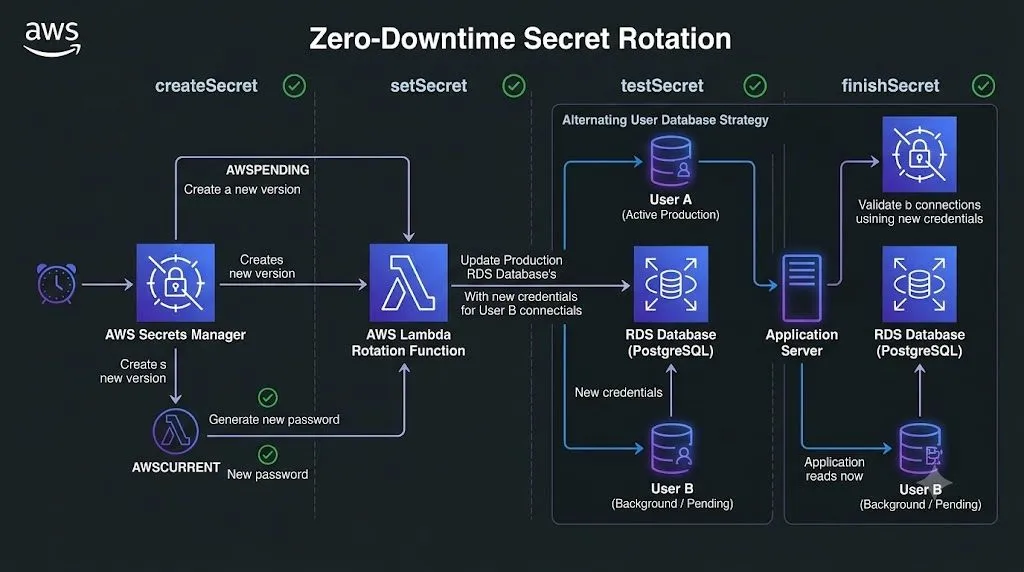
When AWS Secrets Manager triggers a rotation, it executes a four-step lifecycle using an AWS Lambda function:
createSecret: Generates a new secret string and labels it asAWSPENDING.setSecret: Updates the target database, service, or API with the new credential.testSecret: Verifies that the newAWSPENDINGcredential functions correctly.finishSecret: Promotes the new version toAWSCURRENTand cleans up old staging labels.
Strategy: Alternating Users
To achieve zero downtime, use the Alternating Users Strategy rather than Single User rotation:
- User A & User B: Secrets Manager manages two distinct application database users.
- Active State: While
User Aserves active production traffic, Secrets Manager updatesUser B's password in the background. - Switch: Secrets Manager tests
User Band then points application reads toUser B, leaving zero window for failed connections.
Enjoyed reading this content? Let the author know!
Your likes, comments, shares, and saves help creators reach more builders.

Loading recommendations
Loading article