
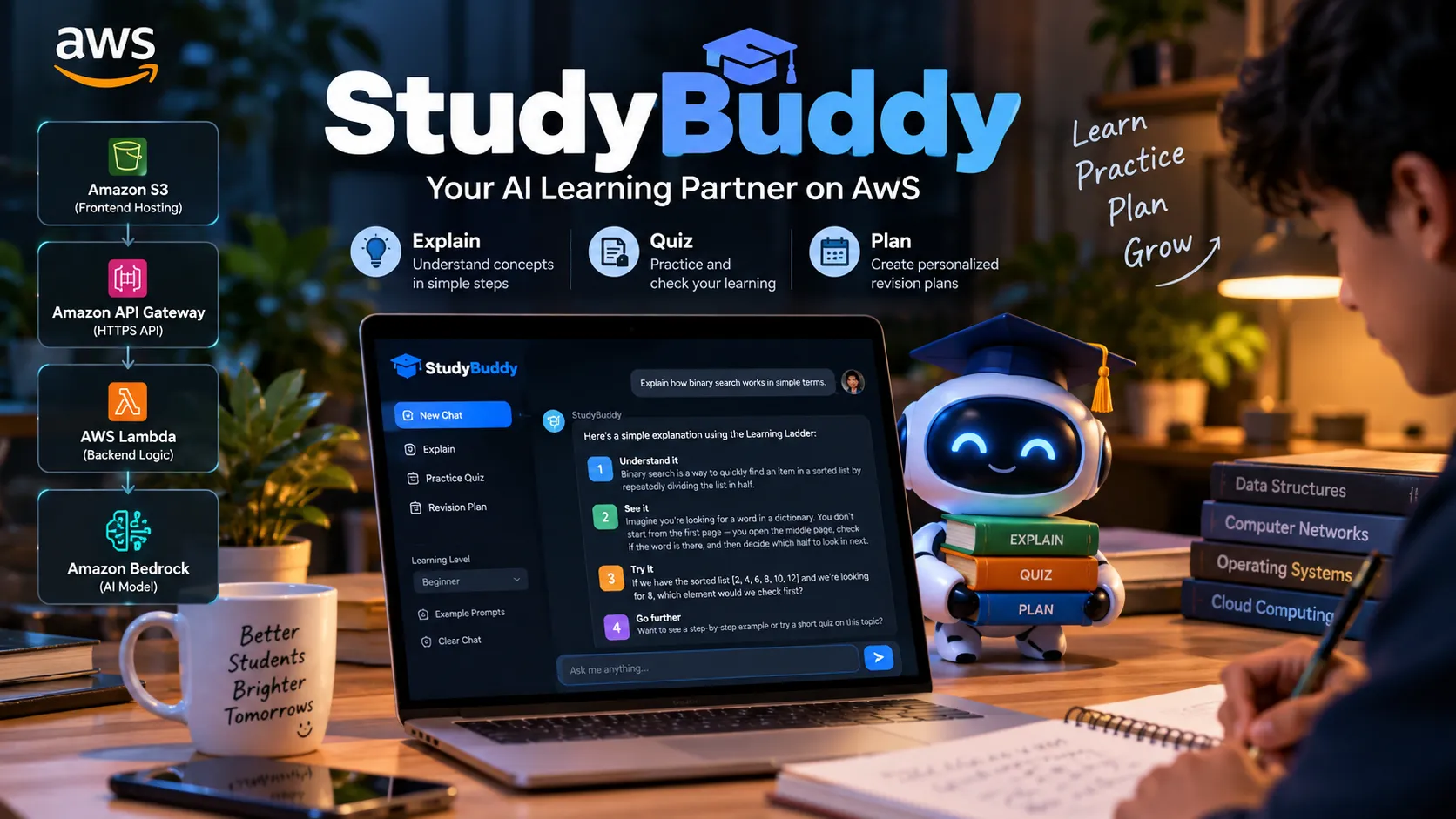
StudyBuddy: Building a More Human Learning Experience with AWS
StudyBuddy is an AI-powered learning assistant designed to help students learn smarter through personalized academic support. Built with React, AWS Lambda, Amazon Bedrock, and DynamoDB, it demonstrates how generative AI and cloud technologies can create an interactive, scalable learning experience.

1. The problem: learning can feel harder than it needs to
When a student gets stuck on a topic, searching for help can produce pages of information without making the next step any clearer. A beginner may need a plain-language explanation, while another student may want practice questions or a manageable revision plan. StudyBuddy is my attempt to bring these needs into one focused learning workspace.
The goal is not to replace teachers, textbooks, or a student's own thinking. It is to make it easier to start learning, practise actively, and organise the next study session. I designed the prototype around three core AI modes: Explain, Quiz, and Revision. Students can also choose a learning level—beginner, intermediate, or advanced—so the response can be tailored to the depth they need.

The StudyBuddy workspace, where students can choose a learning mode and start with a suggested prompt
2. Designing the Learning Ladder
The central interaction is the Learning Ladder, a structure used by the assistant when explaining a topic:
- Understand it: introduce the idea in clear, accessible language.
- See it: explain the concept with an example or analogy.
- Try it: give the learner a short question to check their understanding.
- Go further: suggest an optional next step for deeper learning.
I chose this structure because a useful explanation should do more than provide a definition. It should help the learner build an initial mental model, connect it to an example, and then attempt something independently. Quiz mode supports practice, while Revision mode is intended to turn a topic or goal into realistic study sessions.
The interface also includes example prompts, a learning-level selector, a response loading state, readable error messages, and a way to begin a fresh session. These details are small, but they reduce the amount of setup a learner needs to do before getting started.

An example response demonstrating the four-step Learning Ladder. Capture this after testing the live or local application
3. How I built the application with AWS
StudyBuddy uses React and Vite for the frontend and Python on AWS Lambda for backend request handling. Amazon API Gateway exposes the HTTP API, and the Lambda function invokes Amazon Bedrock using the Converse API. The configured model is controlled by an environment setting, so the model ID can be changed to one available and enabled in the selected AWS Region.
When a student submits a question, the frontend sends the message, learning mode, level, and a limited amount of recent conversation history to the backend. The Lambda handler checks that the request is valid, rejects empty or oversized messages, and confirms that the selected mode and level are supported. It then combines the student's request with StudyBuddy's teaching instructions before calling the model.
The backend returns a learner-friendly response rather than exposing raw provider errors. Error details are logged on the server for troubleshooting, while the interface receives a simpler message if a request fails. The AWS SAM template describes the API, Lambda function, environment variables, model permissions, and DynamoDB workspace table, making the infrastructure easier to reproduce.
The broader workspace includes notes, tasks, flashcards, exam dates, focus-session counts, goals, and accessibility text scaling. When the API is configured, the prototype can sync workspace data to DynamoDB, with browser storage used as an offline fallback. The current demo uses a client-generated workspace ID, however, and that ID is not authentication or secure user isolation. Before storing private student data or opening the app to the public, I need to add authenticated identity and server-side authorization, such as a properly configured Amazon Cognito/JWT flow.

A second learning workflow: capture a real quiz or revision response after confirming the feature works.
4. Configuration, deployment, and responsible use
The project uses AWS SAM for deployment. Before deploying, the chosen Bedrock model must be available in the target Region and enabled for the account. The frontend environment file should contain only the public API base URL. Secrets and AWS credentials must never be placed in
VITE_* variables, because frontend variables are bundled into code that users can inspect. For the AWS-hosted version, the preferred approach is to use the Lambda execution role for AWS service permissions rather than placing long-lived credentials in the application.AWS usage may incur charges, so a budget alert and review of service usage are sensible safeguards. The prototype's CORS origin must also be configured to match the frontend's real origin. For production, authentication, per-user access control, rate limiting, abuse prevention, and monitoring should be in place before treating workspace records as private.
5. Testing and evaluation plan
The repository includes unit tests that mock Bedrock responses and cover request validation and error handling. Mocked tests are useful for checking code paths, but they do not prove that the live AWS deployment, model access, CORS configuration, or end-to-end experience works.
Before publishing, I will follow this verification sequence:
- Validate and deploy the SAM stack in a supported AWS Region.
- Open the frontend and ask a real explanation question; check that the response contains all four Learning Ladder steps.
- Test Quiz mode and Revision mode with representative topics.
- Check workspace persistence, loading states, mobile layout, and behaviour when the API is unavailable.
- Capture screenshots or a short screen recording of the actual running application.
- Record the real test outcomes, any observed latency, known limitations, and follow-up fixes.

Evidence of the persistence status in the running app. Do not use a mock-up as proof of a live cloud save.
6. Current limitations and next steps
StudyBuddy is a prototype, not a validated educational product. Model responses can be incorrect, and learners should verify important facts against trusted sources. The current app does not authenticate users, guarantee curriculum alignment, or establish that the experience improves grades or learning outcomes. Any claim about learning impact should come after a properly designed evaluation with real participants and transparent reporting.
My next steps are to deploy and verify the complete experience, collect feedback on clarity and usefulness, strengthen authentication and authorization, and consider optional curriculum-grounded answers. I would also like to learn which parts of the workspace students actually use, rather than adding features without evidence that they help.
7. Try StudyBuddy
Github Link : https://github.com/RiteshMaury97/studybuddy-aws
StudyBuddy starts with a simple promise: make the next step in learning feel achievable. By combining a structured teaching approach, a focused interface, and a serverless AWS backend, the project gives me a foundation to test, learn from, and improve responsibly.
Enjoyed reading this content? Let the author know!
Your likes, comments, shares, and saves help creators reach more builders.

Loading recommendations
Loading article