
Building a Serverless Image Recognition System Using AWS and AI
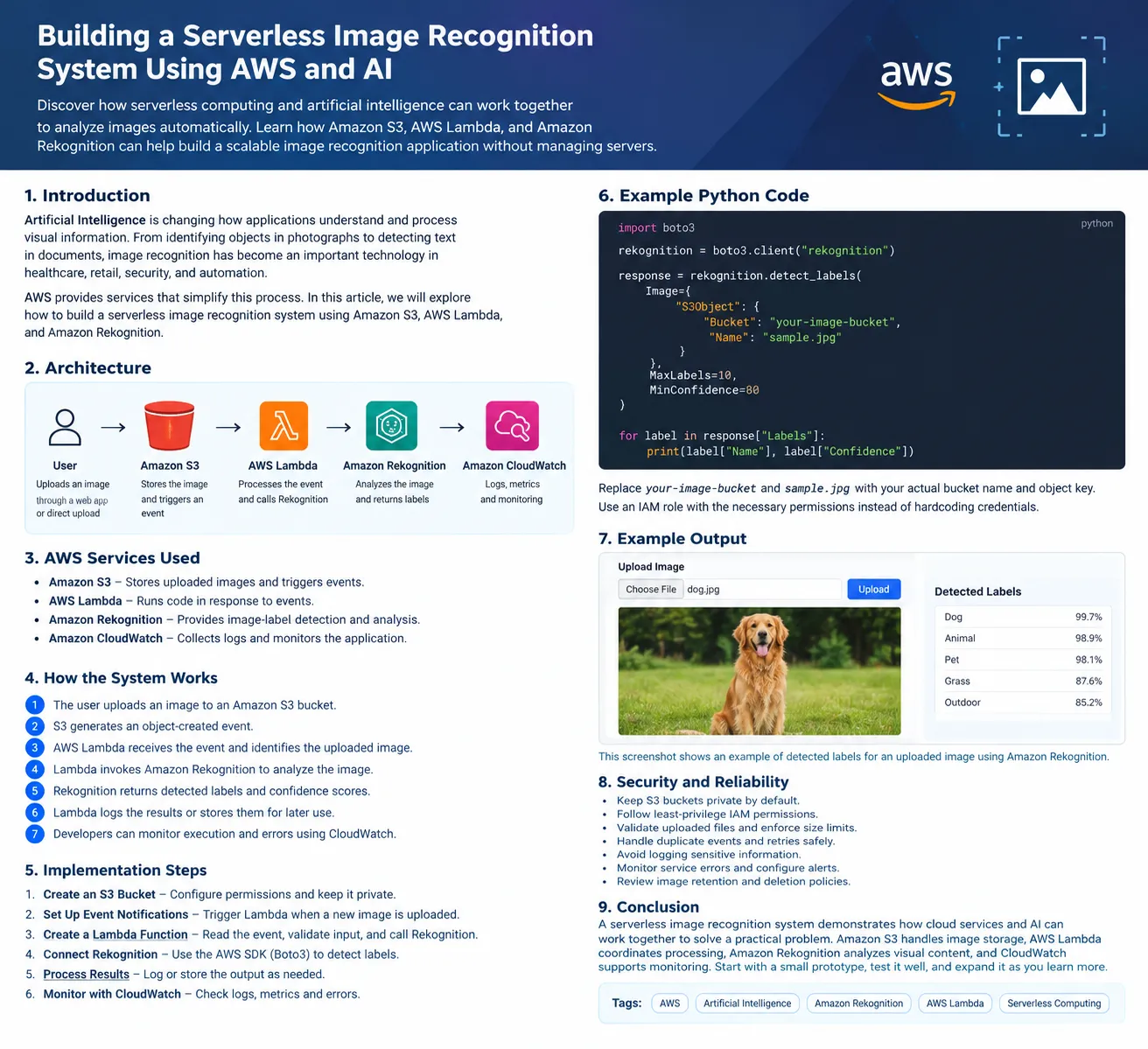
Discover how serverless computing and artificial intelligence can work together to analyze images automatically. Learn how Amazon S3, AWS Lambda, and Amazon Rekognition can help build a scalable image recognition application without managing servers.

Building a Serverless Image Recognition System Using AWS and AI
Introduction
Artificial Intelligence is changing how applications understand and process visual information. From identifying objects in photographs to detecting text in documents, image recognition has become an important technology in healthcare, retail, security, and automation.
However, building an image recognition application requires more than an AI model. Developers also need storage, processing capabilities, and a reliable way to connect different components.
AWS provides services that simplify this process. In this article, we will explore how to build a serverless image recognition system using Amazon S3, AWS Lambda, and Amazon Rekognition.
1. What Is Image Recognition?
Image recognition is a computer vision technique that helps computers identify objects, scenes, text, and other visual features in images.
For example, an image recognition application could analyze a photograph and identify objects such as bicycles, vehicles, trees, or animals.
Traditional approaches may require developers to collect datasets, train models, and manage machine learning infrastructure. Managed AI services can simplify these tasks by providing ready-to-use image analysis capabilities.
2. Why Choose a Serverless Architecture?
Serverless computing allows developers to run application code without managing the underlying servers.
With AWS, a serverless architecture offers several advantages:
- Less infrastructure management: Developers can focus on application logic.
- Automatic scaling: Supported services can handle changing workloads.
- Event-driven processing: Applications can respond automatically when files are uploaded.
- Pay-for-use pricing: Many components charge based on usage rather than requiring continuously running servers.
- Faster development: Managed services reduce the amount of infrastructure code required.
Actual costs depend on usage, service configuration, and regional pricing, so they should be reviewed before deployment.
3. AWS Services Used
Amazon S3
Amazon Simple Storage Service (Amazon S3) stores the images uploaded by users. It can also trigger an event when a new object is created.
AWS Lambda
AWS Lambda runs code in response to events. In this project, it processes image-upload notifications and calls the image analysis service.
Amazon Rekognition
Amazon Rekognition provides managed computer vision capabilities. Its image-label detection feature can identify objects, scenes, and concepts present in supported images.
Amazon CloudWatch
Amazon CloudWatch collects logs and monitoring information that can help developers investigate failures and understand application behavior.
Each service has a specific responsibility, making the overall architecture easier to understand and maintain.
4. How the System Works
The workflow is straightforward:
- A user uploads an image to an Amazon S3 bucket.
- Amazon S3 generates an object-created event.
- AWS Lambda receives the event and identifies the uploaded image.
- Lambda invokes Amazon Rekognition to analyze the image.
- Rekognition returns detected labels and confidence scores.
- Lambda logs the results or stores them for later use.
- Developers can monitor execution and errors using CloudWatch.
The event-driven approach avoids the need for a continuously running server to check for new images.
5. Implementation Approach
Step 1: Create an S3 Bucket
Create an Amazon S3 bucket to store uploaded images. Configure appropriate permissions and avoid making the bucket publicly accessible unless there is a specific, justified requirement.
Step 2: Configure Image Upload Events
Configure an S3 event notification for object creation. Restrict the notification to the relevant image prefix or supported file types where practical.
Carefully configure the event destination and permissions.
Step 3: Create a Lambda Function
Create a Lambda function that reads the bucket name and object key from the event notification. The function should validate the event and invoke the appropriate Rekognition API.
Step 4: Connect Amazon Rekognition
Use the AWS SDK to call Rekognition's image-label detection operation. The Lambda execution role should have only the permissions required to access the relevant images and call the selected API.
Step 5: Process the Results
Extract the labels and confidence scores returned by Rekognition. Depending on the application's requirements, the results can be logged or saved in a database for searching and reporting.
Step 6: Monitor the Application
Use CloudWatch logs and metrics to inspect Lambda executions, identify errors, and understand processing time.
Test the application with different image types, file sizes, and unexpected inputs before using it in a real environment.
6. Example Python Code
The following example demonstrates the core image analysis operation using the AWS SDK for Python, also known as Boto3.
1
2
3
4
5
6
7
8
9
10
11
12
13
14
15
16
17
import boto3

rekognition = boto3.client("rekognition")

response = rekognition.detect_labels(
    Image={
        "S3Object": {
            "Bucket": "your-image-bucket",
            "Name": "sample.jpg"
        }
    },
    MaxLabels=10,
    MinConfidence=80
)

for label in response["Labels"]:
    print(label["Name"], label["Confidence"])
Replace
your-image-bucket and sample.jpg with the appropriate S3 bucket name and object key.Before running the example, configure AWS credentials securely and ensure the identity has permission to call the Rekognition API and access the image. In a deployed Lambda function, use an execution role rather than embedding access keys in the code.
This snippet demonstrates image analysis only. A complete event-driven application also needs event parsing, error handling, deployment configuration, and appropriate logging.
7. Security and Reliability
When developing an image processing application, security should be considered from the beginning.
- Keep S3 buckets private by default.
- Follow least-privilege IAM permissions.
- Validate uploaded files and enforce suitable size limits.
- Handle duplicate events and retries safely.
- Avoid logging sensitive image contents or unnecessary personal information.
- Monitor service errors and configure alerts where appropriate.
- Review image retention and deletion policies.
These measures help make the application more reliable and suitable for real-world use.
8. Possible Applications
A serverless image recognition system can support several practical use cases:
Retail: Identify products in catalog images and assist with inventory workflows.
Agriculture: Help organize crop photographs for further analysis by agricultural specialists.
Education: Build a learning application that identifies common objects in uploaded images.
Document processing: Combine image analysis with suitable text-extraction services to process document images.
Wildlife research: Organize photographs by detected visual categories to assist researchers.
These applications require additional validation and domain-specific safeguards before their outputs can be used for important decisions.
9. Future Improvements
Once the basic application works, developers can extend it by adding:
- An upload interface using a web application.
- A database to store image labels and metadata.
- An API using Amazon API Gateway.
- Notifications when image processing finishes.
- A dashboard showing processing status and detected categories.
- Additional machine learning models for specialized classification tasks.
Each enhancement provides an opportunity to explore another part of the AWS ecosystem.
Conclusion
A serverless image recognition system demonstrates how cloud services and AI can work together to solve a practical problem. Amazon S3 handles image storage, AWS Lambda coordinates processing, Amazon Rekognition analyzes visual content, and CloudWatch supports monitoring.
For students and beginners, this project provides hands-on experience with event-driven architectures, Python, cloud permissions, and managed AI services.
Start with a small prototype, understand how each service communicates with the others, and expand the system only after testing its functionality, security, and cost.
Enjoyed reading this content? Let the author know!
Your likes, comments, shares, and saves help creators reach more builders.

Loading recommendations
Loading article