
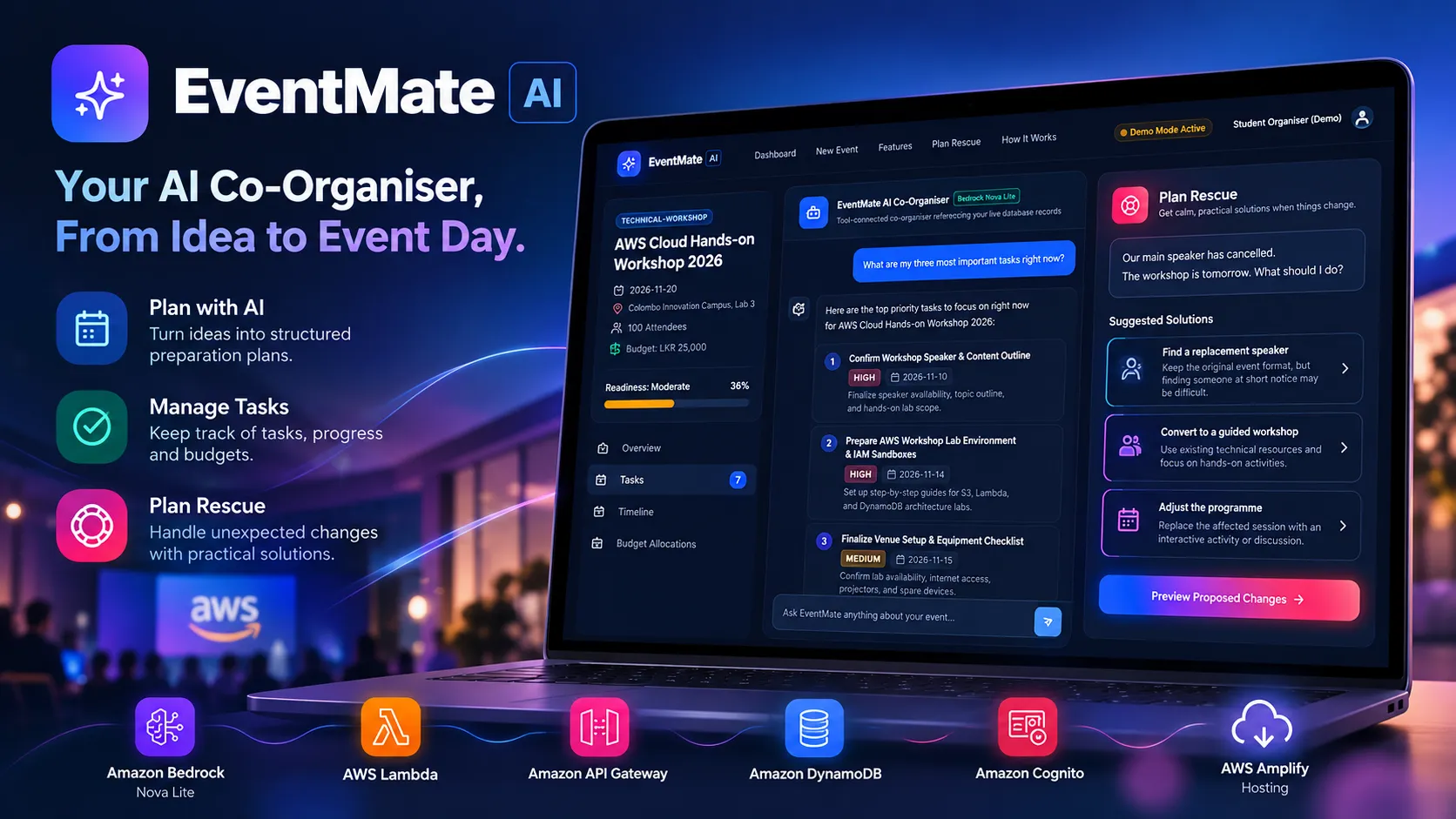
EventMate AI: Building an AI Co-Organizer That Makes Event Planning Easier
I built EventMate AI to help student organizers turn event ideas into practical plans, manage tasks, and handle unexpected challenges. Here's how I used Amazon Bedrock, Nova Lite, and AWS serverless services to build an AI agent that goes beyond simple conversations.

The Idea Behind EventMate AI
Organizing a student event sounds simple until you actually start planning one.
You need to confirm speakers, arrange venues, manage registrations, prepare schedules, coordinate volunteers, and ensure everything is ready before the event begins.
And even when everything is planned, unexpected problems can happen.
As an AWS Student Builder Group Leader at the University of Jaffna, I've had the opportunity to organize technical workshops and community events. Through these experiences, I've learned that creating an event plan is only one part of the process. Keeping everything organized and adapting when things change can be equally challenging.
That experience inspired me to build EventMate AI, an AI-powered event co-organizer designed to help students and community organizers plan events, manage preparation tasks, and respond to unexpected situations.
My goal was to build something more useful than a chatbot that simply generates a checklist.
I wanted an agent that could understand an event, work with real application data, and help organizers take practical actions.

Figure 1: EventMate AI's landing page, providing a simple starting point for event planning and access to the interactive demo.
Try EventMate AI: https://main.d1cbop95vsw4nw.amplifyapp.com/
What Is EventMate AI?
EventMate AI is a full-stack AI event planning application powered by Amazon Bedrock.
It is designed for university students, student clubs, volunteer teams, and community organizers who may not have access to professional event management tools.
The application focuses on three main capabilities.

Figure 2: EventMate AI combines event planning, task management, and Amazon Bedrock-powered agent tools in one application.
1. AI-Powered Event Planning
Users can describe an event in natural language.
For example:
I'm organising a hands-on AWS workshop for 100 university students. The event will last four hours, and I have a budget of LKR 25,000.
EventMate AI uses this information to help create a structured preparation plan.

Figure 3: The first step of EventMate AI's guided event creation process, where organisers provide the event title and type.
The plan includes tasks, priorities, deadlines, and recommendations relevant to the event.
2. Intelligent Task Management
Instead of generating a checklist that disappears after the conversation, EventMate AI stores event information and preparation tasks in Amazon DynamoDB.
Users can manage tasks, update their status, track progress, and ask the agent what needs attention.
For example:
What are the three most important things I should complete before my event?
The agent can retrieve current task information and provide recommendations based on the event's preparation status.

Figure 4: EventMate AI's demo dashboard, displaying an upcoming AWS workshop, preparation readiness, completed tasks, and urgent activities.
3. Plan Rescue
This is the feature I wanted to make especially useful.
Event planning rarely goes exactly as expected. A speaker might cancel, a venue might become unavailable, or the budget might change.
Rather than starting the entire planning process again, organizers can use Plan Rescue to explore possible solutions and update their existing plans.
The Delightful Detail: Plan Rescue
One of the main goals of this weekend challenge is to make an AI agent enjoyable to use.
For EventMate AI, I focused on making the experience feel less stressful when something goes wrong.
Imagine organizing a technical workshop when your main speaker cancels the day before the event.
You open Plan Rescue and enter:
Our main speaker has cancelled, and the workshop is tomorrow. What should I do?
Instead of responding with a long list of generic suggestions, EventMate AI is designed to analyze the event information and identify the parts of the plan that may be affected.
It then suggests practical approaches, along with their trade-offs.
For example:
- Find a replacement speaker: Keep the original event format, but finding someone at short notice may be difficult.
- Convert the session into a guided workshop: Use existing technical resources and focus on hands-on activities.
- Adjust the program: Replace the affected session with an interactive activity or discussion.
The organizer can review these options and choose the most suitable one.
But I didn't want the agent to stop at recommendations.
Once an option is selected, EventMate AI prepares a preview of the proposed changes.
The interface highlights which tasks will be added, which existing tasks will be updated, and which tasks will remain unchanged.

Figure 5: Plan Rescue feature preview, showing a speaker cancellation scenario and how proposed changes are organised into added, updated, and unchanged tasks before approval.
Nothing changes until the organizer approves the proposal.
After confirmation, the backend applies the changes to the event's task records.
This creates an experience where the agent does not simply tell users what to do. It helps them move forward with an updated plan.
For me, this is the most important part of making the application enjoyable: providing useful guidance while keeping the user in control.
How I Built EventMate AI
I developed EventMate AI using React, TypeScript, and several AWS services.
The application follows a serverless architecture, separating the user interface, backend logic, AI processing, and data storage.
Frontend: React and AWS Amplify
I used React, TypeScript, Vite, and Tailwind CSS to build the user interface.
The application includes an event dashboard, preparation checklist, AI assistant, and Plan Rescue interface.
I focused on keeping the interface simple so that even someone organizing their first event can understand the workflow.
I deployed the frontend using AWS Amplify Hosting, making the application accessible through a public HTTPS URL.
The application also includes an interactive demo mode, allowing visitors to explore a sample event without immediately creating an account.
Backend: AWS Lambda and API Gateway
The backend runs on AWS Lambda using Node.js and Express.
Amazon API Gateway provides HTTPS endpoints for the frontend to communicate with the backend.
The backend handles event creation, task management, AI conversations, and Plan Rescue operations.
I used AWS CDK with TypeScript to define and deploy the cloud infrastructure.
AI Agent: Amazon Bedrock and Nova Lite
The AI functionality is powered by Amazon Bedrock, using the Amazon Nova Lite foundation model.

Figure 6: EventMate AI's Co-Organiser Chat, demonstrating how the agent identifies high-priority tasks for an AWS workshop and presents actionable recommendations based on event information.
I integrated the model through the Bedrock Converse API.
Instead of relying only on text generation, EventMate AI uses tool calling to interact with actual application functions.
The agent supports eight tools:
create_event_planget_event_detailslist_event_tasksadd_event_taskupdate_event_taskget_event_progresspropose_rescue_planapply_rescue_plan
For example, when a user asks about preparation progress, the agent can call
get_event_progress to retrieve information calculated from stored tasks.Similarly, when an organizer approves a rescue proposal, the application uses the appropriate backend functionality to update the event plan.
This is what makes EventMate AI an agent rather than a simple question-and-answer chatbot.
Data Storage: Amazon DynamoDB
I used Amazon DynamoDB to store event details, tasks, conversation history, and rescue proposals.
The application uses four tables to separate these responsibilities.
This allows users to return to their events and continue working with their existing information.
Authentication: Amazon Cognito
Amazon Cognito manages user authentication.
The backend validates authentication tokens and checks event ownership before allowing access to private data.
I also implemented input validation, request limits, and restrictions on agent tool execution.
These controls are important because the application allows AI-generated actions to interact with stored user information.
Making the Agent Reliable
One of the most important design decisions was separating AI recommendations from confirmed application changes.
An AI model can suggest an action, but that does not mean the action has actually happened.
For EventMate AI, I designed the backend to verify tool inputs and perform database operations through controlled application functions.
The Plan Rescue workflow also requires explicit approval before applying proposed changes.
Another important consideration was preventing duplicate operations.
For example, an already approved rescue proposal should not be applied a second time.
The backend includes checks to reject repeated application attempts.
These details may not be the most visible parts of the application, but they contribute to a more predictable user experience.
Testing the Experience
I wanted to check whether the application's main features behaved as expected, rather than assuming they worked because the interface looked complete.
The project includes automated tests using Vitest.
The test coverage includes:
- Task progress calculations.
- Agent tool execution.
- Event ownership checks.
- Rescue proposal handling.
- Prevention of duplicate rescue application.
- Frontend component behavior.
- Plan Rescue interactions.
For Plan Rescue, an important test is whether the application prevents the same approved proposal from being applied repeatedly.
This matters because an organizer should not have to worry about accidentally duplicating tasks when using the agent.
The automated tests help check whether the application behaves as intended. However, they are not a replacement for feedback from real organizers.
That is something I would like to explore as the project develops.
What I Learnt
Building EventMate AI helped me think differently about AI applications.
A useful AI agent needs more than a powerful language model.
It needs access to the right information, carefully controlled tools, and a user experience that makes its actions understandable.
I also realized how important it is to keep users involved in decisions.
For an event organizer, automatically changing a plan without explanation could create more problems than it solves.
That is why I designed Plan Rescue around three steps:
Understand the problem → Suggest solutions → Apply approved changes.
The agent provides assistance, but the organizer remains responsible for the final decision.
Try EventMate AI
EventMate AI is deployed on AWS Amplify Hosting, and the source code is available on GitHub.
Live Application:
GitHub Repository:
If you want to explore the application without creating an account, select Explore Demo on the landing page.
This opens a sample event workspace where you can explore the interface and its event management features.
The demo uses preloaded sample data. To explore the authenticated application with AWS-backed event storage and AI functionality, you can create an account.
I recommend exploring the Plan Rescue feature.
Imagine that your workshop speaker has cancelled, your venue is suddenly unavailable, or your budget has been reduced.
See how EventMate AI approaches the problem and presents possible changes to the event plan.
What's Next?
There are several improvements I would like to explore in future versions, including calendar integration, task assignments, event reminders, and collaboration between organising team members.
For this weekend challenge, I wanted to focus on making the core experience useful.
EventMate AI brings together two areas I'm interested in: building applications with AWS and supporting student communities.
Through this project, I explored how an AI agent can go beyond answering questions and become a practical assistant that helps people organise, adapt, and make progress.
Enjoyed reading this content? Let the author know!
Your likes, comments, shares, and saves help creators reach more builders.

Loading recommendations
Loading article