

A Lambda Horror Story: When Runtime and Layer Versions Stop Getting Along
A Python runtime upgrade from 3.7 to 3.9 revealed an unexpected issue in AWS Lambda: a layer compatibility failure that brought production to a halt. Discover what went wrong and three safeguards to prevent runtime changes from haunting your deployments.
Series: AWS OCTOBER MYSTERIES -2026 (3 articles)
- 2A Lambda Horror Story: When Runtime and Layer Versions Stop Getting Along This article

Introduction
In serverless environments, Lambda functions often rely on layers to package shared libraries and dependencies, making applications easier to maintain and deploy. However, as runtimes evolve and dependencies change, compatibility issues can emerge even when the application code itself appears unchanged.
What happens when a Lambda runtime moves forward while its layer gets left behind? A configuration that once worked seamlessly can become a hidden weakness, waiting to surface during a routine deployment and turn an ordinary change into an unexpected investigation.
In this article, we’ll explore three complementary measures to prevent these issues: explicitly defining compatible runtimes for Lambda layers, validating runtime and layer compatibility in the CI/CD pipeline, and monitoring runtime lifecycle events to anticipate upcoming deprecations before they affect production.
The Incident: When a Runtime Change Awoke the Problem
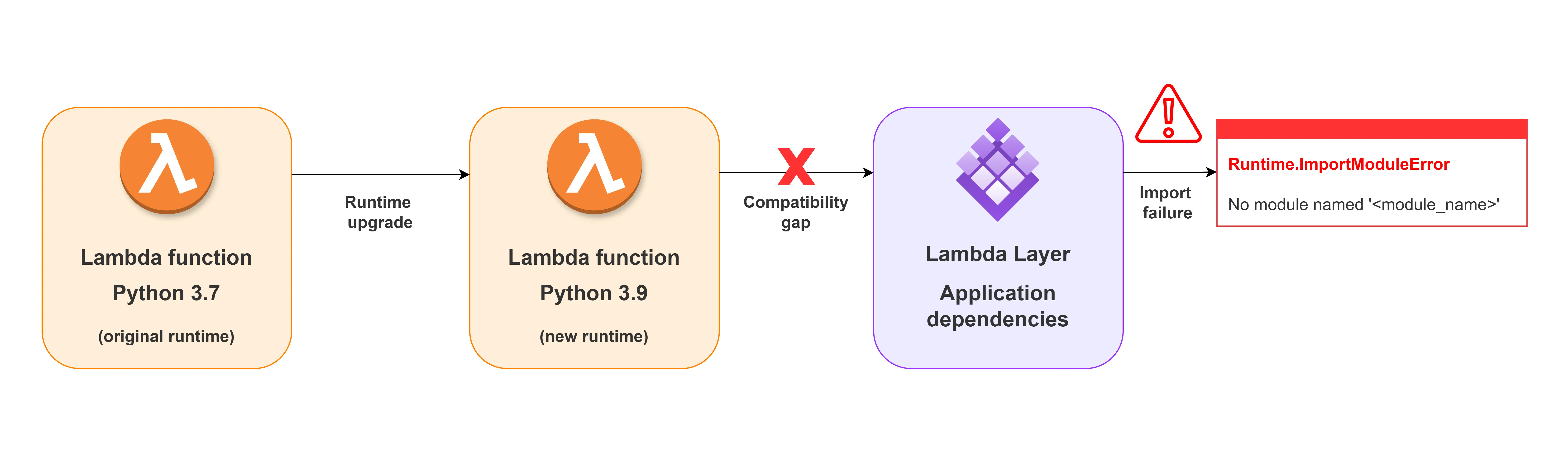
The incident began with a routine maintenance task: upgrading an existing AWS Lambda function from Python 3.7, which was approaching end of life, to Python 3.9.
The goal was to keep the function on a supported runtime, but the first invocation after the upgrade failed with an import error:
The goal was to keep the function on a supported runtime, but the first invocation after the upgrade failed with an import error:
1
2
3
[ERROR] Runtime.ImportModuleError:

Unable to import module 'lambda_function':

No module named '<module_name>'
The error suggested that the required module was unavailable to the function, but it did not explain why the dependency could no longer be imported after the runtime change.
The investigation initially focused on the usual suspects: Was the dependency missing? Was the wrong layer attached? Had a different layer version been deployed, or was the deployment package incomplete?
The timing of the failure pointed toward a less obvious possibility: although the function had moved to a newer Python runtime, its dependencies had not necessarily moved with it.
This raised the key question: was the Lambda layer compatible with the new runtime?
Root Cause: A Compatibility Gap Beneath the Surface
The investigation narrowed the issue down to the Lambda layer attached to the function. While the function’s runtime had been upgraded from Python 3.7 to Python 3.9, the layer’s dependencies had not been verified against the new runtime. As a result, the function could no longer import the required module during initialization.
Lambda layers provide a convenient way to package and reuse dependencies across functions, but they are not automatically compatible with every runtime. A layer may contain Python packages built for a specific interpreter version, or dependencies with compiled components that rely on a particular runtime or system environment. Changing the function’s runtime does not rebuild or update those dependencies.
In this incident, the runtime upgrade exposed a gap in the deployment process: we had updated the runtime without validating the compatibility of its dependencies. The change itself was necessary, but the absence of a compatibility check allowed the issue to reach execution.
This highlighted an important lesson: runtime upgrades should be treated as dependency compatibility changes, not simply configuration updates.
This highlighted an important lesson: runtime upgrades should be treated as dependency compatibility changes, not simply configuration updates.
The next step was to identify how to catch these mismatches earlier and prevent them from reaching production.
The Fix: Three Layers of Protection
The incident revealed a gap in how we managed Lambda runtime upgrades and their dependencies.
To reduce the risk of similar failures, we introduced three complementary safeguards: explicitly declaring compatible runtimes for Lambda layers, validating compatibility before deployment, and monitoring runtime lifecycle events to anticipate upcoming deprecations.
1. Declare Compatible Runtimes for Lambda Layers
Automated validation is only as reliable as the metadata it checks. AWS Lambda allows you to declare supported runtimes when publishing a layer version through the CompatibleRuntimes property.
For example, a layer designed for Python 3.9 can explicitly declare its supported runtime in AWS CloudFormation:
For example, a layer designed for Python 3.9 can explicitly declare its supported runtime in AWS CloudFormation:
1
2
3
4
5
6
7
8
9
10
MyLambdaLayer:

  Type: AWS::Lambda::LayerVersion

  Properties:

    LayerName: my-shared-layer

    Description: Shared dependencies for Lambda functions

    Content:

      S3Bucket: my-deployment-bucket

      S3Key: layers/my-shared-layer.zip

    CompatibleRuntimes:

      - python3.9
This metadata makes the layer's intended compatibility visible to deployment tooling and the engineers maintaining it. It also provides a clear reference for the CI/CD validation step in the next section.
However, declaring a compatible runtime does not guarantee that every dependency will work correctly. Packages must still be built and tested against the target runtime, especially when they contain compiled components or depend on the underlying execution environment.
However, declaring a compatible runtime does not guarantee that every dependency will work correctly. Packages must still be built and tested against the target runtime, especially when they contain compiled components or depend on the underlying execution environment.
2.Catch Compatibility Issues Before Deployment

Once the layer declares its supported runtimes, the CI/CD pipeline can validate that the Lambda function's target runtime is included in that list before deployment. Integrating this check into GitHub Actions allows the workflow to fail early when a mismatch is detected during the pull request or deployment workflow, giving the team an opportunity to fix it before it reaches the target environment.
The following example uses the AWS CLI to retrieve the layer version's declared compatible runtimes and compare them with the runtime targeted by the deployment.
1
2
3
4
5
6
7
8
9
10
11
12
13
14
15
16
17
18
19
20
21
22
23
- name: Validate Lambda layer compatibility

  env:

    LAMBDA_RUNTIME: python3.9

    LAYER_NAME: my-shared-layer

    LAYER_VERSION: "3"

  shell: bash

  run: |

    set -euo pipefail


    COMPATIBLE_RUNTIMES=$(aws lambda get-layer-version \

      --layer-name "$LAYER_NAME" \

      --version-number "$LAYER_VERSION" \

      --query 'CompatibleRuntimes' \

      --output text)


    if [[ " $COMPATIBLE_RUNTIMES " != \

          *" $LAMBDA_RUNTIME "* ]]; then

      echo "::error::Layer is not declared compatible with \

$LAMBDA_RUNTIME. Declared runtimes: $COMPATIBLE_RUNTIMES"

      exit 1

    fi


    echo "Layer compatibility check passed."
Note:
This step assumes AWS credentials have already been configured in the workflow and that the deployment role has permission to call
lambda:GetLayerVersion.3. Monitor Runtime Lifecycle Events Proactively
AWS Lambda runtimes follow a lifecycle, and when a runtime approaches deprecation, teams need enough time to assess affected functions, review their dependencies, and plan an upgrade.
AWS Health provides notifications about upcoming Lambda runtime deprecations, including events that can be consumed through Amazon EventBridge. AWS provides runtime deprecation notifications at least 180 days in advance, giving teams an opportunity to plan and test their migrations before the runtime reaches its deprecation date.
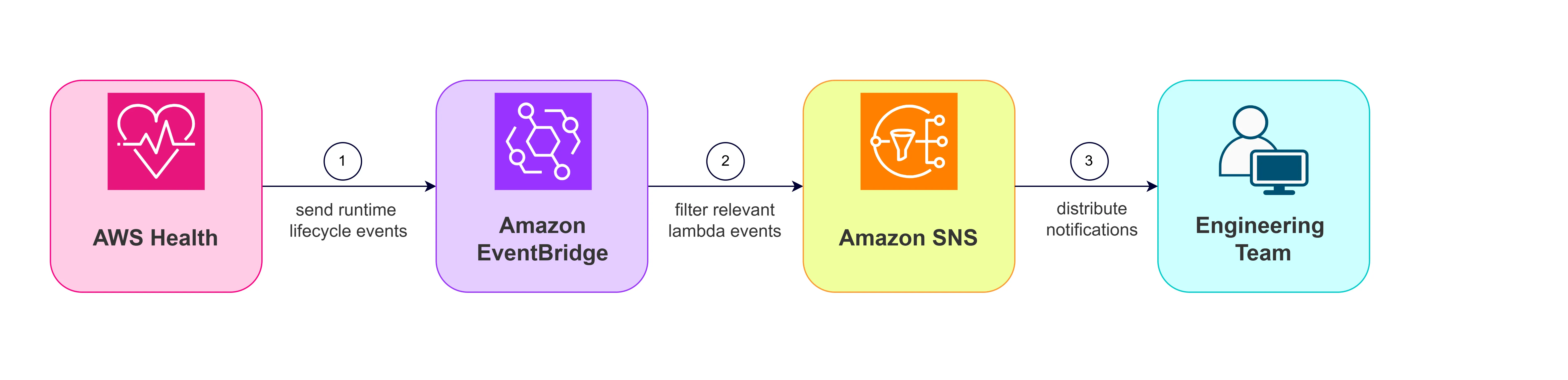
By routing relevant AWS Health events through Amazon EventBridge to an Amazon SNS notification, the team can receive alerts and act before a scheduled runtime change becomes an urgent production concern.
How the architecture works ?
- AWS Health publishes an event when a relevant Lambda runtime lifecycle change is announced for the account.
- Amazon EventBridge evaluates incoming AWS Health events against a rule configured to match scheduled changes affecting AWS Lambda runtimes.
- Amazon SNS receives matching events and distributes notifications to subscribed recipients, such as the engineering team through email.
- The engineering team reviews the affected runtime, identifies impacted functions and dependencies, and schedules the required upgrades and compatibility testing.
This architecture requires no custom Lambda function for basic notifications, keeping the solution simple while making runtime lifecycle events visible to the people responsible for maintaining the application.
Architecture overview:
I previously explored automated Lambda runtime monitoring in my article, Automate Lambda Runtime Health Checks Like a Pro . The article provides additional context on monitoring Lambda runtime health and complements this event-driven approach to lifecycle notifications.
Tradeoff and considerations
Although these three safeguards strengthen Lambda runtime management, each addresses a different part of the problem, and none guarantees compatibility on its own.
Layer metadata is only as reliable as its definition. Declaring CompatibleRuntimes makes the layer's intended support explicit, but it does not verify that every dependency can be imported or executed successfully. Packages containing compiled libraries may require rebuilding for the target Python version and execution environment, making automated compatibility tests an important additional safeguard.
CI/CD validation adds an early checkpoint, but its scope matters. Checking the layer's declared runtimes can catch configuration mismatches before deployment, yet it cannot detect every dependency or packaging issue. Extending the pipeline with import tests and integration tests increases confidence, although it introduces additional build steps and maintenance overhead.
Lifecycle notifications provide warning, not remediation.
AWS Health events routed through EventBridge and SNS help teams prepare for upcoming runtime deprecations, but notifications alone do not identify every affected function or upgrade its dependencies automatically. Teams still need an inventory of their Lambda functions, an owner for each application, and a process for assessing, testing, and scheduling runtime upgrades. Event delivery and notification subscriptions should also be monitored to ensure alerts reach the right people.
Ultimately, these measures introduce a small amount of configuration and operational effort in exchange for earlier detection and better planning. The right level of automation depends on the number of functions, the criticality of the workloads, and the team's existing deployment practices.
Conclusion
A routine Lambda runtime upgrade revealed how easily dependency compatibility can be overlooked, even when the change itself is necessary. The lesson is simple: updating a runtime is not just a configuration change; it also means verifying that the dependencies and layers supporting the function remain compatible.
Our approach follows a clear progression: define compatibility → validate compatibility → anticipate future changes. These three safeguards work together rather than replacing one another, combining explicit layer metadata, automated CI/CD validation, and proactive runtime lifecycle monitoring to reduce the risk of unexpected failures.
Runtime upgrades will always be part of maintaining a healthy serverless environment, but unexpected failures don't have to be. With the right safeguards in place, we can spend less time chasing runtime ghosts and more time building reliable applications.
Don't Let Runtime Changes Haunt Production!
Series: AWS OCTOBER MYSTERIES -2026 (3 articles)
- 2A Lambda Horror Story: When Runtime and Layer Versions Stop Getting Along This article
Enjoyed reading this content? Let the author know!
Your likes, comments, shares, and saves help creators reach more builders.

Loading recommendations
Loading article