
AWS Config: Key Concepts and Hands-On Lessons
Hands-on AWS Config: tracking resource configurations, evaluating compliance, and strengthening cloud governance.

Hands-on Lab: AWS SimuLearn – Resource Governance
Platform: AWS Skill Builder
1. Introduction
I recently completed the AWS SimuLearn: Resource Governance lab, where I explored how AWS Config helps organizations track resource configurations, evaluate compliance, and identify misconfigurations.
In this article, I'll summarize what I learned, the challenges I encountered, and the key concepts I want to remember.
2. How AWS Config Works
AWS Config has three important components:
- Configuration Recorder: Records the configurations of selected AWS resource types (such as EC2 and S3) and tracks configuration changes over time.
- Delivery Channel: Delivers configuration history and snapshots to an Amazon S3 bucket for storage.
- Config Rules: Evaluate resources against defined requirements and report whether they are COMPLIANT or NON_COMPLIANT.
Key insight: Configuration Recorder tracks what changed, while Config Rules determine whether configurations meet specific requirements.
3. Hands-On Experience
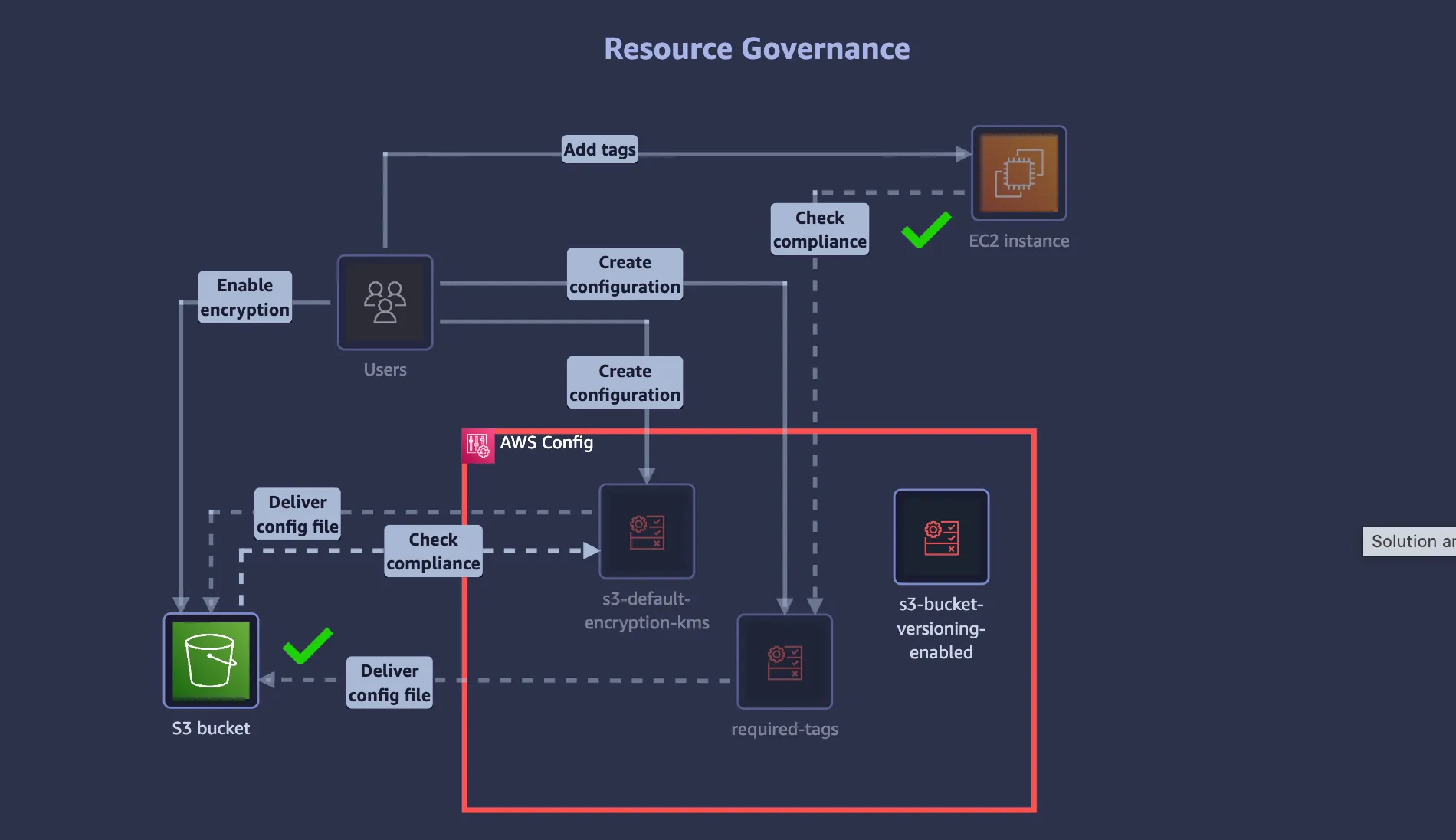
During the lab, I configured AWS Config to monitor EC2 instances and S3 buckets.
I explored three AWS Managed Rules:
s3-bucket-versioning-enabled: Checks whether S3 versioning is enabled.s3-default-encryption-kms: Checks whether S3 uses AWS KMS encryption by default.required-tags: Checks whether resources contain specified required tags.
For the
required-tags rule, I configured tag1Key = CostCenter. Resources within the rule's scope that lack this tag are considered NON_COMPLIANT.4. Challenges and Lessons Learned
Challenge 1: Understanding Configuration Recorder
Initially, I thought AWS Config was only responsible for checking compliance rules.
I later learned that AWS Config also maintains configuration history, allowing us to investigate how resource configurations have changed over time.
Challenge 2: IAM Roles and S3 Permissions
I encountered an error while configuring the Delivery Channel because AWS Config did not have sufficient permissions to write to the selected S3 bucket.
This taught me that IAM roles and S3 bucket policies both play important roles in controlling access.
Challenge 3: Understanding Compliance
I initially thought a compliant resource meant it was completely secure.
However, COMPLIANT only means the resource satisfies the specific rule being evaluated. It does not guarantee overall security.
5. Key Takeaways
AWS Config helps answer three important questions:
- What changed? — Configuration History
- Does it meet our requirements? — Config Rules
- Which resources violate our rules? — Compliance Dashboard
AWS Config primarily monitors and evaluates configurations. Automatic remediation requires additional setup.
Conclusion
This lab helped me understand how AWS Config supports cloud governance, security auditing, and compliance monitoring.
My biggest takeaway is the importance of understanding how AWS services work together, rather than simply following configuration steps.
I'll continue learning AWS through hands-on labs and sharing my experiences with the cloud community.
Community Question: How do you use AWS Config to maintain compliance in your cloud environments?
#AWS #AWSConfig #AWSSkillBuilder #CloudSecurity #CloudGovernance
Enjoyed reading this content? Let the author know!
Your likes, comments, shares, and saves help creators reach more builders.

Loading recommendations
Loading article