
IncidentTrail: Building a Read-Only Incident Investigation Agent on AWS
How I built an incident investigation agent that connects logs, deployment events, and health signals to help developers investigate possible causes without blindly trusting an AI-generated diagnosis.

When an incident happens, developers often have to piece together what went wrong from application logs, deployment records, and health metrics. Finding a possible cause means comparing events across different sources and figuring out which signals are related.
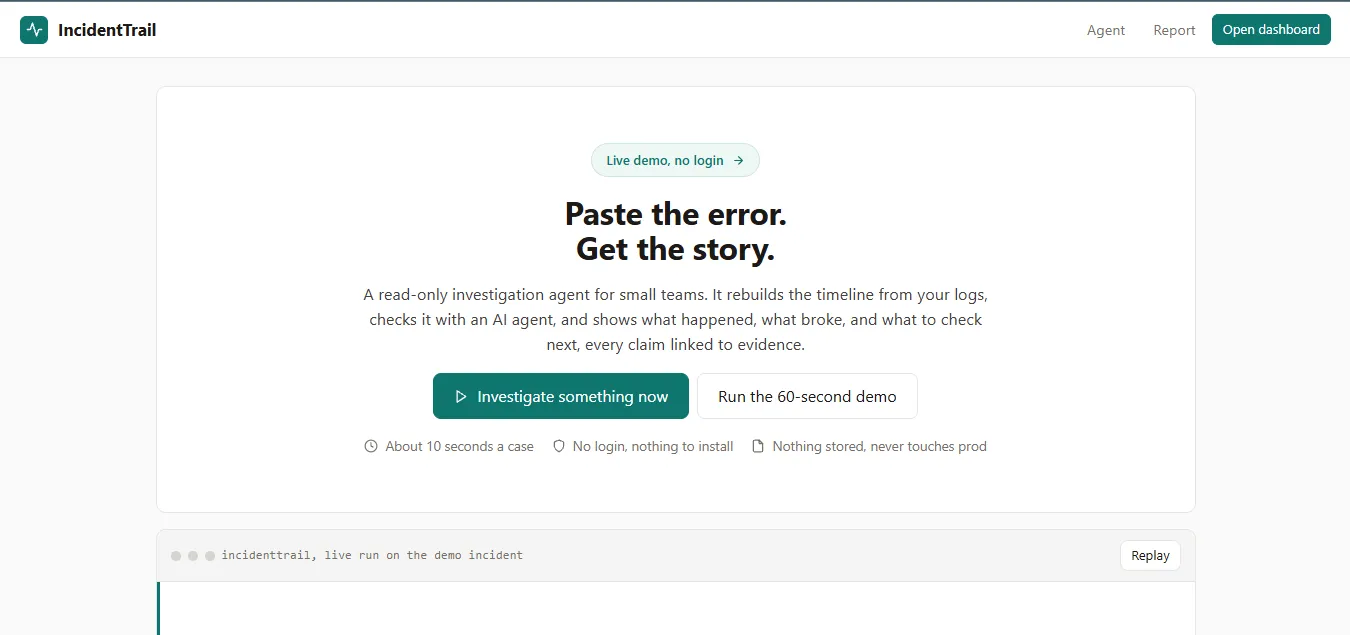
I built IncidentTrail, a read-only incident investigation agent that brings these signals together, builds a timeline, and investigates possible causes using the available evidence.

What IncidentTrail does
IncidentTrail is designed for developers and small engineering teams investigating application incidents.
Users can run a built-in sample incident or paste application logs and stack traces. IncidentTrail processes the events, identifies patterns, and starts an agent investigation. The resulting report contains a timeline, findings, possible explanations, and links to the evidence behind each hypothesis.
The demo includes two sample incidents. In the first, a deployment is followed by an increase in API errors, rising latency, and a growing worker queue. In the second, the queue grows without a nearby deployment. The agent investigates both cases and reports what the available evidence supports.
IncidentTrail is read-only. It helps developers investigate an incident and prepare a summary of their findings without making changes to production systems.
How I built it
The application runs on AWS using AWS Lambda, Amazon API Gateway, and Amazon CloudWatch Logs. I built the backend in Python 3.12 and used AWS SAM and CloudFormation to manage the infrastructure.
API Gateway handles HTTP requests and throttling, while Lambda processes incident data and coordinates the investigation. CloudWatch Logs captures application-side operational logs. The web interface provides the investigation workflow, timeline, report, sample incidents, and a history of previous investigations stored in the browser.
For model inference, the current deployment uses the OpenAI API with function calling. I also implemented an Amazon Bedrock integration using the Converse API, which provides an alternative inference path when the account's model quota is available.

Architecture
The application has two main parts: evidence processing and agent investigation.
The first part uses deterministic Python logic to process the incident data. It parses log lines, sorts events where timestamps are available, assigns stable evidence IDs, detects error bursts, identifies recurring error signatures, and flags deployments that occur near changes in application health.
The parser also handles incomplete logs. When timestamps are missing, events retain their pasted order, and time-based checks are limited accordingly.
The second part is the investigation agent. It receives a summary of the evidence and uses four read-only tools to investigate the incident:
search_eventssearches for relevant events.compare_deployment_windowexamines events around a deployment.inspect_health_metricschecks available health and queue signals.get_related_eventsretrieves events connected to a finding.
The agent selects which checks to run, receives their results, and uses them to refine its hypotheses. The application validates tool calls and limits the investigation to six tool calls, five model calls, and 1,500 output tokens.
The final report connects hypotheses to evidence IDs and identifies information that is still missing. Logs are treated as untrusted input, and the investigation tools cannot modify production systems.
Making the investigation easier to follow
One feature I focused on is Show me why.
Each hypothesis can be expanded to reveal the reasoning behind it, the evidence that supports it, and any missing or contradicting information. Clicking an evidence chip takes the user directly to the corresponding event in the timeline.
This makes it easier to check an explanation against the original logs instead of relying on the model's answer alone.
I also simplified the first-run experience after testing it with a user. The initial version made it less obvious how to begin and introduced an unnecessary token requirement. I changed the landing page to include a short explanation, two numbered steps, and a single Run the demo action. Users can now explore an investigation without preparing their own incident data first.
Testing the agent
The test suite currently has 39 passing tests covering log parsing, input validation, correlation logic, missing timestamps, mocked model-provider flows, authorization, request limits, and prompt-injection handling.
I also tested the deployed application with the sample incidents and raw logs.
In the deployment-related sample, IncidentTrail identifies an error burst and investigates the period around the deployment. The report includes findings and hypotheses linked to the relevant events.
In the queue-growth sample, the system identifies the growing queue without automatically blaming a deployment. This tests an important part of the investigation: the agent should not treat a nearby event as proof of causation.
I also ran a raw traceback containing 13 parsed events, only six of which had usable timestamps. IncidentTrail identified the timestamp limitation in its report, making the gaps in the available evidence visible to the user.
These tests cover the application's expected behaviour and several important edge cases. Evaluating the accuracy of the generated hypotheses across a wider range of real incidents is a next step.
What comes next
IncidentTrail brings structured log analysis and agent-based investigation into one workflow. The deterministic layer identifies patterns in the available data, while the agent investigates those patterns through read-only tools and produces explanations that developers can inspect.
My next steps are to test it with more engineers, evaluate the quality of its hypotheses across more incident scenarios, and improve support for different log formats.
Try IncidentTrail: https://hft2odptgj.execute-api.us-east-1.amazonaws.com/prod/
Source code: https://github.com/joelanarba/incident-trail.git
Enjoyed reading this content? Let the author know!
Your likes, comments, shares, and saves help creators reach more builders.

Loading recommendations
Loading article