
Build a Serverless REST API with AWS Lambda, API Gateway, and DynamoDB
A hands-on walkthrough of creating a simple notes API with no servers to manage. You will set up a DynamoDB table, write a Python Lambda function, expose it through API Gateway, and test it end to end.

Here is the body, ready to copy and paste. Code blocks are included, so if the editor doesn't render Markdown, use its code-block button for those parts.
Introduction
Running a server just to serve a small API is often more work than the API itself. You patch it, size it, and pay for it even when nobody is using it. Serverless services solve this by running your code only when a request arrives.
In this article, you will build a small notes API that can create and list notes, using three AWS services:
- Amazon API Gateway receives HTTP requests
- AWS Lambda runs your code
- Amazon DynamoDB stores the data
By the end, you will have a working endpoint you can call from
curl, a browser, or any app.Architecture
1
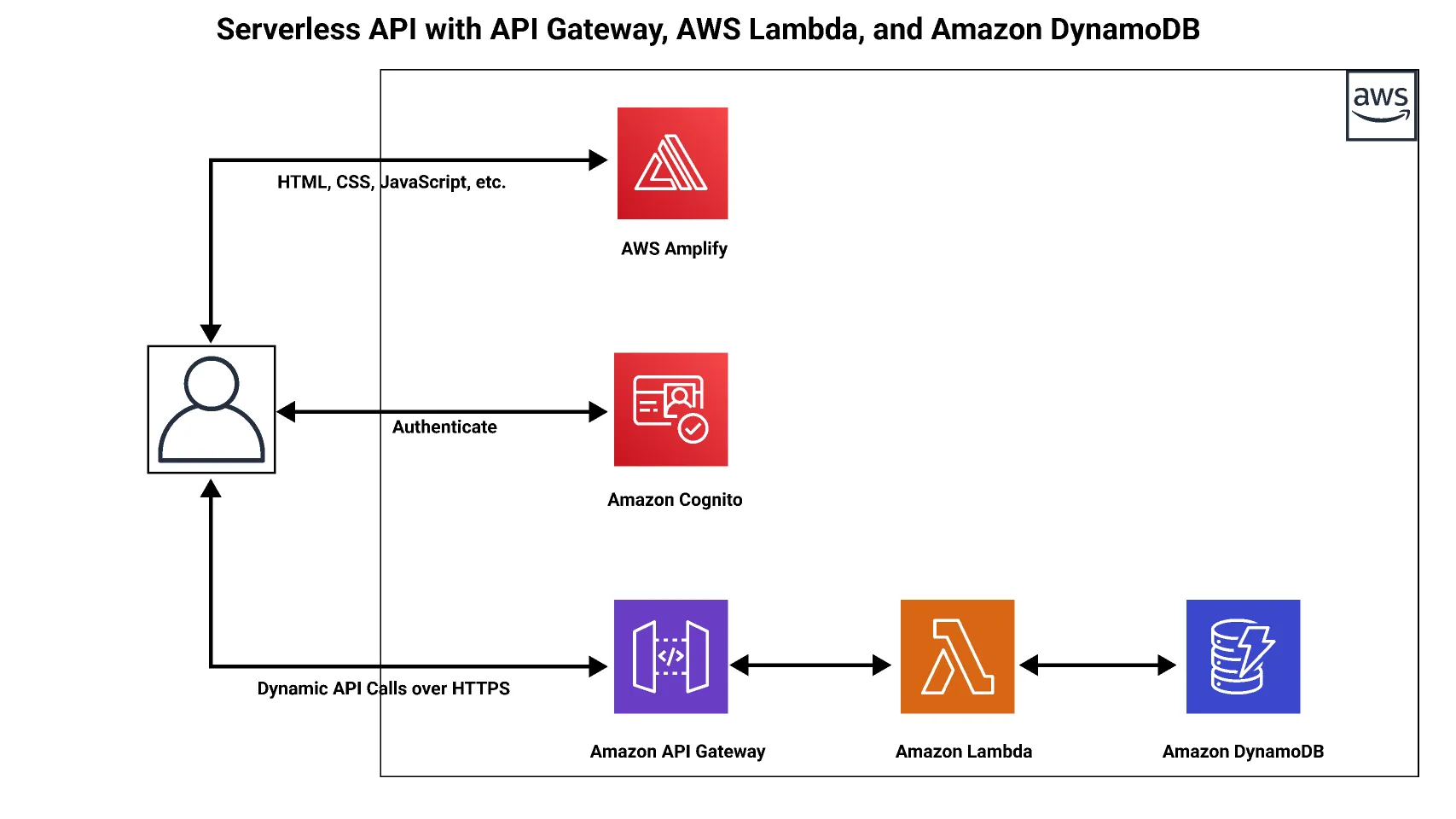
Client → API Gateway (HTTP API) → Lambda (Python) → DynamoDB
A request hits API Gateway, which triggers a Lambda function. The function reads from or writes to DynamoDB and returns a JSON response.
Prerequisites
- An AWS account
- Basic familiarity with Python and the AWS Management Console
curlor a tool like Postman for testing
Step 1: Create the DynamoDB Table
- Open the DynamoDB console and choose Create table.
- Set the table name to
Notes. - Set the partition key to
id(type: String). - Keep the default table settings, which use on-demand capacity, so you pay only for what you use.
- Choose Create table.
Step 2: Create the Lambda Function
- Open the Lambda console and choose Create function.
- Select Author from scratch.
- Name it
notes-apiand choose a current Python runtime (for example, Python 3.12). - Choose Create function.
Replace the default code with the following:
1
2
3
4
5
6
7
8
9
10
11
12
13
14
15
16
17
18
19
20
21
22
23
24
25
26
27
28
29
30
31
32
33
34
35
36
import json
import uuid
import boto3

dynamodb = boto3.resource("dynamodb")
table = dynamodb.Table("Notes")

def response(status, body):
    return {
        "statusCode": status,
        "headers": {"Content-Type": "application/json"},
        "body": json.dumps(body),
    }

def lambda_handler(event, context):
    method = event["requestContext"]["http"]["method"]

    if method == "POST":
        try:
            data = json.loads(event.get("body") or "{}")
        except json.JSONDecodeError:
            return response(400, {"error": "Invalid JSON"})

        text = data.get("text")
        if not text:
            return response(400, {"error": "Field 'text' is required"})

        item = {"id": str(uuid.uuid4()), "text": text}
        table.put_item(Item=item)
        return response(201, item)

    if method == "GET":
        result = table.scan()
        return response(200, result.get("Items", []))

    return response(405, {"error": "Method not allowed"})
Choose Deploy to save the function.
Step 3: Grant Lambda Access to DynamoDB
By default, your function cannot touch DynamoDB. Fix that with a least-privilege permission:
- In the Lambda console, go to Configuration → Permissions and open the function's execution role.
- Choose Add permissions → Create inline policy.
- Use the JSON editor and paste this policy, replacing
REGIONandACCOUNT_IDwith your own values:
1
2
3
4
5
6
7
8
9
10
{
  "Version": "2012-10-17",
  "Statement": [
    {
      "Effect": "Allow",
      "Action": ["dynamodb:PutItem", "dynamodb:Scan"],
      "Resource": "arn:aws:dynamodb:REGION:ACCOUNT_ID:table/Notes"
    }
  ]
}
- Name the policy
NotesTableAccessand save it.
Granting only the two actions the function needs, on one table, follows the principle of least privilege.
Step 4: Create the API in API Gateway
- Open the API Gateway console and choose Create API.
- Select HTTP API and choose Build.
- Under Integrations, add a Lambda integration and select
notes-api. - Name the API
notes-http-api. - Configure routes:
GET /notesPOST /notes
- Keep the default stage with auto-deploy enabled, then create the API.
Copy the Invoke URL shown on the API details page. It looks like
https://abc123.execute-api.us-east-1.amazonaws.com.Step 5: Test the API
Create a note:
1
2
3
curl -X POST https://YOUR_INVOKE_URL/notes \
  -H "Content-Type: application/json" \
  -d '{"text": "My first serverless note"}'
Expected response:
1
{"id": "3f2b...", "text": "My first serverless note"}
List all notes:
1
curl https://YOUR_INVOKE_URL/notes
You should see an array containing the note you just created.
Troubleshooting
- 500 Internal Server Error: Check the function's logs in CloudWatch Logs. A missing IAM permission is the most common cause.
- AccessDeniedException: The execution role policy is missing or has the wrong table ARN, region, or account ID.
- 404 Not Found: Confirm the route path (
/notes) matches your request URL. - CORS errors in a browser: Enable CORS in the API Gateway settings and allow the origins and headers your frontend uses.
Cost Considerations
All three services scale to zero when idle, and each has a free tier that is generous enough for experiments. Free-tier terms can change, so check the current pricing pages. Note that
Scan reads the whole table, which is fine for a demo but becomes slow and costly as data grows.Improvements to Try Next
- Replace
ScanwithQueryby designing a better key schema - Add
GET /notes/{id}andDELETE /notes/{id}routes - Protect the API with a JWT authorizer using Amazon Cognito
- Define everything as code with AWS SAM or AWS CDK so you can redeploy it consistently
- Add monitoring with CloudWatch alarms on errors and latency
Cleanup
To avoid unexpected charges, delete the resources when you are done:
- Delete the API in API Gateway
- Delete the Lambda function and its log group
- Delete the DynamoDB table
- Remove the IAM role if it is no longer needed
Conclusion
You built a working REST API with no servers to provision or patch. API Gateway handles routing, Lambda runs the logic, and DynamoDB stores the data, all billed by usage. This pattern is a solid base for prototypes, internal tools, and production workloads once you add authentication, better data modeling, and infrastructure as code.
Before publishing, try the steps yourself once so you can confirm the console screens match what's written, since AWS updates its UI often.
Enjoyed reading this content? Let the author know!
Your likes, comments, shares, and saves help creators reach more builders.

Loading recommendations
Loading article