
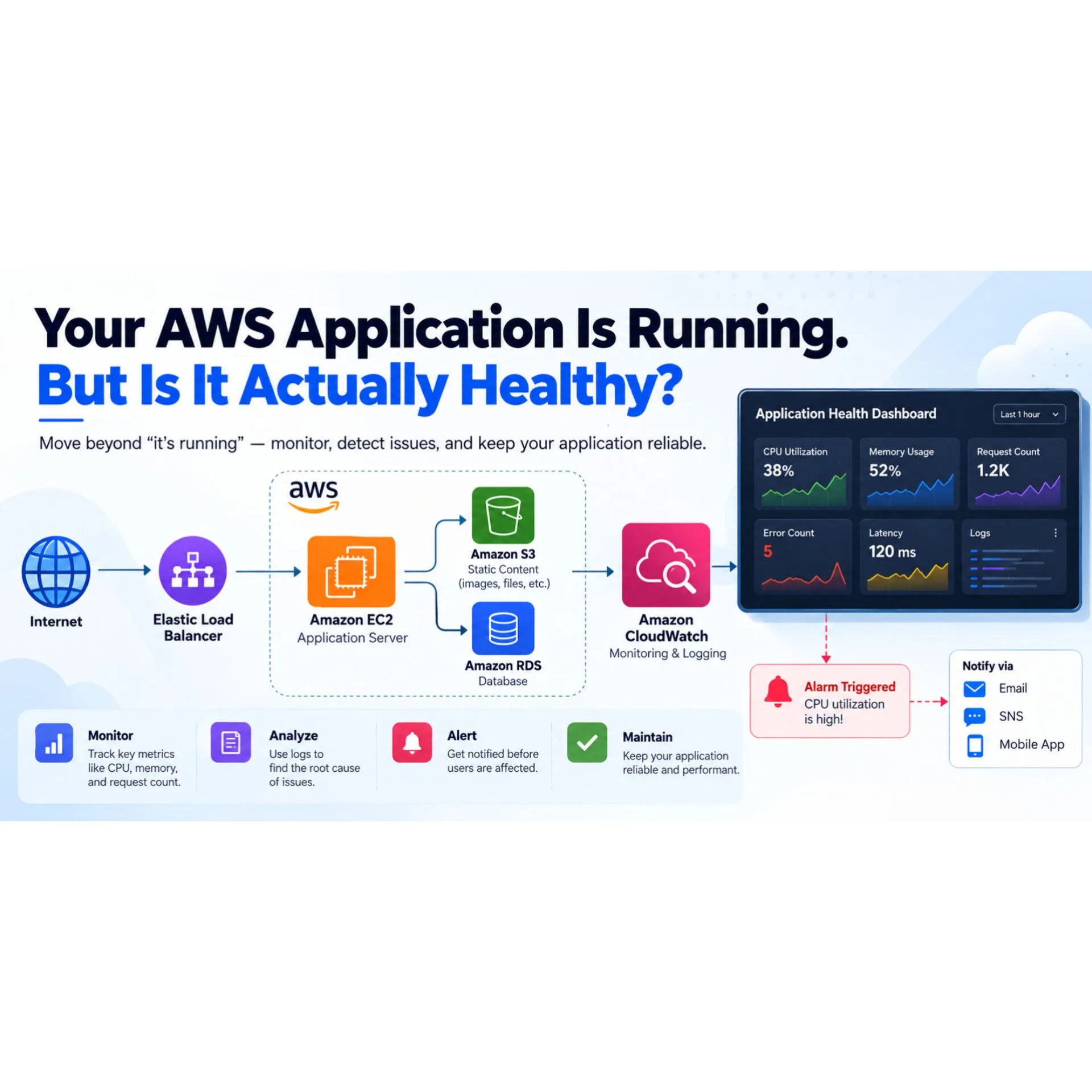
Your AWS Application Is Running. But Is It Actually Healthy?
An application can be running and still have problems. Learn how AWS monitoring helps detect errors, performance issues, and failures.
Imagine deploying your first application on AWS.
Everything looks perfect. Your EC2 instance is running, your website opens, and your application responds to requests.
You think everything is working fine.
But what if users are experiencing slow loading times? What if errors are happening in the background? What if your server is running out of memory?
An application being online doesn't always mean it's healthy.
1. Running Doesn't Always Mean Working
An EC2 instance can be in the running state even when the application installed on it is not responding correctly.
For example, your server might be running, but your website could return errors because the application has crashed.
That's why checking the instance status alone isn't enough.
2. CloudWatch Helps You See What's Happening
Amazon CloudWatch helps you monitor AWS resources and applications.
You can use it to collect metrics, view logs, create dashboards, and configure alarms.
For example, you can monitor CPU utilization and configure an alarm to notify you when it exceeds a threshold you define.
Instead of waiting for users to report a problem, monitoring can help you identify issues earlier.
3. Logs Tell You What Went Wrong
Metrics can tell you that something unusual happened. Logs can help you investigate why.
Suppose your application suddenly starts returning errors.
By examining application logs, you might discover a database connection failure, an incorrect configuration, or an unexpected exception.
The important lesson is to investigate the cause rather than randomly changing settings.
4. Alerts Turn Monitoring Into Action
Monitoring becomes more useful when you know about problems that need attention.
CloudWatch alarms can evaluate metrics against configured thresholds and trigger actions.
For example, an alarm could notify your team when CPU utilization remains unusually high.
Choose thresholds that reflect meaningful problems and avoid creating unnecessary notifications.
5. Think Like a Developer, Not Just a Server Administrator
When building an application, don't ask only:
"Is my EC2 instance running?"
Also ask:
- Is my application responding correctly?
- Are errors increasing?
- Is performance getting worse?
- Are resources being used efficiently?
- Will I know when something goes wrong?
- Are errors increasing?
- Is performance getting worse?
- Are resources being used efficiently?
- Will I know when something goes wrong?
These questions help you build applications that are easier to maintain and troubleshoot.
Final Thoughts
Learning to deploy an application is an important milestone. Learning to monitor, troubleshoot, and maintain it is what helps you take the next step as a cloud developer.
AWS provides services such as Amazon CloudWatch to help builders understand what is happening inside their applications.
One question for the community:
If your website suddenly became slow, what would you check first: CPU utilization, application logs, or database performance?
I'd love to hear how other builders approach this problem.
Enjoyed reading this content? Let the author know!
Your likes, comments, shares, and saves help creators reach more builders.

Loading recommendations
Loading article