
CloudPilot: Building an AWS Cost and Deployment Copilot with Amazon Bedrock
Discover how I built CloudPilot, an AWS-powered AI copilot that helps developers explore deployment options, understand estimated cloud costs, and review potential risks before making infrastructure decisions. Learn how Amazon Bedrock, AWS Lambda, API Gateway, and Amazon S3 work together to create a practical, safety-conscious cloud assistant.

Building on AWS is powerful, but making the right deployment decisions is not always easy. Before launching a resource, developers need to understand which AWS services to use, how different configurations affect cost, and what risks a proposed change might introduce.
For this Build an Agent Weekend Challenge, I built CloudPilot — an AWS Cost and Deployment Copilot designed to make these decisions easier to understand before taking action.
The idea behind CloudPilot is simple: developers should be able to describe what they want to build, explore deployment options, understand estimated costs, and review potential risks through a conversational interface — without giving an AI agent unrestricted access to their AWS environment.
Project: CloudPilot
Live application: http://cloudpilot-app-528582359305.s3-website-us-east-1.amazonaws.com
GitHub repository: https://github.com/omayrq/Cloudpilot
API health endpoint: https://l4jxfpbef1.execute-api.us-east-1.amazonaws.com/prod/health
AWS Region: us-east-1
Live application: http://cloudpilot-app-528582359305.s3-website-us-east-1.amazonaws.com
GitHub repository: https://github.com/omayrq/Cloudpilot
API health endpoint: https://l4jxfpbef1.execute-api.us-east-1.amazonaws.com/prod/health
AWS Region: us-east-1
The Problem: AWS Decisions Involve More Than Choosing a Service
Imagine a developer who wants to deploy a web application. They might need to decide between different compute options, determine how to expose the application, estimate ongoing expenses, and understand the security implications of their architecture.
These decisions can become difficult when someone is still learning AWS or working on a project with a limited budget.
A deployment that works technically is not necessarily cost-efficient. Likewise, a cost-saving change is not automatically safe for production.
I wanted to build a tool that brings these considerations together and helps users make more informed decisions before changing their infrastructure.
CloudPilot is designed for AWS learners, developers, cloud practitioners, and small teams who want practical guidance on deployment planning, cost awareness, and troubleshooting.
What CloudPilot Does
CloudPilot provides a conversational interface for exploring AWS deployment and operational questions.
Its core capabilities include:
- Deployment guidance: Explore possible AWS architectures and deployment approaches based on a user's requirements.
- Cost estimation: Understand illustrative cost calculations and the factors that can influence an AWS bill.
- Troubleshooting assistance: Get structured guidance for investigating common deployment and configuration problems.
- Change review: Examine proposed infrastructure changes, their potential risks, and recommended next steps before implementation.
- Security-aware guidance: Encourage least-privilege access, human review, and careful consideration of operational impact.
The goal is not to replace AWS documentation, billing tools, or engineering judgment. It is to make the decision-making process easier to understand and review.

Figure 1: CloudPilot's user interface, where users can start exploring AWS deployment, cost, and troubleshooting questions.
Architecture: How I Built CloudPilot
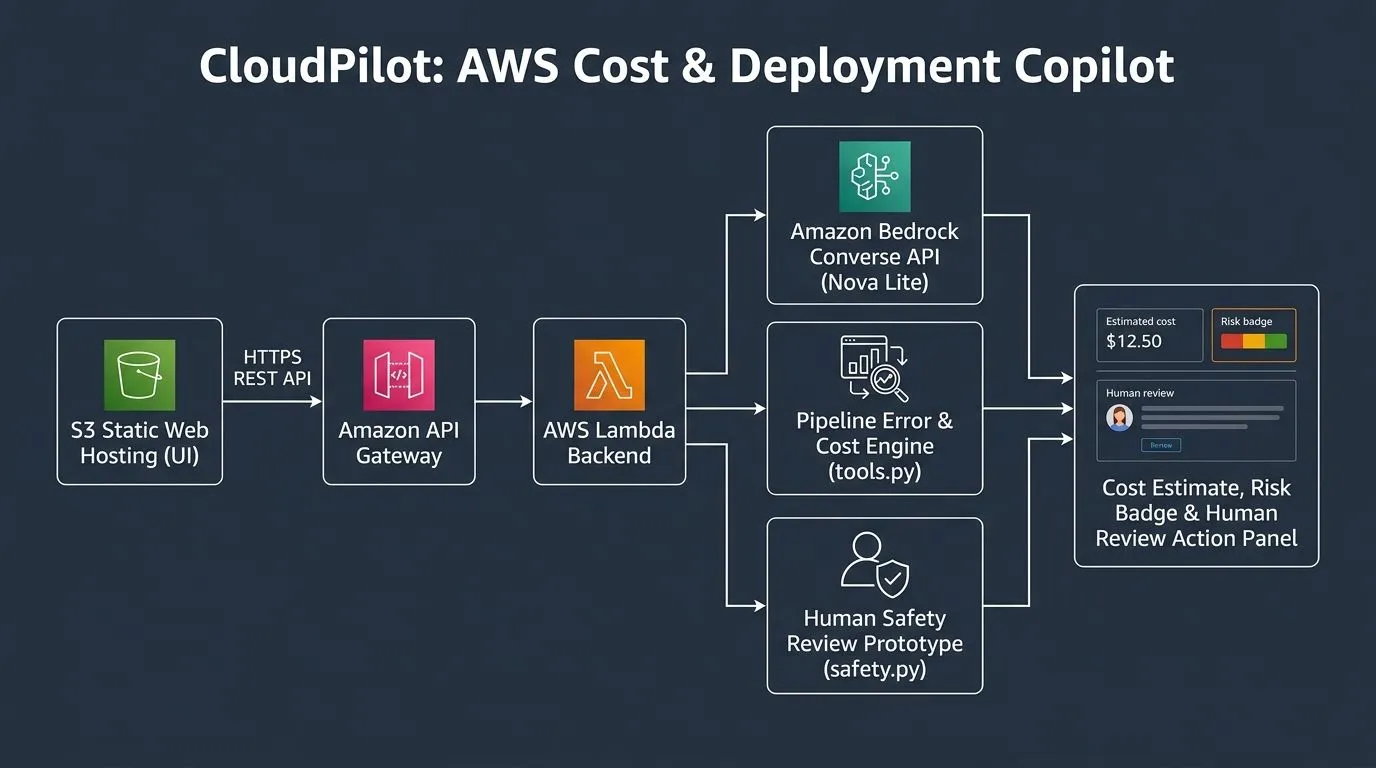
I used AWS managed services to build a lightweight application with a browser-based frontend and a serverless backend.
The main components are:
- Amazon S3: Hosts the static frontend.
- Amazon API Gateway: Provides the HTTP API endpoint for frontend requests.
- AWS Lambda: Runs the backend application logic using Python 3.11.
- Amazon Bedrock: Provides access to the Amazon Nova Lite model for supported AI-powered responses.
- Python modules: Organize the agent workflow, tools, response schemas, and safety-related checks.
The frontend sends a request to the API endpoint. API Gateway forwards the request to Lambda, where the application processes the input and routes it through the relevant workflow. Depending on the task, CloudPilot uses deterministic application logic, supported tools, or the Bedrock model to generate guidance. Structured response handling helps keep the output consistent with the application's expected format.
This architecture keeps the initial implementation relatively simple while separating the user interface from the backend processing.

Figure 2: CloudPilot's architecture connecting the browser, Amazon S3, API Gateway, Lambda, application logic, and Amazon Bedrock.
Why I Chose Amazon Bedrock and Serverless Services
I chose Amazon Bedrock because it provides a managed way to integrate a foundation model into an application without building and maintaining the model infrastructure myself.
Amazon Nova Lite supports the conversational reasoning component of CloudPilot. However, I did not want every decision to depend entirely on a model-generated answer. Where practical, deterministic application logic handles calculations and structured checks, while the model supports tasks that benefit from natural-language understanding and reasoning.
AWS Lambda and API Gateway also made it possible to build an API-driven backend without maintaining a continuously running application server. Amazon S3 provides a straightforward way to host the static frontend.
Serverless does not automatically mean free or cheapest. Actual expenses depend on request volume, execution duration, data transfer, model usage, and other configuration details. These factors must be considered when evaluating the cost of a real deployment.
Cost Awareness: Estimates Before Decisions
One of CloudPilot's key goals is to help users think about cost before deploying or modifying resources.
Instead of treating a deployment as simply working or not working, the application encourages users to consider the financial impact of their choices.
For example, the cost of a serverless workflow can depend on how frequently it runs and how long each execution takes. Model-based features introduce their own usage costs. Networking, storage, logging, and data transfer can also affect the final bill.
CloudPilot includes illustrative cost calculations to make these relationships easier to understand. These figures are estimates, not live AWS quotes or guarantees of actual charges. Before deploying a production workload, users should verify the current pricing for their selected Region, configuration, and usage pattern.
[Image 3 — Insert a screenshot showing CloudPilot's cost estimate or cost-analysis response here.]

Figure 3: An example of CloudPilot helping users understand estimated costs and the factors that influence them.
Safety by Design: Review Before Taking Action
An important design decision was to avoid giving an AI assistant unrestricted authority over AWS infrastructure.
An agent that can make changes without appropriate controls can introduce unexpected costs, downtime, or security risks. For that reason, CloudPilot emphasizes guidance and review rather than presenting every recommendation as an action that should immediately be executed.
Its change-review workflow helps users understand the possible impact of a proposed change, identify risks, and consider next steps. The prototype can communicate a review decision, but that should not be confused with executing or verifying an actual infrastructure change.
For production use, a system that performs AWS operations would need additional controls, including narrowly scoped IAM permissions, explicit authorization, validation of proposed actions, audit logging, and appropriate monitoring. Any infrastructure-changing capability should be tested and secured independently.
My guiding principle is straightforward: an AI agent should help people make better decisions without automatically receiving more authority than it needs.
Testing the Application
I tested the application's main workflows to check that users could interact with the interface, receive structured responses, and review the information presented by the backend. I also checked the deployed backend's health endpoint.
The health endpoint provides a simple way to verify that the backend responds and reports its configured service information. It is a useful operational check, although it does not by itself prove that every feature works correctly under production load.
The next stage of testing for a production deployment would include broader automated and integration tests, malformed-input handling, access-control verification, rate limiting, load testing, and monitoring of actual service costs.

Figure 4: A working CloudPilot interaction demonstrating the application's response and review workflow.
The Detail I Wanted to Get Right
The most important detail for me was making the agent's recommendations easier to review instead of treating AI output as an unquestionable answer.
CloudPilot is intended to help users understand the reasoning behind a deployment choice, consider its potential risks, and think about cost before committing to an implementation.
That makes the experience more useful for someone who is learning AWS or evaluating a design. The user remains responsible for reviewing recommendations and validating them against the actual environment.
For me, that is an important distinction between building an AI chatbot and building a practical cloud assistant.
Challenges and Lessons Learned
One challenge was balancing AI flexibility with predictable application behavior. Natural-language responses are useful, but cost calculations, response structure, and safety checks benefit from explicit application logic.
Another consideration was keeping the estimated cost understandable without suggesting that it represents a complete AWS bill. Real workloads have different usage patterns, and a useful estimate must communicate its assumptions and limitations.
Finally, building the frontend and backend as separate components reinforced the importance of validating inputs, handling errors safely, and checking that the deployed application matches the version being tested.
This project also reminded me that a working prototype is only the beginning. Authentication, permissions, monitoring, testing, and operational safeguards become increasingly important as an application moves toward production.
What's Next for CloudPilot?
There are several opportunities to extend the project:
- Add more detailed cost scenarios with clearly documented assumptions.
- Improve architecture recommendations for common AWS workloads.
- Expand automated tests for troubleshooting and change-review workflows.
- Strengthen production protections, including API access controls and monitoring.
- Explore integrations that allow users to validate recommendations against their AWS environment with explicit permissions and review.
These improvements would help move CloudPilot from a learning-focused prototype toward a more robust assistant for cloud planning and operations.
Try CloudPilot
You can explore the application, review the implementation, and follow the project's development through these links:
- Live application: http://cloudpilot-app-528582359305.s3-website-us-east-1.amazonaws.com
- Source code: https://github.com/omayrq/Cloudpilot
- Backend health check: https://l4jxfpbef1.execute-api.us-east-1.amazonaws.com/prod/health
I built CloudPilot as part of the Build an Agent Weekend Challenge to explore how AWS services and generative AI can work together to make cloud decisions more accessible, understandable, and cost-conscious.
The bigger lesson for me is that a useful cloud agent should do more than generate an answer. It should help users understand their options, recognize trade-offs, and stay in control of important decisions.
I'd love to hear your feedback: If you could add one capability to an AWS cost and deployment copilot, what would be most useful to you?
#agents #AWS #AmazonBedrock #AWSLambda #CloudComputing #GenerativeAI #Serverless
Enjoyed reading this content? Let the author know!
Your likes, comments, shares, and saves help creators reach more builders.

Loading recommendations
Loading article