
Beyond AWS Services: How a Real Web Application Works on the Cloud ☁️
In my first AWS Builder Center article, My First AWS Journey: 7 Things I Wish I Knew Before Starting, I shared some lessons I wish I had known when beginning my cloud journey. One important lesson stood out: learning AWS is not just about understanding individual services. It is about understanding how these services work together to solve real-world problems. So, let's take a simple example: a web application where users can open a website, submit a form, and save information.

1. Start With the Architecture
Before choosing services, we need to understand what our application must do.
Our application needs to:
- Display a user interface.
- Accept requests from users.
- Process application logic.
- Store and retrieve data.
- Monitor errors and performance.
Instead of running everything on a single server, we can divide these responsibilities across different AWS services.
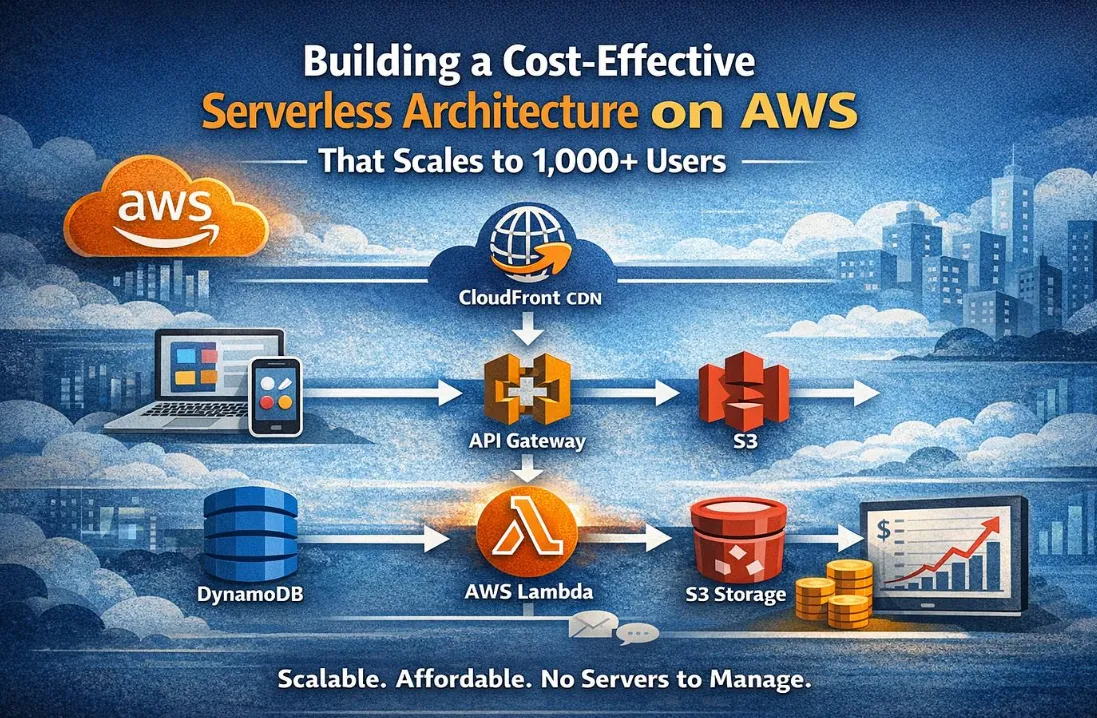
Here is a simplified architecture:
User → Amazon CloudFront → Amazon S3 → Amazon API Gateway → AWS Lambda → Amazon DynamoDB
Each component has a specific responsibility, and understanding these responsibilities is the foundation of cloud architecture.
2. Amazon S3: Where the Frontend Lives
Amazon Simple Storage Service (Amazon S3) provides object storage.
For a static frontend, we can store files such as:
- HTML
- CSS
- JavaScript
- Images and other static assets
For example, a React application can be built into static files and stored in S3.
Instead of maintaining a dedicated server just to deliver these files, we can use managed AWS services to serve our frontend.
Key takeaway: S3 stores the files that make up our static website. It does not execute our backend application code.
3. Amazon CloudFront: Delivering Content Efficiently
What happens when users access our application from different locations?
Amazon CloudFront is a content delivery network (CDN) that caches and delivers content through a global network of edge locations.
When configured appropriately, CloudFront can:
- Reduce latency for frequently requested content.
- Improve the delivery of static assets.
- Support HTTPS connections.
- Work with a private S3 origin through Origin Access Control (OAC).
This means we can keep our website files in a private S3 bucket while allowing users to access the website through CloudFront.
Key takeaway: CloudFront helps deliver content efficiently without requiring us to make our S3 bucket publicly accessible.
4. Amazon API Gateway: Connecting the Frontend to the Backend
A frontend alone cannot securely perform every operation an application needs.
Suppose a user submits a registration form. The application needs an endpoint to receive that request and pass it to the backend.
Amazon API Gateway allows us to create and manage API endpoints.
It can receive HTTP requests from the frontend and route them to an AWS Lambda function.
For example:
POST /registerThe endpoint could receive registration information and invoke a backend function to validate the request.
In a real application, we would also need appropriate authentication, authorization, input validation, and request protection.
Key takeaway: API Gateway provides the interface through which clients communicate with our backend services.
5. AWS Lambda: Running Backend Logic
AWS Lambda lets us run code without provisioning or managing servers.
When API Gateway receives a request, it can invoke a Lambda function to process it.
Our function might:
- Validate the incoming data.
- Check whether required fields are present.
- Apply application-specific business logic.
- Read from or write to a database.
- Return an appropriate response.
Lambda can scale with incoming requests, subject to its concurrency limits and configuration.
It is particularly useful for event-driven applications and workloads that do not require a continuously running server.
Key takeaway: Lambda executes our backend logic while AWS manages the underlying compute infrastructure.
6. Amazon DynamoDB: Storing Application Data
Our application needs a place to store information.
Amazon DynamoDB is a managed NoSQL database that supports key-value and document data models.
A Lambda function can use DynamoDB to store and retrieve application records.
For example, a simple registration workflow might look like this:
- A user submits a form.
- API Gateway receives the request.
- Lambda validates the information.
- Lambda writes the required record to DynamoDB.
- The application returns a response to the user.
The database design depends on how the application will query its data. We should define access patterns before choosing partition keys and other table attributes.
Key takeaway: DynamoDB provides managed data storage without requiring us to maintain database servers.
7. Where Does AWS IAM Fit In?
There is one essential component we should not overlook: security.
AWS Identity and Access Management (IAM) controls access to AWS resources.
For example, our Lambda function might need permission to write records to a specific DynamoDB table.
Instead of granting broad permissions, we should create an execution role with only the permissions the function requires.
This follows the principle of least privilege.
Other important practices include:
- Protecting credentials and never committing access keys to source control.
- Enabling multi-factor authentication for privileged users.
- Keeping S3 buckets private when public access is unnecessary.
- Reviewing IAM policies regularly.
- Avoiding unnecessary use of root credentials.
Security should be part of the architecture from the beginning, not something added after deployment.
8. How Do We Know When Something Goes Wrong?
Deploying an application is only one part of the job. We also need to understand how it behaves.
Amazon CloudWatch helps us monitor AWS resources and applications through metrics, logs, dashboards, and alarms.
For example, we can use CloudWatch to investigate Lambda execution errors, monitor invocation counts, and create alarms for important operational conditions.
Monitoring helps us identify issues instead of waiting for users to report them.
9. Putting Everything Together
Let's summarize the request flow.
Step 1: A user opens the application.
Step 2: CloudFront delivers the frontend files stored in S3.
Step 3: The user submits a form, and the frontend sends an API request.
Step 4: API Gateway receives the request and invokes Lambda.
Step 5: Lambda validates the request and interacts with DynamoDB using its IAM execution role.
Step 6: The result is returned to the frontend.
Step 7: CloudWatch helps us monitor application behavior and troubleshoot problems.
Each service solves a specific problem. Together, they form a serverless architecture that can be expanded as application requirements evolve.
This is a simplified reference architecture, not a complete production deployment. A real system may also require authentication, input validation, abuse protection, error handling, backups, and additional security controls.
10. What I Learned From This Architecture
The biggest takeaway is that cloud engineering involves more than knowing service definitions.
It requires understanding:
- Architecture: Which services should communicate, and why?
- Security: How do we grant only the permissions required?
- Scalability: How will the application respond to changing demand?
- Observability: How do we detect and troubleshoot failures?
- Cost: Which resources incur charges, and how can we avoid unnecessary spending?
For anyone starting with AWS, I recommend learning one service at a time and then connecting those concepts through a small project.
You do not need to master every AWS service before building something useful. Start with a simple requirement, choose the services that address it, and learn how the pieces fit together.
Conclusion
My AWS learning journey is teaching me to look beyond individual services and focus on how complete systems are designed.
Amazon S3, CloudFront, API Gateway, Lambda, DynamoDB, IAM, and CloudWatch each play different roles. Understanding how they interact makes AWS architecture much easier to reason about.
My next step is to put these concepts into practice, experiment with a small application, and document what I learn along the way.
If you are also learning AWS, which service or architecture concept would you like to explore next? Share your thoughts in the comments. Let's keep building and learning together! 🚀
#AWS #AmazonWebServices #CloudComputing #Serverless #CloudArchitecture #LearningInPublic
Enjoyed reading this content? Let the author know!
Your likes, comments, shares, and saves help creators reach more builders.

Loading recommendations
Loading article