

From a University Timetable to a Helpful AI Scheduling Agent
Introduction: A Small Problem That Matters
As a university student, managing lectures, assignments, personal projects, and learning goals can become challenging. A timetable tells us when activities are scheduled, but remembering every upcoming class and knowing what to focus on next is another problem.
I wanted to build something more useful than a traditional timetable application. I wanted an assistant that could help students understand their schedules, receive timely reminders, and spend less time worrying about missing important activities.
That idea led me to build an AI-powered University Scheduling Agent.
My goal was simple: create an agent that makes everyday university life a little easier, more organized, and less stressful.
What Does My Agent Do, and Who Is It For?
My scheduling agent is designed primarily for university students who need help managing their daily academic activities.
Instead of treating a timetable as a static document, the system turns scheduled activities into information that students can act on.
For example, imagine a student has an Internet Application Development lecture from 8:30 AM to 10:30 AM. The student can use the scheduling system to organize this activity and receive a useful reminder.
The agent is intended to help with tasks such as:
- Organizing university timetable information.
- Identifying upcoming lectures and scheduled activities.
- Preparing clear, easy-to-understand reminders.
- Helping students stay aware of their daily plans.
- Reducing the mental effort required to remember every activity.
The bigger vision is to create a personal academic assistant that students can interact with naturally, rather than requiring them to repeatedly check a timetable.
How I Built It
I approached the project by starting with the actual problem instead of immediately adding complex AI features.
First, I worked on the scheduling functionality. The system needs to represent activities with useful information, such as a title, date, and time. This information provides the foundation for identifying what a student has planned.
Next, I focused on the application logic. The system needs to interpret the schedule, identify relevant activities, and prepare information that can be communicated to the user.
The AI-agent component provides an opportunity to make this experience more natural. Rather than simply presenting raw schedule data, an agent can help turn that information into understandable messages and useful interactions.
For example, a useful reminder could look like this:
Good morning! Your Internet Application Development lecture is scheduled for today from 8:30 AM to 10:30 AM. Have a great class!
This is more approachable than a notification containing only a course name and a timestamp.
For the application, I used the technologies involved in my scheduling-system implementation, including JavaScript, Node.js, and React where applicable. These technologies allow me to build the application interface and backend functionality.
For the final implementation, I will document the actual AI model, scheduling logic, notification mechanism, and any AWS services used. If AWS services are integrated into the working version, they will be identified along with their specific responsibilities.
I believe it is important to explain not only which technologies were used, but also why each technology was needed.
The Delightful Detail: Reminders That Feel Human
The most important design decision was to focus on the experience of receiving a reminder.
A scheduling application can technically work while still being unpleasant to use. Messages may be confusing, notifications may lack context, or the system may require too many steps to accomplish a simple task.
I wanted my agent's communication to feel clear, friendly, and useful.
Instead of sending a message such as:
Event: Internet Application Development | Time: 08:30the intended experience is a readable reminder that explains what the student has coming up and when it will happen.
This small change matters because the purpose of a reminder is not merely to deliver data. It is to help someone understand what they need to do.
I also want the system to handle missing or unavailable schedule information gracefully. A helpful assistant should explain when it cannot find a scheduled activity instead of pretending that everything is working correctly.
To evaluate this experience, I can test whether the correct activity and time appear in each reminder, whether the message is easy to understand, and whether users can identify their next activity without opening the full timetable.
These checks provide a practical way to evaluate whether the design is genuinely helpful, rather than simply assuming that a friendly message makes the product better.
Proof That It Works
A working demonstration is an important part of this project.
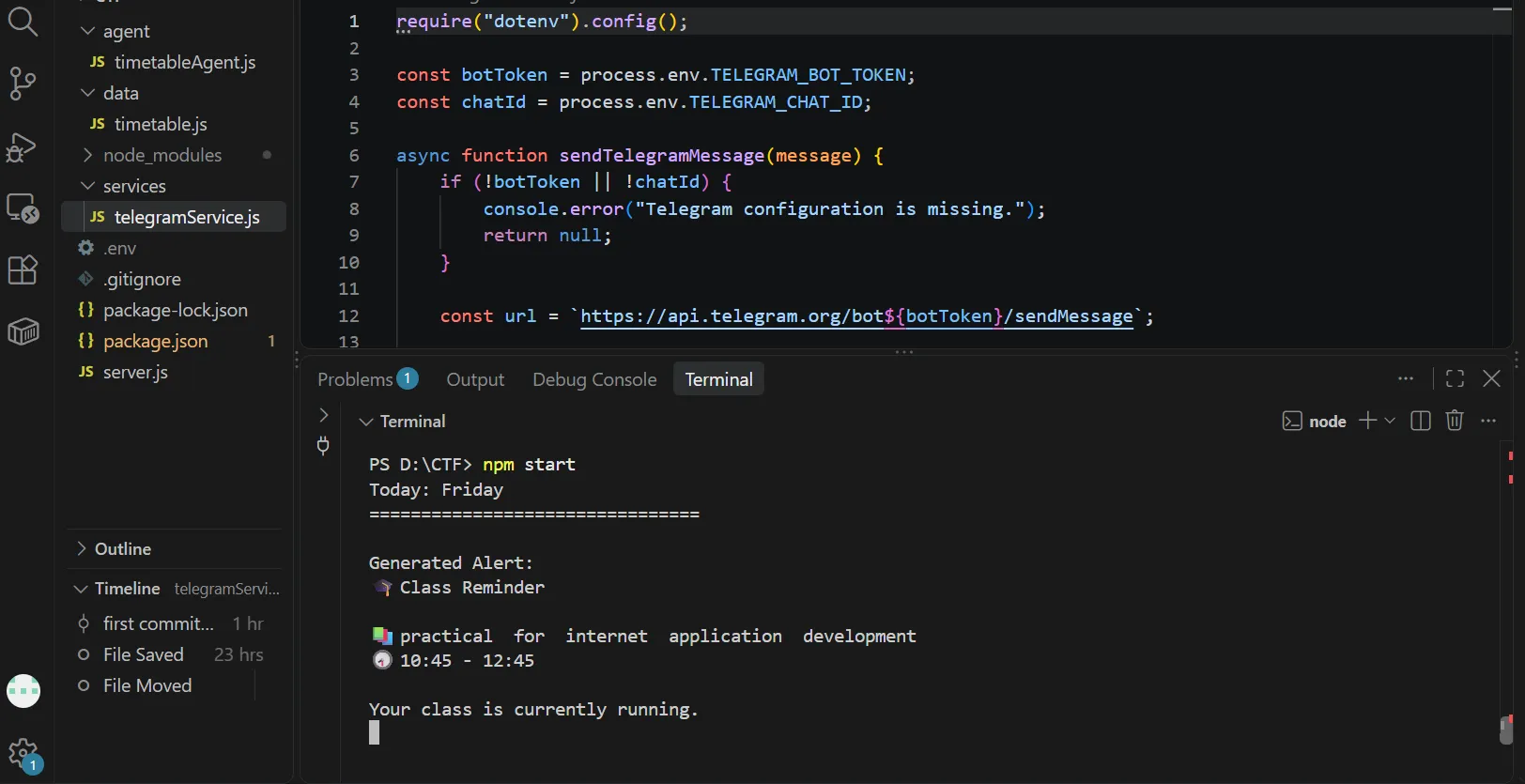
My demonstration will show the scheduling workflow, including an example timetable entry and the corresponding reminder or agent response.
For example, I can create a lecture scheduled for 8:30 AM, verify that the system identifies the correct activity, and demonstrate how the reminder is presented to the user.
The demonstration should show the actual running application and distinguish completed functionality from features that are still under development.
What I Learned
Building this project helped me think differently about AI agents.
An agent is not valuable simply because it uses an AI model. Its value comes from how effectively it helps someone accomplish a real task.
For a university student, a clear reminder delivered at the right time can be more useful than a complicated interface full of unnecessary features.
I also learned that reliability is part of the user experience. A scheduling agent must respect dates and times, avoid misleading reminders, and communicate errors clearly. If notifications are involved, the system must also account for delivery failures and prevent duplicate messages.
These considerations will guide my next improvements, including more natural interactions, more reliable scheduling, and better notification handling.
What's Next?
I want to continue improving the project by exploring ways to make it more useful in everyday student life.
Possible improvements include natural-language timetable entry, daily schedule summaries, configurable reminders, and a simple way to ask the agent about upcoming activities.
I also want to explore suitable AWS services for deploying the application and supporting reliable scheduling and notification delivery, while keeping the architecture simple enough to maintain.
My long-term goal is to create an assistant that does more than store a timetable. I want it to help students feel more prepared for their day.
Final Thoughts
This project started with a simple observation: students already have schedules, but they still need help turning those schedules into actions.
My AI-powered University Scheduling Agent is an attempt to bridge that gap through clear communication, useful reminders, and a more human-centered experience.
For me, the most important lesson is that a good agent does not need to be enormous or complicated. It needs to understand the task, provide useful assistance, and make the person's day a little easier.
That is the kind of agent I want to keep building.
#agents
Enjoyed reading this content? Let the author know!
Your likes, comments, shares, and saves help creators reach more builders.

Loading recommendations
Loading article