
Postman plans for small dev teams: what heavy API testing really costs in 2026
Small teams that run API tests daily now pay per seat for Postman. This guide covers the 2026 plans, which runs count against your monitoring limits, typical costs for a five to eight person team, and how to keep the bill predictable.


For a long time, small teams could run Postman for free. A handful of developers shared a workspace, wrote tests in collections and ran them whenever they needed to. That changed in 2026, when Postman restructured its pricing and moved team collaboration behind a paid plan.
If your team runs a lot of API tests every day, the question is no longer whether to pay, but which plan fits and what will actually drive your bill. This guide walks through the current plans, where daily test runs count against your limits, and how to keep costs predictable.
Pricing changes often, so treat the numbers below as a snapshot at the time of writing and confirm them on Postman's pricing page before you buy.
How Postman's 2026 plans are structured
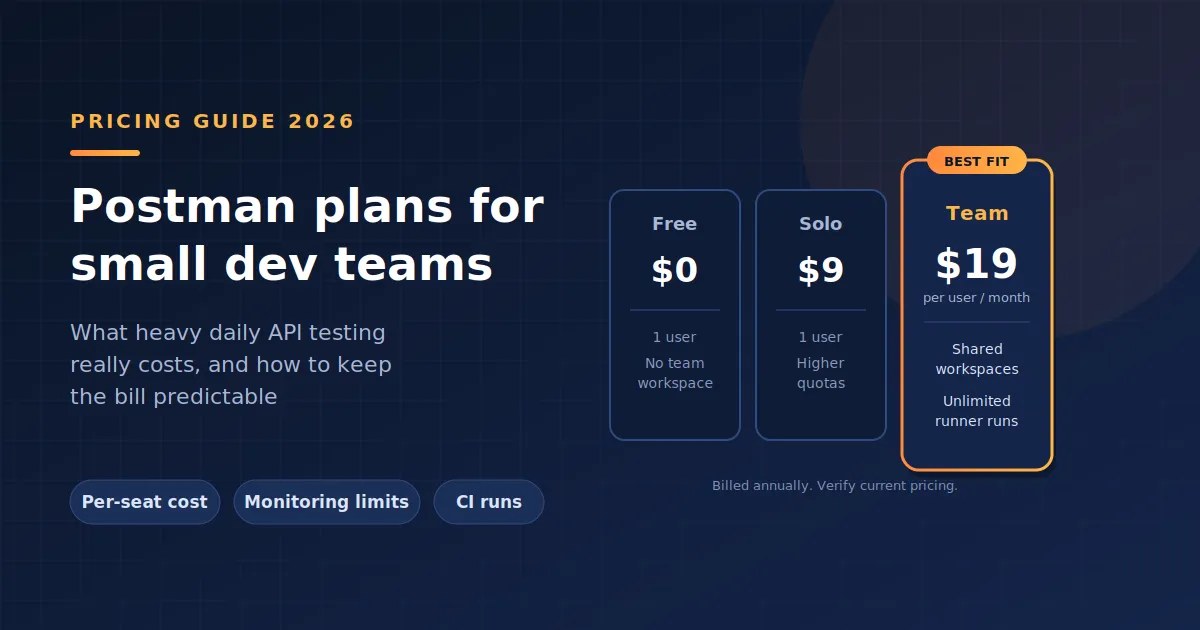
Postman now offers four tiers: Free, Solo, Team and Enterprise. Billed annually, Solo is listed at around $9 per month for a single user, Team at around $19 per user per month, and Enterprise at around $49 per user per month. Monthly billing costs more per seat.
The Free plan covers the core API client and tools, but it is now scoped to a single user. Solo is also built for one person and adds higher quotas and extras. Team is the first plan designed for shared workspaces, while Enterprise adds governance features such as advanced role-based access control and audit logs.
Why the free plan no longer works for teams
The biggest change for small teams is simple: two or more people collaborating in Postman now need the Team plan. Teams that relied on free shared workspaces have moved from paying nothing to paying per seat.
For a solo developer or a freelancer, Free or Solo can still be enough. As soon as a second engineer needs to edit the same collections, Team becomes the realistic starting point.
Where daily test runs count against your limits
For teams running lots of tests, the per-seat price is only part of the picture. How and where you run those tests matters just as much.
Manual and CLI runs
Under the 2026 plans, manual Collection Runner runs are unlimited, and performance test runs are unlimited too. Older plans capped collection runs each month, which used to be a common pain point for test-heavy teams.
Running collections through the Postman CLI on your own machines or CI runners keeps execution off Postman's cloud, which is how most teams wire API tests into their pipelines.
Scheduled runs and monitors
This is where usage-based costs appear. Requests from monitors and scheduled collection runs in the Postman cloud draw from a single monthly monitoring allowance. If you schedule large collections to run several times a day, you can burn through that allowance quickly and need to buy extra blocks of monitoring requests.
A team running a 200-request collection every hour, for example, sends close to 150,000 requests a month from that schedule alone.
What a small team typically pays
On annual billing at the Team rate, a five-person team pays roughly $1,140 a year, and an eight-person team pays roughly $1,824 a year. Add any monitoring add-ons and AI credit overages on top. Enterprise pricing more than doubles the per-seat cost, which rarely makes sense for small teams unless compliance requirements demand it.
Which plan fits which team
A single developer testing their own services will usually be fine on Free, or on Solo if they need higher quotas. A small team of two to fifteen engineers that collaborates on collections and runs tests through CI will usually land on Team. Enterprise is worth evaluating only when you need audit logs, advanced permissions or a private API catalog.
It is also worth comparing Postman against tools that price differently, such as open-source clients or tools that generate tests from real traffic. If you are still deciding what’s the best postman plan for a small dev team that runs lots of api tests every day , this breakdown of the main options and how their costs compare is a useful next read.
Ways to keep costs down
Run automated tests through the CLI in your CI pipeline rather than relying on cloud schedules, so heavy daily runs do not eat into your monitoring allowance. Review seats every quarter and remove inactive users. Use viewer access for people who only need to read collections. Finally, pay annually once you are confident in your team size, since annual billing lowers the per-seat price.
Frequently asked questions
Is the Postman free plan enough for a team of two?
No. Under the 2026 plans, the Free plan is limited to a single user, so two people collaborating in a shared workspace need the Team plan.
Do daily test runs increase my Postman bill?
Manual Collection Runner runs are unlimited, but monitors and scheduled cloud runs draw from a monthly allowance. Exceeding it means buying extra monitoring capacity.
Should a small team pay monthly or annually?
Annual billing is cheaper per seat. Monthly billing makes sense only if your team size is likely to change in the next few months.
Final thoughts
For most small teams that run lots of API tests, the Team plan is the practical choice, as long as heavy runs happen in CI rather than on cloud schedules. Before committing, check current prices, estimate your monthly run volume and compare a few alternatives so the plan you choose still fits as your test suite grow
Enjoyed reading this content? Let the author know!
Your likes, comments, shares, and saves help creators reach more builders.

Loading recommendations
Loading article