
Building and Deploying a Full-Stack Web Application on AWS: A Beginner’s Guide
Learn how to deploy a full-stack web application on AWS using core cloud services, understand the deployment architecture, and apply AWS best practices for security, scalability, and monitoring.

Building and Deploying a Full-Stack Web Application on AWS: A Beginner’s Guide
Cloud computing has changed the way developers build, deploy, and scale applications. Instead of managing physical servers, developers can use cloud platforms such as Amazon Web Services (AWS) to deploy applications quickly and scale them based on demand.
In this article, we will explore how a full-stack web application can be deployed on AWS and understand some of the important AWS services involved in the process.
Why AWS?
AWS provides a large collection of cloud services that can be used for application development, storage, databases, networking, security, monitoring, and deployment.
Some commonly used AWS services include:
- Amazon EC2 – Virtual servers for running applications
- Amazon S3 – Object storage for files and static content
- Amazon RDS – Managed relational databases
- Amazon VPC – Network isolation and configuration
- AWS IAM – Identity and access management
- Amazon CloudWatch – Monitoring and logging
- Elastic Load Balancing – Distributes traffic across servers
- AWS Auto Scaling – Automatically adjusts computing capacity
Understanding these services gives developers a strong foundation for building cloud-based applications.
Basic AWS Architecture
A simple full-stack application can follow this architecture:
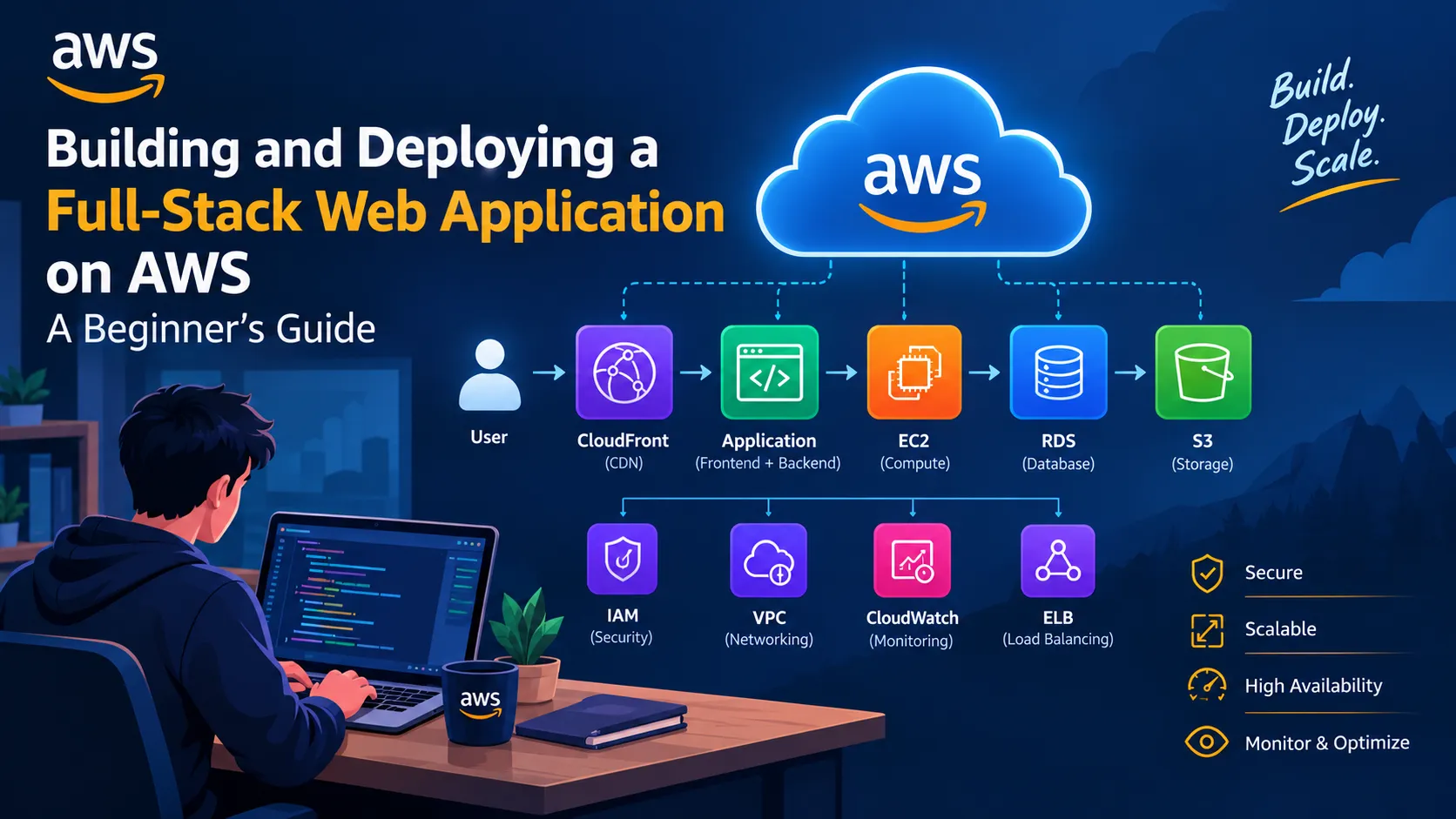
User → Web Application → Backend Server → Database
The frontend provides the user interface, while the backend handles business logic and communicates with the database.
On AWS, the architecture can be extended using services such as EC2, RDS, S3, CloudWatch, IAM, and VPC.
Step 1: Create the Application
The first step is to develop the application locally.
For example, a MERN application can contain:
- React.js for the frontend
- Node.js and Express.js for the backend
- MongoDB or another database
- REST APIs for communication between frontend and backend
Before deploying, the application should be tested locally to make sure the frontend, backend, and database work correctly.
Step 2: Set Up IAM
AWS Identity and Access Management (IAM) controls who can access AWS resources and what actions they are allowed to perform.
Instead of using the root account for everyday tasks, developers should use appropriate IAM identities and permissions.
The principle of least privilege is important here: users and applications should receive only the permissions they actually need.
Step 3: Configure the Network with VPC
Amazon VPC allows us to create an isolated network for AWS resources.
A typical architecture can contain:
- Public subnet
- Private subnet
- Internet Gateway
- Route tables
- Security groups
For example, a web server may be placed in a public subnet while a database can be placed in a private subnet.
This separation improves the security of the application.
Step 4: Deploy the Backend
Amazon EC2 can be used to run the backend application.
The general deployment process is:
- Launch an EC2 instance.
- Configure the required security rules.
- Install the required runtime and dependencies.
- Upload the application.
- Configure environment variables.
- Start the backend server.
- Test the application through its endpoint.
For production applications, additional services such as Elastic Load Balancing and Auto Scaling can be introduced.
Step 5: Store Data Using a Database
Instead of manually managing a database server, developers can use Amazon RDS for supported relational databases.
RDS handles several administrative tasks such as:
- Database provisioning
- Backups
- Monitoring
- Software maintenance
- Scaling options
The application can communicate with the database through a secure private network.
Step 6: Use Amazon S3 for Storage
Amazon S3 provides highly scalable object storage.
It can be useful for storing:
- Images
- Documents
- Backups
- Static website files
- Application assets
S3 is especially useful when an application needs to store large numbers of files without keeping them directly on the application server.
Step 7: Monitor the Application
After deployment, monitoring becomes important.
Amazon CloudWatch can help developers monitor application and infrastructure metrics.
Examples include:
- CPU utilization
- Network activity
- Application logs
- Instance health
- Performance metrics
Monitoring helps developers identify problems before they significantly affect users.
Step 8: Improve Scalability
A major advantage of cloud computing is scalability.
Suppose an application normally receives 1,000 requests per day but suddenly receives 100,000 requests.
Instead of manually adding servers, AWS services such as Auto Scaling and Elastic Load Balancing can help distribute traffic and adjust computing resources according to demand.
This makes the infrastructure more flexible.
Security Best Practices
Security should be considered from the beginning of the project.
Some important practices include:
- Use IAM with least-privilege permissions.
- Avoid storing passwords and API keys directly in source code.
- Keep databases private whenever possible.
- Configure security groups carefully.
- Enable encryption for sensitive data.
- Regularly update dependencies.
- Monitor logs and unusual activity.
- Use HTTPS for application traffic.
What I Learned
Working with AWS provides a better understanding of how modern applications operate beyond local development.
The most important concepts for beginners are not just individual AWS services, but how those services work together.
For example:
IAM → Security
VPC → Networking
EC2 → Computing
RDS → Database
S3 → Storage
CloudWatch → Monitoring
Understanding this relationship makes it easier to design and deploy real-world cloud applications.
Conclusion
AWS provides developers with the infrastructure required to build, deploy, monitor, and scale modern applications.
Starting with core services such as IAM, VPC, EC2, S3, RDS, and CloudWatch is a practical way to develop cloud skills.
For beginners, the best approach is to build a small application, deploy it on AWS, monitor it, and gradually introduce more advanced services.
Cloud computing becomes much easier to understand when you move from learning individual services to building complete solutions with them.
Enjoyed reading this content? Let the author know!
Your likes, comments, shares, and saves help creators reach more builders.

Loading recommendations
Loading article