
SentriPrint: From Fingerprint Sensor to Cloud Attendance System
SentriPrint is our student-built IoT attendance system for the AWS Student Builders Group, replacing paper sign-ins and queues with fingerprint check-in. It uses an AS608 sensor, an ESP32, and a FastAPI backend on AWS EC2. We learned that "using AWS" isn't enough: networking, file permissions, and Nigeria's 2023 Data Protection Act matter. After fixing 403/500 errors and read-only SQLite, we'd harden it with RDS, ALB, HTTPS, IAM roles, and containers.

Motivation and Problem Statement
When I joined AWS Student Builders Group at UNILORIN, we noticed a common problem: manual attendance takes too long and is error-prone. Students wait in lines under the sun to sign a paper sheet, which can get lost or incomplete. I wanted to build a digital attendance system. Fingerprint-based identification seemed a promising approach – almost every student has a unique fingerprint, and biometric scanning would be faster and harder to fudge than writing names. Hence SentriPrint: we aimed to wire a fingerprint sensor to a microcontroller, scan a student’s finger, and immediately send a record of their “check-in” to a cloud database. The big ideas were clear, but as we would discover, the devil is in the details.
Hardware Components
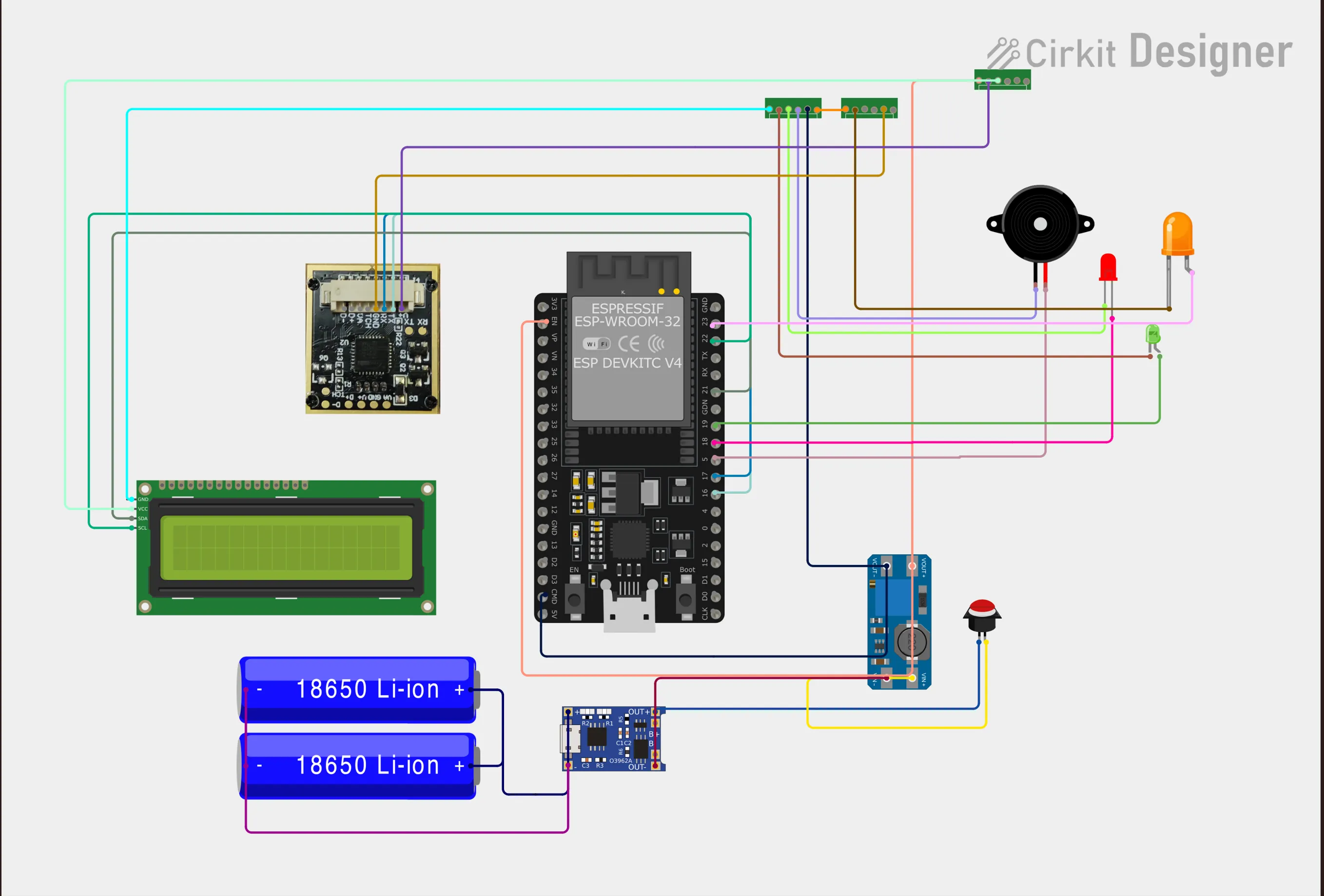
For the fingerprint reader, we chose an AS608 optical fingerprint sensor. This is a small breakout board with a 500 DPI optical sensor and on-board DSP to extract fingerprint features. It’s compact and has a simple serial interface, which is why it’s popular for hobbyist attendance systems. The AS608 requires a 3.3 V supply and draws under 60 mA. It exposes four main pins: V+ (3.3V), GND, TX (serial transmit), and RX (serial receive). We powered it from the 3.3 V regulator on the ESP32 board, and wired its TX/RX to the ESP32’s UART pins. When a finger is placed on the AS608, it captures an image, converts it into a fingerprint ID if enrolled, and sends that ID over UART.
For the microcontroller, we used an ESP32 development board. The ESP32 is convenient because it has built-in Wi-Fi and plenty of GPIOs. We connected the AS608’s TX pin to the ESP32’s RX pin and vice versa, and also wired an LCD screen and a piezo buzzer for feedback. The LCD (a standard 16×2 character display) shows messages like “ID recognized” or “Not found”, and the buzzer beeps on successful scans. For wiring, we simply used jumper wires: AS608’s 3.3 V and GND to the ESP32’s 3.3 V and GND, and TX/RX lines across. In sum, the hardware setup is: fingerprint sensor → ESP32 (powered at 3.3 V) with an LCD and buzzer attached for user feedback.
Firmware & ESP32 Networking
On the ESP32, I wrote Arduino/C++ code to handle the sensor and network. We used a fingerprint library (e.g. Adafruit’s) to enroll and match fingerprints. In the setup, the ESP32 joins our Wi-Fi network (the UNILORIN campus Wi-Fi). In loop, it listens for a finger. Once the AS608 reports a recognized fingerprint ID, the ESP32 makes an HTTP request to our backend server with that ID. For example, the code might build a URL like
http://<serverIP>/attendance?finger_id=123. Using the ESP32’s WiFiClient library, we did something like:1
2
3
4
5
6
7
8
9
10
11
12
13
14
int fingerID = sensor.getFingerprintID();
if (fingerID >= 0) {
// Construct the attendance URL
String url = String("http://") + serverIP + "/attendance?finger_id=" + String(fingerID);
http.begin(url);
int httpCode = http.GET();
http.end();
if (httpCode == 200) {
lcd.print("Welcome!");
tone(buzzerPin, 1000, 100);
} else {
lcd.print("Check-in error");
}
}1
2
3
4
5
6
7
8
9
10
11
12
13
flowchart TD
Sensor["AS608 Fingerprint
Sensor"]
ESP32["ESP32 Board
(Wi-Fi)"]
API["FastAPI App
(Amazon EC2)"]
DB["SQLite DB
(EBS Volume)"]
Sensor -->|UART Serial| ESP32
ESP32 -->|HTTP (Wi-Fi)| API
API -->|SQL Query| DBThis means the ESP32 acts like an IoT client: it reads the fingerprint ID from the AS608 over UART, then sends a simple GET to our FastAPI endpoint. We also included a “device ID” parameter (e.g., for if we had multiple SentriPrint units), though our prototype had just oneThis diagram above shows the flow: the fingerprint sensor sends an ID to the ESP32, which then makes an HTTP request over Wi-Fi to the FastAPI server on EC2. The server looks up (or records) attendance in the SQLite database stored on the EC2’s attached volume.
Backend & Database
For the server, we chose FastAPI (a modern, high-performance Python web framework) running on Ubuntu/Linux. Our main application defined endpoints like
For the server, we chose FastAPI (a modern, high-performance Python web framework) running on Ubuntu/Linux. Our main application defined endpoints like
/attendance. For example, in Python we might write:1
2
3
4
5
6
7
8
9
10
11
12
13
async def record_attendance(fingerprint_id: int):
cursor.execute("SELECT id FROM students WHERE fingerprint_id=?", (fingerprint_id,))
result = cursor.fetchone()
if not result:
raise HTTPException(status_code=404, detail="Fingerprint not registered")
student_id = result[0]
try:
cursor.execute("INSERT INTO attendance(student_id) VALUES (?)", (student_id,))
conn.commit()
except sqlite3.IntegrityError:
raise HTTPException(status_code=400, detail="Attendance already recorded")
return {"status": "ok", "student_id": student_id}In other words, the API looks up which student has that fingerprint, then inserts a new attendance row. We start the server with Uvicorn; for local testing I often ran:
uvicorn app:app --reload --host 0.0.0.0 --port 8000
The crucial part is
--host 0.0.0.0, which makes the server listen on all interfaces. (By default FastAPI binds to 127.0.0.1, which would not accept connections from the ESP32 on the network.)For data storage, we used SQLite as a simple embedded database. It was convenient because it required no separate server – the entire DB is a single file. For example, at startup we created tables like:
1
2
3
4
5
6
7
8
9
10
11
12

CREATE TABLE IF NOT EXISTS students (
id INTEGER PRIMARY KEY,
name TEXT,
fingerprint_id INTEGER UNIQUE
);
CREATE TABLE IF NOT EXISTS attendance (
id INTEGER PRIMARY KEY,
student_id INTEGER,
timestamp DATETIME DEFAULT CURRENT_TIMESTAMP,
UNIQUE(student_id, date(timestamp))
);
This schema enforces that each student can only check in once per day (via the UNIQUE on student_id + date). Initially, SQLite worked fine on our local machine. But when we deployed the server to AWS (an Ubuntu EC2), we encountered the infamous
SQLite error: attempt to write a readonly database. As the SQLite documentation notes, this error means SQLite was able to open the file but could not write to it – usually a permissions problem. In our case, the directory or file had restrictive permissions. The fix was to chmod the database file (and its folder) so that the ubuntu user could write. After that, inserts (like calling conn.commit()) worked without error. We learned that on Linux (and AWS) you must ensure the DB file is owned by the same user running the app, and the directory is writable.Along the way we handled error cases in the API. For example, if the finger ID isn’t in our
students table, we returned a 404. If an insert failed due to the UNIQUE constraint (same student checking in twice), we returned a 400. In early testing we even added a 403 for “attendance closed” (for instance, we tried gating check-ins after a certain time), but that proved confusing and we ultimately simplified our logic. The end result was a running backend that could accept ESP32 requests and store attendance records in SQLite.Deployment on AWS
For deployment, we spun up an Amazon EC2 instance (we used a small t3.micro in the Africa (Cape Town) region, since at the time AWS’s nearest full region to Nigeria was Cape Town). We installed Python and our app on that instance. We attached an Amazon EBS (gp2) volume for persistent storage (which held our SQLite DB file). AWS documentation confirms that the Lagos Local Zone (af-south-1-los-1a) supports gp2 EBS volumes, and that is what our EC2 root volume was by default. We also set up a default VPC and a Security Group allowing inbound traffic on port 8000 (for our FastAPI) and port 22 (SSH).
For deployment, we spun up an Amazon EC2 instance (we used a small t3.micro in the Africa (Cape Town) region, since at the time AWS’s nearest full region to Nigeria was Cape Town). We installed Python and our app on that instance. We attached an Amazon EBS (gp2) volume for persistent storage (which held our SQLite DB file). AWS documentation confirms that the Lagos Local Zone (af-south-1-los-1a) supports gp2 EBS volumes, and that is what our EC2 root volume was by default. We also set up a default VPC and a Security Group allowing inbound traffic on port 8000 (for our FastAPI) and port 22 (SSH).
Once the code was on EC2, we launched the FastAPI app under Uvicorn on port 8000. We pointed our ESP32 code to the EC2’s public IP (or a DNS name). CloudWatch was used minimally for metrics: at least the EC2 default metrics (CPU, network). We also configured CloudWatch Logs to capture our Uvicorn output for debugging. For example, seeing the logs helped us diagnose the permission errors above.
Because we initially tested locally, we also tried tunneling via Cloudflare Tunnel (cloudflared), which can expose a local server to the internet over HTTPS. That worked, but we realized for reliability it was easier to put both device and server on the same network: we connected the ESP32 to the campus Wi-Fi as well, so it could directly reach the EC2 instance’s public address. This eliminated many network/NAT headaches.
Nigeria Data Residency & AWS Local Zone
Early on, one judge pointed out “there are no data centers in Nigeria.” Strictly speaking, that’s misleading. Nigeria does have commercial data centers (e.g. Rack Centre, Rackspace Nigeria, etc.), and AWS in particular has expanded its footprint: AWS now operates a Lagos Local Zone (
af-south-1-los-1a) under the Africa (Cape Town) Region. A Local Zone isn’t a full region, but it does mean AWS servers (EC2 instances, ALBs, ECS/EKS) can run physically in Lagos. For example, the AWS site lists “Lagos: ALB (Application Load Balancer) ✔, Amazon EC2 ✔, Amazon VPC ✔, etc.” in the Lagos Local Zone.This is highly relevant to data protection laws. Nigeria’s 2023 Data Protection Act (NDPA) doesn’t flat-out ban cross-border data flow, but it does state that personal data should not leave Nigeria without “adequate safeguards”. In other words, you either keep regulated data in-country or meet certain conditions (like consent or contracts) for transfer. In our prototype, we didn’t store sensitive personal data beyond student IDs – but had we needed strict residency, we could have launched our EC2 in the Lagos Local Zone instead of Cape Town. One caveat: the Lagos Local Zone does not include Amazon RDS or native S3 at this time. So a production version of SentriPrint would either use managed services in a neighboring region or use AWS Outposts in Nigeria.
To align with the NDPA (Nigerian Data Protection Act), we also make sure to encrypt all traffic (the sensor→ESP32 link is local, and ESP32→FastAPI can use HTTPS). The FastAPI server itself only holds minimal data (student IDs, timestamps), and we can easily apply AWS KMS encryption on the EC2/EBS side if needed. The takeaway: while the judge’s comment was not technically correct, it highlighted an important nuance: when building real systems for Nigeria, plan for data residency. For our article, it’s enough to note that AWS does have a Lagos edge location, and Nigeria’s law requires you to justify any cross-border transfer. In our case, since attendance data are student biometrics, we emphasized local hosting (or encrypted channels) to be safe.
Challenges and Failures
SentriPrint’s journey was full of learning moments. Networking issues: In early tests, the FastAPI server was only accessible from
localhost. I forgot to use --host 0.0.0.0, so the ESP32’s requests were refused. Once fixed, the device could reach the server. We also wrestled with local vs. cloud: at first we ran everything on my laptop and even used a Cloudflare Tunnel to simulate an internet endpoint. It turned out easier to put the ESP32 on the same Wi-Fi as the server. That way, our server’s public IP was reachable directly and we didn’t need a dynamic DNS or tunnel.HTTP errors: We saw puzzling status codes. For example, our first full test gave a
403 Forbidden when the device posted attendance. That turned out to be a vestige of our code where we returned 403 if "attendance was closed" or duplicate. We simplified that logic: duplicate inserts now return 400 (handled via SQLite’s UNIQUE constraint) and we removed any time-gating that triggered 403.Database errors: As mentioned, a critical bug was the SQLite “attempt to write a readonly database” error. This really threw us off until we Googled it. It was exactly the textbook case: SQLite could open the DB file but not write to it. We verified the file’s permissions and realigned the user/ownership. That fixed our 500 errors and the REST endpoint started returning 200 on writes.
Device reachability: We initially tested on
localhost:8000 and the ESP32 got no response (it tried to contact 127.0.0.1 from the ESP’s perspective, which is itself). We learned to use the actual LAN IP of the server. When we moved to AWS, we updated the code to hit the EC2’s public IP. We also opened the EC2’s security group properly (once we finally stopped forgetting to allow port 8000/22).In short, each failure had a root cause: network host binding, file permissions, wrong IP, firewall rules, and so on. The troubleshooting itself was a huge learning experience – as the saying goes, “the cloud won’t save you from networking 101”!
Architecture and Services: Prototype vs. Production
At this point, SentriPrint was functional but still a prototype. To scale it up, we’d adopt more robust AWS services. Here’s a comparison:
| AWS Service | Prototype (SentriPrint MVP) | Production (Scalable Solution) |
|---|---|---|
| Amazon EC2 | One t3.micro instance running FastAPI app | Auto Scaling group of larger EC2 instances (e.g. C5/R5) |
| Amazon EBS (Storage)Amazon EBS (Storage) | gp2 (default) EBS volume on EC2 | gp3 or io1/2 EBS volumes with provisioned IOPS |
| AWS Service | Prototype (SentriPrint MVP) | Production (Scalable Solution) |
| Amazon EC2 | One t3.micro instance running FastAPI app | Auto Scaling group of larger EC2 instances (e.g. C5/R5) |
| Amazon EBS (Storage) | gp2 (default) EBS volume on EC2 | gp3 or io1/2 EBS volumes with provisioned IOPS |
| Amazon VPC | Default VPC with a single public subnet | Custom VPC with multiple AZs, subnets (public/private) |
| Security Groups | Open to wide range (HTTP 8000/80, SSH) for testing | Lockdown only needed ports (e.g. HTTPS 443, SSH 22) |
| IAM Roles | Not used (AWS credentials if any were static) | IAM instance profile and fine-grained IAM roles/policies |
| Application Load Balancer | None (direct to EC2) | ALB in front of instances (with HTTPS via ACM certs) |
| Amazon RDS | SQLite file on EC2 instance | Amazon RDS (e.g. MySQL/Aurora) for a managed relational DB |
| Amazon S3 | None | S3 for backup (DB snapshots), logs, and any static assets |
| ECS/EKS (Containers) | None | Containerize API (ECS/EKS) for easier deployment/updates |
| CloudWatch | Basic EC2 metrics (default) | Full monitoring: custom metrics, CloudWatch Logs, Alarms |
| AWS Local Zones / Outposts | (Not used explicitly) | Use Lagos Local Zone or Outposts for data residency |
In our prototype, we installed FastAPI directly on EC2 and just used SQLite on its root volume. In a production design, we would migrate the database to Amazon RDS (managed SQL) for scalability and backups. We’d put an Application Load Balancer (ALB) in front, use HTTPS (via AWS Certificate Manager), and run multiple EC2 instances (possibly in containers on ECS/EKS). We’d also use AWS Identity and Access Management (IAM) roles instead of any embedded credentials, and CloudWatch and CloudTrail for observability and auditing. The Lagos Local Zone (af-south-1-los-1a) could be leveraged for low-latency access within Nigeria, or even AWS Outposts for full data-center-level residency if needed.
Conclusion and Next Steps
Building SentriPrint taught me that an end-to-end IoT project touches many layers of the stack. The key lessons include:
- Design first, wire later: In hindsight, I would have sketched the full architecture before wiring anything. Defining the API contract, database schema, and network flow first might have saved debug time.
- Managed services simplify scaling: We used SQLite and a single EC2 for speed, but a mature system would use RDS, S3, and load balancers. AWS’s best practices encourage moving from a single-server monolith to managed services as you grow.
- Permissions matter: Our sqlite error was a reminder that file and OS permissions can silently kill a project. On AWS, always double-check IAM roles, file owners, and security groups.
- Local infrastructure counts: For compliance and latency, AWS’s Nigeria local zone can be key.
We’d plan to run critical data in Lagos to meet local regulations (NDPA) and get faster access.
- Iterate and simplify: We tried fancy things (like cloudflared tunnels), but often the simplest solution (same LAN access) was best for a prototype.
In summary, SentriPrint went from a hardware hackathon prototype to a cloud-connected system. It solved the immediate problem (students can now “check in” quickly), but more importantly it exposed me to real-world issues: debugging hardware-software integration, reading technical error messages, and adapting a solution for the cloud. The final system is fully functional, but the real product now would be the experience and best practices we documented. The next steps would be to rewrite the backend for production (RDS, ALB, containerized), add a frontend (maybe mobile app or web dashboard), and potentially integrate with AWS Cognito for student identities. But for now, SentriPrint stands as a proof-of-concept of cloud+edge engineering, and a personal lesson in building not just an idea, but a working system that actually works from end to end.
Sources: AWS documentation and industry references were used to understand services and compliance. For example, AWS notes that a Lagos Local Zone (af-south-1-los-1a) exists under Africa (Cape Town), and that Local Zones support EC2/EBS (gp2) and ALBs. Nigeria’s Data Protection Act 2023 is interpreted by legal sources as requiring “adequate” safeguards for any personal data transfer out of Nigeria. The AS608 sensor’s specifications (3.3 V, 500 dpi) come from its product info. SQLite error behavior is documented in SQLite resources. These sources underpinned our design decisions and troubleshooting.
Once again, I'm Chukwunta Chidera Joshua, I'm Passionate about Secure Cloud IOT, Community Builder and my current area of interest is Platform Engineering, aka the Developer's developers.
Enjoyed reading this content? Let the author know!
Your likes, comments, shares, and saves help creators reach more builders.

Loading recommendations
Loading article