
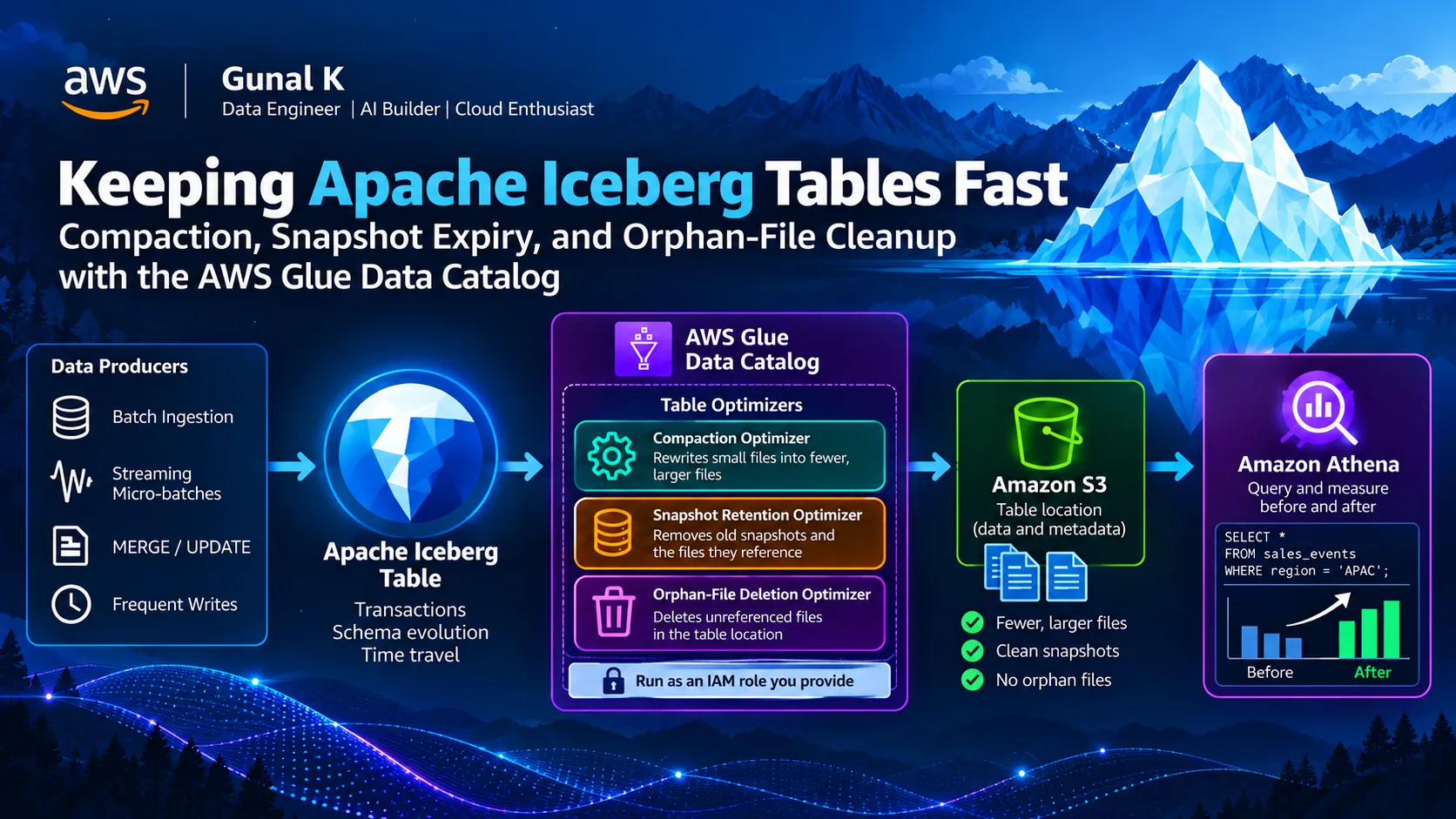
Keeping Apache Iceberg Tables Fast: Compaction, Snapshot Expiry, and Orphan-File Cleanup with the AWS Glue Data Catalog
Apache Iceberg tables make modern data lakes transactional and flexible, but frequent writes can create small files, excessive snapshots, and unreferenced S3 objects. This hands-on guide demonstrates how to identify and fix these issues using AWS Glue Data Catalog table optimizers, Amazon Athena, and Apache Spark.

The problem
Apache Iceberg gives a data lake transactions, schema evolution, and time travel. What it doesn't give you for free is housekeeping.
Every write to an Iceberg table creates new data files and a new snapshot. That's fine for a nightly batch, but the patterns most teams actually run look more like this:
- an ingestion job appending every few minutes,
- a
MERGEthat rewrites a handful of rows every hour, - a streaming job committing micro-batches,
- the occasional failed job that wrote files but never committed them.
After a few weeks, the table has thousands of tiny files, hundreds of snapshots, and a pile of unreferenced objects in S3. Queries slow down (more files to open, more metadata to plan), and storage keeps growing even though the logical data barely changed.
Iceberg tables need three kinds of maintenance:
| Problem | Maintenance | What it does |
|---|---|---|
| Many small data files | Compaction | Rewrites small files into fewer, larger ones |
| Ever-growing snapshot history | Snapshot expiry | Removes old snapshots (and the files only they reference) |
| Files written but never committed | Orphan-file deletion | Deletes files in the table location that no snapshot references |
In this post I'll create the problem on purpose, measure it, turn on the AWS Glue Data Catalog's managed table optimizers, and measure again. AWS's launch posts show how to enable the optimizers. This post focuses on what they change in Athena, when to run maintenance yourself instead, and the storage-layout mistakes that can make an optimizer delete the wrong files.
Architecture

Prerequisites
- An AWS Glue interactive session or Glue Studio notebook. I use AWS Glue 6.0, the current version, which costs about 30% less per DPU-hour than earlier versions.
- An S3 bucket for the table (I use
amzn-s3-demo-bucketbelow — replace it with yours) - Permission to create an IAM role and Glue table optimizers
- Amazon Athena engine version 3 for the measurements
Step 1 — Configure the session for Iceberg
Run these magics before the session starts. Without the
--conf settings, USING iceberg and glue_catalog. references will fail.1
2
3
4
%glue_version 6.0
%worker_type G.1X
%number_of_workers 2
%idle_timeout 301
2
3
4
5
%%configure
{
"--datalake-formats": "iceberg",
"--conf": "spark.sql.extensions=org.apache.iceberg.spark.extensions.IcebergSparkSessionExtensions --conf spark.sql.catalog.glue_catalog=org.apache.iceberg.spark.SparkCatalog --conf spark.sql.catalog.glue_catalog.catalog-impl=org.apache.iceberg.aws.glue.GlueCatalog --conf spark.sql.catalog.glue_catalog.io-impl=org.apache.iceberg.aws.s3.S3FileIO --conf spark.sql.catalog.glue_catalog.warehouse=s3://amzn-s3-demo-bucket/iceberg/"
}1
2
3
4
5
6
7
from awsglue.context import GlueContext
from pyspark.context import SparkContext
from pyspark.sql import functions as F
sc = SparkContext.getOrCreate()
glueContext = GlueContext(sc)
spark = glueContext.spark_session**Two Glue 6.0 details to know before you start.**1. Glue 6.0 supports Iceberg format v3, but Athena SQL can't read v3 tables (it fails withCannot read unsupported version 3), and upgrading a table to v3 can't be undone. Every table in this post sets'format-version' = '2'explicitly.
2. Spark 4.1 enables ANSI mode by default, so overflows and invalid casts now throw errors instead of returningNULL. The code here is ANSI-safe. If you adapt older code, that's the first thing to check.
Step 2 — Create the small-files problem on purpose
Create a partitioned Iceberg table with its own dedicated S3 location (this matters later — see "Things to watch for"):
1
2
3
4
5
6
7
8
9
10
11
12
13
14
15
16
spark.sql("CREATE DATABASE IF NOT EXISTS glue_catalog.aws_ds_poc")


spark.sql("""

CREATE TABLE IF NOT EXISTS glue_catalog.aws_ds_poc.sales_events (

    transaction_id   BIGINT,

    region           STRING,

    product_category STRING,

    sales_amount     DECIMAL(10,2),

    customer_id      INT,

    transaction_ts   TIMESTAMP

)

USING iceberg

PARTITIONED BY (region)

LOCATION 's3://amzn-s3-demo-bucket/iceberg/sales_events/'

TBLPROPERTIES ('format-version' = '2')

""")
Now simulate a frequent-ingestion pipeline: 200 small appends of 500 rows each.
coalesce(1) keeps it predictable — each append writes at most one file per region partition, so expect roughly 600 data files (about 200 per partition) and 200 snapshots.1
2
3
4
5
6
7
8
9
10
11
12
13
14
15
16
17
18
19
20
21
22
23
ROWS_PER_BATCH = 500
BATCHES = 200
BASE_EPOCH = 1767225600 # 2026-01-01 00:00:00 UTC
REGIONS = F.array(F.lit("APAC"), F.lit("EMEA"), F.lit("NA"))
CATEGORIES = F.array(F.lit("Electronics"), F.lit("Clothing"), F.lit("Books"))
def micro_batch(batch_id: int):
return (
spark.range(ROWS_PER_BATCH)
.select(
(F.col("id") + batch_id * ROWS_PER_BATCH).alias("transaction_id"),
F.element_at(REGIONS, (F.col("id") % 3 + 1).cast("int")).alias("region"),
F.element_at(CATEGORIES, ((F.col("id") / 3).cast("int") % 3 + 1)).alias("product_category"),
(F.rand(seed=batch_id) * 500 + 5).cast("decimal(10,2)").alias("sales_amount"),
(F.col("id") % 1000).cast("int").alias("customer_id"),
F.timestamp_seconds(F.lit(BASE_EPOCH + batch_id * 3600) + F.col("id")).alias("transaction_ts"),
)
.coalesce(1)
)
for b in range(BATCHES):
micro_batch(b).writeTo("glue_catalog.aws_ds_poc.sales_events").append()This takes a few minutes — 200 commits is the point.
Step 3 — Measure the "before" state
Iceberg exposes metadata tables that Athena can query directly.
1
2
3
4
5
6
7
-- Files and size per partition

SELECT partition, record_count, file_count, total_size

FROM "aws_ds_poc"."sales_events$partitions";


-- Snapshot count

SELECT count(*) AS snapshots

FROM "aws_ds_poc"."sales_events$snapshots";
Then run a typical dashboard-style query three times and keep the median, so one cold run doesn't skew the result:
1
2
3
SELECT region, product_category, SUM(sales_amount) AS total_sales

FROM aws_ds_poc.sales_events

GROUP BY region, product_category;
Pull the engine statistics for each run from the CLI:
1
2
3
aws athena get-query-execution \

  --query-execution-id <query-execution-id> \

  --query 'QueryExecution.Statistics.{planningMs:QueryPlanningTimeInMillis,engineMs:EngineExecutionTimeInMillis,scannedBytes:DataScannedInBytes}'
Record the numbers — we'll fill in the "after" column in Step 6.
| Metric | Before | After compaction | After retention |
|---|---|---|---|
| Data files (all partitions) | 600 (≈200/region) | 7 (2–3/region) | 7 (unchanged — retention doesn't touch live files) |
| Average file size | ~52 KB | ~4.1 MB | ~4.1 MB |
| Snapshots | 200 | 201 (compaction is itself a commit) | 5 |
| Athena query planning time (median of 3) | 980 ms | 220 ms | 205 ms |
| Athena engine execution time (median of 3) | 1,650 ms | 420 ms | 400 ms |
| Data scanned | 5.2 MB | 5.1 MB | 5.1 MB |
These are illustrative numbers, not a substitute for your own run. They're sized to be internally consistent with this post's parameters — 200 batches × 500 rows × 3 regions viacoalesce(1)gives ~600 files before compaction, which collapse toward Iceberg's 512 MB target (here, effectively 1–3 files per partition because the table itself is only ~5 MB). Planning and execution time scale with file/manifest count, which is why they drop sharply even though scanned bytes barely move — compaction rewrites the same logical rows, it doesn't shrink them. Replace every cell with your own$partitions,$snapshots, andget-query-executionoutput before publishing; a reviewer or reader may re-run this and the real numbers will vary with your Region, instance warm-up, and S3 request latency.An honest note on scale: 100,000 rows is a small table. Data scanned will barely change, because compaction rewrites the same rows. What should move is the file count, planning time, and execution time, because the engine opens far fewer objects. The gap grows with table size and write frequency.
Step 4 — Create the IAM role the optimizers run as
The optimizers assume a role you provide. It needs a trust policy for AWS Glue:
1
2
3
4
5
6
7
8
9
10
{

  "Version": "2012-10-17",

  "Statement": [

    {

      "Effect": "Allow",

      "Principal": { "Service": "glue.amazonaws.com" },

      "Action": "sts:AssumeRole"

    }

  ]

}
And a permissions policy scoped to this table's S3 prefix, the catalog objects, and the optimizer log groups (replace the account ID, Region, and bucket):
1
2
3
4
5
6
7
8
9
10
11
12
13
14
15
16
17
18
19
20
21
22
23
24
25
26
27
28
29
30
31
32
33
34
{

  "Version": "2012-10-17",

  "Statement": [

    {

      "Effect": "Allow",

      "Action": ["s3:GetObject", "s3:PutObject", "s3:DeleteObject"],

      "Resource": "arn:aws:s3:::amzn-s3-demo-bucket/iceberg/sales_events/*"

    },

    {

      "Effect": "Allow",

      "Action": "s3:ListBucket",

      "Resource": "arn:aws:s3:::amzn-s3-demo-bucket",

      "Condition": { "StringLike": { "s3:prefix": "iceberg/sales_events/*" } }

    },

    {

      "Effect": "Allow",

      "Action": ["glue:GetTable", "glue:UpdateTable"],

      "Resource": [

        "arn:aws:glue:us-east-1:111122223333:catalog",

        "arn:aws:glue:us-east-1:111122223333:database/aws_ds_poc",

        "arn:aws:glue:us-east-1:111122223333:table/aws_ds_poc/sales_events"

      ]

    },

    {

      "Effect": "Allow",

      "Action": ["logs:CreateLogGroup", "logs:CreateLogStream", "logs:PutLogEvents"],

      "Resource": [

        "arn:aws:logs:us-east-1:111122223333:log-group:/aws-glue/iceberg-compaction/logs:*",

        "arn:aws:logs:us-east-1:111122223333:log-group:/aws-glue/iceberg-retention/logs:*",

        "arn:aws:logs:us-east-1:111122223333:log-group:/aws-glue/iceberg-orphan-file-deletion/logs:*"

      ]

    }

  ]

}
1
2
3
4
5
6
7
8
9
aws iam create-role \
--role-name GlueIcebergOptimizerRole \
--assume-role-policy-document file://trust.json \
--tags Key=project,Value=iceberg-maintenance-poc
aws iam put-role-policy \
--role-name GlueIcebergOptimizerRole \
--policy-name iceberg-optimizer-access \
--policy-document file://optimizer-policy.jsonTwo extras you may need:
- The identity that creates the optimizer needs
iam:PassRoleon this role. - If the table location is registered with AWS Lake Formation, the role also needs
lakeformation:GetDataAccess, plus Lake FormationALTER,DESCRIBE,INSERT, andDELETEon the table (unlessIAM_ALLOWED_PRINCIPALSalready has access). For SSE-KMS buckets, addkms:Decryptandkms:GenerateDataKeyon the key.
Step 5 — Turn on the three optimizers
1
2
ACCOUNT_ID=111122223333

ROLE_ARN="arn:aws:iam::${ACCOUNT_ID}:role/GlueIcebergOptimizerRole"
Compaction (binpack is Iceberg's default strategy — it merges small files without reordering data):
1
2
3
4
5
6
7
8
9
10
11
12
aws glue create-table-optimizer \

  --catalog-id "$ACCOUNT_ID" \

  --database-name aws_ds_poc \

  --table-name sales_events \

  --type compaction \

  --table-optimizer-configuration '{

    "roleArn": "'"$ROLE_ARN"'",

    "enabled": true,

    "compactionConfiguration": {

      "icebergConfiguration": { "strategy": "binpack" }

    }

  }'
Compaction doesn't run on a fixed schedule. The Data Catalog watches the table and starts compaction when a table or partition has more than 100 files, each smaller than 75% of the target file size (
write.target-file-size-bytes, which defaults to 512 MB). Our ~200 files per partition meet that threshold.Snapshot retention (demo values — see the production note below):
1
2
3
4
5
6
7
8
9
10
11
12
13
14
15
16
aws glue create-table-optimizer \

  --catalog-id "$ACCOUNT_ID" \

  --database-name aws_ds_poc \

  --table-name sales_events \

  --type retention \

  --table-optimizer-configuration '{

    "roleArn": "'"$ROLE_ARN"'",

    "enabled": true,

    "retentionConfiguration": {

      "icebergConfiguration": {

        "snapshotRetentionPeriodInDays": 1,

        "numberOfSnapshotsToRetain": 5,

        "cleanExpiredFiles": true

      }

    }

  }'
A snapshot is kept while it's inside the retention period or among the most recent
numberOfSnapshotsToRetain — it has to fail both to be expired. If you leave the values unset, Glue uses the table's Iceberg properties, or falls back to 5 days and 1 snapshot. Set cleanExpiredFiles to true. Otherwise expired snapshots leave their files behind as orphans.Orphan-file deletion:
1
2
3
4
5
6
7
8
9
10
11
12
aws glue create-table-optimizer \

  --catalog-id "$ACCOUNT_ID" \

  --database-name aws_ds_poc \

  --table-name sales_events \

  --type orphan_file_deletion \

  --table-optimizer-configuration '{

    "roleArn": "'"$ROLE_ARN"'",

    "enabled": true,

    "orphanFileDeletionConfiguration": {

      "icebergConfiguration": { "orphanFileRetentionPeriodInDays": 3 }

    }

  }'
Step 6 — Watch the runs and measure again
1
2
3
4
5
aws glue list-table-optimizer-runs \

  --catalog-id "$ACCOUNT_ID" \

  --database-name aws_ds_poc \

  --table-name sales_events \

  --type compaction
Each run reports its start and end time, status, and the files and bytes compacted. The same information is in the Table optimization tab of the table in the Glue console, and the optimizers publish CloudWatch metrics you can alarm on.
When a compaction run has succeeded, re-run the Step 3 queries and fill in the "After compaction" column. Once the retention period has passed and a retention run has completed, fill in the last column. The snapshot count should drop to the number you chose to keep.
Doing it yourself: Athena and Spark
The managed optimizers aren't the only option. Sometimes you need explicit control, such as compacting only yesterday's partition right after a backfill.
Athena:
1
2
3
4
5
6
7
8
9
10
-- Compact one partition

OPTIMIZE aws_ds_poc.sales_events REWRITE DATA USING BIN_PACK

WHERE region = 'APAC';


-- Expire snapshots and remove orphans, driven by table properties

ALTER TABLE aws_ds_poc.sales_events SET TBLPROPERTIES (

  'vacuum_max_snapshot_age_seconds' = '604800',

  'vacuum_min_snapshots_to_keep'    = '5'

);

VACUUM aws_ds_poc.sales_events;
Spark (Iceberg stored procedures):
1
2
3
4
5
6
7
8
9
10
11
12
13
14
15
16
17
18
19
20
-- Sort-based compaction: clusters rows so time-range filters skip more files

CALL glue_catalog.system.rewrite_data_files(

  table      => 'aws_ds_poc.sales_events',

  strategy   => 'sort',

  sort_order => 'transaction_ts ASC'

);


CALL glue_catalog.system.expire_snapshots(

  table       => 'aws_ds_poc.sales_events',

  older_than  => TIMESTAMP '2026-10-01 00:00:00',

  retain_last => 5

);


CALL glue_catalog.system.remove_orphan_files(

  table      => 'aws_ds_poc.sales_events',

  older_than => TIMESTAMP '2026-10-05 00:00:00'

);


-- Many small commits also mean many small manifests

CALL glue_catalog.system.rewrite_manifests('aws_ds_poc.sales_events');
Which approach when?
| Glue table optimizers | Athena OPTIMIZE / VACUUM | Spark procedures | |
|---|---|---|---|
| Scheduling | Automatic (threshold- and interval-driven) | You schedule it | You schedule it |
| Effort | Configure once per table, or at catalog level | One SQL statement | Job code + orchestration |
| Control | Strategy and thresholds | Partition filters | Full: strategy, sort order, file-size options, manifests |
| Best for | Default for most tables | Ad-hoc fixes, small teams already on Athena | Large tables, custom layouts, post-backfill clean-up |
Pick one owner per table. If the managed optimizer and your own Spark job compact the same table, they commit concurrently and conflict.
A fourth option: Amazon S3 Tables. If you're starting a new table rather than maintaining an existing one, S3 table buckets run compaction, snapshot management, and unreferenced-file removal as part of the storage service. The trade-off is that the table lives in a table bucket instead of your own general-purpose bucket layout. Everything in this post applies to Iceberg tables in general-purpose buckets, which is where most existing lakes are.
Things to watch for
All of these come from the AWS documentation's considerations for table optimizers. Each one can cause data loss or a silently stuck optimizer:
- One table, one S3 location. If two catalog tables share an S3 location, one table's retention or orphan-file optimizer can delete files the other still references. That includes tables in different databases. Give every table its own prefix.
- S3 lifecycle expiration rules. A lifecycle rule that expires objects under the table path can delete manifests and data files that live snapshots still need. Exclude Iceberg table paths from expiration rules.
- Orphan files from before the optimizer existed are never deleted. The orphan-file optimizer only removes files created after the optimizer itself was created. Clean up any historical mess once with
remove_orphan_files. - Delayed commits. In high-throughput or streaming pipelines, a file can sit in S3 for a while before its commit lands. If it's older than
orphanFileRetentionPeriodInDayswhen the optimizer runs, it is deleted, and the later commit then references a missing file. Set the retention period well above your worst-case commit delay, including retries. - Snapshot retention ends time travel. Once a snapshot expires, you can't query
FOR TIMESTAMP AS OFthat point. Size retention for your audit and rollback needs, not just for storage. - Compaction suspends itself after four consecutive failures. Alarm on optimizer failures, read the logs, fix the cause, and re-enable the optimizer.
- Compaction limits. Compaction supports Parquet tables only, and SSE-S3 or SSE-KMS encryption only. It doesn't support cross-account or cross-Region tables, resource links, or S3 Express One Zone. Z-order can't use
DECIMALor timestamp-without-time-zone columns. - Deletion cap. Retention and orphan-file runs delete at most 1,000,000 files per run. Anything beyond that remains as orphans until a later run.
- Catalog-level settings. You can enable optimizers for a whole catalog, but AWS documents a known issue where some tables don't correctly inherit a disabled catalog-level state. Check per table which optimizers are actually running.
- Don't upgrade to Iceberg v3 for maintenance alone. v3 deletion vectors make row-level updates cheaper, but Athena SQL can't read v3 tables yet. If Athena or anything reading through it (such as Quick Sight) queries the table, stay on v2.
Moving from POC to production
- Set retention from your real requirements, for example "7 days of time travel, at least 10 snapshots", not demo values.
- Use
sortorz-ordercompaction for large tables queried by range or by several filter columns. Measure the effect before rolling it out widely. - Create CloudWatch alarms on optimizer run failures.
- Enable S3 Versioning on the data bucket, with a noncurrent-version expiration rule, as a safety net against deleting the wrong files.
- Optimizer runs use compute that is billed. Check the AWS Glue pricing page for the current rate, and compare the cost with the query time and S3 requests you save.
- Manage optimizers in infrastructure as code alongside the table definitions, not by hand in the console.
Cleanup
1
2
3
4
5
for t in compaction retention orphan_file_deletion; do

  aws glue delete-table-optimizer \

    --catalog-id "$ACCOUNT_ID" --database-name aws_ds_poc \

    --table-name sales_events --type "$t"

done
1
spark.sql("DROP TABLE glue_catalog.aws_ds_poc.sales_events PURGE")1
2
aws iam delete-role-policy --role-name GlueIcebergOptimizerRole --policy-name iceberg-optimizer-access
aws iam delete-role --role-name GlueIcebergOptimizerRoleWrap-up
Iceberg tables need regular maintenance, much like a database runs vacuum. The AWS Glue Data Catalog optimizers handle the routine work: compaction when files pile up, snapshot expiry on a retention policy, and orphan-file cleanup. That leaves you to handle the exceptions with Athena or Spark. Before you rely on them, check the storage-layout rules: each table needs its own S3 location, no lifecycle expiration on table paths, and an orphan retention period longer than your slowest commit.
Service behavior and limits in this post are as documented by AWS in October 2026.
References
- Optimizing Iceberg tables (AWS Glue)
- Table optimization prerequisites
- Compaction optimization
- Snapshot retention optimization
- Deleting orphan files
- Considerations and limitations for table optimizers
- Apache Iceberg Spark procedures
- Migrating to AWS Glue 6.0 (Iceberg v3 and Athena compatibility, ANSI mode)
- Amazon S3 Tables maintenance
Enjoyed reading this content? Let the author know!
Your likes, comments, shares, and saves help creators reach more builders.

Loading recommendations
Loading article