
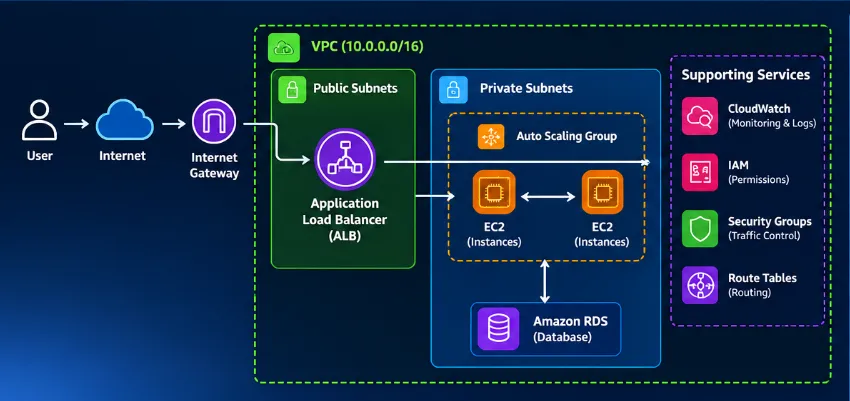
What happens when a user clicks “Login” on a web application running on AWS?
The request doesn't simply go to an EC2 instance.

It travels through multiple layers — networking, routing, load balancing, security, compute, database, IAM, and monitoring — before a response reaches the user.
In this article, I break down this complete journey and explain how these AWS services work together to build a scalable and reliable web application.
🚀 Inside the architecture:
• VPC, public & private subnets
• Internet Gateway & route tables
• Application Load Balancer & target groups
• EC2 and Auto Scaling
• Security Groups & IAM
• Amazon RDS connectivity
• CloudWatch monitoring
• A practical step-by-step troubleshooting approach
• Internet Gateway & route tables
• Application Load Balancer & target groups
• EC2 and Auto Scaling
• Security Groups & IAM
• Amazon RDS connectivity
• CloudWatch monitoring
• A practical step-by-step troubleshooting approach
More importantly, this article focuses on how to think about AWS architecture, rather than simply memorizing AWS services.
When something goes wrong, don't randomly change configurations.
Follow the request. Follow the dependency. Find the failure.
That's the mindset that helps turn AWS knowledge into real-world cloud engineering skills.
#aws-builders #aws #amazonwebservices #awsarchitecture #cloudarchitecture #cloudcomputing #devops #cloudengineering #awscommunity #awssolutionsarchitect #amazonec2 #awsvpc #awselb #amazonrds #amazoncloudwatch
Enjoyed reading this content? Let the author know!
Your likes, comments, shares, and saves help creators reach more builders.

Loading recommendations
Loading article