
Deploying a Containerized API on AWS with ECS Fargate
A practical walkthrough of deploying a Dockerized Flask API using Amazon ECR, ECS Fargate, Application Load Balancer, and Amazon RDS, with private networking and health checks.

Deploying a Containerized API on AWS with ECS Fargate
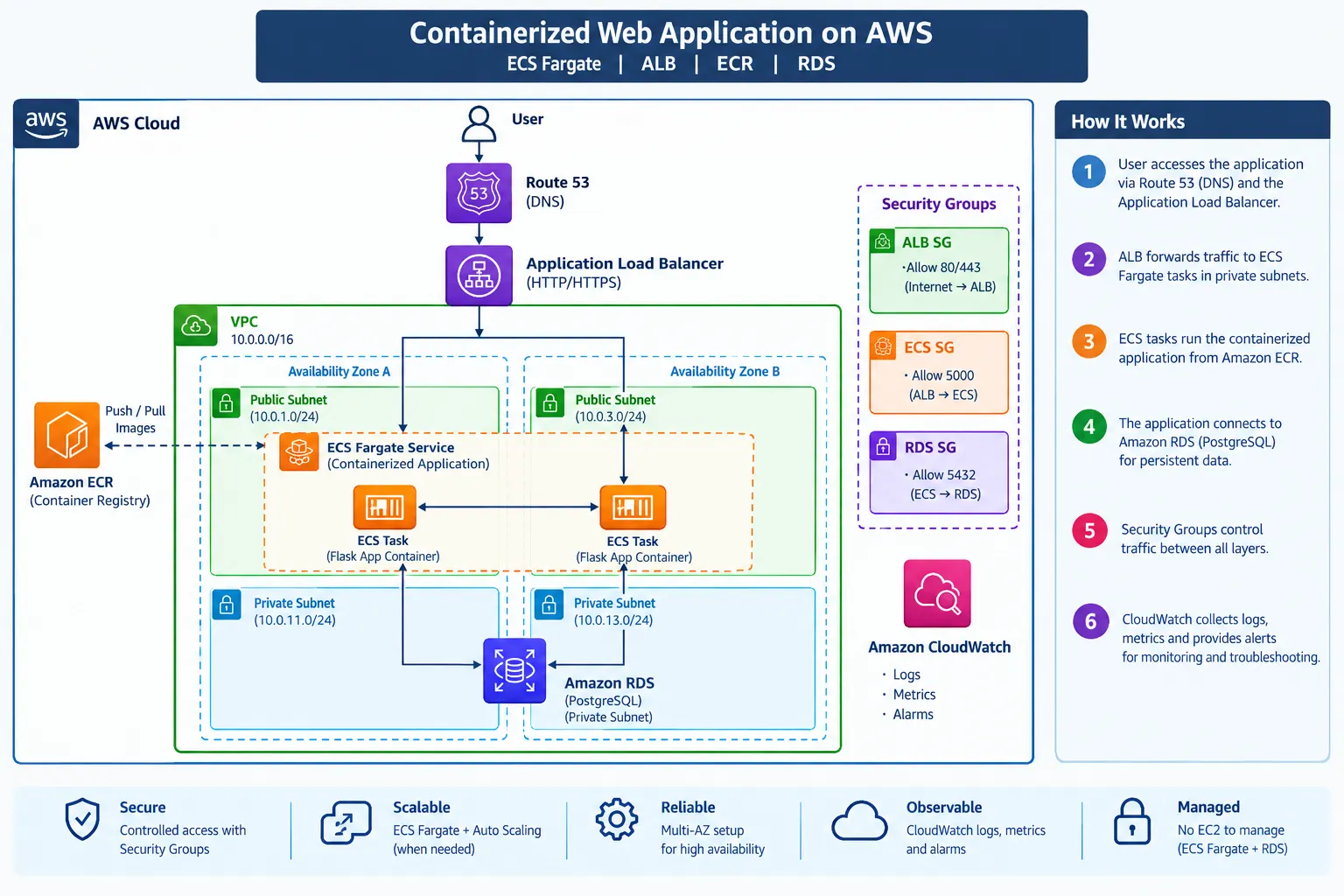
Running containers in production requires more than building a Docker image. The application also needs reliable networking, traffic distribution, security, and monitoring.
In this walkthrough, I’ll deploy a small Flask API using Amazon ECR, ECS Fargate, Application Load Balancer, and Amazon RDS.
Architecture
1
2
3
4
5
6
7
8
9
10
11
12
13
14
15
16
17
18
19
                  Internet
                     |
                     v
             Application Load
                Balancer
                     |
             +-------+-------+
             |               |
             v               v
        ECS Fargate     ECS Fargate
           Task 1          Task 2
             |               |
             +-------+-------+
                     |
                     v
                 Amazon RDS

        Docker Image → Amazon ECR
        Logs          → CloudWatch
Prerequisites
- AWS account
- AWS CLI
- Docker
- Basic knowledge of AWS and containers
Region used in this example:
1
ap-south-1
Step 1: Create the Application
Create a simple Flask API:
1
2
3
4
5
6
7
8
9
10
11
12
13
from flask import Flask
app = Flask(__name__)
def home():
return "Running on ECS Fargate"
def health():
return {"status": "healthy"}
app.run(host="0.0.0.0", port=5000)
Create
requirements.txt:1
flask
The
/health endpoint will be used by the ALB health check.Step 2: Build the Docker Image
Create a
Dockerfile:1
2
3
4
5
6
7
8
9
10
11
12
FROM python:3.12-slim
WORKDIR /app
COPY requirements.txt .
RUN pip install --no-cache-dir -r requirements.txt
COPY app.py .
EXPOSE 5000
CMD ["python", "app.py"]
Build and test:
1
2
docker build -t aws-container-app .
docker run -p 5000:5000 aws-container-app
Test:
1
curl http://localhost:5000/health
Expected:
1
{"status":"healthy"}
Step 3: Push the Image to ECR
Create an ECR repository:
1
2
3
aws ecr create-repository \
  --repository-name aws-container-app \
  --region ap-south-1
Authenticate Docker:
1
2
3
4
5
aws ecr get-login-password \
  --region ap-south-1 | \
docker login \
  --username AWS \
  --password-stdin <ACCOUNT_ID>.dkr.ecr.ap-south-1.amazonaws.com
Tag and push:
1
2
3
4
5
docker tag aws-container-app:latest \
<ACCOUNT_ID>.dkr.ecr.ap-south-1.amazonaws.com/aws-container-app:latest

docker push \
<ACCOUNT_ID>.dkr.ecr.ap-south-1.amazonaws.com/aws-container-app:latest
Now ECS can pull the image directly from ECR.
Step 4: Deploy on ECS Fargate
Create an ECS cluster and Fargate task definition.
Example configuration:
1
2
3
4
CPU:              0.5 vCPU
Memory:           1 GB
Container Port:   5000
Desired Tasks:    2
Deploy the tasks in private subnets and attach an ECS security group.
The security group should allow port
5000 only from the ALB security group.Step 5: Configure the Application Load Balancer
Create an internet-facing ALB in the public subnets.
Configure the target group:
1
2
3
4
Target type:     IP
Protocol:        HTTP
Port:            5000
Health check:    /health
The traffic flow is now:
1
2
3
4
5
6
7
Internet
   ↓
ALB
   ↓
ECS Fargate
   ↓
Flask Container
The ALB sends traffic only to healthy ECS tasks.
Step 6: Connect RDS
Create an Amazon RDS PostgreSQL database in private subnets.
Allow database traffic only from the ECS security group:
1
2
3
4
5
ECS Security Group
        ↓
     TCP 5432
        ↓
    RDS PostgreSQL
Avoid making the database publicly accessible.
For production workloads, database credentials should be stored using AWS Secrets Manager instead of hardcoding them.
Step 7: Test the Deployment
After the ECS service becomes healthy, test the ALB:
1
curl http://<ALB-DNS>/health
Expected:
1
{"status":"healthy"}
To verify recovery, stop one ECS task.
ECS should automatically launch a replacement task to maintain the desired count of two.
Monitoring
Configure the ECS task to send container logs to Amazon CloudWatch Logs.
This makes it easier to investigate application errors, failed deployments, and container restarts.
Key Takeaways
This architecture separates the application into clear layers:
- ECR → container image
- ECS Fargate → container runtime
- ALB → traffic distribution
- RDS → persistent database
- Security Groups → controlled communication
- CloudWatch → logs and monitoring
This setup provides a strong foundation for adding HTTPS, Auto Scaling, AWS WAF, Secrets Manager, and CI/CD later.
Conclusion
Moving from a locally running Docker container to an AWS-managed deployment involves more than pushing an image to the cloud.
By combining ECR, ECS Fargate, ALB, RDS, and CloudWatch, we can create a containerized architecture that is easier to scale, monitor, and operate.
Enjoyed reading this content? Let the author know!
Your likes, comments, shares, and saves help creators reach more builders.

Loading recommendations
Loading article