
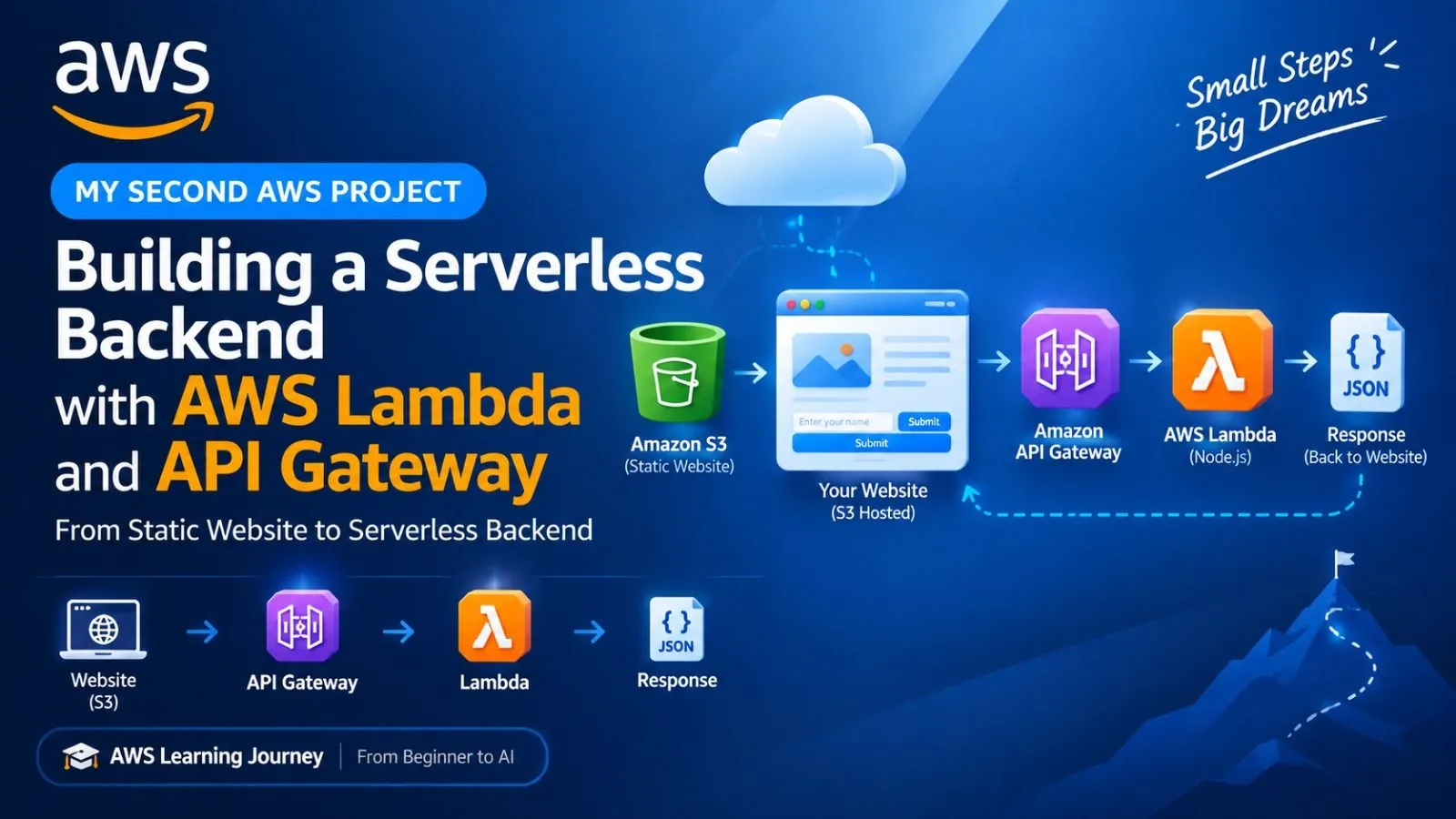
Building a Serverless Backend with AWS Lambda and API Gateway
In my second AWS project, I built a simple serverless backend using Amazon API Gateway and AWS Lambda. I connected my S3-hosted website to an API that accepts a user's name and returns a personalized JSON response. Through this project, I learned about serverless architecture, API Gateway, Lambda, JavaScript fetch(), JSON, CORS, and CloudWatch. This project helped me understand frontend-to-backend communication in AWS.


AWS Learning Journey: From Beginner to AI — Project #2
My Second AWS Project: Building a Serverless Backend with AWS Lambda and API Gateway
Introduction
In my first AWS project, I learned how to host a simple static website using Amazon S3.
My Second AWS Project: Building a Serverless Backend with AWS Lambda and API Gateway
Introduction
In my first AWS project, I learned how to host a simple static website using Amazon S3.
After that, I wanted to understand how a website communicates with a backend. So, in my second project, I connected my S3-hosted website to AWS Lambda and Amazon API Gateway.
My goal was simple:
Send a request from my website, process it using AWS services, and display the response on the website.
This project helped me understand the basics of frontend-to-backend communication using a serverless architecture.
What I Built
I created a small AWS Learning Journey API. Users can enter their name on the website and receive a personalized response from my AWS backend.
I created a small AWS Learning Journey API. Users can enter their name on the website and receive a personalized response from my AWS backend.
Project Flow
Website
↓
Amazon API Gateway
↓
AWS Lambda
↓
JSON Response
↓
Website
For example:
Website
↓
Amazon API Gateway
↓
AWS Lambda
↓
JSON Response
↓
Website
For example:
Input: Hari
Output: Hello, Hari!
AWS Lambda
AWS Lambda allows developers to run backend code without managing traditional servers.
Output: Hello, Hari!
AWS Lambda
AWS Lambda allows developers to run backend code without managing traditional servers.
For this project, I created a Lambda function using Node.js. The function receives the user's name, processes the request, and returns a personalized greeting.
Example Response
{
"message": "Hello, Hari!"
}
[Add Screenshot: AWS Lambda Function]
{
"message": "Hello, Hari!"
}
[Add Screenshot: AWS Lambda Function]
Amazon API Gateway
Next, I created an HTTP API using Amazon API Gateway and connected it to my Lambda function.
Next, I created an HTTP API using Amazon API Gateway and connected it to my Lambda function.
API Route
POST /greet
The website sends a request like this:
POST /greet
The website sends a request like this:
{
"name": "Hari"
}
API Gateway forwards the request to Lambda. Lambda processes the request and sends a JSON response back to the website.
"name": "Hari"
}
API Gateway forwards the request to Lambda. Lambda processes the request and sends a JSON response back to the website.
This showed me how API Gateway acts as a bridge between the frontend and the backend.
[Add Screenshot: API Gateway Route]
Connecting My Website to the Backend
I used JavaScript's fetch() function to connect my S3-hosted website to the API.
I used JavaScript's fetch() function to connect my S3-hosted website to the API.
const response = await fetch(API_URL, {
method: "POST",
headers: {
"Content-Type": "application/json"
},
body: JSON.stringify({
name: name
})
});
method: "POST",
headers: {
"Content-Type": "application/json"
},
body: JSON.stringify({
name: name
})
});
const data = await response.json();
With this integration, my static website was able to:
With this integration, my static website was able to:
Send user input to the backend
Communicate with API Gateway
Trigger the Lambda function
Receive a JSON response
Display the result to the user
[Add Screenshot: Working Website]
Communicate with API Gateway
Trigger the Lambda function
Receive a JSON response
Display the result to the user
[Add Screenshot: Working Website]
Project Architecture
The complete architecture of my project looked like this:
The complete architecture of my project looked like this:
1
2
3
4
5
6
7
8
9
10
11
             User
               ↓
    Amazon S3 Static Website
               ↓
        Amazon API Gateway
               ↓
          AWS Lambda
               ↓
         JSON Response
               ↓
            Website
This was an important step in my AWS learning journey. I moved beyond simply hosting a website and started understanding how a real cloud application works.
What I Learned
Through this project, I learned how to use:
Through this project, I learned how to use:
AWS Lambda for running backend code without managing servers
Amazon API Gateway for creating and exposing HTTP APIs
JavaScript fetch() for frontend-to-backend communication
CORS for allowing browser requests between different origins
CloudWatch for viewing Lambda execution logs
JSON for sending and receiving structured data
Serverless architecture for building lightweight cloud applications
Cost Management and Cleanup
I built this project as a small learning exercise and used AWS services within the available Free Tier allowances where applicable.
Amazon API Gateway for creating and exposing HTTP APIs
JavaScript fetch() for frontend-to-backend communication
CORS for allowing browser requests between different origins
CloudWatch for viewing Lambda execution logs
JSON for sending and receiving structured data
Serverless architecture for building lightweight cloud applications
Cost Management and Cleanup
I built this project as a small learning exercise and used AWS services within the available Free Tier allowances where applicable.
I also monitored my AWS usage and removed resources that were no longer required after testing.
Always check the current AWS pricing, Free Tier limits, and billing details for your own AWS account.
What's Next?
My first project was:
My first project was:
Amazon S3 → Static Website
My second project became:
My second project became:
Amazon S3 → API Gateway → AWS Lambda
Now, I want to take the next step by adding a database:
Now, I want to take the next step by adding a database:
Amazon S3
↓
API Gateway
↓
AWS Lambda
↓
Amazon DynamoDB
My next project will explore Amazon DynamoDB and how to store and retrieve real application data.
Final Thoughts
This project taught me that I do not need to learn all of AWS at once.
This project taught me that I do not need to learn all of AWS at once.
I can start with one service, understand how it works, build a small project, and then connect it with another service.
Step by step, I am building my AWS knowledge and moving closer to my goal of becoming an AI and cloud developer.
One AWS service at a time.
Enjoyed reading this content? Let the author know!
Your likes, comments, shares, and saves help creators reach more builders.

Loading recommendations
Loading article