
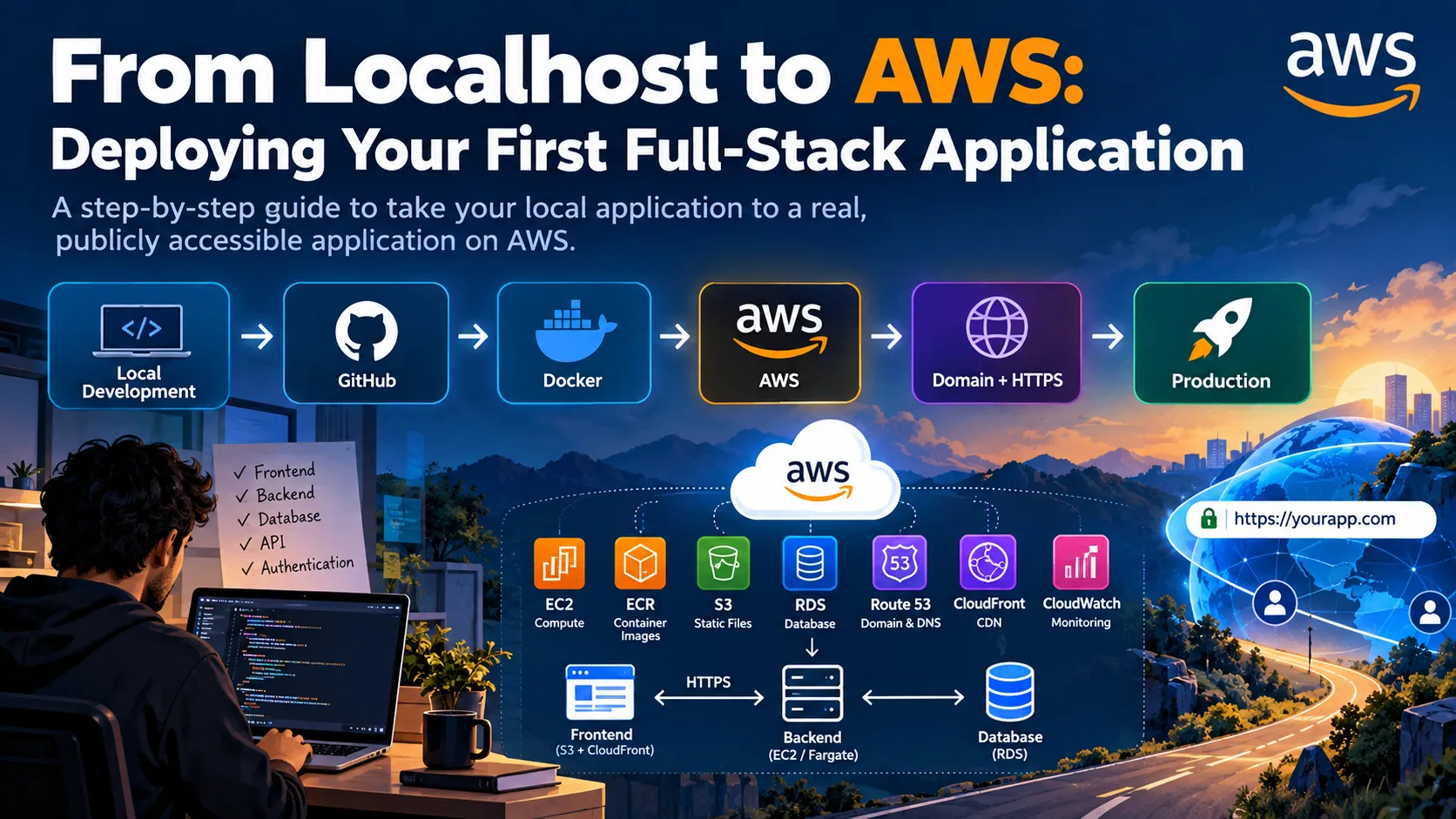
🚀 From Localhost to AWS: Deploying Your First Full-Stack Application
Learn how to take a full-stack application from localhost to production on AWS. This beginner-friendly guide walks through the journey from GitHub and Docker to AWS deployment, domain setup, HTTPS, and a production-ready application.

Your application works perfectly on localhost. But what happens when you want the world to access it?
Building a full-stack application locally is exciting. Your frontend talks to your backend, your backend connects to the database, and everything works perfectly on your machine.
But localhost is only the beginning.
The next challenge is turning that local application into a real, publicly accessible application running on cloud infrastructure.
For developers learning AWS, this transition can feel overwhelming. There are dozens of AWS services, networking concepts, security settings, deployment options, and configuration decisions.
So let's break the journey into a simple flow:
1
2
3
4
5
6
7
8
9
10
11
Local Development
       ↓
GitHub
       ↓
Docker
       ↓
AWS
       ↓
Domain + HTTPS
       ↓
Production 🚀
1. Start with Your Application Locally
Before thinking about AWS, make sure your application works locally.
A typical full-stack application might look like:
1
2
3
4
5
Frontend
   ↓
Backend API
   ↓
Database
For example, you might have:
- React or Next.js frontend
- Node.js backend
- PostgreSQL or MongoDB database
- REST API
- Authentication
- Environment variables
At this stage, you should be able to run the application locally and verify that the major functionality works.
For example:
1
2
3
Frontend → http://localhost:3000
Backend  → http://localhost:5000
Database → Local/Cloud Database
The important lesson is:
Don't deploy a broken application and expect AWS to fix it.
Cloud deployment should be the next step after your application is working locally.
2. Push Your Code to GitHub
Once the application is ready, put your source code in a Git repository.
A common workflow is:
1
2
3
4
5
Code
 ↓
Git
 ↓
GitHub Repository
GitHub gives you version control and makes it easier to connect your project with deployment and CI/CD workflows later.
A basic workflow might be:
1
2
3
git add .
git commit -m "Initial project"
git push origin main
But there is one important security rule:
Never commit secrets.
Avoid pushing files containing:
1
2
3
4
5
DATABASE_URL
AWS_ACCESS_KEY_ID
AWS_SECRET_ACCESS_KEY
JWT_SECRET
API_KEY
Use environment variables and secret-management mechanisms instead.
Your repository should contain your code and configuration structure, not your private credentials.
3. Containerize the Application with Docker
Docker can make the transition between development and deployment more consistent.
Instead of depending on everything installed directly on the server, you can package your application and its dependencies into a container image.
The basic concept is:
1
2
3
4
5
6
7
Application Code
      +
Dependencies
      ↓
Docker Image
      ↓
Container
A simplified Dockerfile might look like:
1
2
3
4
5
6
7
8
9
10
11
12
13
FROM node:22

WORKDIR /app

COPY package*.json ./

RUN npm install

COPY . .

EXPOSE 5000

CMD ["npm", "start"]
You can then build an image:
1
docker build -t my-fullstack-app .
And run it locally:
1
docker run -p 5000:5000 my-fullstack-app
The exact Docker configuration will depend on your application.
For multi-container applications, Docker Compose can also be useful during development.
4. Understand What AWS Actually Does
Now comes the cloud part.
AWS provides the infrastructure and managed services needed to run your application.
You don't necessarily need to use dozens of services.
For a beginner full-stack deployment, you might start with:
| Requirement | AWS Service |
|---|---|
| Compute | Amazon EC2 |
| Container images | Amazon ECR |
| Object storage | Amazon S3 |
| Database | Amazon RDS |
| DNS | Amazon Route 53 |
| CDN | Amazon CloudFront |
| Monitoring | Amazon CloudWatch |
| Access control | AWS IAM |
You don't need all of these for every project.
The architecture should depend on your application's requirements.
5. Store Your Docker Image in Amazon ECR
If you're deploying a containerized application, Amazon Elastic Container Registry (Amazon ECR) can store your Docker images.
The flow becomes:
1
2
3
4
5
6
7
8
9
Dockerfile
    ↓
Docker Build
    ↓
Docker Image
    ↓
Amazon ECR
    ↓
AWS Compute
For example, you might build your image locally and push it to ECR.
Your deployment environment can then pull the image from the registry.
This is especially useful when you want a repeatable deployment process.
6. Run Your Backend on AWS
One straightforward approach for beginners is Amazon EC2.
You can launch an EC2 instance and use it to run your backend application.
The architecture could look like:
1
2
3
4
5
6
7
8
9
Internet
   ↓
EC2
   ↓
Docker Container
   ↓
Backend API
   ↓
Database
Your EC2 instance provides the compute environment, while Docker runs your application inside a container.
However, EC2 also means that you are responsible for more infrastructure management, including operating-system maintenance, security configuration, scaling, and deployment processes.
As you become more comfortable with AWS, you can explore managed container services such as Amazon ECS with AWS Fargate.
7. Choose the Right Database
Your application probably needs persistent data.
For relational workloads, Amazon RDS can provide managed database infrastructure.
For example:
1
2
3
4
5
Backend
   ↓
Amazon RDS
   ↓
PostgreSQL / MySQL
One important architectural principle is:
Don't expose your database directly to the public internet unless there is a specific reason to do so.
A production architecture should use appropriate networking and security controls so that the application can communicate with the database without unnecessarily exposing the database to the internet.
This is where concepts such as VPCs, security groups, subnets, and IAM become important.
8. What About the Frontend?
Your frontend deployment depends on how your application is built.
For a static frontend, Amazon S3 combined with Amazon CloudFront can be a useful architecture.
For example:
1
2
3
4
5
6
7
User
 ↓
CloudFront
 ↓
S3
 ↓
HTML / CSS / JavaScript / Images
CloudFront can cache content closer to users and can integrate with HTTPS.
If your frontend requires server-side rendering, the deployment architecture will be different.
For example, a Next.js application may require compute infrastructure capable of running the application server rather than simply serving static files.
The key lesson is:
Choose the AWS architecture based on how your application actually runs.
9. Connect Frontend and Backend
Your local application may currently use something like:
1
http://localhost:5000/api
That obviously won't work for users on the internet.
Your production frontend needs to communicate with your production backend through a publicly reachable endpoint.
For example:
1
2
3
4
5
6
7
Frontend
   ↓
HTTPS
   ↓
Backend API
   ↓
Database
Your API URL should normally be configured through environment variables rather than hardcoded throughout the application.
For example:
1
NEXT_PUBLIC_API_URL=https://api.example.com
This allows you to use different configurations for development and production.
10. Don't Forget IAM
AWS Identity and Access Management (IAM) is one of the most important AWS concepts to understand.
Your application and infrastructure should receive only the permissions they actually need.
This is called the principle of least privilege.
For example, if an application only needs to read objects from an S3 bucket, it shouldn't automatically receive full access to every S3 resource in your AWS account.
A good mindset is:
1
2
3
What does this resource need to access?
                ↓
Grant only those permissions
Avoid building your deployment around long-lived credentials embedded inside source code or Docker images.
11. Add a Domain Name
Once your application is running, you probably don't want users visiting an IP address.
Instead:
1
https://example.com
You can use Amazon Route 53 for DNS management.
A simplified architecture might look like:
1
2
3
4
5
6
7
8
9
User
 ↓
example.com
 ↓
Route 53
 ↓
CloudFront / Load Balancer
 ↓
Application
The exact architecture depends on your application and AWS services.
12. Add HTTPS
Security shouldn't be an afterthought.
Production web applications should use HTTPS.
A typical AWS architecture can use AWS Certificate Manager to provision and manage TLS certificates for supported AWS services.
The result is:
1
2
3
HTTP ❌

HTTPS ✅
HTTPS protects data in transit and is essential for modern web applications.
13. Monitor Your Application
Deployment isn't the end.
Once your application is live, you need to know what is happening.
This is where monitoring becomes important.
Amazon CloudWatch can help you monitor AWS resources and applications through metrics, logs, and alarms.
For example, you might monitor:
- CPU utilization
- Application logs
- Error rates
- Request metrics
- Resource health
- Database metrics
A simple production mindset is:
1
2
3
4
5
6
7
8
9
Deploy
  ↓
Monitor
  ↓
Detect Problems
  ↓
Fix
  ↓
Improve
14. Move Toward CI/CD
Manually deploying every update isn't ideal.
A better approach is to automate the deployment process.
A simplified CI/CD workflow could look like:
1
2
3
4
5
6
7
8
9
10
11
12
13
14
15
Developer
    ↓
Git Push
    ↓
GitHub
    ↓
CI/CD Pipeline
    ↓
Build & Test
    ↓
Docker Image
    ↓
Amazon ECR
    ↓
AWS Deployment
Every time you push a change, the pipeline can build and test the application before deploying it.
This makes deployments more consistent and reduces manual work.
15. A Simple Full-Stack AWS Architecture
Putting everything together, a possible architecture could look like:
1
2
3
4
5
6
7
8
9
10
11
12
13
14
15
16
17
18
19
20
21
22
23
24
25
26
27
28
29
30
31
                    ┌──────────────┐
                    │     User     │
                    └──────┬───────┘
                           ↓
                    ┌──────────────┐
                    │  Route 53    │
                    └──────┬───────┘
                           ↓
                    ┌──────────────┐
                    │  CloudFront  │
                    └──────┬───────┘
                           ↓
                    ┌──────────────┐
                    │   Frontend   │
                    └──────┬───────┘
                           ↓
                     HTTPS / API
                           ↓
                    ┌──────────────┐
                    │   Backend    │
                    │ EC2/Fargate  │
                    └──────┬───────┘
                           ↓
                    ┌──────────────┐
                    │     RDS      │
                    └──────────────┘

              ┌──────────────────────┐
              │        S3            │
              │ Images / Files       │
              └──────────────────────┘
This is only one possible architecture.
AWS offers many ways to build the same type of application, and the best design depends on requirements such as traffic, performance, security, cost, and operational complexity.
16. The Most Important Lesson
Moving from localhost to AWS isn't simply:
“Put my code on a server.”
It's about understanding how different pieces of your application communicate.
You need to start thinking about:
- Networking
- Security
- IAM
- Databases
- Containers
- DNS
- HTTPS
- Monitoring
- Scalability
- Cost
- Deployment automation
This is where cloud development becomes much more interesting.
Your code may be the same application you built locally, but the architecture around that code changes dramatically.
🚀 Final Roadmap
If you're a beginner trying to deploy your first full-stack application, don't try to learn every AWS service at once.
Follow a progression like this:
1
2
3
4
5
6
7
8
9
10
11
12
13
14
15
16
17
18
19
20
21
22
23
1. Build locally
       ↓
2. Push to GitHub
       ↓
3. Learn Docker
       ↓
4. Learn IAM
       ↓
5. Learn basic AWS networking
       ↓
6. Deploy backend
       ↓
7. Deploy database
       ↓
8. Deploy frontend
       ↓
9. Configure domain + HTTPS
       ↓
10. Add monitoring
       ↓
11. Automate with CI/CD
       ↓
12. Optimize security + cost
The goal isn't to become an AWS expert overnight.
The goal is to take one application from
localhost to a real production environment and understand every major component along the way.Once you successfully deploy your first application, AWS stops feeling like a giant list of services and starts becoming a collection of tools you can use to solve real engineering problems.
💬 Your Turn
Have you deployed a full-stack application to AWS yet?
What was the hardest part for you—Docker, networking, IAM, database setup, domain configuration, or CI/CD?
Share your experience and tips with the AWS Builder community! ☁️🚀
Enjoyed reading this content? Let the author know!
Your likes, comments, shares, and saves help creators reach more builders.

Loading recommendations
Loading article