
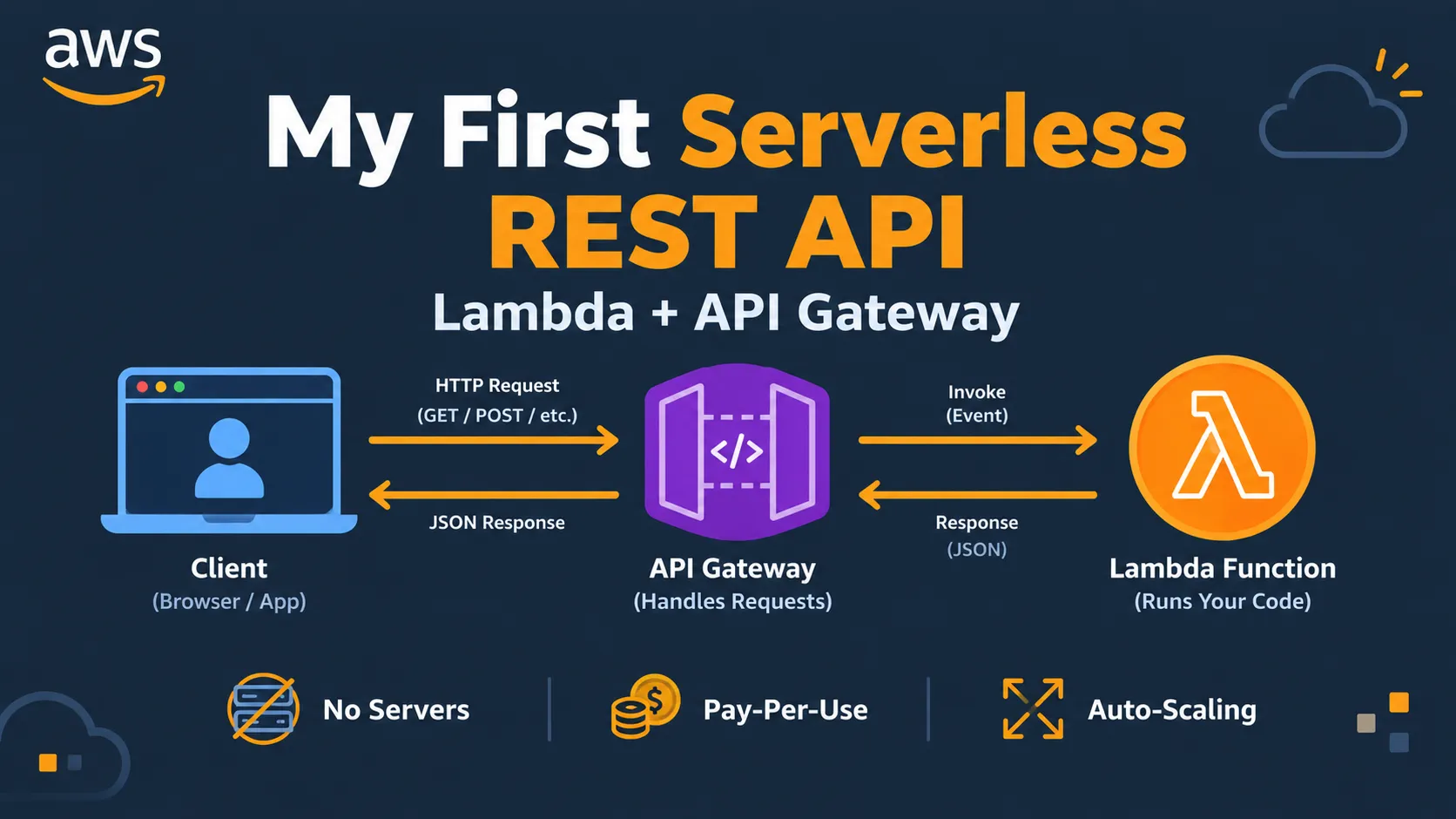
Building My First Serverless REST API with Lambda and API Gateway
After learning Lambda, I wanted to build something real. In this article, I share how I connected AWS Lambda to API Gateway, created a simple REST API endpoint, tested it with a browser and curl, and what I learned about serverless backends. Based on official AWS documentation.

Introduction
In my previous article, I built my first AWS Lambda function and connected it to an S3 trigger. That was exciting, but I wanted to go further. I wanted to build something that could respond to HTTP requests — like a real API.
That's when I learned about Amazon API Gateway.
AWS documentation describes API Gateway as a fully managed service that makes it easy for developers to create, publish, maintain, monitor, and secure APIs at any scale. When combined with Lambda, it lets you build a serverless backend without managing any servers.
In this article, I'll share how I built my first serverless REST API using Lambda and API Gateway. Everything here is based on the official AWS documentation.
What Is API Gateway?
Before building, I read the documentation. Here is what I understood:
- API Gateway acts as the "front door" for your application. It receives HTTP requests and routes them to the right backend.
- It works with Lambda to create a fully serverless API. No servers to manage.
- It handles authentication, throttling, and monitoring so you don't have to build those from scratch.
- It supports REST APIs, HTTP APIs, and WebSocket APIs. For beginners, HTTP APIs are simpler and cheaper.
The AWS Free Tier includes 1 million API calls per month for the first 12 months, which is more than enough for learning.
Step 1: Create a Lambda Function for the API
First, I created a new Lambda function that would handle API requests.
- Open the AWS Lambda console.
- Choose Create function.
- Choose Author from scratch.
- Enter a Function name (for example,
my-first-api-function). - For Runtime, choose Python 3.12.
- Keep the default permissions and choose Create function.
Then I replaced the default code with this simple handler:
1
2
3
4
5
6
7
8
9
10
11
12
13
14
15
16
17
18
19
import json

def lambda_handler(event, context):
    name = "World"

    if 'queryStringParameters' in event and event['queryStringParameters']:
        if 'name' in event['queryStringParameters']:
            name = event['queryStringParameters']['name']

    return {
        'statusCode': 200,
        'headers': {
            'Content-Type': 'application/json'
        },
        'body': json.dumps({
            'message': f'Hello, {name}!',
            'source': 'Lambda + API Gateway'
        })
    }
This function reads a
name parameter from the query string and returns a greeting. If no name is provided, it defaults to "World".I saved the function and moved on to API Gateway.
Step 2: Create an HTTP API in API Gateway
Next, I created the API that would trigger my Lambda function.
- Open the API Gateway console.
- Choose Create API.
- Under HTTP API, choose Build.
- For API name, enter
my-first-api. - Choose Next.
- Under Configure routes, choose Add integration → Lambda.
- Select your Lambda function (
my-first-api-function). - For Method, choose GET.
- For Resource path, enter
/hello. - Choose Next.
- For Stage name, keep
$default. - Choose Create.
API Gateway automatically created a route and gave me an Invoke URL. It looked something like this:
1
https://abc123xyz.execute-api.us-east-1.amazonaws.com/hello
Step 3: Test the API
I opened a browser and pasted the Invoke URL. The response was:
1
2
3
4
{
  "message": "Hello, World!",
  "source": "Lambda + API Gateway"
}
It worked! My serverless API was live.
Then I tested it with a query parameter by adding
?name=Aman to the URL:1
https://abc123xyz.execute-api.us-east-1.amazonaws.com/hello?name=AmanThe response was:
1
2
3
4
{
  "message": "Hello, Aman!",
  "source": "Lambda + API Gateway"
}
I also tested it using
curl in my terminal:1
curl "https://abc123xyz.execute-api.us-east-1.amazonaws.com/hello?name=Aman"The same result came back. My API was working from both the browser and the command line.
Step 4: Understanding the Flow
Here is what happens when someone calls the API:
- A user sends a request to the API Gateway URL.
- API Gateway receives the request and routes it to the Lambda function.
- Lambda runs the code and returns a response.
- API Gateway sends the response back to the user.
This is the core of serverless architecture. No servers, no infrastructure management, and you only pay for what you use.
Step 5: Clean Up
After testing, I deleted the resources to avoid unexpected charges.
- Open the API Gateway console.
- Select your API.
- Choose Actions → Delete.
- Confirm.
Then I deleted the Lambda function:
- Open the Lambda console.
- Select your function.
- Choose Actions → Delete.
- Confirm.
AWS documentation recommends cleaning up resources after testing.
What I Learned
Building my first serverless API taught me three things:
- API Gateway + Lambda is powerful. You can build a real API without managing any servers.
- Query parameters are easy to handle. The
eventobject in Lambda contains everything you need. - Serverless is cost-effective. With the Free Tier, 1 million API calls and 1 million Lambda requests per month are more than enough for learning.
What's Next for Me
My next step is to connect this API to a DynamoDB table so I can store and retrieve data. This will help me understand how to build a complete serverless CRUD application.
Let's Discuss
- Have you built an API with Lambda and API Gateway?
- Did you use REST API or HTTP API?
- What was the hardest part of learning API Gateway?
Let's learn together. ☁️⚡
Enjoyed reading this content? Let the author know!
Your likes, comments, shares, and saves help creators reach more builders.

Loading recommendations
Loading article