
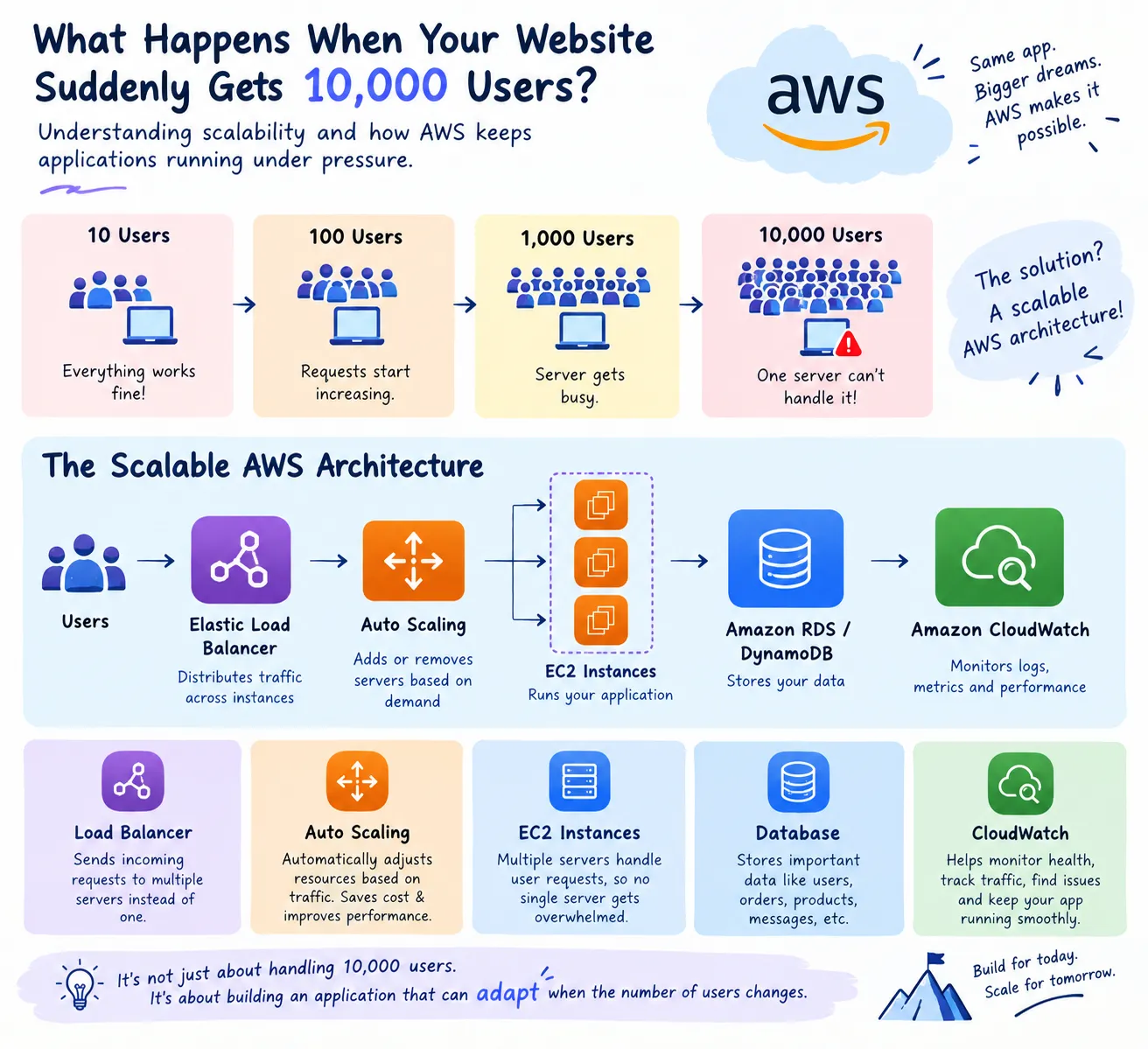
🚀 What Happens When Your Website Suddenly Gets 10,000 Users?
What happens when a website suddenly goes from 10 users to 10,000? 🚀 In this article, I explore how AWS helps applications handle changing traffic through Elastic Load Balancing, Auto Scaling, EC2, databases, and CloudWatch. This beginner-friendly journey explains how these services work together to distribute traffic, add resources when demand increases, monitor performance, and build applications that can scale with growing users. ☁️

Understanding scalability and how AWS keeps applications running under pressure
Imagine you build a small website.
At first, only 10 people use it. Everything works perfectly.
Then one day, your project gets shared online.
Suddenly:
10 → 100 → 1,000 → 10,000 users
Your website starts receiving thousands of requests at the same time.
So the question is:
Can your application handle the sudden traffic without crashing?
This is where scalability becomes important.
🌱 From One Server to a Scalable Architecture
A beginner might start with something like:
👥 Users
↓
🖥️ One Server
↓
🗄️ Database
This works when traffic is small.
But when thousands of users arrive simultaneously, that single server can become overloaded.
The solution isn't simply buying a bigger server.
Instead, we can design the application so that it can handle changing demand.
☁️ A Scalable AWS Architecture
A simplified architecture could look like this:
👥 USERS
↓
⚖️ LOAD BALANCER
↓
┌───────────┼───────────┐
↓ ↓ ↓
🖥️ Server 🖥️ Server 🖥️ Server
│ │ │
└───────────┼───────────┘
↓
🗄️ DATABASE
↓
📊 MONITORING
Instead of sending every request to one server, traffic can be distributed across multiple resources.
⚖️ Step 1 — Load Balancing
Imagine a restaurant with one cashier.
If 100 customers arrive, the queue becomes huge.
Now imagine three cashiers sharing the customers.
That's similar to what a load balancer helps accomplish.
👥 👥 👥 👥 👥
↓
⚖️ Load Balancer
↙ ↓ ↘
🖥️ 🖥️ 🖥️
It distributes incoming requests across available targets instead of overwhelming one server.
📈 Step 2 — Auto Scaling
But what happens if traffic increases even more?
Suppose:
Morning: 500 users
Afternoon: 2,000 users
Evening: 10,000 users
Keeping the maximum number of servers running all day may waste resources.
This is where Amazon EC2 Auto Scaling can help.
Resources can be adjusted according to application demand.
📉 Low Traffic
↓
Fewer resources
Imagine you build a small website.
At first, only 10 people use it. Everything works perfectly.
Then one day, your project gets shared online.
Suddenly:
10 → 100 → 1,000 → 10,000 users
Your website starts receiving thousands of requests at the same time.
So the question is:
Can your application handle the sudden traffic without crashing?
This is where scalability becomes important.
🌱 From One Server to a Scalable Architecture
A beginner might start with something like:
👥 Users
↓
🖥️ One Server
↓
🗄️ Database
This works when traffic is small.
But when thousands of users arrive simultaneously, that single server can become overloaded.
The solution isn't simply buying a bigger server.
Instead, we can design the application so that it can handle changing demand.
☁️ A Scalable AWS Architecture
A simplified architecture could look like this:
👥 USERS
↓
⚖️ LOAD BALANCER
↓
┌───────────┼───────────┐
↓ ↓ ↓
🖥️ Server 🖥️ Server 🖥️ Server
│ │ │
└───────────┼───────────┘
↓
🗄️ DATABASE
↓
📊 MONITORING
Instead of sending every request to one server, traffic can be distributed across multiple resources.
⚖️ Step 1 — Load Balancing
Imagine a restaurant with one cashier.
If 100 customers arrive, the queue becomes huge.
Now imagine three cashiers sharing the customers.
That's similar to what a load balancer helps accomplish.
👥 👥 👥 👥 👥
↓
⚖️ Load Balancer
↙ ↓ ↘
🖥️ 🖥️ 🖥️
It distributes incoming requests across available targets instead of overwhelming one server.
📈 Step 2 — Auto Scaling
But what happens if traffic increases even more?
Suppose:
Morning: 500 users
Afternoon: 2,000 users
Evening: 10,000 users
Keeping the maximum number of servers running all day may waste resources.
This is where Amazon EC2 Auto Scaling can help.
Resources can be adjusted according to application demand.
📉 Low Traffic
↓
Fewer resources
📈 High Traffic
↓
More resources
The idea is simple:
Scale when demand changes.
🗄️ Step 3 — What About the Database?
Adding more application servers doesn't solve everything.
Your application still needs somewhere to store information such as:
👤 User accounts
🛒 Orders
📦 Product information
💬 Messages
The database therefore becomes another important part of the architecture.
A scalable application needs to think about both compute and data.
📊 Step 4 — Monitor What Is Happening
How do you know whether your application is actually healthy?
You monitor it.
Amazon CloudWatch can help developers observe metrics and logs from AWS resources and applications.
For example:
📊 CPU Usage
📊 Request Count
📊 Error Rate
📜 Application Logs
Monitoring helps answer questions like:
Is traffic increasing?
Is something failing?
Is the application becoming overloaded?
🔄 The Complete Flow
Putting everything together:
👥 USERS
↓
⚖️ LOAD BALANCER
↓
🖥️ 🖥️ 🖥️
APPLICATION SERVERS
↓
🗄️ DATABASE
↓
📊 CLOUDWATCH
And when demand increases:
📈 More Users
↓
⚖️ Load Balancer
↓
➕ More Resources
↓
🚀 Application Handles More Traffic
🤯 The Real Lesson
Scalability isn't just about handling 10,000 users.
It's about designing an application that can adapt when the number of users changes.
A good cloud architecture asks:
What happens if traffic suddenly increases?
What happens if one server fails?
How can resources be used efficiently?
How will we know when something goes wrong?
These questions are what turn a basic application into a more reliable cloud-based system.
💭 What I'm Learning
As I explore AWS, I'm realizing that cloud computing isn't just about deploying an application.
It's about thinking ahead.
You don't only ask:
“Does my application work?”
You also ask:
“Will it still work when the situation changes?”
That shift in thinking is what makes cloud architecture interesting to me.
☁️ Final Thought
A website doesn't become powerful just because it can handle 10 users.
The real challenge is building an architecture that can adapt from:
10 → 100 → 1,000 → 10,000+ users
without making the entire system collapse.
Build for today.
Design for tomorrow.
Scale when the world arrives. 🚀☁️
↓
More resources
The idea is simple:
Scale when demand changes.
🗄️ Step 3 — What About the Database?
Adding more application servers doesn't solve everything.
Your application still needs somewhere to store information such as:
👤 User accounts
🛒 Orders
📦 Product information
💬 Messages
The database therefore becomes another important part of the architecture.
A scalable application needs to think about both compute and data.
📊 Step 4 — Monitor What Is Happening
How do you know whether your application is actually healthy?
You monitor it.
Amazon CloudWatch can help developers observe metrics and logs from AWS resources and applications.
For example:
📊 CPU Usage
📊 Request Count
📊 Error Rate
📜 Application Logs
Monitoring helps answer questions like:
Is traffic increasing?
Is something failing?
Is the application becoming overloaded?
🔄 The Complete Flow
Putting everything together:
👥 USERS
↓
⚖️ LOAD BALANCER
↓
🖥️ 🖥️ 🖥️
APPLICATION SERVERS
↓
🗄️ DATABASE
↓
📊 CLOUDWATCH
And when demand increases:
📈 More Users
↓
⚖️ Load Balancer
↓
➕ More Resources
↓
🚀 Application Handles More Traffic
🤯 The Real Lesson
Scalability isn't just about handling 10,000 users.
It's about designing an application that can adapt when the number of users changes.
A good cloud architecture asks:
What happens if traffic suddenly increases?
What happens if one server fails?
How can resources be used efficiently?
How will we know when something goes wrong?
These questions are what turn a basic application into a more reliable cloud-based system.
💭 What I'm Learning
As I explore AWS, I'm realizing that cloud computing isn't just about deploying an application.
It's about thinking ahead.
You don't only ask:
“Does my application work?”
You also ask:
“Will it still work when the situation changes?”
That shift in thinking is what makes cloud architecture interesting to me.
☁️ Final Thought
A website doesn't become powerful just because it can handle 10 users.
The real challenge is building an architecture that can adapt from:
10 → 100 → 1,000 → 10,000+ users
without making the entire system collapse.
Build for today.
Design for tomorrow.
Scale when the world arrives. 🚀☁️
Enjoyed reading this content? Let the author know!
Your likes, comments, shares, and saves help creators reach more builders.

Loading recommendations
Loading article