

AWS Interconnect – multicloud with Azure: Hands-on PoC, Pitfalls, and Costs
I tested AWS Interconnect – multicloud with Microsoft Azure during public preview, connecting an AWS VPC to an Azure VNet over private networking. Here's what I learned about supported regions, provisioning pitfalls, BGP route verification, and the actual costs of running a hands-on PoC.

TL;DR
AWS Interconnect – multicloud entered public preview for Microsoft Azure on August 31, 2026.
I ran a hands-on proof of concept (PoC) connecting an AWS VPC in
us-west-1 to an Azure VNet in West US , and successfully established private VM-to-VM connectivity in both directions — without VPN tunnels, manual cross-connects, or routing traffic over the public internet.The entire PoC took two days, including provisioning, troubleshooting, connectivity testing, and cleanup.
This post covers what I built, the pitfalls I encountered, how I verified BGP routing, and what it actually cost.
If you're evaluating private multicloud connectivity, I hope my experience saves you some time.
Why this matters
Historically, establishing private connectivity between AWS and another cloud meant building and operating a combination of VPN tunnels, colocation facilities, or third-party network services.
That is undifferentiated heavy lifting.
AWS Interconnect – multicloud simplifies this by providing managed Layer 3 private connectivity between AWS and supported cloud providers. Traffic travels over the providers' private networks rather than the public internet.
Google Cloud and Oracle Cloud Infrastructure (OCI) are already generally available, while Microsoft Azure entered public preview in August 2026.

Some key characteristics include:
- Private connectivity: Traffic does not traverse the public internet.
- Link encryption: MACsec is enabled by default on physical links between cloud providers.
- Monitoring: AWS provides CloudWatch metrics and Network Synthetic Monitor capabilities.
MACsec protects the inter-provider physical links. It does not replace end-to-end encryption or workload-level security controls.
What I built
I chose a simple topology: one AWS VPC connected to one Azure VNet.
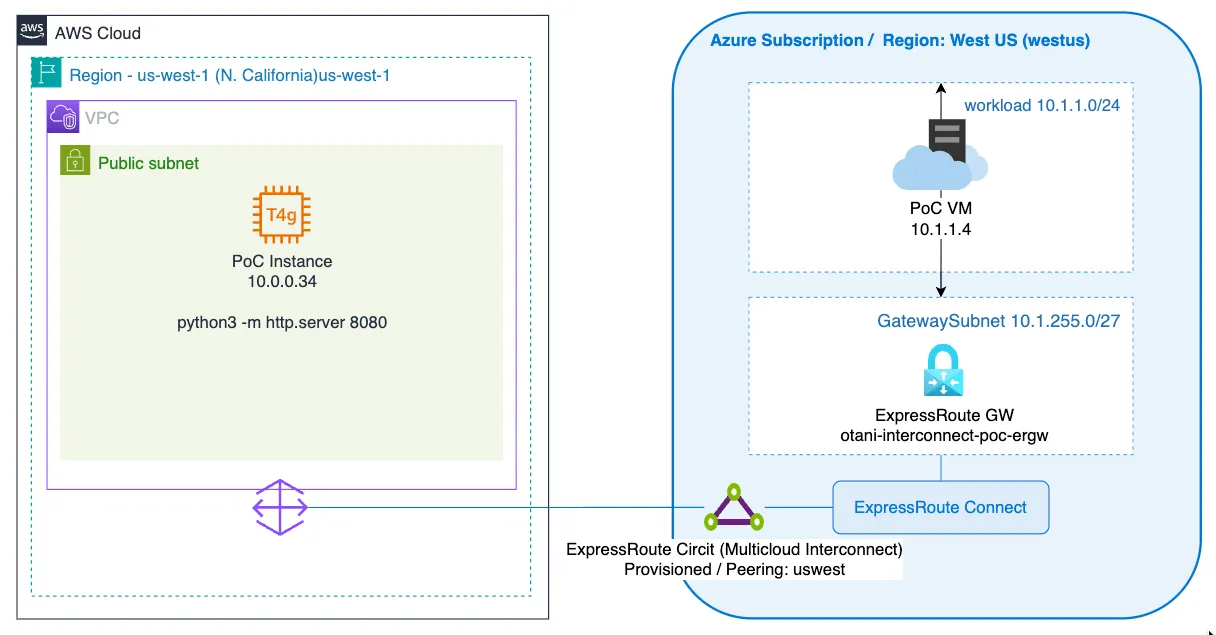
Side | Resource | Configuration |
|---|---|---|
AWS ( us-west-1 ) | VPC | 10.0.0.0/16 |
AWS | Subnet | 10.0.1.0/24 |
AWS | Virtual Private Gateway (VGW) | Attached to the VPC |
AWS | Direct Connect Gateway (DXGW) | Amazon-side ASN 64512 |
AWS | Interconnect – multicloud | 1 Gbps, associated with DXGW |
Azure (West US) | VNet | 10.1.0.0/16 |
Azure | Subnet | 10.1.1.0/24 |
Azure | GatewaySubnet | 10.1.255.0/27 |
Azure | Multicloud Interconnect / ExpressRoute circuit | 1 Gbps |
Azure | ExpressRoute virtual network gateway | Standard SKU |
Azure | ExpressRoute connection | Connects gateway to circuit |
Under the hood, Azure Multicloud Interconnect uses ExpressRoute. On the AWS side, the attachment point is the Direct Connect gateway. On the Azure side, connectivity is established through an ExpressRoute circuit and virtual network gateway.
My test environment
Plain text
AWS CLI: 2.37.7Python: 3.14.7OS: macOS (Darwin 25.6.0)Architecture: arm64
I also used Azure CLI for provisioning and troubleshooting. Unfortunately, I had already deleted the Azure test environment when preparing this article, and I no longer have the Azure CLI version recorded.
The Azure CLI issue described later may therefore be version-specific.
Pick a region pair first — this was my first major gotcha
During the preview, Azure connectivity is limited to four supported AWS–Azure region pairs.
You cannot arbitrarily combine regions from the two providers.
AWS Region | Azure Region |
|---|---|
US East (N. Virginia) us-east-1 | East US eastus |
US West (N. California) us-west-1 | West US westus |
Europe (Frankfurt) eu-central-1 | Germany West Central germanywestcentral |
Asia Pacific (Sydney) ap-southeast-2 | Australia East australiaeast |
My company's Azure environment had a resource group located in West US 3. However, West US 3 is not West US, and it was not supported by the preview.
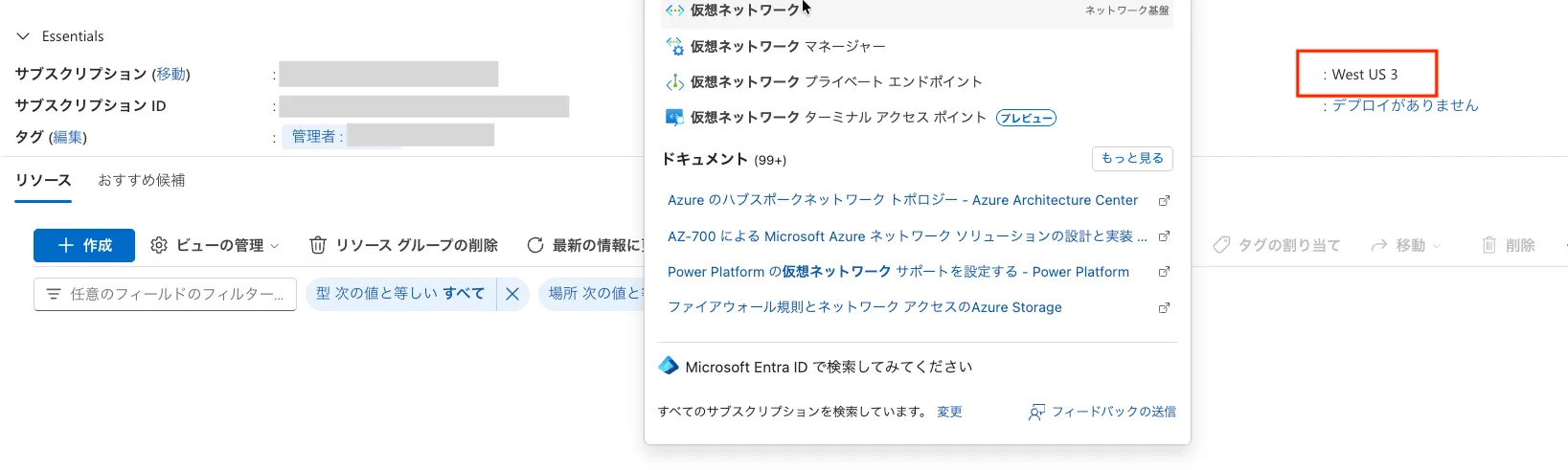
I initially assumed that the resource group's location would constrain the location of resources created within it. Fortunately, that isn't how Azure resource groups work.
A resource group's location primarily determines where its metadata is stored. Resources within the group can be deployed to different supported regions.
I kept the existing West US 3 resource group and deployed the networking resources in West US.
Lesson learned:
Confirm the supported region pair before provisioning anything.
West US , West US 2 , and West US 3 are different regions.Provisioning: create on one side, accept on the other
The provisioning process uses an activation-key handshake.
- Initiate the Interconnect from either AWS or Azure.
- Obtain the activation key generated by the initiating provider.
- Redeem the activation key on the other provider.
- Wait for both sides to finish provisioning.

I chose the Azure-first approach because I was less familiar with Azure and wanted to explore that side first.
Pitfall: conflicting provisioning attempts
On my first attempt, I created the Azure Multicloud Interconnect circuit and generated an activation key.

Before redeeming the key in AWS, however, I also initiated a separate AWS-side Interconnect toward the same Azure account.

I subsequently deleted that second request.
Shortly afterward, the Azure circuit entered a failed state.

Plain text
Circuit is in a failed state.Please try a refresh before contacting support.
Refreshing did not resolve the problem.
Since Azure Multicloud Interconnect is based on ExpressRoute, I investigated the ExpressRoute provisioning state.
I suspect that the conflicting provisioning attempts contributed to the failure, but I did not capture sufficient diagnostics to establish the root cause.
It is also possible that another preview-related provisioning issue was involved.
Rather than spending more time recovering the failed circuit, I deleted it and started again. I had not yet deployed the paid ExpressRoute gateway, so recreating the circuit was straightforward.
On the second attempt, I generated the activation key in Azure and redeemed it in AWS without initiating another connection.
This time, provisioning succeeded.
The AWS Interconnect status changed to
Available , and the Azure circuit's provider status changed to Provisioned .

Lesson learned:
Complete a single activation-key workflow from start to finish before initiating another request. Avoid overlapping provisioning operations during the preview.
Wiring the AWS side
On AWS, I created the VPC, Virtual Private Gateway (VGW), and Direct Connect gateway.
I then associated the VGW with the DX gateway.
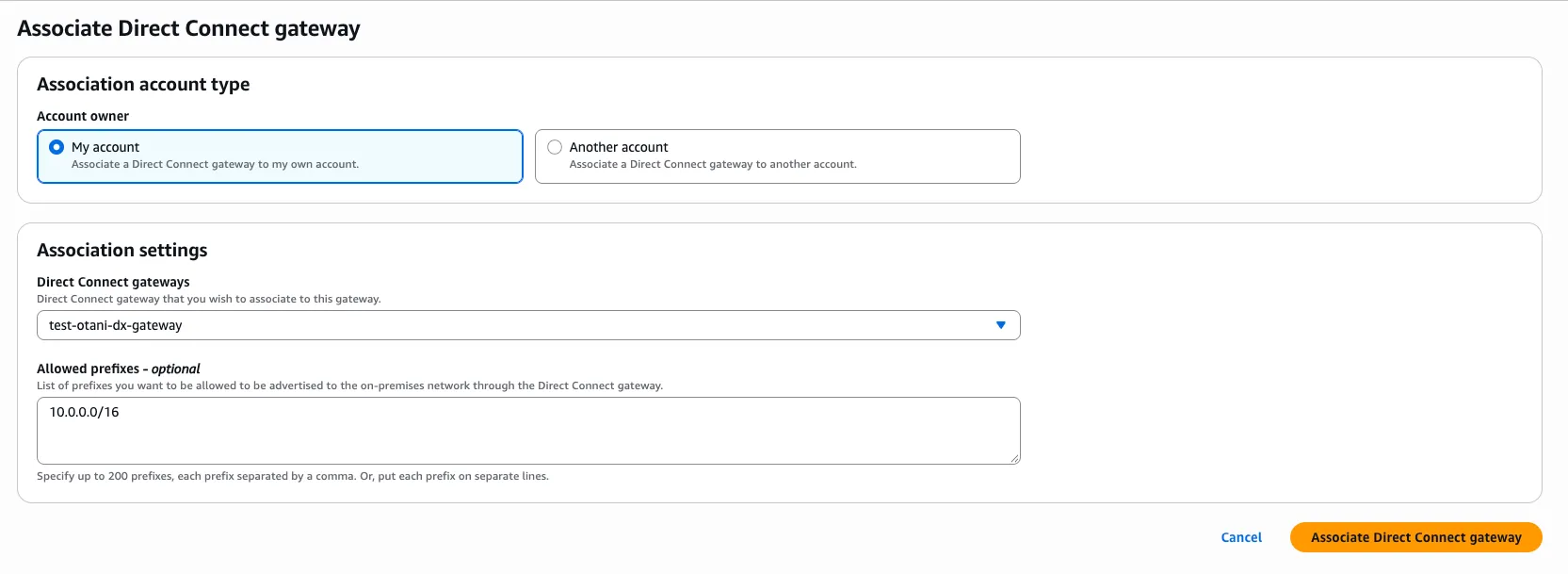
During association, you configure the allowed prefixes. These act as a filter for the VPC prefixes advertised toward the external network.
In this example, the allowed prefix is:
Plain text
10.0.0.0/16
This is the AWS VPC CIDR, not the Azure VNet CIDR.
I also enabled route propagation on the relevant VPC route table so that routes learned through the VGW could be propagated automatically.
Pitfall: creating the VGW in the wrong region
My first VGW was accidentally created in
us-east-1 , even though my VPC was in us-west-1 .A VGW must be attached to a VPC in its own region.

I recreated the VGW in the correct region and continued the setup.
This was a simple mistake, but it reinforced the importance of double-checking resource regions when working across multiple cloud consoles.
Wiring the Azure side — and a CLI issue worth knowing
The Azure side required an ExpressRoute virtual network gateway and a connection linking that gateway to the Multicloud Interconnect circuit.
The gateway was the most time-consuming resource to provision.
It can take tens of minutes to become available, and billing begins when the gateway is provisioned.
You can check its state using the following command:
Plain text
az network vnet-gateway show \--name <gw-name> \--resource-group <rg> \--query provisioningState \-o tsv
A successful deployment eventually reports:

Plain text
Succeeded
One pleasant surprise was that I didn't need to manually create a public IP address for the ExpressRoute gateway. Azure manages that requirement automatically for this deployment model.
The Azure CLI problem
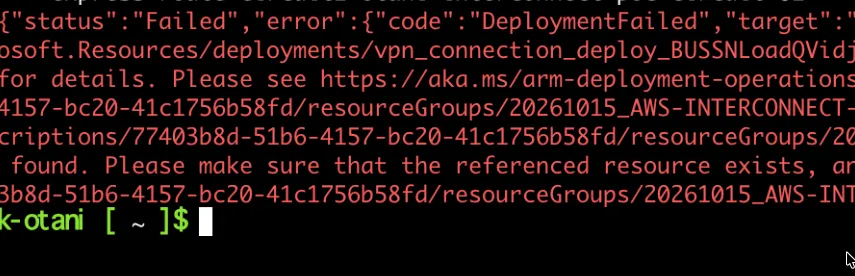
When I attempted to create the ExpressRoute connection between the virtual network gateway and the circuit, the CLI returned an error similar to the following:
Plain text
InvalidResourceReference ...virtualNetworkGateways/XXXXXX-POC-ERGW not found
In my environment, the resource and resource-group names appeared in uppercase in the failed request.
Even passing full resource IDs did not resolve the issue.
I cannot confirm whether this was a specific Azure CLI version issue or another resource-reference handling problem.
What worked for me was creating the connection through an Azure Resource Manager (ARM) template instead.
Here is a simplified version of the template:
Plain text
{"$schema": "https://schema.management.azure.com/schemas/2019-04-01/deploymentTemplate.json#","contentVersion": "1.0.0.0","resources": [{"type": "Microsoft.Network/connections","apiVersion": "2023-09-01","name": "<connection-name>","location": "westus","properties": {"connectionType": "ExpressRoute","routingWeight": 0,"virtualNetworkGateway1": {"id": "<gateway-id>"},"peer": {"id": "<circuit-id>"}}}]}
I deployed it with:
Plain text
az deployment group create \--resource-group <rg> \--template-file erconn.json \--name erconn-deploy
The connection was created successfully.
This was one of the most useful troubleshooting lessons from the PoC: when a CLI command behaves unexpectedly, deploying the underlying Azure resource through an ARM template can provide an alternative path.
A note on resiliency settings
During the preview, I used Standard resiliency.
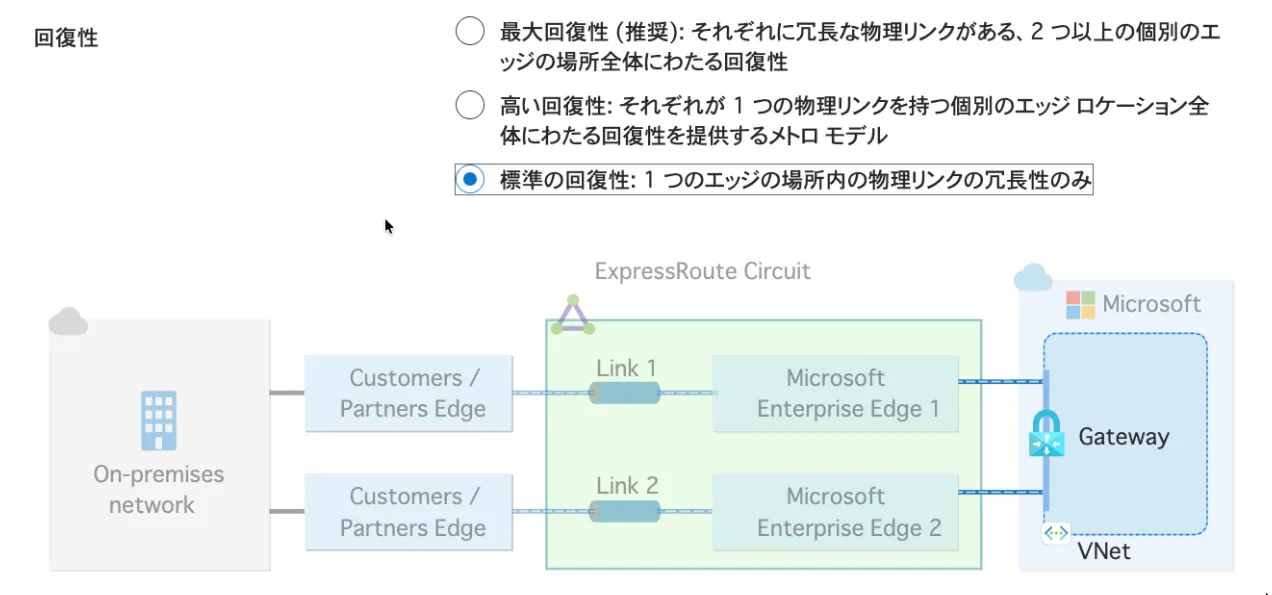
Higher resiliency configurations may require multiple circuits or locations, which can conflict with preview resource limits.
Check the latest preview quotas and supported resiliency configurations before selecting an option.
Security settings for cross-cloud connectivity
Establishing private network connectivity does not automatically mean that workloads can communicate with each other.
AWS Security Groups, Azure Network Security Groups (NSGs), route tables, and operating system firewalls still control traffic.
For my connectivity tests, the relevant traffic consisted of ICMP for ping tests and TCP port 8080 for HTTP communication.
The corresponding test rules are summarized below:
Side | Direction | Protocol | Remote CIDR |
|---|---|---|---|
AWS Security Group | Inbound | ICMP | 10.1.0.0/16 |
AWS Security Group | Inbound | TCP 8080 | 10.1.0.0/16 |
Azure NSG | Inbound | ICMP | 10.0.0.0/16 |
Azure NSG | Inbound | TCP 8080 | 10.0.0.0/16 |
These are example least-privilege rules for the anonymized topology, rather than an export of the original security configuration.
The Azure and AWS instances must also have appropriate outbound permissions, and their operating system firewalls must permit the required traffic.
For example, an HTTP test from Azure to AWS requires the following:
- A route from Azure toward the AWS VPC.
- An AWS-side return route toward the Azure VNet.
- An AWS Security Group rule allowing TCP 8080 from the Azure address range.
- Appropriate Azure NSG and operating system firewall rules.
- An HTTP service listening on the target instance.
For production environments, I recommend restricting the allowed source ranges and ports as much as possible.
Also, remember that private connectivity and encryption are different concepts.
The inter-provider links use MACsec, but application-level encryption such as TLS may still be required depending on your security requirements.
Verifying that it actually works
Creating the Interconnect resources successfully is only the beginning.
I wanted to verify that routing was established correctly and that application traffic could travel between the two environments.
Checking BGP learned routes
The Azure portal did not expose the usual ExpressRoute peering configuration blade for my Multicloud Interconnect circuit.
Instead, I checked learned routes through Azure CLI.
Plain text
az network vnet-gateway list-learned-routes \--name <gw-name> \--resource-group <rg> \-o table
The output showed the AWS VPC prefix being learned through eBGP.
The original results contained the real network prefixes, so I have replaced them with the anonymized CIDRs used in this article.
The following is an illustrative summary of the relevant routes:
Plain text
Network Origin Description10.1.0.0/16 Network Azure VNet10.0.0.0/16 EBgp AWS VPC (path 1)10.0.0.0/16 EBgp AWS VPC (path 2)10.0.0.0/16 EBgp AWS VPC (path 3)10.0.0.0/16 EBgp AWS VPC (path 4)
This is a simplified illustration, not a verbatim CLI output. The actual learned routes showed four entries for the AWS prefix with different next-hop addresses.
This was consistent with the service's redundant four-path architecture. The AS path also included Microsoft's ExpressRoute ASN (
12076 ) and the Amazon-side DX gateway ASN ( 64512 ).These observations confirmed that Azure was learning the advertised AWS prefix through eBGP.
However, the presence of four learned paths does not by itself prove that application traffic is evenly distributed across all four paths.
Checking routes on AWS
On the AWS side, I enabled route propagation on the VPC route table associated with the VGW.
The Azure VNet prefix appeared as a propagated route.
In the anonymized example, that prefix is
Plain text
10.1.0.0/16
This confirmed that the AWS side had learned a route toward the Azure network.
Testing VM-to-VM communication
Finally, I launched a test virtual machine in each environment.
I verified connectivity using the following tests:
- ICMP ping from AWS to Azure.
- ICMP ping from Azure to AWS.
- HTTP over TCP port 8080 in both directions.
Both tests succeeded using private IP addresses.
EC2 Instance:
Bash
sh-5.2$ ping 10.1.1.4PING 10.1.1.4 (10.0.1.4) 56(84) bytes of data.64 bytes from 10.1.1.4: icmp_seq=1 ttl=62 time=2.85 ms64 bytes from 10.1.1.4: icmp_seq=2 ttl=62 time=2.00 ms64 bytes from 10.1.1.4: icmp_seq=3 ttl=62 time=2.15 ms64 bytes from 10.1.1.4: icmp_seq=4 ttl=62 time=2.13 ms64 bytes from 10.1.1.4: icmp_seq=5 ttl=62 time=2.21 ms64 bytes from 10.1.1.4: іcmp_seq=6 ttl=62 time=2.18 ms^C--- 10.0.1.4 ping statistics ---10 packets transmitted, 10 received, 0% packet loss, time 9013msrtt min/avg/max/mdev = 2.004/2.248/2.850/0.214 mssh-5.2$sh-5.2$sh-5.2$ python3-m http.server 8080Serving HTTP on 0.0.0.0 port 8080 (http://0.0.0.0:8080/)...
Azure VM:
Bash
azureuser@azure-vm:~$ curl http://10.0.0.34:8080<!DOCTYPE HTML PUBLIC"-//WBC//DTD HTML 4.01//EN" "http://www.w3.org/TR/html4/strict.dtd"><html><head>‹meta http-equiv= ...
The successful tests confirmed that routing, security controls, and end-to-end connectivity were functioning for this PoC.
What it cost
One important takeaway: the Interconnect itself was free during the Azure preview, but the overall PoC was not entirely free.
The main recurring cost came from the Azure ExpressRoute virtual network gateway.
Here is the pricing information I collected for the West US region.
Resource | Cost |
|---|---|
Azure Multicloud Interconnect circuit | No Azure service charge during preview |
AWS preview Interconnect | No preview Interconnect service charge |
AWS VPC / VGW / DX gateway resources | No standalone hourly gateway charge |
Azure VNet / subnets | No standalone resource charge |
Azure ExpressRoute gateway (Standard) | $0.19/hour |
Azure ExpressRoute gateway (ErGw1AZ) | $0.361/hour |
EC2 and Azure test VMs | Instance and related resource charges apply |
Data transfer | Depends on provider, direction, and applicable pricing |
The Azure gateway rates were obtained from the Azure Retail Prices API for
westus , in USD per hour. Prices should be checked again before reproducing the PoC.At
$0.19/hour , the Standard gateway costs approximately $4.56 per day, or $138.70 for a 730-hour month.Since my PoC spanned two days, the gateway's theoretical maximum cost over 48 hours would have been approximately
$9.12 , excluding other resources and assuming continuous operation.My actual gateway runtime was shorter than the full two-day PoC period.
The Azure Multicloud Interconnect preview does not charge for the Azure Interconnect service or Azure egress traffic, but other resource charges may still apply.
On AWS, outbound data transfer through Direct Connect can be charged depending on the applicable pricing model.
For a few ping and HTTP tests, the transferred data volume is negligible. For production workloads, data transfer costs should be evaluated carefully.
Lesson learned:
The managed connectivity service can be inexpensive to evaluate, but don't forget the gateway and test compute resources.
Cleanup
Once the connectivity tests were complete, I removed the test resources.
Since the ExpressRoute gateway incurs hourly charges, it is important to delete it when it is no longer needed.
On Azure, I used the Azure portal to delete the resources. The cleanup completed without any issues.
Note that deleting an Azure VM does not necessarily remove all associated resources, such as managed disks, network interfaces, or public IP addresses.
Check for remaining billable resources after cleanup.
On AWS, I terminated the test EC2 instance and checked for any remaining resources that could incur charges.
For a temporary PoC, deleting the entire test environment is generally safer than leaving unused resources behind.
Preview resources may also have lifecycle restrictions or require recreation when the service changes or reaches general availability. Check the current documentation before relying on them for long-term connectivity.
Takeaways
My initial goal was straightforward: connect one AWS VPC and one Azure VNet privately and verify that communication worked.
I achieved that goal, but the process involved more troubleshooting than I initially expected.
The PoC took two days from start to finish, including infrastructure provisioning, troubleshooting, routing verification, application testing, and cleanup.
The most valuable lessons were:
- Verify the supported region pair first. West US and West US 3 are not interchangeable.
- Use one activation-key workflow at a time. Avoid initiating overlapping Interconnect provisioning requests.
- Keep ARM templates in mind when Azure CLI behaves unexpectedly. An ARM deployment provided a practical workaround for my connection creation issue.
- Don't stop at the resource status. Check BGP learned routes, VPC route tables, Security Groups, NSGs, and real application connectivity.
- Watch the gateway costs. The preview Interconnect service may be free, but the supporting resources are not necessarily free.
AWS Interconnect – multicloud significantly reduces the complexity of establishing private connectivity between cloud providers.
What previously required substantial networking coordination can now be provisioned through managed cloud resources.
For my small topology, the end-to-end PoC took two days, including the issues I encountered along the way.
The Azure integration is still in preview, with limitations such as 1 Gbps bandwidth, restricted region availability, and no preview SLA. Japan regions are not currently included in the supported AWS–Azure region pairs.
I would treat it as an evaluation opportunity rather than a production-ready option until the relevant service capabilities and support commitments are available.
Even with those limitations, it was a valuable hands-on experience — especially for an AWS engineer getting more familiar with Azure networking.
Thanks for reading!
Enjoyed reading this content? Let the author know!
Your likes, comments, shares, and saves help creators reach more builders.

Loading recommendations
Loading article