
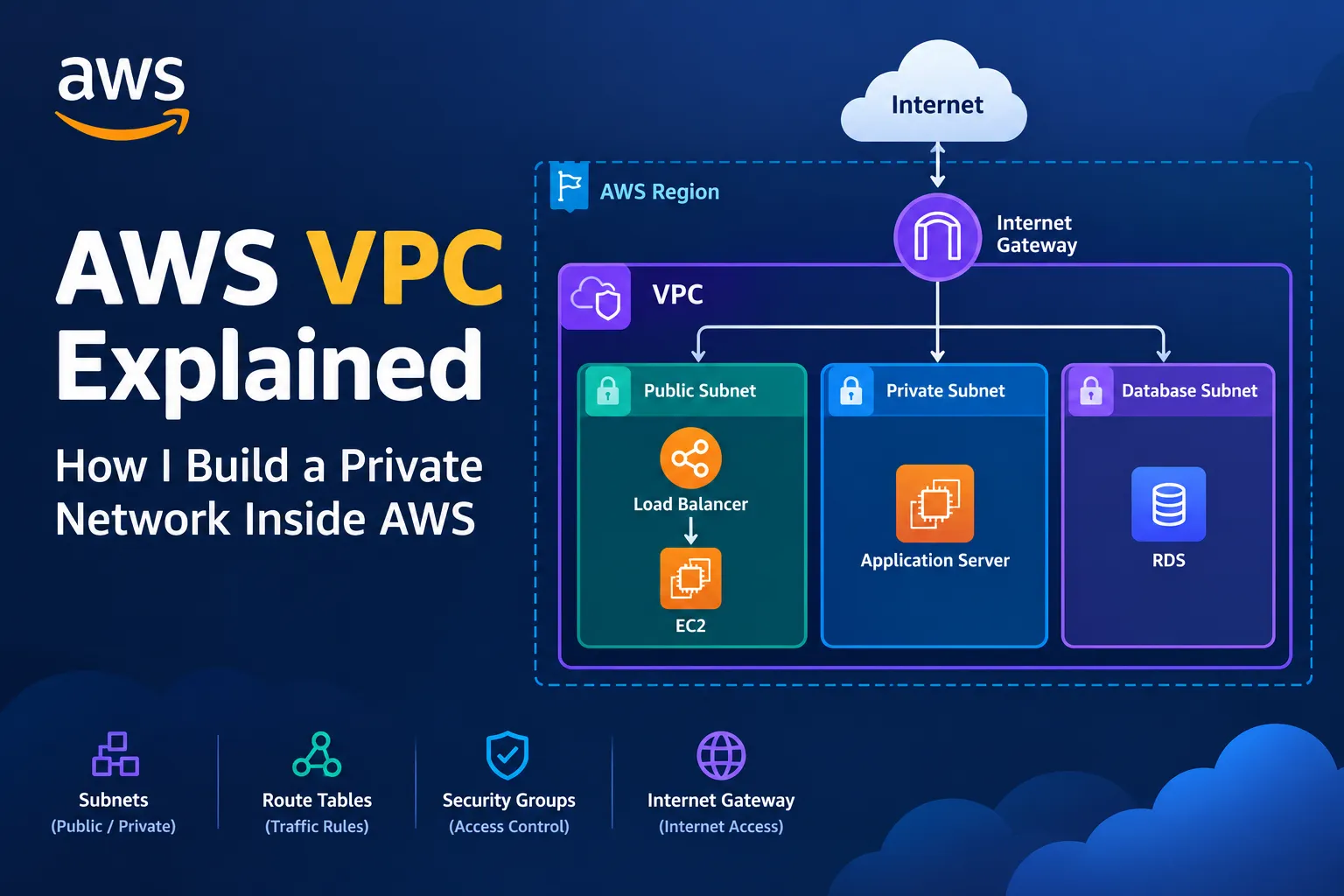
🌐 AWS VPC Explained: How I Build a Private Network Inside AWS
A beginner-friendly guide to Amazon VPC, including subnets, route tables, internet gateways, NAT gateways, security groups, and network design. Learn how AWS networking works behind the scenes and how to build a secure cloud architecture.


🌐 AWS VPC Explained: How I Build a Private Network Inside AWS
When I first started learning AWS, I focused mainly on services like EC2, Lambda, S3, and DynamoDB.
But eventually I asked myself:
Where do these AWS resources actually live from a networking perspective?
An EC2 instance needs a network.
A database needs network connectivity.
A Lambda function may need access to other AWS services.
Applications need to communicate securely.
That's when I started learning about one of the most important AWS concepts:
🌐 Amazon VPC
Amazon Virtual Private Cloud (VPC) allows me to create a logically isolated network inside AWS.
My simple mental model is:
1
2
3
4
5
6
7
8
9
10
11
12
AWS Region
    │
    ▼
┌──────────────────────────────┐
│            VPC               │
│                              │
│   ┌──────────┐  ┌──────────┐ │
│   │ Public   │  │ Private  │ │
│   │ Subnet   │  │ Subnet   │ │
│   └──────────┘  └──────────┘ │
│                              │
└──────────────────────────────┘
Once I understood VPCs, AWS networking started making much more sense.
🧠 What Is an AWS VPC?
A VPC is my own logically isolated network environment within AWS.
Inside it, I can define things such as:
1
2
3
4
5
6
IP address ranges
Subnets
Route tables
Internet connectivity
Network security
Private resources
For example, I could create a VPC using:
1
10.0.0.0/16
Then divide that network into smaller subnets.
1
2
3
4
5
6
7
VPC: 10.0.0.0/16
       │
       ├── Public Subnet
       │
       ├── Private Subnet
       │
       └── Database Subnet
This is the foundation of many AWS architectures.
🏠 My Simple Analogy
I think of a VPC like a large building.
1
2
3
4
5
VPC
│
├── Public Area
├── Private Area
└── Database Area
The VPC is the building.
Subnets are different sections.
Route tables are like directions that determine where traffic can go.
Security groups are like security guards controlling who can enter specific resources.
This analogy helped me understand the pieces without trying to memorize everything at once.
📦 What Is a Subnet?
A subnet is a smaller network inside my VPC.
For example:
1
2
3
4
5
6
7
8
VPC
10.0.0.0/16
       │
       ├── Public Subnet
       │   10.0.1.0/24
       │
       └── Private Subnet
           10.0.2.0/24
Instead of putting everything into one large network, I can separate resources based on their role.
For example:
1
2
3
4
5
6
7
8
9
10
11
Public Subnet
    │
    └── Load Balancer

Private Subnet
    │
    └── Application Server

Database Subnet
    │
    └── Database
This separation can improve both security and architecture.
🌍 What Makes a Subnet "Public"?
This was one of the concepts that confused me initially.
A subnet isn't public simply because I call it:
1
Public Subnet
A subnet is generally considered public when its route table has a route to an Internet Gateway.
Conceptually:
1
2
3
4
5
6
7
8
9
10
Public Subnet
      │
      ▼
Route Table
      │
      ▼
Internet Gateway
      │
      ▼
Internet
A private subnet doesn't have a direct route to the Internet Gateway.
That distinction is extremely important.
🚪 What Is an Internet Gateway?
An Internet Gateway (IGW) provides a path between resources in a VPC and the internet, subject to routing and security configuration.
A simplified architecture looks like:
1
2
3
4
5
6
7
8
9
10
11
12
             🌍 Internet
                  │
                  ▼
         Internet Gateway
                  │
                  ▼
                VPC
                  │
           Public Subnet
                  │
                  ▼
                EC2
Without the appropriate internet gateway and routing configuration, an EC2 instance in a subnet won't simply become internet-accessible.
🛣️ What Is a Route Table?
This is another important concept.
A route table contains rules that determine where network traffic should go.
Think of it like a map.
For example:
1
2
3
4
Destination       Target
--------------------------------
10.0.0.0/16       Local
0.0.0.0/0         Internet Gateway
The first rule means traffic within the VPC can use the local VPC routing.
The second says:
Traffic destined for other IPv4 networks should go toward the Internet Gateway.
So the flow becomes:
1
2
3
4
5
6
7
8
9
10
EC2
 │
 ▼
Route Table
 │
 ▼
Internet Gateway
 │
 ▼
Internet
🔒 What Is a Private Subnet?
A private subnet is useful when I don't want resources to have direct inbound internet connectivity through an Internet Gateway.
For example:
1
2
3
4
5
Private Subnet
      │
      ├── Application Server
      │
      └── Database
This is useful for resources that don't need to accept direct connections from the public internet.
A common architecture is:
1
2
3
4
5
6
7
8
9
10
Internet
   │
   ▼
Load Balancer
   │
   ▼
Private Application Servers
   │
   ▼
Database
Now the application servers and database don't need to be directly exposed to the public internet.
🚪 What Is a NAT Gateway?
This was another networking concept I had to understand carefully.
Suppose an EC2 instance is inside a private subnet.
It might need to make an outbound connection to the internet.
For example:
1
2
3
4
5
Private EC2
    │
    │ Download update
    ▼
Internet
But I don't want that instance to have a direct inbound internet path.
A NAT Gateway can provide outbound internet connectivity for resources in private subnets, when configured appropriately.
Conceptually:
1
2
3
4
5
6
7
8
9
10
Private Subnet
      │
      ▼
  NAT Gateway
      │
      ▼
Internet Gateway
      │
      ▼
  Internet
This gives me an important pattern:
1
2
3
4
Private resources
      │
      ▼
Outbound Internet
without making those resources directly reachable from the public internet through the same path.
🏗️ Public + Private Architecture
Now I can build a much more realistic architecture.
1
2
3
4
5
6
7
8
9
10
11
12
13
14
15
16
17
18
19
20
21
22
23
24
                         🌍 Internet
                              │
                              ▼
                     Internet Gateway
                              │
                              ▼
                    ┌─────────────────┐
                    │  Public Subnet  │
                    │                 │
                    │ Load Balancer   │
                    └────────┬────────┘
                             │
                             ▼
                    ┌─────────────────┐
                    │ Private Subnet  │
                    │                 │
                    │ App Server      │
                    │ App Server      │
                    └────────┬────────┘
                             │
                             ▼
                    ┌─────────────────┐
                    │ Database Layer  │
                    └─────────────────┘
This is much closer to how I now think about production architectures.
🛡️ Security Groups
VPC networking isn't complete without security.
A Security Group acts as a virtual firewall for supported AWS resources.
For example, suppose I have:
1
2
3
4
Load Balancer
      │
      ▼
EC2
I don't necessarily want the EC2 instance to accept traffic from everyone on the internet.
Instead, I can design rules so that the EC2 instance accepts application traffic from the appropriate source.
Conceptually:
1
2
3
4
5
6
7
8
Internet
    │
    ▼
Load Balancer
    │
    │ Allowed
    ▼
EC2
This creates a much cleaner security model.
🔐 Security Group Example
Imagine my application runs on port 80.
I might have a security rule conceptually like:
1
2
3
Protocol: TCP
Port: 80
Source: Appropriate application traffic
For SSH administration, I should avoid opening SSH to the entire internet unless there is a strong reason and appropriate controls.
For example, this is generally risky:
1
2
SSH
0.0.0.0/0
Because it means the service is reachable from anywhere on the IPv4 internet, subject to other controls.
A much narrower source is preferable when possible.
🧱 Network ACLs
Another networking component is the Network Access Control List (Network ACL).
A simple way I remember the difference is:
1
2
3
4
5
Security Group
→ Resource-level traffic control

Network ACL
→ Subnet-level traffic control
Security Groups are stateful.
Network ACLs are stateless.
That distinction is important when designing AWS networking.
🧩 Security Groups vs Network ACLs
My simple comparison:
| Feature | Security Group | Network ACL |
|---|---|---|
| Applies to | Resource/network interface | Subnet |
| Stateful | Yes | No |
| Rules | Allow rules | Allow + Deny |
| Main purpose | Resource-level protection | Subnet-level filtering |
I don't need to memorize every networking feature immediately.
Understanding the purpose of each component is more important.
🌎 Availability Zones
A VPC exists within an AWS Region, and I can create subnets in different Availability Zones.
For example:
1
2
3
4
5
6
7
AWS Region
│
├── Availability Zone A
│      └── Subnet A
│
└── Availability Zone B
       └── Subnet B
This becomes extremely useful for highly available applications.
Instead of:
1
2
3
4
One AZ
   │
   ├── EC2
   └── Database
I can design:
1
2
3
4
5
6
7
Region
│
├── AZ-A
│    └── Application
│
└── AZ-B
     └── Application
If one Availability Zone experiences a problem, the architecture can potentially continue operating using resources in another zone, depending on how the application is designed.
🚀 Combining VPC With Load Balancing
I previously learned about Load Balancers and Auto Scaling.
Now I can see where they fit inside a VPC.
1
2
3
4
5
6
7
8
9
10
11
12
13
14
15
16
17
18
19
20
21
                         🌍 Internet
                              │
                              ▼
                     Internet Gateway
                              │
                              ▼
                    ┌─────────────────┐
                    │ Public Subnets  │
                    │                 │
                    │ Load Balancer   │
                    └────────┬────────┘
                             │
                    ┌────────┴────────┐
                    ▼                 ▼
             Private Subnet A   Private Subnet B
                    │                 │
                   EC2               EC2
                    │                 │
                    └────────┬────────┘
                             ▼
                         Database
Now several AWS concepts connect together:
1
2
3
4
5
6
7
8
9
10
11
VPC
+
Subnets
+
Load Balancer
+
EC2
+
Auto Scaling
+
Security Groups
This is starting to look like a real cloud architecture.
🔄 How a Request Can Travel
Let's follow one request.
A user opens my application:
1
https://myapp.example
The request might flow like:
1
2
3
4
5
6
7
8
9
10
11
12
13
14
15
16
User
 │
 ▼
Internet
 │
 ▼
Internet Gateway
 │
 ▼
Load Balancer
 │
 ▼
Private EC2
 │
 ▼
Database
The important thing is that not every component needs to be directly exposed to the internet.
That is a major security and architecture lesson.
🔐 Why Keep Databases Private?
Imagine I have a database containing application data.
I probably don't want:
1
2
3
Internet
    │
    └──────► Database ❌
A better architecture is:
1
2
3
4
5
6
7
8
9
10
Internet
    │
    ▼
Load Balancer
    │
    ▼
Application
    │
    ▼
Database
The database is accessed through the application layer.
This reduces the number of components that need direct internet exposure.
🧠 CIDR Blocks
Another term I encountered while learning VPCs is CIDR.
CIDR notation describes IP address ranges.
For example:
1
10.0.0.0/16
could represent a VPC address range.
I could divide it into smaller ranges:
1
2
3
10.0.1.0/24
10.0.2.0/24
10.0.3.0/24
Conceptually:
1
2
3
4
5
10.0.0.0/16
       │
       ├── 10.0.1.0/24
       ├── 10.0.2.0/24
       └── 10.0.3.0/24
Understanding CIDR becomes important when designing subnets.
⚠️ Common Beginner Mistakes
❌ Mistake 1: Thinking "public subnet" means every resource is public
A subnet's routing configuration matters, and individual resources still require appropriate network and security configuration.
❌ Mistake 2: Opening every port
Just because a service works when I open:
1
0.0.0.0/0
doesn't mean that's a good production configuration.
❌ Mistake 3: Putting databases directly on the public internet
Databases generally belong in private network designs when public access isn't required.
❌ Mistake 4: Ignoring Availability Zones
Putting everything into one Availability Zone can create unnecessary availability risk.
❌ Mistake 5: Confusing Security Groups and Route Tables
They solve different problems:
1
2
3
4
5
Route Table
→ Where should traffic go?

Security Group
→ Which traffic is allowed to reach the resource?
❌ Mistake 6: Thinking a VPC automatically makes everything secure
A VPC is a networking foundation.
Security still requires correct routing, access controls, identity, encryption, and application design.
🧠 The Biggest VPC Lesson
Before learning VPCs, I thought:
"AWS resources just connect to the internet."
Now I understand that networking is something I can design.
I can decide:
1
2
3
4
5
6
7
8
9
10
11
Where resources live
        ↓
How they communicate
        ↓
Which traffic is allowed
        ↓
Which resources are public
        ↓
Which resources stay private
        ↓
How traffic reaches the internet
That's a completely different way of thinking about cloud infrastructure.
🏗️ My Updated AWS Architecture
After connecting VPC with the AWS services I've learned so far, my architecture now looks like:
1
2
3
4
5
6
7
8
9
10
11
12
13
14
15
16
17
18
19
20
21
22
23
                         🌍 Users
                            │
                            ▼
                     Internet Gateway
                            │
                            ▼
                ┌──────────────────────┐
                │     Public Subnets   │
                │                      │
                │    Load Balancer     │
                └──────────┬───────────┘
                           │
                  ┌────────┴────────┐
                  ▼                 ▼
          ┌─────────────┐    ┌─────────────┐
          │ Private AZ-A│    │ Private AZ-B│
          │             │    │             │
          │ EC2 / App   │    │ EC2 / App   │
          └──────┬──────┘    └──────┬──────┘
                 │                  │
                 └────────┬─────────┘
                          ▼
                   Private Database
Then:
1
2
3
4
5
6
7
8
9
10
11
12
13
14
CloudWatch
    │
    ▼
Monitoring

IAM
    │
    ▼
Permissions

Secrets Manager
    │
    ▼
Credentials
Everything starts fitting together.
🎯 My VPC Mental Model
I'm currently remembering the major components like this:
1
2
3
4
5
6
7
8
9
10
11
12
13
14
                    VPC
                     │
        ┌────────────┼────────────┐
        ▼            ▼            ▼
     Subnets     Route Tables   Security
        │            │            │
        ▼            ▼            ▼
     Resources     Traffic      Access
                     │
                     ▼
              Internet Gateway
                     │
                     ▼
                  Internet
And for private resources:
1
2
3
4
5
6
7
8
9
10
Private Subnet
      │
      ▼
  NAT Gateway
      │
      ▼
Internet Gateway
      │
      ▼
Internet
🚀 Final Takeaway
The biggest thing I learned from AWS VPC is:
Cloud architecture starts with networking.
Before deploying an application, I need to think about:
🌐 Where will it live?
🔒 What should be public?
🛡️ What should remain private?
🛣️ How will traffic move?
🚪 Which ports should be accessible?
🌍 How will I design across Availability Zones?
The simple architecture I want to remember is:
1
2
3
4
5
6
7
8
9
10
11
12
13
                 🌍 Internet
                     │
                     ▼
              Load Balancer
                     │
                     ▼
              Public Subnet
                     │
                     ▼
             Private Subnet
                     │
                     ▼
                  Database
AWS VPC taught me that networking isn't just something happening in the background.
It is one of the foundations of a secure, scalable, and highly available cloud architecture. 🌐🔐☁️
Enjoyed reading this content? Let the author know!
Your likes, comments, shares, and saves help creators reach more builders.

Loading recommendations
Loading article