
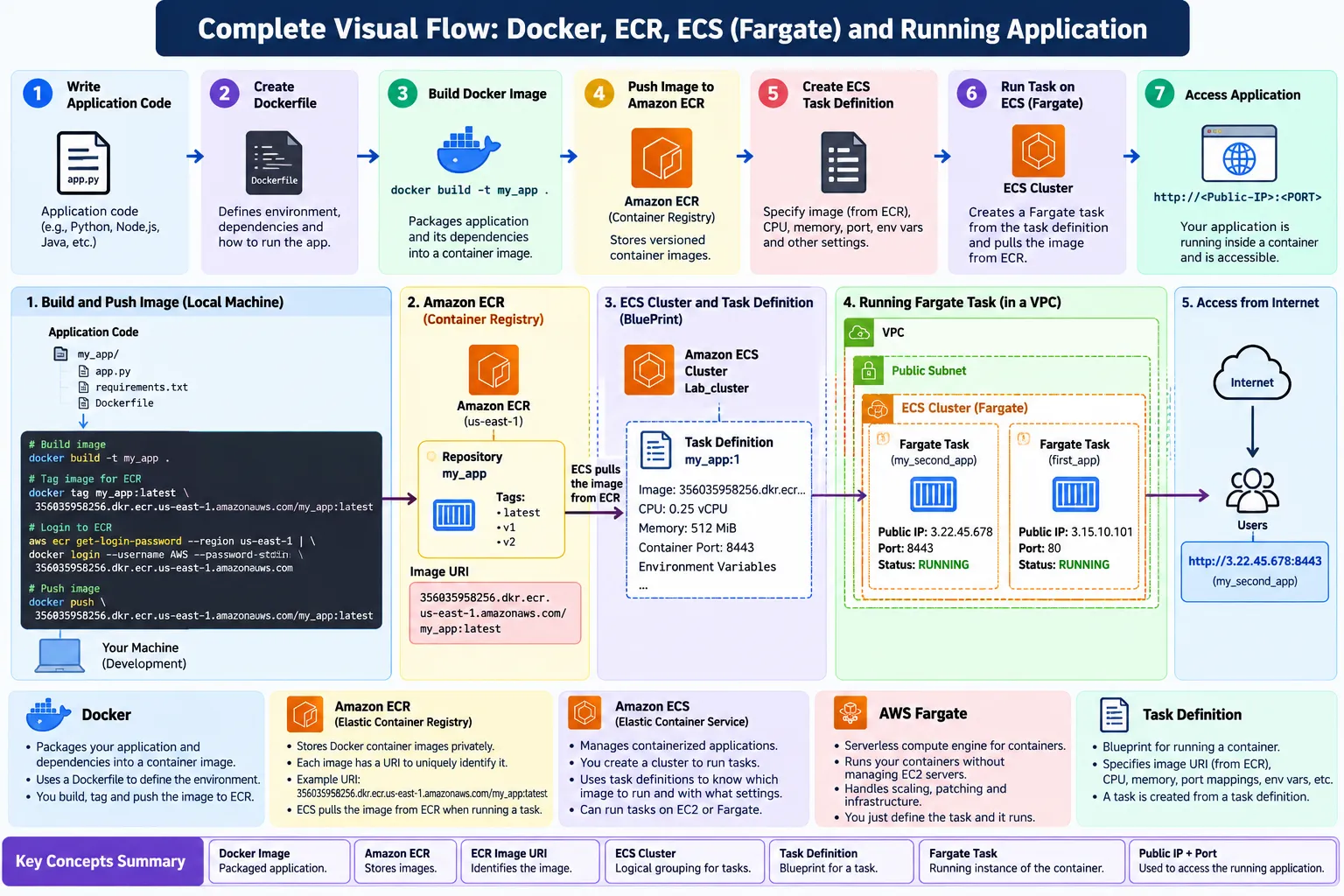
From Docker to AWS Fargate: A Complete ECR and ECS Deployment Journey
Learn how a Docker application moves from local development to Amazon ECR and finally runs as a production-ready container on Amazon ECS with AWS Fargate.

🚀 From Docker to AWS Fargate: Complete Container Deployment Journey
Containers have changed the way applications are built, shipped, and deployed. Instead of configuring the same environment repeatedly, we can package an application with its dependencies into a Docker image and deploy that image across different environments.
In this hands-on AWS lab, I learned how a Dockerized application moves from local development to a running application on AWS using Amazon ECR, Amazon ECS, and AWS Fargate.
The complete journey was:
Docker → Amazon ECR → ECS Task Definition → ECS Cluster → AWS Fargate → Running Container → Application
🏗️ Complete Architecture
1
2
3
4
5
6
7
8
9
10
11
12
13
14
15
16
17
18
19
20
21
22
23
24
25
26
27
28
29
30
31
👨💻 APPLICATION CODE
│
▼
🐳 DOCKER
Build Image
│
▼
📦 AMAZON ECR
Store Container Image
│
│ Pull Image
▼
📋 ECS TASK DEFINITION
Container Blueprint
│
▼
🏢 ECS CLUSTER
Manage Tasks
│
▼
⚡ AWS FARGATE
Run Containers
│
▼
🚀 RUNNING TASK
│
▼
🌐 APPLICATION
│
▼
👤 USER
The core idea is simple:
Docker builds the image, ECR stores the image, ECS manages the container, and Fargate provides the compute required to run it.
🐳 1. Docker: Building the Container Image
The journey starts with the application and a Dockerfile.
A Dockerfile contains instructions for creating a container image.
For example:
1
2
3
4
5
6
7
8
9
10
11
12
FROM python:3.11

WORKDIR /app

COPY requirements.txt .
RUN pip install -r requirements.txt

COPY . .

EXPOSE 8443

CMD ["python", "app.py"]
The Dockerfile defines:
- Base image
- Application dependencies
- Working directory
- Application files
- Container port
- Startup command
We can build the image using:
1
docker build -t my_app .
The process looks like:
1
2
3
4
5
6
7
8
9
10
Application Code
       │
       ▼
   Dockerfile
       │
       ▼
 docker build
       │
       ▼
  Docker Image
The Docker image packages the application and its required environment into a portable unit.
📦 2. Amazon ECR: Storing the Docker Image
After creating the Docker image, we need somewhere to store it.
This is where Amazon Elastic Container Registry (ECR) comes in.
ECR is a managed container registry used to store Docker/container images.
An image can have an ECR URI such as:
1
356035958256.dkr.ecr.us-east-1.amazonaws.com/my_app:latest
Let's break it down:
1
2
3
4
5
6
7
8
9
10
11
12
13
14
15
356035958256
      │
      └── AWS Account ID

dkr.ecr.us-east-1.amazonaws.com
      │
      └── ECR Registry

my_app
      │
      └── Repository

latest
      │
      └── Image Tag
The image can then be pushed into ECR:
1
2
docker push \
356035958256.dkr.ecr.us-east-1.amazonaws.com/my_app:latest
Now the Docker image is stored in Amazon ECR and can be pulled by ECS.
🏷️ 3. Docker Image Tagging
Before pushing the local Docker image to ECR, we associate it with the ECR repository using a tag.
For example:
1
2
docker tag my_app:latest \
356035958256.dkr.ecr.us-east-1.amazonaws.com/my_app:latest
The workflow becomes:
1
2
3
4
5
6
7
8
9
Local Docker Image
      │
      │ docker tag
      ▼
ECR Image URI
      │
      │ docker push
      ▼
Amazon ECR
The tag is important because it allows us to identify a particular image/version.
For example:
1
2
3
my_app:latest
my_app:v1
my_app:v2
🔑 4. Understanding the ECR Image URI
One of the most important concepts I learned was the ECR image URI.
Example:
1
356035958256.dkr.ecr.us-east-1.amazonaws.com/my_app:latest
This URI tells ECS exactly which container image it should pull.
However, it is important to understand:
The ECR image URI is NOT the URL used by users to access the application.
There are two completely different concepts.
📦 ECR Image URI
1
356035958256.dkr.ecr.us-east-1.amazonaws.com/my_app:latest
Purpose:
1
2
3
Identify the Docker image
        ↓
ECS pulls this image
🌐 Application URL
1
http://<PUBLIC-IP>:<PORT>
Purpose:
1
2
3
Identify the running application
        ↓
Users access the application
So:
1
2
3
4
5
6
7
ECR URI
   ↓
"Which image should ECS run?"

Public IP + Port
   ↓
"Where can users access the running application?"
This distinction is extremely useful when troubleshooting container deployments.
📋 5. ECS Task Definition
After storing the image in ECR, ECS needs instructions describing how to run it.
This is the purpose of an ECS Task Definition.
Think of a task definition as a blueprint for a container.
It can specify:
1
2
3
4
5
6
7
8
9
10
11
12
13
14
Task Definition
│
├── Container Image
│      └── my_app:latest
│
├── CPU
│
├── Memory
│
├── Container Port
│
├── Environment Variables
│
└── Container Configuration
For example:
1
2
3
4
5
6
7
8
9
10
11
Image:
356035958256.dkr.ecr.us-east-1.amazonaws.com/my_app:latest

CPU:
0.25 vCPU

Memory:
512 MB

Container Port:
8443
The important distinction is:
A task definition is not the running container. It is the blueprint used to create the running container.
🏢 6. Amazon ECS Cluster
The next component is the Amazon Elastic Container Service (ECS) Cluster.
An ECS cluster provides a logical environment for running ECS tasks.
For example:
1
2
3
4
5
6
7
8
                  ECS Cluster
                  Lab_cluster
                       │
              ┌────────┴────────┐
              │                 │
              ▼                 ▼
        Fargate Task      Fargate Task
        first_app         my_second_app
A single cluster can contain multiple applications and tasks.
In the lab, I worked with multiple applications running as separate Fargate tasks inside the ECS cluster.
⚡ 7. AWS Fargate
Now comes one of the most useful parts of the architecture: AWS Fargate.
Fargate is a serverless compute engine for containers.
It allows us to run ECS containers without directly managing the underlying servers.
With ECS on EC2, we would need to manage infrastructure such as:
1
2
3
4
5
6
7
You
 │
 ├── EC2 Instances
 ├── Operating Systems
 ├── Capacity
 ├── Server Maintenance
 └── Containers
With ECS + Fargate:
1
2
3
4
5
6
7
8
9
10
11
You
 │
 ├── Define Container
 ├── Define CPU / Memory
 └── Run Task
          │
          ▼
       Fargate
          │
          ▼
 AWS manages underlying infrastructure
This allows developers to focus more on the application and less on server management.
🚀 8. Running the Container
Once the ECS task is launched using Fargate, ECS pulls the Docker image from ECR.
The process is:
1
2
3
4
5
6
7
8
9
10
11
12
13
14
15
16
17
Amazon ECR
    │
    │ Pull Image
    ▼
ECS Task Definition
    │
    ▼
ECS Cluster
    │
    ▼
AWS Fargate
    │
    ▼
Running Container
    │
    ▼
Application
The running task can have networking information such as:
1
2
3
4
5
Public IP:
54.xxx.xxx.xxx

Port:
8443
The application can then be accessed using:
1
http://<PUBLIC-IP>:<PORT>
The complete request path is:
1
2
3
4
5
6
7
8
9
10
11
12
13
User
  │
  ▼
Public IP : Port
  │
  ▼
Fargate Task
  │
  ▼
Container
  │
  ▼
Application
🔄 9. Complete Deployment Workflow
The entire deployment process can be remembered using these steps.
Step 1: Create the Application
1
Application Code
⬇️
Step 2: Create a Dockerfile
1
Dockerfile
⬇️
Step 3: Build the Docker Image
1
docker build -t my_app .
⬇️
Step 4: Tag the Image
1
2
docker tag my_app:latest \
356035958256.dkr.ecr.us-east-1.amazonaws.com/my_app:latest
⬇️
Step 5: Push the Image to ECR
1
2
docker push \
356035958256.dkr.ecr.us-east-1.amazonaws.com/my_app:latest
⬇️
Step 6: Create an ECS Task Definition
Configure:
1
2
3
4
5
Container Image
CPU
Memory
Container Port
Environment Variables
⬇️
Step 7: Run the Task Using Fargate
1
2
3
4
5
6
7
8
9
10
ECS Cluster
     │
     ▼
Fargate Task
     │
     ▼
Running Container
     │
     ▼
Application
⬇️
Step 8: Access the Application
1
http://<PUBLIC-IP>:<PORT>
🧩 10. Docker vs ECR vs ECS vs Fargate
| Technology | Purpose |
|---|---|
| 🐳 Docker | Builds and packages the application into a container image |
| 📦 Amazon ECR | Stores Docker/container images |
| 🏷️ Image Tag | Identifies a particular image/version |
| 📋 Task Definition | Defines how the container should run |
| 🏢 Amazon ECS | Orchestrates and manages containers |
| ⚡ AWS Fargate | Provides serverless compute for running containers |
| 🌐 Public IP + Port | Provides access to the running application |
🔥 11. What Happens Behind the Scenes?
When a user accesses the application, several components work together.
1
2
3
4
5
6
7
8
9
10
11
12
13
14
                   👤 USER
                     │
                     │ HTTP Request
                     ▼
              🌐 Public Endpoint
                     │
                     ▼
              ⚡ FARGATE TASK
                     │
                     ▼
               🚀 CONTAINER
                     │
                     ▼
              💻 APPLICATION
But before the container could run:
1
2
3
4
5
6
7
8
9
10
11
12
13
14
15
16
17
18
19
20
21
22
              🐳 DOCKER
                  │
                  │ Build
                  ▼
             Docker Image
                  │
                  │ Push
                  ▼
              📦 ECR
                  │
                  │ Pull
                  ▼
           ECS Task Definition
                  │
                  ▼
             ECS Cluster
                  │
                  ▼
              FARGATE
                  │
                  ▼
          Running Container
This is the complete container lifecycle.
🎯 12. What I Learned From This Lab
This hands-on lab helped me understand the complete container deployment lifecycle instead of treating Docker, ECR, ECS, and Fargate as isolated technologies.
The key takeaways were:
🐳 Docker
Docker packages an application and its dependencies into a portable container image.
📦 Amazon ECR
ECR provides a managed registry where container images can be stored.
🏷️ Image Tagging
Docker images can be tagged with repository names and versions before being pushed to ECR.
🔑 ECR Image URI
The ECR URI uniquely identifies the container image that ECS should pull.
📋 Task Definition
An ECS task definition acts as a blueprint that tells ECS how the container should run.
🏢 ECS Cluster
An ECS cluster provides a logical environment for running and managing ECS tasks.
⚡ Fargate
Fargate provides serverless compute for running containers without directly managing servers.
🚀 Fargate Task
A task represents an actual running instance of the container based on the task definition.
🌐 Networking
The running application can be accessed through its configured network endpoint, such as a public IP and port.
🧠 13. The Most Important Mental Model
If there is only one diagram to remember, remember this:
1
2
3
4
5
6
7
8
9
10
11
12
13
14
15
16
17
18
19
20
21
22
23
24
25
26
27
28
29
30
👨💻 CODE
│
▼
🐳 DOCKER
Build Image
│
▼
📦 ECR
Store Image
│
▼
📋 TASK DEFINITION
"How should it run?"
│
▼
🏢 ECS
"Manage the task"
│
▼
⚡ FARGATE
"Run the task"
│
▼
🚀 CONTAINER
│
▼
🌐 APPLICATION
│
▼
👤 USER
🚀 Final Takeaway
The entire architecture can be summarized in one sentence:
Docker builds the container image, Amazon ECR stores it, the ECS Task Definition describes how to run it, Amazon ECS manages the task, AWS Fargate provides the compute, and the running container serves the application to users.
This lab gave me a practical understanding of how modern containerized applications move from source code → Docker image → ECR → ECS → Fargate → running application.
And that is considerably more useful than memorizing a pile of AWS acronyms and hoping the exam gods are feeling merciful. 😄
☁️ Final Architecture at a Glance
1
2
3
4
5
6
7
8
9
10
11
12
13
14
15
16
17
18
19
20
21
22
23
24
25
26
27
28
29
30
31
32
33
┌──────────────────────────────────────────────────────────────┐
│                        AWS CLOUD                             │
│                                                              │
│   🐳 Docker                                                  │
│       │                                                      │
│       │ Build                                                │
│       ▼                                                      │
│   📦 Docker Image                                            │
│       │                                                      │
│       │ Push                                                 │
│       ▼                                                      │
│   📦 Amazon ECR                                              │
│       │                                                      │
│       │ Pull                                                 │
│       ▼                                                      │
│   📋 ECS Task Definition                                     │
│       │                                                      │
│       ▼                                                      │
│   🏢 ECS Cluster                                             │
│       │                                                      │
│       ▼                                                      │
│   ⚡ AWS Fargate                                             │
│       │                                                      │
│       ▼                                                      │
│   🚀 Running Container                                       │
│       │                                                      │
│       ▼                                                      │
│   🌐 Application                                             │
│       │                                                      │
└───────┼──────────────────────────────────────────────────────┘
        │
        ▼
      👤 USER
#AWS #Docker #ECR #ECS #Fargate #CloudComputing #Containers #DevOps #AWSBuilder
Enjoyed reading this content? Let the author know!
Your likes, comments, shares, and saves help creators reach more builders.

Loading recommendations
Loading article