
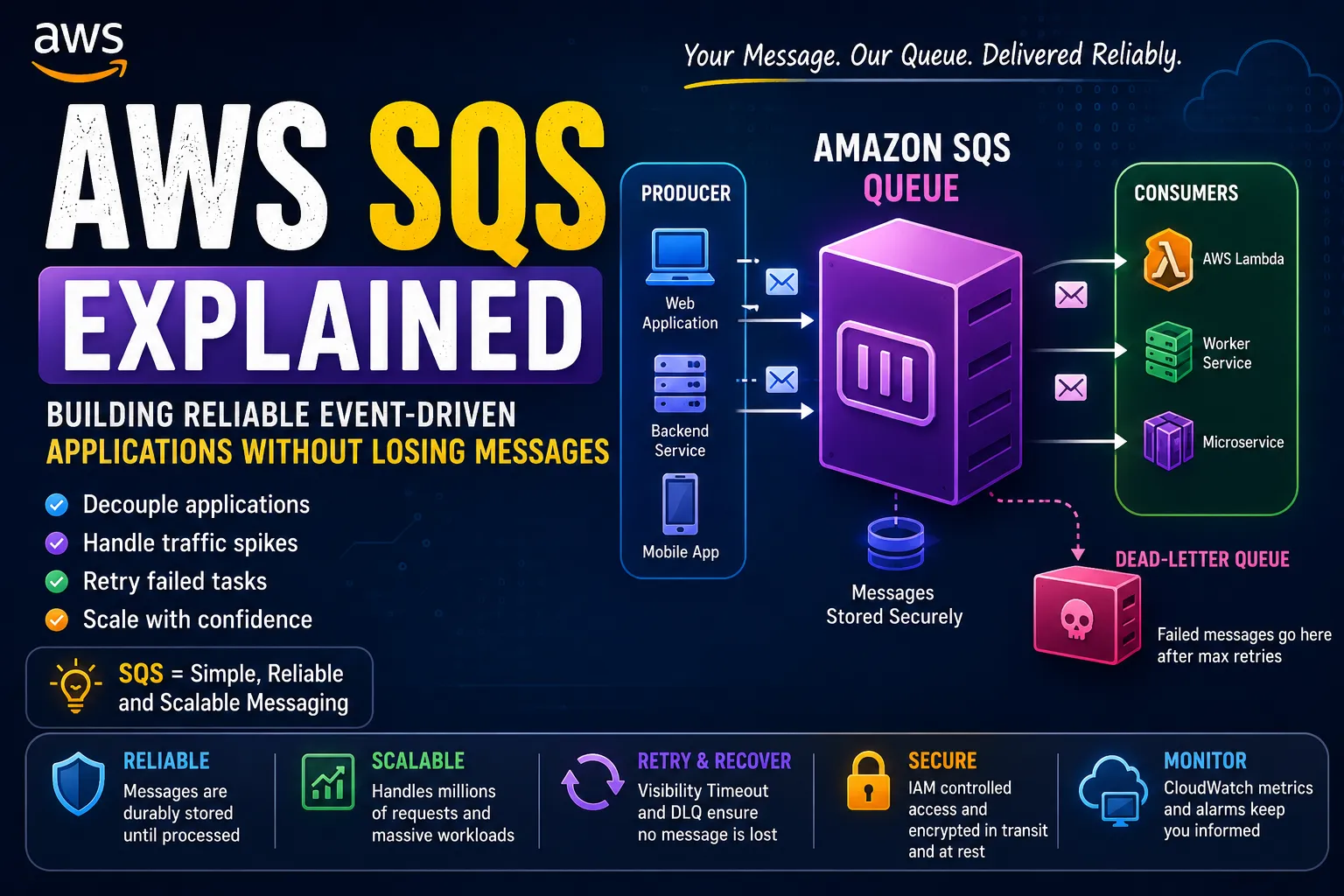
📨 AWS SQS Explained: Building Reliable Event-Driven Applications Without Losing Messages
A beginner-friendly guide to Amazon SQS, explaining queues, producers, consumers, visibility timeouts, dead-letter queues, and how SQS can make AWS applications more reliable and scalable.


📨 AWS SQS Explained: Building Reliable Event-Driven Applications
While learning AWS, I noticed that many applications communicate directly with each other.
For example:
1
2
3
4
Application A
     │
     ▼
Application B
But what happens if Application B is temporarily unavailable?
Does Application A fail?
Does the request get lost?
Does Application A have to keep retrying?
This is where I discovered an important AWS service:
Amazon Simple Queue Service (SQS)
SQS allows applications to communicate asynchronously using messages.
My new mental model is:
1
2
3
4
5
6
7
8
9
10
Producer
   │
   ▼
┌───────────────┐
│  Amazon SQS   │
│    Queue      │
└───────┬───────┘
        │
        ▼
     Consumer
Instead of requiring two applications to communicate at exactly the same time, a queue sits between them.
That simple idea can make distributed applications much more reliable.
🧠 What Is Amazon SQS?
Amazon SQS is a managed message queuing service.
The basic idea is:
1
Producer → Queue → Consumer
The producer sends a message.
The queue stores the message.
The consumer retrieves and processes the message.
For example:
1
2
3
4
5
6
7
8
9
Website
   │
   │ "Process this order"
   ▼
  SQS
   │
   │ Later
   ▼
Worker
The website doesn't necessarily need to wait for the worker to finish processing the order.
🚨 The Problem With Direct Communication
Imagine an online store.
A customer places an order:
1
2
3
4
5
6
7
Customer
   │
   ▼
Order API
   │
   ▼
Payment Service
What happens if the payment service is temporarily unavailable?
The order API might fail.
Now imagine several downstream services:
1
2
3
4
5
6
Order API
   │
   ├── Payment
   ├── Email
   ├── Inventory
   └── Shipping
If every service has to respond immediately, the entire application can become tightly coupled.
A queue can change this architecture.
📬 Adding SQS
Instead of directly calling the worker:
1
2
3
4
Order API
    │
    ▼
Payment Worker
I can introduce SQS:
1
2
3
4
5
6
7
Order API
    │
    ▼
   SQS
    │
    ▼
Payment Worker
Now the API can place a message into the queue.
The worker can process it when it is ready.
🏗️ Producer, Queue, Consumer
These are three terms I want to remember.
Producer
Creates and sends messages.
1
2
3
4
Application
    │
    ▼
Producer
Queue
Stores messages until they are processed.
1
2
3
4
5
6
7
8
9
10
Producer
    │
    ▼
┌─────────────┐
│ SQS Queue   │
│             │
│ Message 1   │
│ Message 2   │
│ Message 3   │
└─────────────┘
Consumer
Receives and processes messages.
1
2
3
4
SQS
 │
 ▼
Consumer
So:
1
Producer → SQS → Consumer
is the basic pattern.
📦 What Is a Message?
A message contains information that the consumer needs.
For example:
1
2
3
4
5
{
  "orderId": "ORD-1001",
  "customerId": "CUST-200",
  "action": "process-payment"
}
The consumer can read this message and process the requested operation.
The message could contain information such as:
1
2
3
4
5
6
Order ID
User ID
Event Type
File Name
Task Information
Processing Instructions
The exact structure depends on the application.
🔄 How the Flow Works
Let's imagine an order-processing system.
Step 1 — Customer places an order
1
2
3
4
Customer
   │
   ▼
Order API
Step 2 — API sends a message
1
2
3
4
Order API
   │
   ▼
SQS
Message:
1
2
3
4
{
  "orderId": "1001",
  "action": "process"
}
Step 3 — Worker retrieves it
1
2
3
4
SQS
 │
 ▼
Worker
Step 4 — Worker processes the order
1
2
3
4
5
Worker
  │
  ├── Validate order
  ├── Process payment
  └── Update database
This is a simple example of an event-driven architecture.
⏳ Why Queues Are Useful
One of the biggest benefits is that the producer and consumer don't have to be available at exactly the same moment.
Imagine the consumer is temporarily busy.
Without a queue:
1
2
3
4
5
6
7
Producer
   │
   ▼
Consumer ❌
   │
   ▼
Request fails
With SQS:
1
2
3
4
5
6
7
8
Producer
   │
   ▼
SQS
   │
   │ Message waits
   ▼
Consumer
The queue acts as a buffer.
This is one of the most important concepts I learned from SQS.
📈 Handling Traffic Spikes
Imagine my application normally receives:
1
100 tasks/minute
But suddenly:
1
10,000 tasks/minute
A single worker might struggle.
With SQS:
1
2
3
4
5
6
7
8
9
10
              10,000 Tasks
                   │
                   ▼
              ┌─────────┐
              │   SQS   │
              └────┬────┘
                   │
        ┌──────────┼──────────┐
        ▼          ▼          ▼
     Worker 1   Worker 2   Worker 3
The queue can absorb messages while consumers process them.
I can then increase the number of consumers when necessary.
⚙️ SQS + Lambda
This is where SQS becomes even more interesting for me.
AWS Lambda can consume messages from an SQS queue.
The architecture becomes:
1
2
3
4
5
6
7
8
9
10
Producer
   │
   ▼
SQS Queue
   │
   ▼
AWS Lambda
   │
   ▼
Application Logic
For example:
1
2
3
4
5
6
7
8
9
10
Order API
    │
    ▼
   SQS
    │
    ▼
 Lambda
    │
    ▼
DynamoDB
Now I have a serverless, event-driven application.
🔥 Combining SQS With What I've Already Learned
I've already explored:
- API Gateway
- Lambda
- DynamoDB
- IAM
- CloudWatch
- Secrets Manager
Now I can combine them.
1
2
3
4
5
6
7
8
9
10
11
12
13
14
15
16
                     🌍 User
                        │
                        ▼
                  API Gateway
                        │
                        ▼
                     Lambda
                        │
                        ▼
                   SQS Queue
                        │
                        ▼
                 Processing Lambda
                        │
                        ▼
                   DynamoDB
CloudWatch can monitor the components.
IAM controls permissions.
Secrets Manager can provide sensitive credentials when needed.
Now the architecture is becoming much more realistic.
👀 What Is a Visibility Timeout?
This was one of the most interesting SQS concepts for me.
Imagine a consumer receives a message:
1
2
3
4
SQS
 │
 ▼
Consumer
SQS temporarily hides that message from other consumers while the current consumer processes it.
This period is called the visibility timeout.
Conceptually:
1
2
3
4
5
6
7
8
9
10
Message
   │
   ▼
Consumer receives message
   │
   ▼
Message temporarily hidden
   │
   ▼
Consumer processes message
If processing succeeds, the consumer can delete the message.
If processing fails and the message isn't deleted, it can become visible again after the visibility timeout.
This gives the application another opportunity to process it.
🔁 Why Visibility Timeout Matters
Imagine a payment-processing message.
1
Process Payment
The consumer receives it.
Then something goes wrong:
1
2
3
4
Consumer
   │
   ▼
Processing fails ❌
If the message hasn't been successfully deleted, SQS can make it available again after the visibility timeout.
This creates a retry mechanism.
The important idea is:
A message isn't considered successfully processed simply because a consumer received it.
The application needs to successfully handle the message.
☠️ What Happens If a Message Keeps Failing?
This introduces another important concept:
Dead-letter queues (DLQs)
Imagine one message is broken.
It keeps failing:
1
2
3
4
5
6
7
8
9
Message
  ↓
Consumer ❌
  ↓
Retry ❌
  ↓
Retry ❌
  ↓
Retry ❌
I don't want an endlessly failing message to keep blocking normal processing.
A Dead-Letter Queue can be used to isolate messages that exceed a configured number of processing attempts.
Conceptually:
1
2
3
4
5
6
7
8
9
10
11
12
13
14
15
16
17
                  Main Queue
                      │
                      ▼
                  Consumer
                      │
               ┌──────┴──────┐
               │             │
              ✅             ❌
               │             │
               ▼             ▼
           Completed        Retry
                              │
                              ▼
                         Too many failures
                              │
                              ▼
                           DLQ
This gives developers a place to investigate failed messages.
🔎 Why Dead-Letter Queues Are Useful
Suppose my application has 100,000 messages.
99,999 process successfully.
One message contains invalid data.
I don't want that one message to make the entire system behave badly.
A DLQ lets me separate problematic messages.
Then I can investigate:
1
2
3
4
5
6
7
8
9
Why did this message fail?

Was the data invalid?

Was there a temporary service failure?

Was there a bug in the consumer?

Does the message need to be reprocessed?
This is a powerful operational pattern.
📊 Monitoring an SQS Queue
This connects directly to my previous CloudWatch article.
I can monitor queue-related metrics to understand what's happening.
For example:
1
2
3
4
Messages waiting
Processing activity
Failed processing
Queue age
A growing queue can be a warning sign.
For example:
1
2
3
4
5
6
7
8
9
Normal:

Queue
██████

Potential problem:

Queue
████████████████████████
If messages keep accumulating, my consumers might not be processing work fast enough.
🚨 Queue Depth as a Signal
Imagine:
1
10 messages
Then:
1
100 messages
Then:
1
1,000 messages
Then:
1
10,000 messages
That trend could indicate that incoming work is arriving faster than consumers can process it.
Now I can investigate:
1
2
3
4
5
6
7
8
9
Are consumers failing?

Do I need more consumers?

Is downstream infrastructure slow?

Is there a bug?

Did traffic suddenly increase?
This is where monitoring and architecture come together.
🔐 IAM and SQS
Just like with Secrets Manager and DynamoDB, IAM controls access.
For example:
1
2
3
4
5
6
7
8
9
10
Producer
   │
   ▼
IAM Permission
   │
   ▼
SendMessage
   │
   ▼
SQS
A consumer might need permission to:
1
2
ReceiveMessage
DeleteMessage
The exact permissions depend on the architecture.
The important principle is:
Give each component only the permissions it needs.
🆚 SQS vs Direct API Calls
Here's the mental difference I use now.
Direct communication
1
2
3
4
Application A
     │
     ▼
Application B
Application A depends directly on Application B being available.
Queue-based communication
1
2
3
4
5
6
7
Application A
     │
     ▼
    SQS
     │
     ▼
Application B
The queue creates a buffer between them.
This can improve resilience and reduce tight coupling.
🆚 SQS vs SNS
Another AWS concept I want to understand is the difference between SQS and SNS.
A simple mental model is:
SQS
1
2
3
4
5
6
7
Producer
   │
   ▼
 Queue
   │
   ▼
Consumer
Designed around message queuing and consumption.
SNS
1
2
3
4
              SNS
             / | \
            ▼  ▼  ▼
          SQS Lambda Email
SNS is designed around publishing messages to subscribers.
They can also be used together.
For example:
1
2
3
4
5
6
7
Application
    │
    ▼
   SNS
  /   \
 ▼     ▼
SQS   Lambda
This allows one event to be distributed to multiple consumers.
🏗️ A More Advanced AWS Architecture
Now imagine an online store.
1
2
3
4
5
6
7
8
9
10
11
12
13
14
15
16
17
18
19
20
21
                         🌍 Customer
                              │
                              ▼
                        API Gateway
                              │
                              ▼
                           Lambda
                              │
                              ▼
                             SNS
                           /     \
                          /       \
                         ▼         ▼
                       SQS       SQS
                        │          │
                        ▼          ▼
                    Payment    Notification
                    Worker       Worker
                        │          │
                        ▼          ▼
                    DynamoDB      Email
This architecture is much more flexible than putting everything into one synchronous request.
Each component can perform its own job.
⚠️ Common Beginner Mistakes
❌ Mistake 1: Assuming SQS guarantees exactly-once processing
Application design still needs to account for duplicate processing.
Consumers should ideally be designed to handle retries safely.
❌ Mistake 2: Ignoring visibility timeout
If processing takes longer than expected, the visibility timeout needs to be considered carefully.
❌ Mistake 3: Forgetting a DLQ
A DLQ can make repeated failures much easier to isolate and investigate.
❌ Mistake 4: Not monitoring queue growth
A continuously growing queue can indicate that consumers can't keep up.
❌ Mistake 5: Putting everything into one queue
Different workloads may need different processing characteristics.
Architecture should follow the application's requirements.
🧠 The Biggest Lesson From SQS
Before learning SQS, I thought applications mostly needed to communicate directly.
Now I understand another pattern:
Sometimes the best communication is asynchronous.
Instead of:
1
"Do this right now and give me the result."
I can say:
1
"Here is the task. Process it when you're ready."
The queue becomes a buffer between systems.
🚀 My Updated AWS Architecture
After learning SQS, my AWS mental model now looks like:
1
2
3
4
5
6
7
8
9
10
11
12
13
14
15
16
17
18
19
20
21
22
23
24
                         🌍 User
                            │
                            ▼
                      API Gateway
                            │
                            ▼
                         Lambda
                            │
                            ▼
                       SQS Queue
                            │
                    ┌───────┴───────┐
                    ▼               ▼
                Lambda Worker   Lambda Worker
                    │               │
                    └───────┬───────┘
                            ▼
                         DynamoDB

                    CloudWatch
                         │
             ┌───────────┴───────────┐
             ▼                       ▼
          Metrics                   Logs
Now I'm not just learning individual AWS services.
I'm learning patterns for building distributed systems.
🎯 Final Takeaway
My biggest takeaway from Amazon SQS is:
A queue can separate applications, absorb traffic spikes, enable retries, and make distributed systems more resilient.
The simple pattern is:
1
2
3
4
5
6
7
Producer
   │
   ▼
  SQS
   │
   ▼
Consumer
Then I can add:
1
2
3
4
5
6
SQS
 │
 ├── Visibility Timeout
 ├── Retries
 ├── Dead-Letter Queue
 └── CloudWatch Monitoring
And with Lambda:
1
2
3
4
5
6
7
8
9
10
API
 │
 ▼
SQS
 │
 ▼
Lambda
 │
 ▼
Database
This is another major step in my AWS learning journey.
I'm starting to understand that cloud architecture isn't just about where code runs.
It's also about how systems communicate, recover from failures, and handle unpredictable workloads.
Build asynchronously. Handle failures gracefully. Scale with confidence. 🚀📨☁️
Enjoyed reading this content? Let the author know!
Your likes, comments, shares, and saves help creators reach more builders.

Loading recommendations
Loading article