
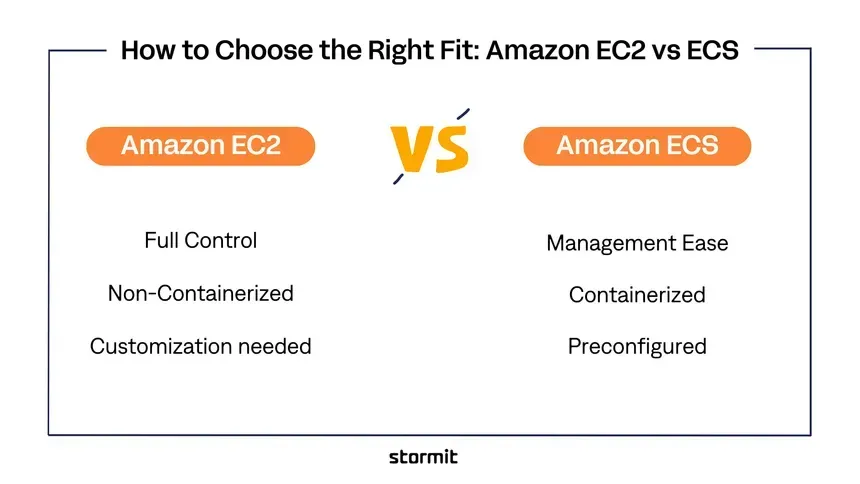
AWS EC2 vs ECS: Which One Should You Choose and Why?
When deploying applications on AWS, one of the most common decisions developers face is: Should I deploy my application on EC2 or use ECS? Both are powerful AWS services, but they solve different problems. At a high level: EC2 gives you virtual servers that you manage. ECS gives you a container orchestration platform for running Docker containers. The right choice depends on how much infrastructure you want to manage, how your application is packaged, how quickly you need to scale

1. EC2 vs ECS in One Sentence
The simplest way to think about the difference is:
EC2 = You manage the server.
ECS = You manage the containerized application while AWS handles much of the orchestration.
This distinction becomes extremely important as your application grows.
2. What Is Amazon EC2?
Amazon EC2 (Elastic Compute Cloud) provides virtual machines in the AWS cloud.
You choose an instance type, operating system, storage, networking configuration, and other infrastructure.
For example:
1
2
3
4
5
6
7
8
9
10
11
12
Internet
   │
   ▼
Load Balancer
   │
   ▼
EC2 Instance
   │
   ├── Application
   ├── Runtime
   ├── Dependencies
   └── Operating System
You are responsible for managing much of the server environment.
This can include:
- Operating system updates
- Security patches
- Application runtime
- Server configuration
- Disk management
- Monitoring
- Deployment processes
- Scaling configuration
EC2 gives you a lot of control.
That control is one of its biggest advantages—and also one of its biggest disadvantages.
3. What Is Amazon ECS?
Amazon ECS (Elastic Container Service) is AWS's container orchestration service.
Instead of thinking primarily in terms of servers, you package your application as a container.
For example:
1
2
3
4
5
6
7
8
9
10
11
12
13
Application
     │
     ▼
Docker Image
     │
     ▼
Container Registry
     │
     ▼
ECS
     │
     ▼
Running Containers
ECS manages the scheduling and lifecycle of containers.
You define things such as:
- Container image
- CPU requirements
- Memory requirements
- Environment variables
- Ports
- Networking
- Number of desired tasks
- Health checks
- Scaling policies
ECS then helps keep the desired number of containers running.
4. ECS Has Two Important Compute Options
When people compare EC2 and ECS, there is an important detail that is often missed.
ECS itself can run containers using different compute options.
The two common approaches are:
1
2
3
ECS
├── ECS on EC2
└── ECS on AWS Fargate
ECS on EC2
You run ECS containers on EC2 instances.
1
2
3
4
5
6
7
8
ECS
 │
 ▼
EC2 Instances
 │
 ├── Container
 ├── Container
 └── Container
You still manage the underlying EC2 infrastructure.
ECS on Fargate
AWS manages the underlying compute infrastructure for your containers.
1
2
3
4
5
6
7
8
ECS
 │
 ▼
Fargate
 │
 ├── Container
 ├── Container
 └── Container
This removes much of the server-management work.
So when someone says:
"ECS doesn't require servers."
That's slightly misleading.
ECS can run on EC2 or Fargate.
5. EC2 Architecture
A traditional EC2 deployment might look like:
1
2
3
4
5
6
7
8
9
10
11
12
13
14
                  Internet
                     │
                     ▼
              ┌─────────────┐
              │ Load Balancer│
              └──────┬──────┘
                     │
             ┌───────┴───────┐
             │               │
             ▼               ▼
          EC2 #1           EC2 #2
             │               │
             ▼               ▼
          App Server      App Server
You control the EC2 instances.
For example, you might install:
1
2
3
4
5
6
7
8
9
Ubuntu
Nginx
Python
FastAPI
Docker
Node.js
Java
PostgreSQL client
Monitoring agent
You have considerable flexibility.
But you also have considerable responsibility.
6. ECS Architecture
A typical ECS deployment looks like:
1
2
3
4
5
6
7
8
9
10
11
12
13
14
15
16
17
18
19
20
                 Internet
                    │
                    ▼
             ┌─────────────┐
             │ Load Balancer│
             └──────┬──────┘
                    │
                    ▼
             ┌─────────────┐
             │     ECS     │
             │   Service   │
             └──────┬──────┘
                    │
          ┌─────────┼─────────┐
          │         │         │
          ▼         ▼         ▼
       Task #1   Task #2   Task #3
          │         │         │
          ▼         ▼         ▼
       Container Container Container
The application is packaged into a container image.
ECS handles the desired number of tasks and their lifecycle.
7. The Biggest Difference: Infrastructure Management
This is probably the most important difference.
With EC2
You think:
"Which server should run my application?"
You manage:
1
2
3
4
5
6
7
8
Server
OS
CPU
RAM
Disk
Networking
Runtime
Application
With ECS/Fargate
You think:
"How many containers should run my application?"
You primarily manage:
1
2
3
4
5
6
7
Container Image
Task Definition
Service
CPU
Memory
Networking
Scaling
The underlying infrastructure is largely abstracted away when using Fargate.
8. EC2 vs ECS: Quick Comparison
| Feature | EC2 | ECS |
|---|---|---|
| Primary abstraction | Virtual machine | Container/service |
| Container support | Optional | Core feature |
| Infrastructure control | Very high | High, but more abstracted |
| Server management | Required | Reduced |
| Docker workflow | Optional | Native |
| Auto scaling | Supported | Supported |
| Deployment management | You design it | Built into ECS concepts |
| Learning curve | Moderate | Moderate to high |
| Operational overhead | Higher | Lower with Fargate |
| Best for | Server-level control | Containerized applications |
| Portability | Moderate | High with containers |
| Serverless option | No | Yes, through Fargate |
9. When Should You Choose EC2?
EC2 is a strong choice when you need maximum control over the server.
For example, choose EC2 when:
1. You need OS-level control
If your application requires specific operating-system configurations, EC2 can be a better fit.
You can configure the server exactly as required.
2. You have legacy applications
Some older applications aren't designed to run cleanly inside containers.
For example:
1
2
3
4
5
6
7
Legacy Application
       │
       ▼
Custom OS configuration
       │
       ▼
EC2
Moving such an application to ECS may require significant modernization.
3. You need specialized infrastructure
Some workloads need specific instance characteristics or infrastructure configurations.
EC2 provides direct access to the underlying instance.
4. You already have strong infrastructure expertise
If your team is comfortable managing:
- Linux
- Networking
- Security
- Patching
- Monitoring
- Infrastructure automation
then EC2 can be a perfectly reasonable choice.
10. When Should You Choose ECS?
ECS becomes attractive when your application is already containerized or you want to adopt a container-based deployment model.
For example:
1
2
3
4
5
6
7
8
9
10
11
12
13
14
15
16
Developer
   │
   ▼
Dockerfile
   │
   ▼
Docker Image
   │
   ▼
Container Registry
   │
   ▼
ECS
   │
   ▼
Production
ECS is particularly useful for:
- Microservices
- APIs
- Web applications
- Background workers
- Event-driven applications
- Containerized applications
- Applications requiring frequent deployments
11. ECS + Fargate Is Often the Simplest Starting Point
For a new application, a very attractive architecture is:
1
2
3
4
5
6
7
8
9
10
11
12
13
14
User
 │
 ▼
Application Load Balancer
 │
 ▼
ECS Service
 │
 ▼
Fargate Tasks
 │
 ├── Container
 ├── Container
 └── Container
You don't need to manage EC2 instances yourself.
You specify:
1
2
3
4
5
6
CPU
Memory
Container Image
Port
Environment
Desired Count
AWS manages the underlying compute infrastructure.
This can significantly reduce operational work.
12. What About Cost?
Cost is one of the most misunderstood parts of this comparison.
It's tempting to say:
"EC2 is cheaper."
Or:
"Fargate is cheaper."
Neither statement is universally true.
Your actual cost depends on:
- CPU utilization
- Memory requirements
- Workload duration
- Number of services
- Instance utilization
- Scaling behavior
- Storage
- Network traffic
- Reserved/discounted pricing
- Spot capacity
A useful general rule is:
EC2 can be more cost-efficient for consistently high utilization when you're willing to manage the infrastructure.
Fargate can be attractive when:
You value operational simplicity and want compute capacity to closely follow your workload.
13. EC2 Can Become More Efficient at Scale
Imagine you need a large number of containers running continuously.
With ECS on EC2, you might have:
1
2
3
4
5
6
7
8
9
10
11
EC2 #1
 ├── Container A
 ├── Container B
 ├── Container C
 └── Container D

EC2 #2
 ├── Container E
 ├── Container F
 ├── Container G
 └── Container H
Multiple workloads can share the same EC2 capacity.
If you maintain high utilization, this can be economically attractive.
However, you now need to manage the EC2 fleet.
14. Fargate Trades Some Cost Efficiency for Simplicity
With Fargate:
1
2
3
4
5
ECS Service
    │
    ├── Task
    ├── Task
    └── Task
You don't manage the underlying servers.
That means less operational work.
For many teams, this is worth paying for.
The real question isn't simply:
"Which is cheaper?"
It's:
"Which option gives us the best total cost when infrastructure operations are included?"
15. Scaling
Both EC2 and ECS support scaling.
But the operational model is different.
EC2 scaling
You typically scale the number or size of instances.
1
2
3
4
5
2 EC2
  ↓
4 EC2
  ↓
8 EC2
You need to consider:
- Instance capacity
- AMIs
- Auto Scaling Groups
- Instance health
- Capacity planning
ECS scaling
You can scale the number of application tasks.
1
2
3
4
5
2 Tasks
  ↓
4 Tasks
  ↓
10 Tasks
This maps more naturally to containerized applications.
16. Deployment
With traditional EC2 deployments, you might:
1
2
3
4
5
6
7
Build
  ↓
SSH / Deployment Agent
  ↓
Copy Application
  ↓
Restart Service
With ECS:
1
2
3
4
5
6
7
8
9
Build
  ↓
Docker Image
  ↓
Container Registry
  ↓
New ECS Task Definition
  ↓
Rolling Deployment
This creates a very clean deployment model.
For teams practicing modern CI/CD, ECS can be a natural fit.
17. ECS and CI/CD
A typical pipeline might look like:
1
2
3
4
5
6
7
8
9
10
11
12
13
14
15
16
17
18
19
Developer
    │
    ▼
Git Repository
    │
    ▼
CI/CD Pipeline
    │
    ▼
Build Docker Image
    │
    ▼
Container Registry
    │
    ▼
ECS Deployment
    │
    ▼
Production
This makes application deployments repeatable.
You don't have to manually configure production servers every time you deploy.
18. ECS Is Not Kubernetes
Another common misconception is:
"If I use containers, I need Kubernetes."
Not necessarily.
AWS provides ECS as a managed container orchestration service.
You can choose between:
1
ECS
and
1
EKS
depending on your requirements.
ECS is generally simpler if you're primarily operating within AWS and don't specifically need Kubernetes.
EKS is more appropriate when Kubernetes compatibility and its ecosystem are important requirements.
19. EC2 vs ECS: Developer Experience
For a developer, the workflows are quite different.
EC2 mindset
1
2
3
4
5
6
7
8
9
Server
 ↓
Install software
 ↓
Configure software
 ↓
Deploy application
 ↓
Maintain server
ECS mindset
1
2
3
4
5
6
7
8
9
Application
 ↓
Dockerfile
 ↓
Build image
 ↓
Push image
 ↓
Deploy container
The second model tends to make environments more reproducible.
20. A Real-World Example
Suppose you're building a FastAPI application.
Option 1: EC2
1
2
3
4
5
6
7
EC2
 │
 ├── Ubuntu
 ├── Python
 ├── FastAPI
 ├── Nginx
 └── Application
You manage the server.
Option 2: ECS + Fargate
1
2
3
4
5
6
7
8
9
Docker Image
 │
 ▼
ECS
 │
 ▼
Fargate
 │
 └── FastAPI Container
The application becomes a portable container.
You can run the same image locally, in staging, and in production.
21. What I Would Choose for a New Application
For a new, container-friendly application, my default choice would usually be:
1
ECS + Fargate
Why?
Because it gives you:
- Container-based deployments
- Less server management
- Easy scaling
- Integration with AWS networking
- Load balancing
- IAM integration
- CloudWatch integration
- A clean CI/CD workflow
You can focus more on the application and less on maintaining servers.
22. When I Would Choose EC2 Instead
I would choose EC2 when the workload requires:
1
2
3
4
5
6
7
8
9
Maximum server control
        OR
Specialized infrastructure
        OR
Legacy application requirements
        OR
Very high and predictable utilization
        OR
Specific instance-level customization
EC2 isn't an inferior technology.
It's simply a lower-level abstraction.
23. A Simple Decision Tree
Use this decision process:
1
2
3
4
5
6
7
8
9
10
11
12
13
14
15
16
              Start
                │
                ▼
       Is your application
        containerized?
          /          \
        No            Yes
        │              │
        ▼              ▼
       EC2       Do you want to
                 manage servers?
                   /       \
                 Yes        No
                  │          │
                  ▼          ▼
              ECS on EC2   ECS + Fargate
This isn't an absolute rule, but it's a useful starting point.
24. My Recommendation
For most new web APIs, microservices, backend applications, and containerized workloads, I would start with:
ECS + Fargate
Then move to ECS on EC2 if there is a clear operational or cost reason to manage your own compute capacity.
Choose plain EC2 when you genuinely need server-level control or have workloads that don't fit naturally into the container model.
The key is not to choose a service because it is newer or more popular.
Choose the abstraction that matches your workload.
25. Final Comparison
Think about the three options like this:
1
2
3
4
5
6
7
8
9
10
11
12
13
14
                 CONTROL
                   ▲
                   │
                   │
                 EC2
                   │
                   │
              ECS on EC2
                   │
                   │
             ECS + Fargate
                   │
                   ▼
             SIMPLICITY
EC2
"Give me a server. I'll manage it."
ECS on EC2
"Give me container orchestration, but I'll manage the servers."
ECS + Fargate
"Run my containers without making me manage the underlying servers."
That is the fundamental difference.
Conclusion
There is no universal winner between EC2 and ECS.
The better question is:
How much infrastructure do you want to manage?
If you need maximum control, choose EC2.
If you want container orchestration while keeping control of the compute layer, choose ECS on EC2.
If you want a modern container-based deployment with minimal server management, choose ECS with Fargate.
For a new application, ECS + Fargate is often an excellent default starting point, while EC2 remains a powerful option when control, customization, or workload economics make it worthwhile.
The most important lesson is:
Don't choose EC2 vs ECS based only on infrastructure cost. Choose based on total operational cost, complexity, scalability, and the amount of infrastructure your team actually wants to own.
Enjoyed reading this content? Let the author know!
Your likes, comments, shares, and saves help creators reach more builders.

Loading recommendations
Loading article