

Keep the lights on while EC2 is off: a CloudFront maintenance toggle for event-day chat
For a one-day JAWS-UG Kyoto workshop, I set up Rocket.Chat on a t8i.medium EC2 instance behind Amazon CloudFront. I planned to keep the instance stopped until the event, but I still wanted visitors to see a friendly page instead of waiting for an origin timeout. This post explains how a Bash script switches CloudFront between the application and a static maintenance page hosted in Amazon S3, using a CloudFront Function to rewrite request paths.

Why I needed this
I decided to host Rocket.Chat for a single-day JAWS-UG Kyoto hands-on event , to better understand where participants got stuck during the workshop.
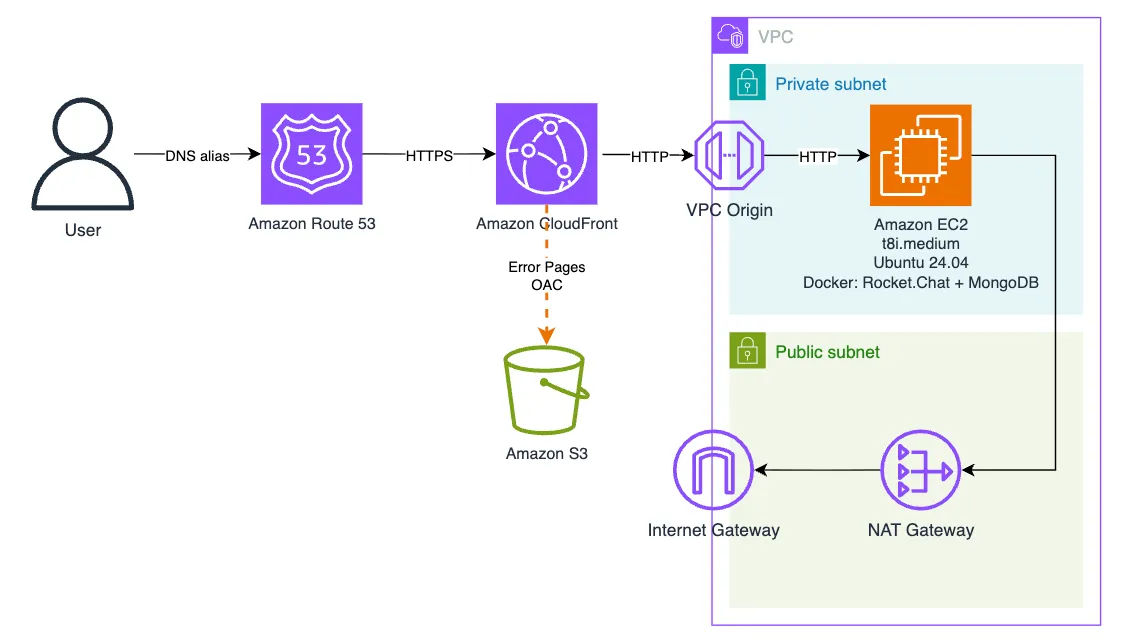
I chose a deliberately minimal architecture:
Source repository:
GitHub / otanikohei / ephemeral-rocketchat
Running an EC2 instance 24/7 for an event that lasts only a few hours would be wasteful, so I planned to keep the instance stopped until the day of the event.
Because a NAT Gateway incurs hourly charges even when no traffic is flowing, I managed it in a separate CloudFormation stack so that I could remove it when the environment was not in use.
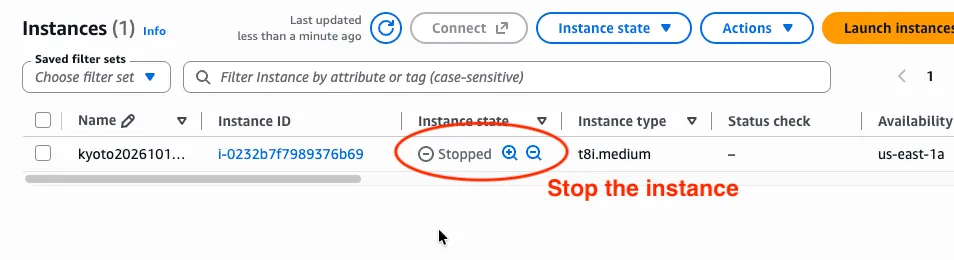
But simply stopping the origin would create a poor user experience. CloudFront would no longer be able to reach the EC2 instance, so viewers could receive errors such as 502, 503, or 504. Requests could also take longer to fail while CloudFront waits for the origin connection to time out.

The idea: route around EC2 instead of waiting for an error
My first version relied entirely on CloudFront custom error responses: when an origin request failed with a 502, 503, or 504 response, CloudFront served
/error.html from an S3 bucket and returned a 200 response to the viewer.
Technically, this worked. The problem was the delay.
In my testing, it took around 30 seconds for the custom error page to appear after a request to the unavailable origin. For a maintenance page, making users wait that long just to learn that the service is unavailable defeats the purpose.

During maintenance, a catch-all
/* cache behavior routes application paths to S3. A viewer-request CloudFront Function rewrites the URI to /error.html, allowing browser GET requests to display the maintenance page without contacting EC2.
Function code:
1
2
3
4
5
function handler(event) {
    var request = event.request;
    request.uri = '/error.html';
    return request;
}
This way, CloudFront does not have to wait for the EC2 origin to fail before showing the maintenance page. That got me thinking: could I make this switchable with a single action? Then an idea clicked.
Two commands to switch modes
rocket.sh stop— stop the EC2 instance and serve a friendly maintenance page.rocket.sh start— start the EC2 instance and switch CloudFront back to the normal application.
stop
- Add the
/*cache behavior targeting the S3 origin (errorpage-s3-origin), with a CloudFront Function that rewrites every URI to/error.html. - Without waiting for the CloudFront distribution update to finish deploying, stop the EC2 instance.
start
- Start the EC2 instance
- Without waiting for Rocket.Chat to become ready, remove the maintenance
/*cache behavior so that requests are routed back to the EC2 origin. - Reset the default root object if it was changed by the earlier implementation.
The S3 bucket remains private and is accessible only through CloudFront using Origin Access Control (OAC) . As a result, the maintenance page remains available even while the EC2 instance is completely stopped.
The one gotcha that matters: a behavior routes, it does not rewrite
My first attempt looked clever but was quietly wrong. I added a
/* cache behavior pointing to the S3 origin and set the distribution's default root object to error.html, assuming that the combination would make every request return the preparing page.It doesn't, and the reason is worth understanding. A cache behavior can route requests to an origin based on a path pattern, but matching that pattern does not rewrite the request URI. So a request to
/channel/general still reaches the S3 origin with that URI, and S3 looks for an object such as channel/general. Because that object does not exist, the request fails instead of returning the preparing page. To fix this, I added a CloudFront Function to rewrite the request URI.There was one more subtle point about behavior ordering.
CloudFront selects a cache behavior based on the original viewer request URI. The first matching path pattern wins. The viewer-request function runs after that behavior has been selected. Importantly, rewriting the URI does not cause CloudFront to evaluate the cache behaviors again or switch origins.
For example, a request to
/channel/general matches the maintenance /* behavior and is therefore routed to the S3 origin. The function then rewrites the URI to /error.html, but the request stays on that same /* behavior and still uses the S3 origin.The distribution already had a separate
/error.html behavior pointing to S3 for the original custom-error-response mechanism. I kept that more specific behavior ahead of the maintenance /* behavior.Cache behavior order during maintenance
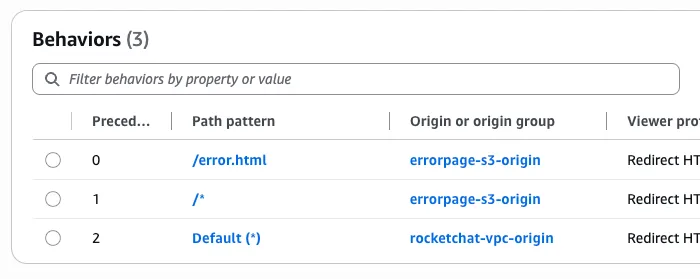
/error.html→ S3 (errorpage-s3-origin)/*→ S3 (errorpage-s3-origin) + viewer-request function →/error.html<- Added bystop- Default behavior → EC2 (
rocketchat-vpc-origin)
I keep the
/error.html behavior ahead of the maintenance /* behavior.How CloudFront updates actually work
CloudFront does not provide a patch-style API for changing just one field of a distribution configuration. The update flow is:
- Run
aws cloudfront get-distribution-configto retrieve the full distribution configuration together with its ETag. - Modify the JSON configuration. I use
jqfor this. - Call
aws cloudfront update-distribution --if-match <ETag>with the complete modified configuration.
The
--if-match ETag provides optimistic concurrency control. If the distribution configuration has changed since the script retrieved it, CloudFront rejects the update instead of silently overwriting the newer configuration.The script also resolves the CloudFront Distribution ID and EC2 Instance ID from the CloudFormation stack outputs rather than hard-coding them.
The instance: a latest-generation t8i.medium
I deliberately chose a t8i.medium, one of the latest-generation Intel-based burstable (T-family) instance types, instead of an older
t3 or t3a. There were a couple of reasons.AWS What's new: Introducing Amazon EC2 T8i instances

- Burstable performance to keep costs down.
At8i.mediumprovides 2 vCPUs and 4 GiB of memory, which I considered a compact starting point for this small workshop deployment for running Rocket.Chat and a MongoDB replica set together on a single instance.
I chose a burstable T-family instance specifically to keep costs down.
An event-day chat is bursty by nature: most of the time I don't need sustained CPU performance, but I still want headroom when activity suddenly spikes. And, honestly, my curiosity about trying the latest instance type gave me the final push. ❤️
Here is the pricing I compared:


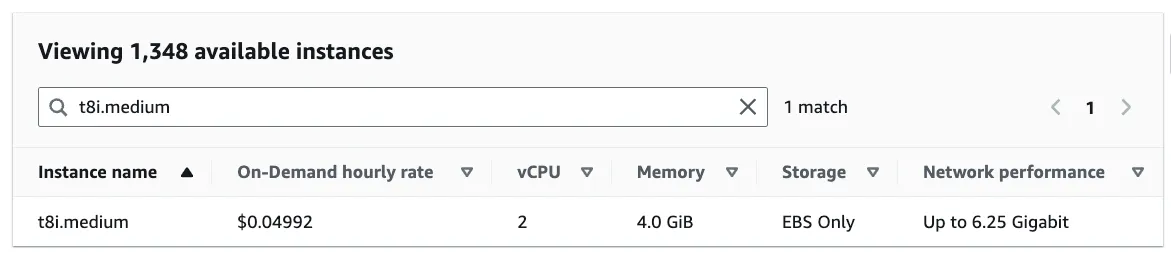
The prices shown are for the US East (N. Virginia) Region (us-east-1).
- Resolving the Ubuntu AMI automatically
The CloudFormation template uses an SSM public parameter to resolve the latest Ubuntu 24.04 AMI at stack creation or update time, so I don't have to pin and maintain a specific AMI ID myself.
One footnote worth sharing: because t8i was still very new, the version of cfn-lint I was using did not recognize the instance type yet and reported a W1030 warning.
I confirmed that t8i.medium was a valid instance type through the EC2 API, so I chose to temporarily suppress the W1030 rule ( cfn-lint -i W1030 ) rather than switching back to an older instance family.
If you adopt a newly released instance family, keep in mind that static validation tools may take some time to catch up.
1
2
% cfn-lint 03-app.yaml
W1030 {'Ref': 'InstanceType'} is not one of ['a1.2xlarge', 'a1....metal', 'z1d.xlarge'] in 'us-east-1' when 'Ref' is resolved
NAT Gateway
A NAT Gateway is highly available, fully managed, and requires no maintenance, but it comes at a cost. The pricing is as follows.
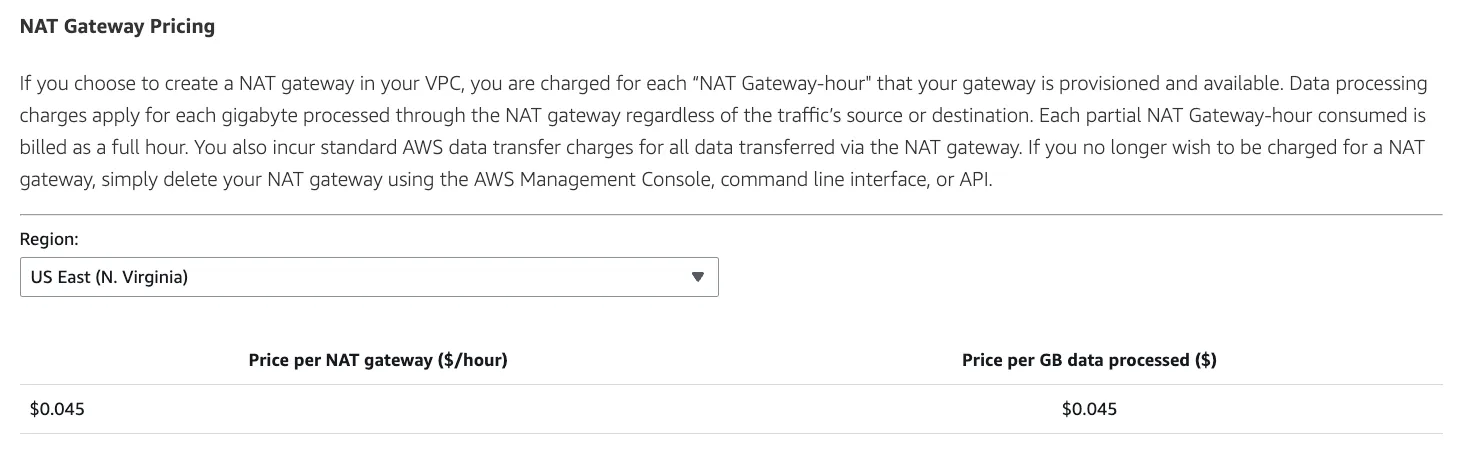
The prices shown are for the US East (N. Virginia) Region (us-east-1).
In this environment, I can remove the NAT Gateway after the initial setup, provided that the features used during the workshop do not require outbound internet access. To avoid paying for an idle resource, I deliberately separated the CloudFormation stacks and removed unnecessary dependencies so that the NAT Gateway stack can be safely deleted after setup.
Operational notes
- The script issues the EC2 stop/start request and returns; it does not wait for the instance state transition to complete. CloudFront configuration changes can also take several minutes to deploy. For this event, a manual verification workflow was sufficient, but you can add
aws ec2 waitand a CloudFront deployment check if you need stronger confirmation before moving to the next step. -> For production use, these checks should be part of the script. - Stopping and starting the EC2 instance preserves its primary private IP address. The Docker containers also start automatically when the instance comes back because they use
restart: unless-stopped. - The custom error responses (
502/503/504 → /error.html) remain configured, so the two mechanisms coexist. During maintenance, the/*behavior becomes the primary path once the CloudFront update has deployed, while the custom error responses provide a useful fallback during transitions or unexpected origin failures. - In this setup, the separate NAT Gateway stack can be removed after the required Docker images and dependencies have been pulled, as long as the application no longer requires outbound internet access. The inbound CloudFront-to-EC2 path does not depend on the NAT Gateway.
- Because the script does not wait for deployment or application readiness, visitors may still experience origin timeouts or see the custom error page during transitions.
Takeaways
- Don't automatically fall back to an older instance generation for a short-lived event workload. For x86 burstable workloads,
t8ioffers up to 30% better price/performance thant3, making it a good fit for this tightly sized 2 vCPU / 4 GiB environment. Just keep in mind that validation tools may take some time to recognize newly released instance families. - CloudFront behavior precedence matters. A catch-all
/*behavior should come after any more specific path patterns that need their own behavior. - Treat CloudFront distribution updates as a read-modify-write operation protected by an ETag; there is no partial-patch workflow.
- Make operational scripts idempotent, and resolve resource IDs from CloudFormation stack outputs instead of hard-coding them. That reduces manual configuration and makes accidentally running the same command twice much less risky on event day.
All infrastructure is defined in CloudFormation, while the maintenance toggle is implemented as a single Bash +
jq script.For production use, please see Khoa Nguyen's comment below.
Thank you.
Enjoyed reading this content? Let the author know!
Your likes, comments, shares, and saves help creators reach more builders.

Loading recommendations
Loading article