
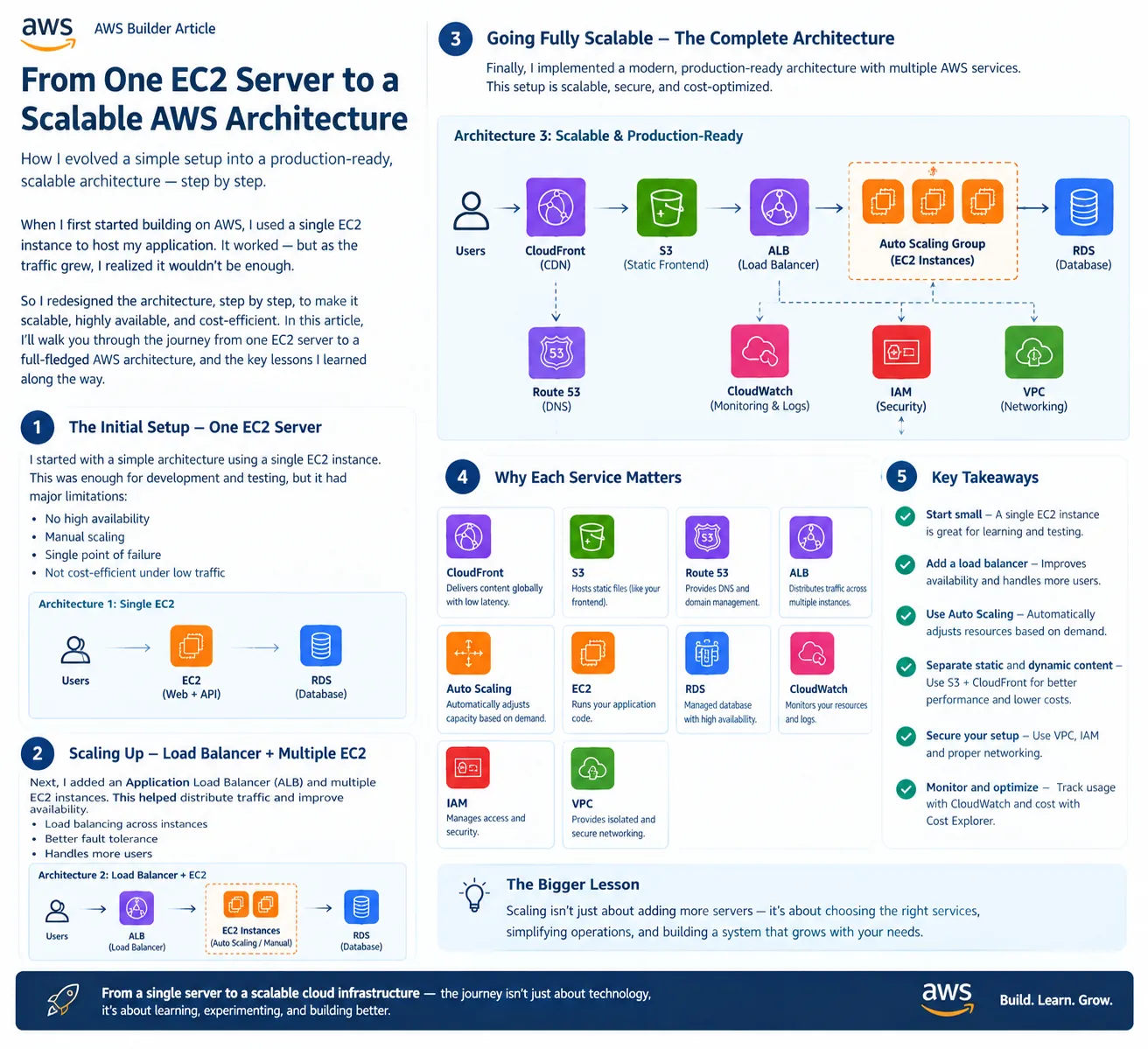

🏗️ From One EC2 Server to a Scalable AWS Architecture
When I first started building applications on AWS, I used a simple approach: one EC2 instance running everything.
It was easy to understand, easy to deploy, and perfect for learning.
But as the application grew, one question became important:
What happens when more users arrive?
A single server can become a bottleneck and, more importantly, a single point of failure. So instead of immediately building a complicated architecture, I decided to evolve it step by step.
1️⃣ Stage One — One EC2 Server
The initial architecture was simple:
1
2
3
4
5
Users
  ↓
EC2
  ↓
RDS
The EC2 instance handled the application while RDS stored the data.
This is perfectly reasonable for:
- Learning
- Development
- Small applications
- Prototypes
But it has limitations:
- One EC2 instance can fail.
- Scaling requires manual intervention.
- Traffic spikes can overload the server.
- Application and infrastructure become tightly coupled.
So the next step was to remove the single-server dependency.
2️⃣ Stage Two — Add a Load Balancer
Instead of sending users directly to one EC2 instance, I introduced an Application Load Balancer (ALB).
1
2
3
4
5
6
7
                 Users
                   ↓
                  ALB
                ↙     ↘
             EC2       EC2
                \     /
                  RDS
Now traffic can be distributed across multiple EC2 instances.
This provides:
- Better availability
- Traffic distribution
- Improved fault tolerance
- The ability to handle more users
If one instance fails, the load balancer can route traffic to healthy instances.
3️⃣ Stage Three — Add Auto Scaling
Having multiple EC2 instances is better, but manually adding and removing servers isn't efficient.
That's where Auto Scaling becomes useful.
1
2
3
4
5
6
7
8
9
             Users
               ↓
              ALB
               ↓
       ┌───────┼───────┐
       ↓       ↓       ↓
      EC2     EC2     EC2
       ↑       ↑       ↑
          Auto Scaling
During low traffic:
1
2 EC2 instances
During high traffic:
1
5 EC2 instances
When demand decreases, Auto Scaling can reduce capacity again.
This means the infrastructure can respond to demand instead of running maximum capacity all the time.
4️⃣ Stage Four — Separate Static Content
The next optimization was separating static content from the application servers.
Instead of serving images, CSS, JavaScript, and other static files directly from EC2, I can use Amazon S3 and CloudFront.
1
2
3
4
5
6
7
8
9
10
11
                 Users
                   ↓
              CloudFront
              ↙       ↘
             S3       ALB
          Frontend      ↓
                    Auto Scaling
                         ↓
                     EC2 Instances
                         ↓
                        RDS
Now:
S3 → stores static content.
CloudFront → delivers content through a CDN.
ALB → distributes dynamic application traffic.
EC2 → runs the application.
RDS → manages relational data.
This separation improves scalability and can reduce unnecessary load on application servers.
5️⃣ The Final Architecture
The architecture has now evolved into:
1
2
3
4
5
6
7
8
9
10
11
12
13
14
15
16
17
18
19
                         Users
                           │
                           ▼
                       Route 53
                           │
                           ▼
                      CloudFront
                       /       \
                      /         \
                    S3          ALB
               Static Files      │
                                 ▼
                         Auto Scaling Group
                          /      |      \
                        EC2     EC2     EC2
                          \      |      /
                                 │
                                 ▼
                                RDS
Supporting services can include:
1
2
3
4
IAM        → Security & access control
VPC        → Network isolation
CloudWatch → Monitoring & logs
AWS Budgets/Cost Explorer → Cost monitoring
The important part is that each service has a specific responsibility.
🔍 Why Not Start With the Final Architecture?
This is one of the biggest lessons I learned.
You don't always need:
1
2
3
4
5
6
7
8
CloudFront
+ ALB
+ Auto Scaling
+ Multiple EC2
+ RDS
+ Monitoring
+ Multiple AZs
+ ...
from day one.
If your application has 10 users, deploying infrastructure designed for 10 million users may add unnecessary complexity and cost.
Instead:
1
2
3
4
5
6
7
8
9
Start Small
    ↓
Measure
    ↓
Identify Bottlenecks
    ↓
Scale
    ↓
Optimize
Architecture should evolve according to actual requirements.
💡 The Bigger Lesson
Scalability isn't simply about adding more servers.
It's about designing a system where each component can perform its job efficiently.
The journey looks like:
1
2
3
4
5
6
7
8
9
10
11
One EC2
   ↓
ALB + Multiple EC2
   ↓
Auto Scaling
   ↓
S3 + CloudFront
   ↓
Monitoring + Security
   ↓
Production-ready Architecture
And the most important principle is:
Build for today's requirements, but design so that tomorrow's growth doesn't require rebuilding everything.
AWS gives us the building blocks. The real skill is knowing when to use them, why to use them, and when not to use them.
🚀 Final Takeaway
You don't become a Solutions Architect by memorizing AWS services.
You become one by learning to answer questions like:
“What happens if traffic increases?”
“What happens if this server fails?”
“Can this scale automatically?”
“Am I paying for resources I don't need?”
“How can I make this more secure and reliable?”
“What happens if this server fails?”
“Can this scale automatically?”
“Am I paying for resources I don't need?”
“How can I make this more secure and reliable?”
That's the mindset that turns a simple EC2 deployment into a scalable AWS architecture.
Enjoyed reading this content? Let the author know!
Your likes, comments, shares, and saves help creators reach more builders.

Loading recommendations
Loading article