
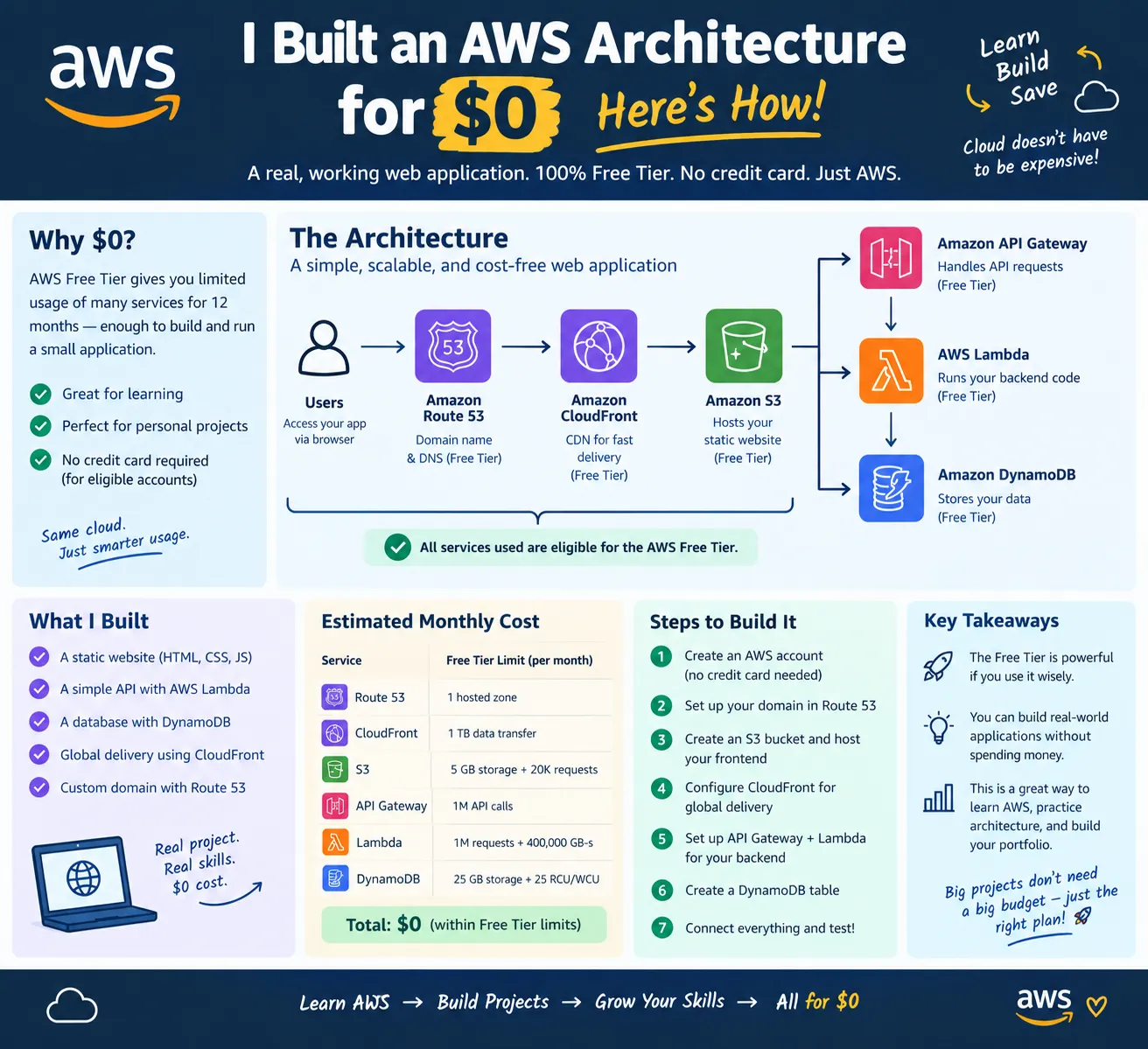
I Built an AWS Architecture for $0
Can I build a real web application architecture on AWS without spending money?

💸 I Built an AWS Architecture for $0 — Here’s How
When people hear AWS, they often think, “Cloud = expensive.”
But that isn't always true.
For learning, experimentation, and small projects, AWS provides a Free Tier and a Free Plan that can let new customers build and experiment without paying for eligible usage within the applicable limits. New AWS customers can receive $100 in credits and can earn up to another $100 through eligible activities.
So I asked myself:
Can I build a real web application architecture on AWS without spending money?
The answer is yes — if you design it carefully and stay within the applicable free usage and credit limits.
🏗️ The Architecture
A simple serverless architecture can look like this:
1
2
3
4
5
6
7
8
9
10
11
12
13
14
                 👤 User
                    │
                    ▼
              Amazon CloudFront
                    │
              ┌─────┴─────┐
              ▼           ▼
          Amazon S3    API Gateway
          Frontend         │
                           ▼
                        Lambda
                           │
                           ▼
                       DynamoDB
What does each service do?
Amazon S3 → Hosts the static frontend.
Amazon CloudFront → Delivers the application through a global CDN.
API Gateway → Provides APIs for the application.
AWS Lambda → Runs backend code without maintaining servers.
Amazon DynamoDB → Stores application data without managing a database server.
Lambda, for example, uses a pay-for-use model and currently includes a monthly free usage allowance for eligible accounts.
💰 Where Does the $0 Come From?
The goal isn't to make AWS permanently free.
The goal is to design the application so that its usage stays within the available Free Tier/Free Plan allowances and credits.
That means:
- Use serverless services where they make sense.
- Keep storage small.
- Avoid unnecessary data transfer.
- Delete resources you no longer need.
- Monitor your credits and usage.
- Set budgets and alerts.
- Don't assume every AWS service is free.
AWS specifically recommends monitoring your Free Tier usage and provides billing tools for tracking your credits and usage.
⚠️ The Important Catch
“$0 AWS architecture” does not mean “AWS can never charge you.”
For example, registering a custom domain through Route 53 normally has a domain-registration fee, while AWS services such as S3 and CloudFront have usage-based pricing outside applicable free allowances.
So the real lesson is:
The cheapest AWS architecture isn't necessarily the architecture with the fewest services. It's the architecture that uses the right services for the workload and keeps unnecessary usage under control.
🚀 What I Learned
Building on AWS for $0—or close to it—is less about finding “free services” and more about learning cloud architecture and cost management together.
You learn how:
Users → CDN → Storage → API → Compute → Database
can work together to create a real application without immediately needing expensive infrastructure.
And that's the exciting part.
You don't need a huge budget to start learning cloud architecture.
You need a good architecture, careful monitoring, and a clear understanding of AWS pricing.
Final Thought
Start small. Build smart. Monitor everything. Scale when you actually need to.
That's how you can turn a $0 learning budget into real AWS experience. 🚀
Enjoyed reading this content? Let the author know!
Your likes, comments, shares, and saves help creators reach more builders.

Loading recommendations
Loading article