
Automating AWS Infrastructure with CloudFormation
My hands-on notes on CloudFormation templates, stacks, resources, updates, and Infrastructure as Code

I recently completed the AWS SimuLearn: Automation with CloudFormation lab.
This lab helped me understand the basic idea of Infrastructure as Code (IaC): instead of manually creating AWS resources, I can describe the infrastructure in a YAML or JSON template and let CloudFormation create and manage it.
1
2
3
4
5
6
7
8
Template
   ↓
CloudFormation
   ↓
Stack
   ├── EC2
   ├── Security Group
   └── S3 Bucket
Template, Stack, and Resources
A template is the infrastructure definition.
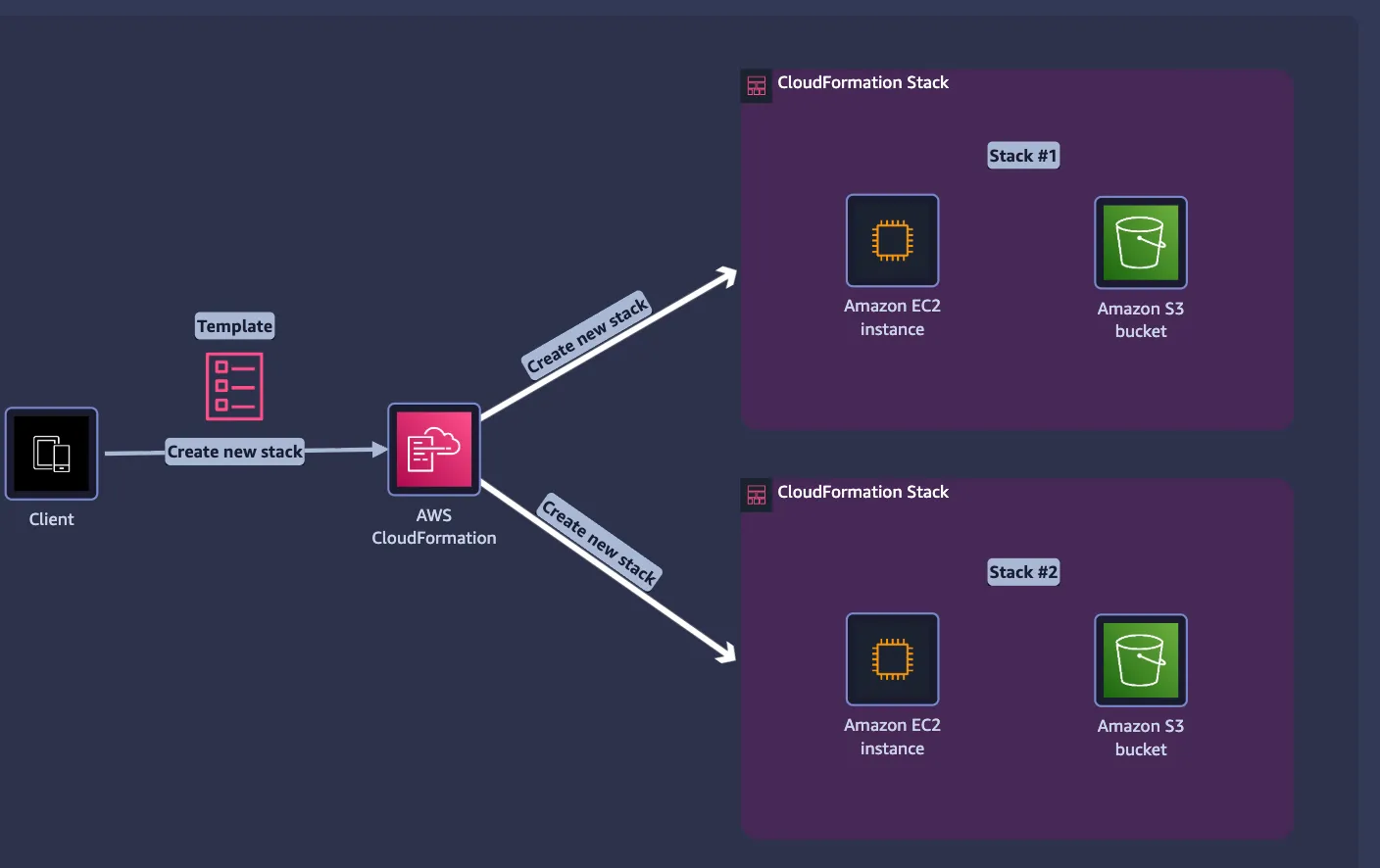
A stack is a collection of resources that CloudFormation manages as one unit.
The same template can be reused to create multiple independent stacks.
1
2
3
4
Same Template
   ↓
Stack A → EC2 A + S3 A
Stack B → EC2 B + S3 B
A stack is only a management boundary. It does not mean the resources are in the same VPC or network.
Logical ID vs Physical ID
Inside the template, resources have Logical IDs:
1
2
3
Resources:
  RobotAppServer:
    Type: AWS::EC2::Instance
RobotAppServer is the Logical ID.After CloudFormation creates the resource, AWS assigns the real Physical ID, such as:
1
RobotAppServer → i-052c6b621e8fad7f4
So:
1
2
Logical ID  = name inside the template
Physical ID = actual AWS resource identifier
The stack itself also gets a unique Stack ID/ARN automatically.
Resource References
Resources can reference each other using intrinsic functions such as
!Ref.1
2
SecurityGroups:
- !Ref RobotAppSecurityGroupThis allows CloudFormation to understand relationships between resources.
Resource Names
A Logical ID is not necessarily the visible name of the actual resource.
For example, an EC2
Name is usually a tag:1
2
3
Tags:
- Key: Name
Value: RobotAppServerIf a physical name is not specified, CloudFormation can generate one automatically for many resource types.
Events vs Resources
The Resources tab shows what the stack currently manages.
1
2
3
RobotAppServer
RobotAppSecurityGroup
RobotS3Bucket
The Events tab shows what CloudFormation has done:
1
2
3
4
CREATE_IN_PROGRESS
CREATE_COMPLETE
CREATE_FAILED
ROLLBACK_IN_PROGRESS
If a stack fails, Events is the first place I should check because it shows the failed resource and the reason.
DeletionPolicy
DeletionPolicy controls what CloudFormation should do with a resource when it is removed.1
2
3
RobotS3Bucket:
Type: AWS::S3::Bucket
DeletionPolicy: DeleteCommon options are:
1
2
3
Delete   → remove the resource
Retain   → keep the resource
Snapshot → create a snapshot first, when supported
This is important for resources that contain valuable data.
Updating a Stack
Changing a template does not mean CloudFormation recreates the entire infrastructure.
For example:
1
InstanceType: t2.micro
can be changed to:
1
InstanceType: t2.small
CloudFormation determines how the affected resource must be updated.
AWS documentation describes update behavior as:
1
2
3
No interruption
Some interruptions
Replacement
Some interruptions means the resource can be updated but may experience temporary downtime.Replacement means CloudFormation needs to replace the existing resource.A Change Set can be used to preview what CloudFormation plans to add, modify, replace, or delete before applying the update.
My Main Takeaway
The key mental model I learned is:
1
2
3
4
5
6
7
8
9
YAML / JSON Template
        ↓
CloudFormation
        ↓
Stack
        ↓
AWS Resources
        ↓
Create / Update / Delete as one managed infrastructure
CloudFormation helps make infrastructure repeatable, standardized, and less error-prone, instead of manually configuring the same environment again and again.
Enjoyed reading this content? Let the author know!
Your likes, comments, shares, and saves help creators reach more builders.

Loading recommendations
Loading article