
Automating EBS Backups with AWS Backup
Learn how to use backup vaults, IAM roles, backup plans, retention, and tags to automate EBS backups on AWS.

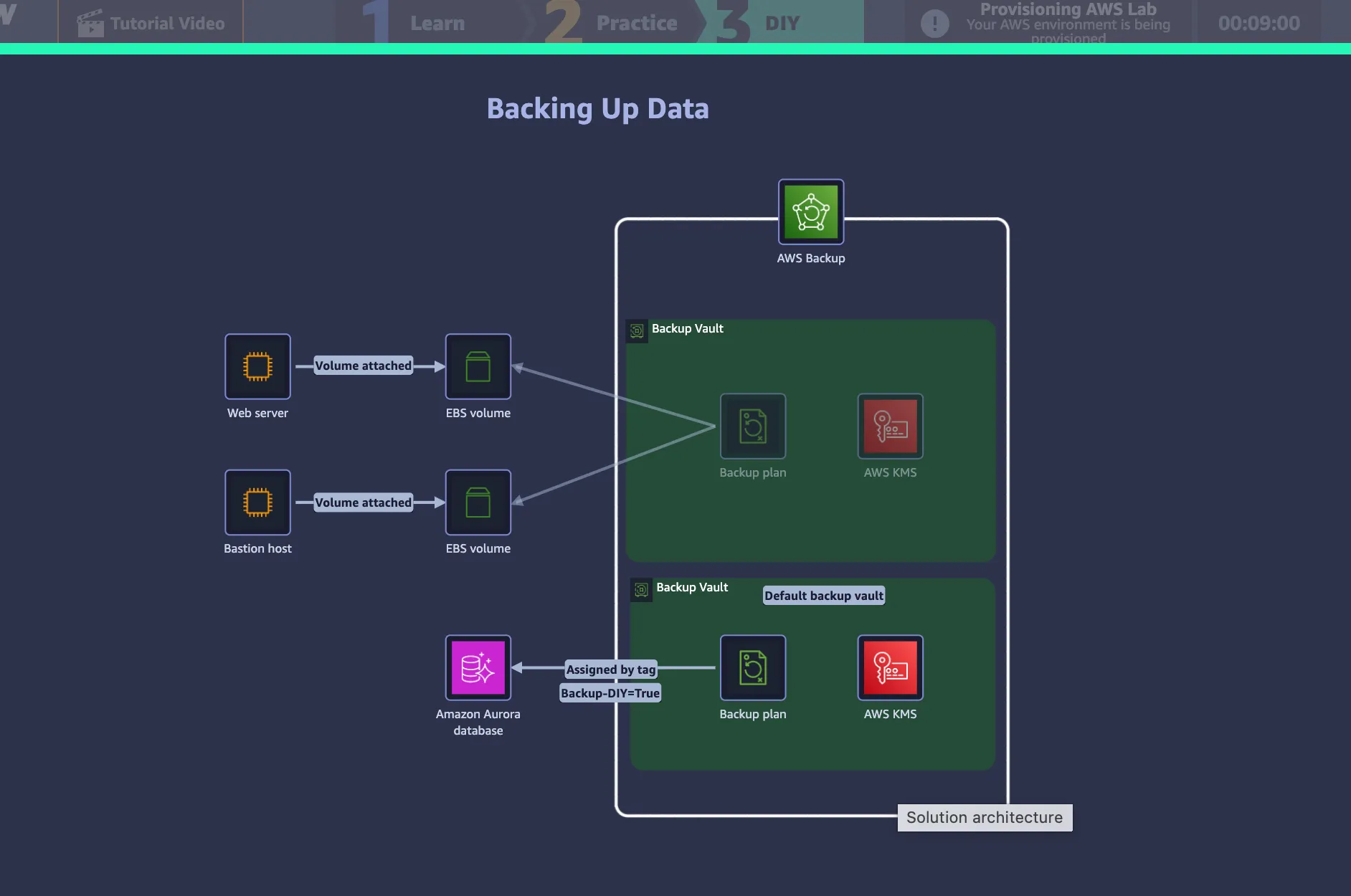
I recently completed the AWS Skill Builder lab AWS SimuLearn: Backing Up Data, which gave me hands-on experience with AWS Backup and automated backup workflows.
The lab helped me understand how AWS Backup can be used to protect resources such as Amazon EBS volumes using backup vaults, IAM roles, backup plans, tags, and retention policies.
What is AWS Backup?
AWS Backup is a managed service that helps centralize and automate backup management across supported AWS services.
Instead of managing backups separately for each resource, AWS Backup provides a central place to define schedules, retention periods, protected resources, and backup storage.
A simplified workflow looks like this:
1
2
3
4
5
6
7
8
9
AWS Resource
     ↓
AWS Backup
     ↓
Backup Plan
     ↓
Recovery Point
     ↓
Backup Vault
Creating a Backup Vault
One of the first tasks in the lab was creating a custom Backup Vault.
A Backup Vault is a logical container used to organize and manage recovery points.
You can think of it as a secure place where backup recovery points are stored and managed.
1
2
3
4
5
6
7
EBS Volume
    ↓
Backup Job
    ↓
Recovery Point
    ↓
Backup Vault
Backup data is also protected using encryption, with AWS KMS involved in managing encryption keys.
Creating an On-Demand Backup
The lab also covered on-demand backups.
An on-demand backup is useful when a backup needs to be created immediately instead of waiting for a scheduled job.
For example, before performing maintenance, patching, or a major configuration change, an on-demand backup can provide a recent recovery point.
1
2
3
4
5
6
7
EBS Volume
    ↓
Start On-Demand Backup
    ↓
AWS Backup
    ↓
Recovery Point
Automating Backups with Backup Plans
The next step was creating an automated Backup Plan.
A Backup Plan defines how AWS Backup should protect resources.
It can include settings such as:
1
2
3
4
Backup frequency
Retention period
Backup vault
Lifecycle rules
For example:
1
2
3
4
5
Backup every day
        ↓
Store in MyBackupVault
        ↓
Keep backups for 7 days
Once the plan is configured, AWS Backup can run automatically without requiring manual backup creation every day.
Using Tags for Resource Selection
One of the most useful concepts in the lab was using tags to automatically select resources.
Instead of manually adding every EBS volume to a backup plan, resources can be marked with tags such as:
1
2
Key: Backup
Value: True
The Backup Plan can then select resources that match the tag.
1
2
3
4
5
6
7
EBS Volume A → Backup=True
EBS Volume B → Backup=True
EBS Volume C → No Backup Tag

        ↓

Backup Plan selects A and B
This approach is especially useful in larger environments.
If a new resource is created and given the correct tag, it can automatically become part of the backup strategy without manually updating the resource list.
Why AWS Backup Needs an IAM Role
Another important concept from the lab was the IAM Role.
AWS Backup is a managed AWS service, but it still needs permission to perform actions on resources in an AWS account.
The simplified flow is:
1
2
3
4
5
6
7
8
9
AWS Backup
    ↓
Assume IAM Role
    ↓
Receive permissions
    ↓
Call AWS service APIs
    ↓
Create backup
The IAM Role defines what AWS Backup is allowed to do.
For example, it may allow AWS Backup to perform the required actions on Amazon EBS resources to create backups and recovery points.
Retention Policies
The lab also introduced retention periods.
Retention defines how long backups should be kept.
For example:
1
2
Daily backup
Retention: 7 days
Recovery points that reach the end of their configured lifecycle can then expire automatically.
This helps reduce unnecessary storage usage and control backup costs.
On-Demand vs Automated Backup
After completing the lab, I now think about AWS Backup using two main approaches:
1
2
3
4
5
6
7
8
On-Demand Backup
→ Started manually
→ Useful before maintenance or major changes

Automated Backup
→ Controlled by a Backup Plan
→ Runs on a schedule
→ Can select resources using tags
Key Takeaways
The biggest lesson from this lab was that AWS Backup is not only about creating copies of data.
It is about defining a repeatable and automated backup policy.
A complete workflow can look like this:
1
2
3
4
5
6
7
8
9
10
11
12
13
14
15
Resource
   ↓
Tag
   ↓
Backup Plan
   ↓
IAM Role
   ↓
AWS Backup
   ↓
Recovery Point
   ↓
Backup Vault
   ↓
Retention Policy
The main concepts I learned were:
- Backup Vault organizes and stores recovery points.
- Backup Plans define backup schedules and lifecycle rules.
- Tags help automatically select resources.
- IAM Roles give AWS Backup the permissions it needs.
- On-demand backups create immediate recovery points.
- Retention policies control how long backups are kept.
This lab gave me a much clearer understanding of how AWS Backup can turn a manual backup process into an automated, policy-based workflow.
Enjoyed reading this content? Let the author know!
Your likes, comments, shares, and saves help creators reach more builders.

Loading recommendations
Loading article