
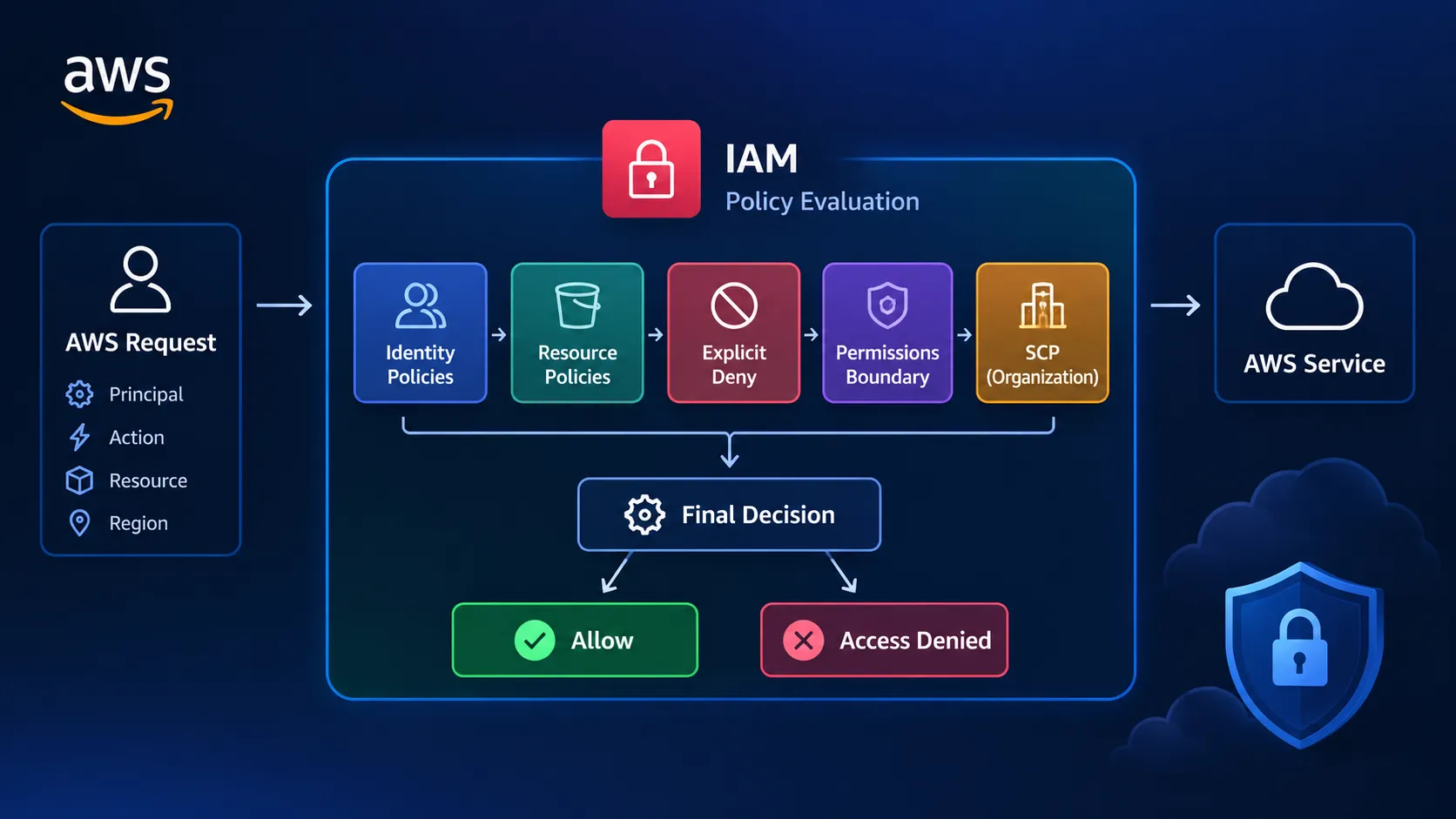
From AccessDenied to Access Granted: How AWS IAM Actually Evaluates Permissions
Ever wondered why an AWS request returns AccessDenied even when an IAM policy appears to allow it? This article breaks down how AWS evaluates identity policies, resource policies, explicit denies, and permissions boundaries through practical troubleshooting scenarios.

AccessDenied is one of the most common—and frustrating—errors when working with AWS.
You check the IAM policy and find the required action. The resource ARN looks correct. Yet AWS still refuses the request.
Why?
The answer is that AWS authorization is not based on a single policy. Multiple permission layers can influence the final decision, and an explicit
Deny can override an Allow.This article explains how to approach these situations and troubleshoot IAM permissions systematically.
1. What happens when an AWS request is made?
When you make a request to an AWS service, AWS first needs to determine:
- Who is making the request?
- Is the request authenticated?
- What action is being requested?
- Which resource is being accessed?
- Do the applicable policies allow the action?
- Is there an explicit
Deny? - Are there additional restrictions such as permissions boundaries or Service Control Policies?
The final result is either:
Allow or AccessDenied
A useful mental model is:
1
2
3
4
5
6
7
8
9
10
11
12
13
14
15
16
17
18
19
20
21
22
23
24
AWS Request
     |
     v
Authentication
     |
     v
Policy Evaluation
     |
     +---- Identity-based policies
     |
     +---- Resource-based policies
     |
     +---- Permissions boundaries
     |
     +---- Service Control Policies
     |
     +---- Conditions / other restrictions
     |
     v
Final Decision
     |
     +---- Allow
     |
     +---- Explicit Deny
2. An Allow does not always mean access
One of the most important IAM concepts is:
AnAllowis not enough if another applicable policy explicitly denies the request.
For example, an identity policy might contain:
1
2
3
4
5
{
  "Effect": "Allow",
  "Action": "s3:GetObject",
  "Resource": "arn:aws:s3:::example-bucket/*"
}
At first glance, the user should be able to read objects from the bucket.
But suppose another applicable policy contains:
1
2
3
4
5
{
  "Effect": "Deny",
  "Action": "s3:GetObject",
  "Resource": "arn:aws:s3:::example-bucket/private/*"
}
A request for an object inside
private/ can still be denied.This is why looking at only one IAM policy is often not enough.
3. Identity-based policies
Identity-based policies are attached to IAM identities such as:
- Users
- Groups
- Roles
They define what actions that identity can perform.
For example:
1
2
3
4
5
{
  "Effect": "Allow",
  "Action": "ec2:DescribeInstances",
  "Resource": "*"
}
This grants permission to call
DescribeInstances.When troubleshooting, check:
- Is the correct policy attached?
- Is the action spelled correctly?
- Is the resource correct?
- Are there conditions restricting the request?
- Is the request being made using the identity you expected?
4. Resource-based policies
Some AWS resources can also define who is allowed to access them.
Amazon S3 bucket policies are a common example.
This means authorization can involve both:
1
2
3
Identity Policy
      +
Resource Policy
For example, a bucket policy might allow access to a particular IAM role while another policy restricts access.
This is an important distinction because the permission may not be located on the IAM user or role you are inspecting.
5. Explicit Deny wins
The simplest rule to remember is:
Explicit Deny overrides Allow.
Consider:
1
2
3
Policy A → Allow
Policy B → Allow
Policy C → Deny
The final result is:
1
ACCESS DENIED
This is why searching for only an
Allow statement is not enough when debugging permissions.Look for
Effect: "Deny" across the policies that can apply to the request.6. Permissions boundaries
Permissions boundaries introduce another layer that can confuse beginners.
A permissions boundary does not directly grant permissions.
Instead, it defines the maximum permissions that an IAM user or role can receive through identity-based policies.
Think of it as:
1
2
3
4
5
Identity Policy
       ∩
Permissions Boundary
       =
Maximum Effective Permissions
For example, an identity policy might allow:
1
2
3
s3:GetObject
s3:PutObject
ec2:StartInstances
But if the permissions boundary allows only S3 actions, the EC2 permission cannot become effective.
So when an identity policy looks correct but access is still denied, checking the permissions boundary is important.
7. Service Control Policies
If the AWS account belongs to an AWS Organization, Service Control Policies (SCPs) can introduce another restriction.
An SCP does not grant permissions by itself.
Instead, it can limit the maximum permissions available to accounts or organizational units.
For example:
1
2
3
4
5
6
7
8
9
10
11
Identity Policy
      ↓
Allows action

SCP
      ↓
Does not permit action

Result
      ↓
AccessDenied
This can be particularly confusing because the IAM policy may look completely correct.
8. iam:PassRole — a common source of confusion
Another permission that frequently appears during AWS deployments is:
1
iam:PassRole
Suppose you are creating an AWS resource that needs to use an IAM role.
Having permission to create the resource does not necessarily mean you have permission to pass that role to the AWS service.
The caller may also need permission similar to:
1
2
3
4
5
{
  "Effect": "Allow",
  "Action": "iam:PassRole",
  "Resource": "arn:aws:iam::123456789012:role/MyApplicationRole"
}
This is a good example of why an error message should be read carefully instead of simply adding broad permissions.
9. A practical troubleshooting workflow
When you encounter
AccessDenied, avoid immediately attaching AdministratorAccess.Instead, work through the following checklist:
Step 1 — Read the error carefully
Identify:
- Principal
- AWS service
- Action
- Resource
- Account
- Region
The error often tells you exactly which action was denied.
Step 2 — Identify the principal
Determine whether the request is coming from:
- IAM user
- IAM role
- Federated identity
- AWS service
Make sure you are checking the policy of the identity actually making the request.
Step 3 — Check identity-based policies
Search for an applicable
Allow statement.Confirm that:
1
2
3
Action → matches
Resource → matches
Condition → satisfied
Step 4 — Search for explicit denies
Look beyond the identity policy.
Check applicable:
- Identity policies
- Resource policies
- Permissions boundaries
- SCPs
- Conditions
Step 5 — Check resource-level restrictions
For services such as S3, inspect the resource policy and related access controls.
Step 6 — Check special permissions
Some operations require additional permissions.
A common example is:
1
iam:PassRole
Step 7 — Fix the smallest permission necessary
Avoid solving every
AccessDenied error by granting:1
AdministratorAccess
Instead, identify the missing permission and grant only what the workload actually requires.
10. The most useful IAM mental model
When troubleshooting IAM, don't ask:
"Which policy gives me permission?"
Ask:
"What combination of policies determines whether this exact request is allowed?"
Think in terms of:
1
2
3
4
5
6
7
8
9
10
11
12
13
14
15
Who?
 ↓
What action?
 ↓
Which resource?
 ↓
Which policies apply?
 ↓
Is there an Allow?
 ↓
Is there an Explicit Deny?
 ↓
Are there additional boundaries or restrictions?
 ↓
Final decision
This mindset makes IAM troubleshooting much more systematic.
Conclusion
AWS IAM becomes much easier to troubleshoot once
AccessDenied is treated as a policy-evaluation problem rather than simply a missing-permission problem.An identity policy may contain an
Allow, but resource policies, explicit denies, permissions boundaries, SCPs, conditions, and special permissions such as iam:PassRole can all affect the final result.The next time AWS returns
AccessDenied, don't immediately add more permissions.Start with the request itself, identify the principal and action, trace the applicable policy layers, find the exact restriction, and then apply the smallest fix necessary.
That's the difference between simply making an AWS request work and actually understanding why AWS allowed it.
Enjoyed reading this content? Let the author know!
Your likes, comments, shares, and saves help creators reach more builders.

Loading recommendations
Loading article