
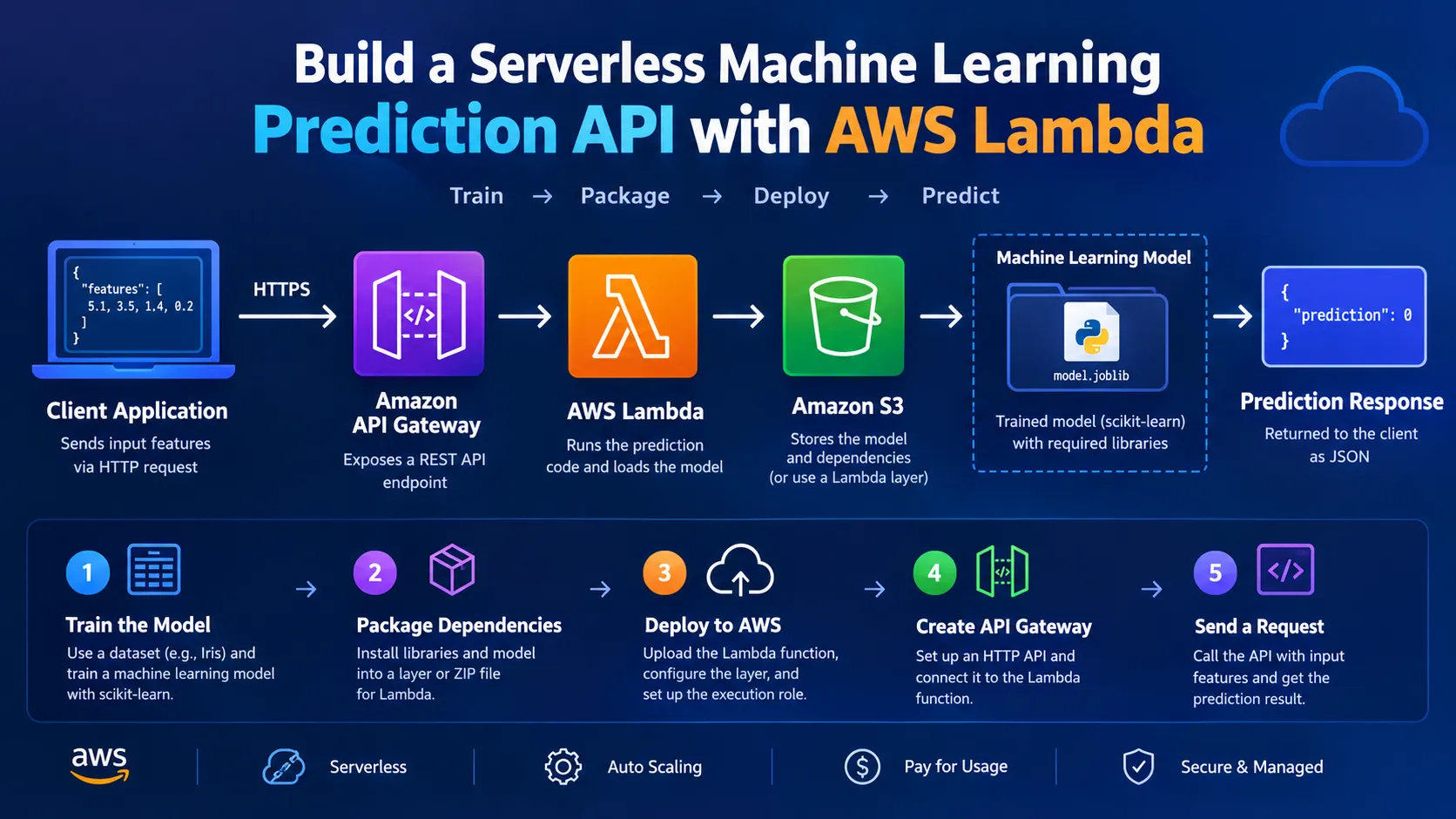
Build a Serverless Machine Learning Prediction API with AWS Lambda
Learn how to build a serverless machine learning prediction API using Python, AWS Lambda, and Amazon API Gateway. This tutorial demonstrates how to train a simple ML model, package it, deploy it to AWS, and expose predictions through a REST API.

Build a Serverless Machine Learning Prediction API with AWS Lambda
Machine learning models are often trained in notebooks or local development environments, but making those models available to applications requires an inference service.
In this tutorial, we'll build a simple serverless machine learning prediction API using Python and AWS Lambda. We'll train a machine learning model locally, package it with its dependencies, deploy it to Lambda, and expose the prediction function through Amazon API Gateway.
The example uses a simple classification model so that the focus remains on the deployment architecture.
What We'll Build
The final architecture will look like this:
1
2
3
4
5
6
7
8
9
10
11
12
13
14
15
16
17
Client Application
       |
       | HTTP Request
       v
Amazon API Gateway
       |
       v
AWS Lambda
       |
       v
Machine Learning Model
       |
       v
Prediction
       |
       v
API Response
The client sends input features to an API endpoint. API Gateway forwards the request to Lambda, which loads the machine learning model and generates a prediction.
Prerequisites
You should have:
- An AWS account
- Python 3.10+ installed locally
- Basic Python knowledge
- Basic machine learning knowledge
- AWS CLI installed and configured
- Familiarity with AWS Lambda and API Gateway
For a production application, you should also understand IAM permissions and API security.
Step 1: Create the Machine Learning Model
For this tutorial, we'll use the Iris dataset and a Random Forest classifier from scikit-learn.
Create a project directory:
1
2
mkdir serverless-ml-api
cd serverless-ml-api
Create a Python virtual environment:
1
python -m venv .venv
Activate it.
Linux/macOS:
1
source .venv/bin/activate
Windows:
1
.venv\Scripts\activate
Install the required packages:
1
pip install scikit-learn joblib
Step 2: Train the Model
Create a file called
train.py:1
2
3
4
5
6
7
8
9
10
11
12
13
14
15
16
17
18
19
20
21
22
from sklearn.datasets import load_iris
from sklearn.ensemble import RandomForestClassifier
import joblib
# Load dataset
iris = load_iris()
X = iris.data
y = iris.target
# Train model
model = RandomForestClassifier(
n_estimators=100,
random_state=42
)
model.fit(X, y)
# Save model
joblib.dump(model, "model.joblib")
print("Model trained and saved successfully.")
Run the training script:
1
python train.py
You should now have:
1
2
3
serverless-ml-api/
├── train.py
└── model.joblib
The
model.joblib file contains the trained machine learning model.Step 3: Create the Lambda Function
Now we'll create the Lambda function responsible for making predictions.
Create a file called
lambda_function.py:1
2
3
4
5
6
7
8
9
10
11
12
13
14
15
16
17
18
19
20
21
22
23
24
25
26
27
import json
import joblib
model = joblib.load("/opt/python/model.joblib")
def lambda_handler(event, context):
body = json.loads(event.get("body", "{}"))
features = body.get("features")
if not features:
return {
"statusCode": 400,
"body": json.dumps({
"error": "features are required"
})
}
prediction = model.predict([features])[0]
return {
"statusCode": 200,
"body": json.dumps({
"prediction": int(prediction)
})
}
This function expects an API request containing a list of features.
For example:
1
2
3
4
5
6
7
8
{
    "features": [
        5.1,
        3.5,
        1.4,
        0.2
    ]
}
The Lambda function passes these values to the model and returns the predicted class.
Step 4: Understand the Lambda Function
The following line loads the model:
1
model = joblib.load("/opt/python/model.joblib")
The
/opt directory is commonly used by Lambda layers for additional libraries and files.The request body is then parsed:
1
body = json.loads(event.get("body", "{}"))
The features are extracted:
1
features = body.get("features")
Finally, the model generates a prediction:
1
prediction = model.predict([features])[0]
The result is returned as an HTTP response.
Step 5: Package the Machine Learning Dependencies
AWS Lambda does not automatically include libraries such as scikit-learn and joblib.
One way to provide these dependencies is through a Lambda layer.
Create a directory for the dependencies:
1
mkdir python
Install the dependencies into that directory:
1
pip install scikit-learn joblib -t python/
Copy the model into the layer directory:
1
cp model.joblib python/
Your structure should look similar to:
1
2
3
4
5
6
7
8
9
10
serverless-ml-api/
├── lambda_function.py
├── train.py
├── model.joblib
└── python/
    ├── joblib/
    ├── sklearn/
    ├── numpy/
    ├── scipy/
    └── model.joblib
Compress the
python directory:1
zip -r ml-layer.zip python/
You can then create a Lambda layer from this ZIP file.
Important Note About Lambda Packages
Machine learning libraries can be large and may have native dependencies.
For production workloads, consider using a packaging approach that matches your Lambda runtime and architecture. Lambda layers, container images, or a managed ML inference service such as Amazon SageMaker may be more appropriate depending on model size and requirements.
For larger models, serverless Lambda inference may not be the best choice.
Step 6: Create the Lambda Function in AWS
Open the AWS Lambda console.
Choose:
Create function → Author from scratch
Configure the function with a name such as:
1
ml-prediction-api
Select a Python runtime compatible with your application.
Choose an appropriate architecture and execution role.
Create the function.
Upload your Lambda function code and configure the dependencies using the packaging method you've selected.
Step 7: Configure the Lambda Layer
If you're using a Lambda layer:
- Open the Lambda function.
- Find the Layers section.
- Choose Add a layer.
- Select the custom layer you created.
- Add it to the function.
The Lambda runtime can then access the Python dependencies and model provided by the layer.
Step 8: Test the Lambda Function
Create a test event that represents an API Gateway request.
For example:
1
2
3
{
    "body": "{\"features\":[5.1,3.5,1.4,0.2]}"
}
Run the test.
A successful response should look similar to:
1
2
3
4
{
    "statusCode": 200,
    "body": "{\"prediction\": 0}"
}
The exact prediction depends on the trained model.
Step 9: Create an API Gateway Endpoint
Now we'll make the model accessible through an HTTP API.
Open Amazon API Gateway.
Create an HTTP API and connect it to the Lambda function.
Configure a route such as:
1
POST /predict
The architecture is now:
1
2
3
4
5
6
7
8
9
10
11
12
13
POST /predict
      |
      v
API Gateway
      |
      v
Lambda
      |
      v
ML Model
      |
      v
Prediction
API Gateway provides an endpoint that applications can call.
Step 10: Test the Prediction API
You can test the API using
curl.1
2
3
4
curl -X POST \
https://YOUR_API_ID.execute-api.YOUR_REGION.amazonaws.com/predict \
-H "Content-Type: application/json" \
-d '{"features":[5.1,3.5,1.4,0.2]}'
The API should return a response similar to:
1
2
3
{
    "prediction": 0
}
You can now call your machine learning model over HTTP.
Step 11: Connect the API to an Application
Once the API is working, it can be consumed by many types of applications.
For example:
1
2
3
4
5
6
7
8
9
10
Web Application
       |
       v
API Gateway
       |
       v
Lambda
       |
       v
ML Model
A frontend application could send a request such as:
1
2
3
4
5
6
7
8
9
10
11
12
13
14
15
16
const response = await fetch(
    "https://YOUR_API_URL/predict",
    {
        method: "POST",
        headers: {
            "Content-Type": "application/json"
        },
        body: JSON.stringify({
            features: [5.1, 3.5, 1.4, 0.2]
        })
    }
);

const result = await response.json();

console.log(result);
This allows the machine learning model to become part of a larger application.
Why Use Serverless Machine Learning?
Using Lambda for lightweight ML inference can provide several advantages.
No Server Management
You don't need to manage a virtual machine or manually maintain an application server.
Automatic Scaling
Lambda can handle multiple requests by creating execution environments as needed, subject to account and service quotas.
Pay for Usage
With serverless architecture, you generally pay based on the resources and requests used rather than maintaining an always-running server.
Easy API Integration
API Gateway makes it straightforward to expose the prediction function through an HTTP API.
When Lambda Is Not the Right Choice
Serverless ML inference is not suitable for every model.
Consider another architecture when:
- The model is very large.
- Dependencies exceed Lambda packaging limits.
- Inference requires significant CPU or GPU resources.
- The model requires long-running inference.
- You need specialized ML serving features.
- You need highly optimized, persistent inference infrastructure.
For these workloads, Amazon SageMaker or another suitable compute architecture may be a better option.
Improving the API
The example is intentionally simple. A production ML API should include additional functionality.
Input Validation
Validate the number, type, and range of incoming features before sending them to the model.
For example:
1
2
3
4
5
6
7
if len(features) != 4:
    return {
        "statusCode": 400,
        "body": json.dumps({
            "error": "Exactly four features are required"
        })
    }
Error Handling
Wrap model inference in appropriate exception handling so unexpected inputs don't cause unnecessary failures.
Authentication
Protect the API using an appropriate authentication and authorization mechanism.
Monitoring
Use Amazon CloudWatch to monitor:
- Lambda errors
- Invocation count
- Duration
- Logs
- API errors
Model Versioning
Keep track of model versions so that you know exactly which model produced each prediction.
Security Considerations
Security should be considered before exposing a machine learning model to the internet.
Avoid placing AWS credentials inside your source code.
Use IAM roles where possible.
Validate incoming requests.
Protect the API from unauthorized access.
Do not log sensitive user information unnecessarily.
Also consider rate limiting and request-size limits to protect the backend from excessive traffic.
A More Complete Architecture
A production-oriented version could look like this:
1
2
3
4
5
6
7
8
9
10
11
12
13
14
15
16
17
18
19
20
21
22
23
24
25
26
27
28
29
30
31
                ┌─────────────────┐
                │  Web / Mobile   │
                │    Client       │
                └────────┬────────┘
                         │
                         v
                ┌─────────────────┐
                │  API Gateway    │
                └────────┬────────┘
                         │
                         v
                ┌─────────────────┐
                │  AWS Lambda     │
                │                 │
                │ Input Validation│
                └────────┬────────┘
                         │
                         v
                ┌─────────────────┐
                │ ML Model        │
                │ Inference       │
                └────────┬────────┘
                         │
                         v
                ┌─────────────────┐
                │   Prediction    │
                └─────────────────┘

                         |
                         v
                Amazon CloudWatch
This architecture keeps the prediction service independent from the frontend application.
Conclusion
In this tutorial, we built a serverless machine learning prediction API using Python, scikit-learn, AWS Lambda, and Amazon API Gateway.
The workflow is simple:
1
2
3
4
5
6
7
8
9
10
11
12
13
14
15
16
Train Model
    |
    v
Package Model
    |
    v
Deploy to Lambda
    |
    v
API Gateway
    |
    v
Prediction Request
    |
    v
ML Prediction
This approach is useful for lightweight machine learning models where inference can be performed within Lambda's resource and packaging constraints.
As your application grows, you can extend this architecture with authentication, monitoring, model versioning, automated deployment, and persistent data storage.
For larger or more demanding machine learning workloads, consider managed ML inference services such as Amazon SageMaker.
The key idea is that machine learning models don't have to remain inside notebooks. By combining ML with serverless AWS services, you can turn a trained model into an API that applications can consume.
Enjoyed reading this content? Let the author know!
Your likes, comments, shares, and saves help creators reach more builders.

Loading recommendations
Loading article