
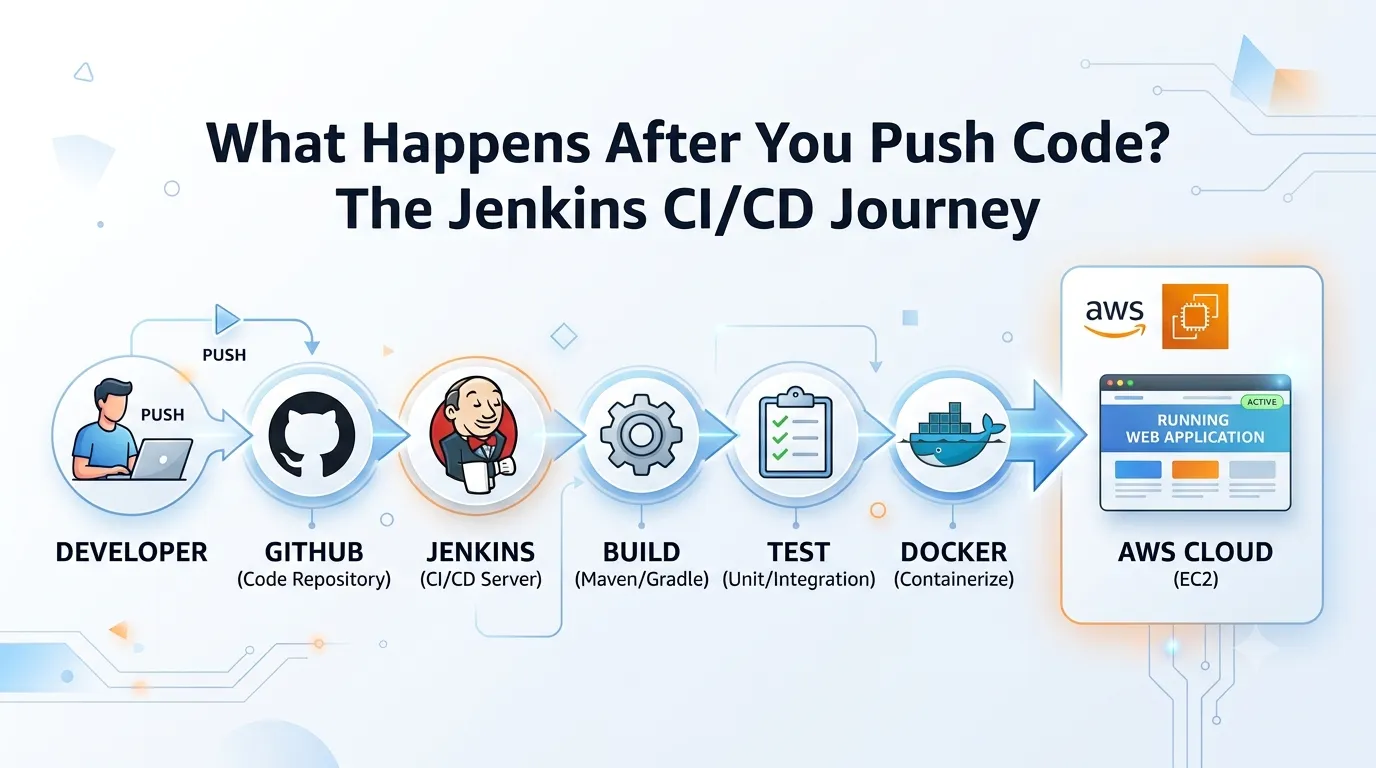
“What Happens After You Push Code? The Jenkins CI/CD Journey 🚀”
You pushed your code to GitHub. Now what? 👀 Discover what happens behind the scenes as Jenkins automatically takes your code through build, test, Docker, and AWS deployment—turning a simple Git push into a complete CI/CD workflow.

👨💻 Developer
↓
📦 GitHub
↓
⚙️ Jenkins
↓
🔨 Build
↓
🧪 Test
↓
🐳 Docker
↓
☁️ AWS
↓
🚀 Application
↓
📦 GitHub
↓
⚙️ Jenkins
↓
🔨 Build
↓
🧪 Test
↓
🐳 Docker
↓
☁️ AWS
↓
🚀 Application
Imagine you have finished a small change in your application.
You test it on your laptop. Everything looks good.
Now you need to get that change into the application running on AWS.
Normally, you might have to:
- Build the application
- Run tests
- Create a Docker image
- Connect to the server
- Deploy the new version
- Check whether everything is working
Doing this again and again can become slow and error-prone.
But what if one simple Git push could start this entire process automatically?
That's where a Jenkins CI/CD pipeline comes in. 🚀
Let's follow the journey.
👨💻 1. Developer
Everything starts with the developer.
You make a change to your application and test it locally.
For example, you fix a bug or add a new feature.
When you're ready, you commit the change:
1
2
3
git add .
git commit -m "Add new feature"
git push
That last command is where our journey begins.
📦 2. GitHub
The code is pushed to GitHub.
GitHub becomes the central place where the project's source code is stored.
But now an important question appears:
How does Jenkins know that new code has arrived? 🤔
That's where a trigger comes in.
Jenkins can be configured to start a pipeline when changes are pushed to the repository.
So the flow becomes:
Developer → GitHub → Jenkins
The developer doesn't need to manually tell Jenkins:
"Hey, I pushed new code. Please start working." 😄
The pipeline can handle that automatically.
⚙️ 3. Jenkins
Now Jenkins takes over.
Jenkins is an automation server that can execute the steps we define in our CI/CD pipeline.
It checks out the latest code and starts moving it through different stages.
Think of Jenkins as the orchestrator of our journey.
It doesn't necessarily do everything itself.
Instead, it coordinates different tools and commands:
1
2
3
4
5
6
7
8
9
Jenkins
  ↓
Build
  ↓
Test
  ↓
Docker
  ↓
Deploy
This is what makes Jenkins useful in a CI/CD workflow.
🔨 4. Build
The first major checkpoint is the build.
Jenkins takes the source code and runs the commands required to create a build.
Depending on the application, this could mean:
- Installing dependencies
- Compiling source code
- Creating build files
- Checking for build errors
For example, a Java application might use Maven, while a Node.js application might use npm.
The exact commands depend on the project.
If the build fails:
❌ Pipeline stops
If it succeeds:
✅ Move to the next stage
This is important because there is no point deploying an application that cannot even build successfully.
🧪 5. Test
Now comes another important question:
"Does the new code actually work?"
Jenkins can automatically run tests.
For example:
1
2
3
4
5
6
7
8
9
Build
  ↓
Run Tests
  ↓
Tests Passed?
   ↙     ↘
 No       Yes
 ↓         ↓
Stop     Continue
If the tests fail, Jenkins can stop the pipeline.
This prevents a faulty version from automatically moving toward deployment.
And that's one of the biggest benefits of CI/CD:
Problems can be discovered before users see them.
🐳 6. Docker
The code has successfully built and passed the tests.
Now we need to package the application so it can run consistently.
This is where Docker can enter our pipeline. 🐳
Jenkins can build a Docker image from the application's Dockerfile.
For example:
1
docker build -t myapp:latest .
The image contains the application and the required environment needed to run it.
Now we have:
Source code → Tested application → Docker image
That image can then be stored in a container registry and used during deployment.
☁️ 7. AWS
Our application is ready.
But where will it run?
Let's say our target environment is an AWS EC2 instance.
Jenkins can automate the deployment process.
A simplified flow could look like:
1
2
3
4
5
6
7
Jenkins
   ↓
Docker Image
   ↓
AWS EC2
   ↓
Run Container
Jenkins can connect the different steps together so that a successful pipeline results in a new application version being deployed.
The exact deployment method can vary depending on the AWS architecture.
🚀 8. Application
Finally, we reach the destination.
The updated application is running in AWS.
A developer made one change and pushed the code.
Behind that simple Git push, Jenkins helped coordinate:
1
2
3
4
5
6
7
8
9
10
11
12
13
14
15
👨💻 Developer
↓
📦 GitHub
↓
⚙️ Jenkins
↓
🔨 Build
↓
🧪 Test
↓
🐳 Docker
↓
☁️ AWS
↓
🚀 ApplicationThat's the basic idea behind a CI/CD pipeline.
💡 But What If Something Fails?
This is where CI/CD becomes really useful.
Imagine the developer pushes code containing a bug.
The pipeline might look like this:
1
2
3
4
5
6
7
8
9
GitHub
   ↓
Jenkins
   ↓
Build ✅
   ↓
Test ❌
   ↓
STOP 🛑
The application doesn't continue to deployment.
Instead, the developer gets a signal that something needs to be fixed.
After fixing the problem, another Git push can start the process again.
🔥 The Real Power of CI/CD
The impressive part isn't simply that Jenkins can run commands.
It's that we can create a repeatable path from code change to deployment.
Without automation:
Code → Manual Build → Manual Test → Manual Docker → Manual Deployment
With a CI/CD pipeline:
Git Push → Jenkins → Build → Test → Docker → AWS
The developer focuses on writing code.
The pipeline handles the repetitive work.
And that's the real idea behind CI/CD:
Build it once. Automate it. Repeat it reliably. 🚀
So the next time you run:
1
git push
remember that a simple command can trigger an entire journey from your laptop to a running application in the cloud.
Enjoyed reading this content? Let the author know!
Your likes, comments, shares, and saves help creators reach more builders.

Loading recommendations
Loading article