
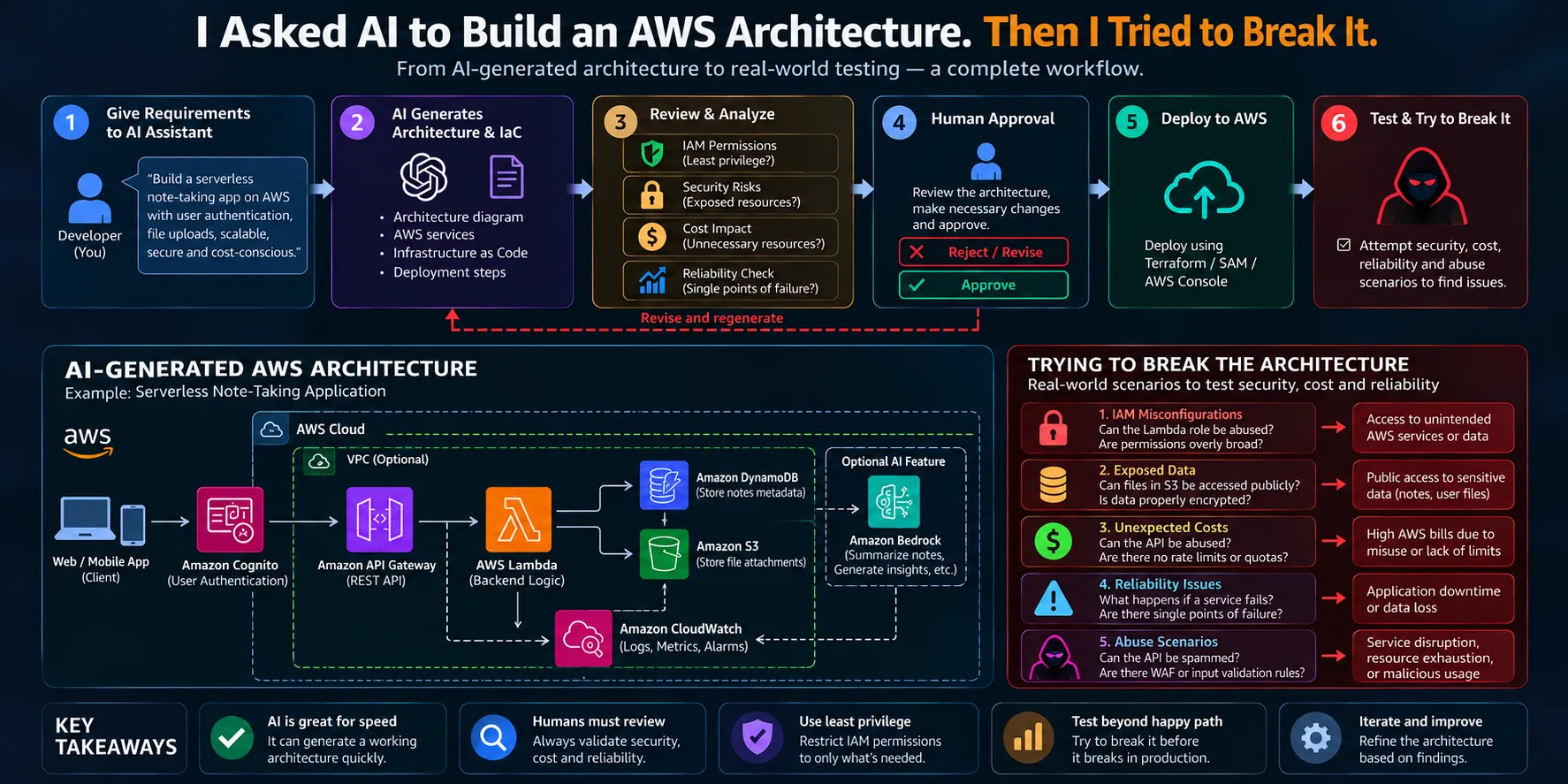
I Asked AI to Build an AWS Architecture. Then I Tried to Break It.
What happens when you stop trusting AI-generated cloud infrastructure?

I ASKED AI TO BUILD AN AWS ARCHITECTURE.
It looked good.
The services made sense.
The architecture was clean.
The application was serverless.
Everything seemed to fit together.
So I asked a different question:
"What happens if I try to break it?"
That changed the entire experiment.
Instead of simply asking whether AI could design an AWS architecture, I wanted to find out what AI might miss.
Could the permissions be too broad?
Could user data be exposed?
Could the architecture become unexpectedly expensive?
What happens when a service fails?
Could someone abuse the API?
And most importantly:
Would the architecture still make sense after someone actually tried to break it?

From AI-generated architecture to real-world testing: the workflow I followed.
THE EXPERIMENT
The idea was simple.
I gave an AI assistant a set of requirements and asked it to design an AWS architecture.
I didn't tell it exactly which AWS services to use.
I wanted to see what it would choose.
The requirements were:
• Build a serverless note-taking application
• Users should be able to authenticate
• Users should be able to create and retrieve notes
• Users should be able to upload attachments
• The application should be scalable
• The architecture should be secure
• The solution should be cost-conscious
• Users should be able to authenticate
• Users should be able to create and retrieve notes
• Users should be able to upload attachments
• The application should be scalable
• The architecture should be secure
• The solution should be cost-conscious
That's it.
No architecture diagram.
No list of AWS services.
No predefined implementation.
Just the requirements.
WHAT DID THE AI BUILD?
WHAT DID THE AI BUILD?
The resulting architecture looked surprisingly reasonable.
The core architecture consisted of:
• Amazon Cognito — user authentication
• Amazon API Gateway — API layer
• AWS Lambda — backend logic
• Amazon DynamoDB — application data
• Amazon S3 — file storage
• Amazon CloudWatch — logging and monitoring
• Amazon API Gateway — API layer
• AWS Lambda — backend logic
• Amazon DynamoDB — application data
• Amazon S3 — file storage
• Amazon CloudWatch — logging and monitoring
The basic request flow looked like this:


The initial architecture generated from the application requirements.
AT FIRST GLANCE, IT LOOKED PERFECT.
And that's exactly what made it interesting.
AI is very good at producing architectures that look correct.
It knows that API Gateway can connect to Lambda.
It knows Lambda can communicate with DynamoDB.
It knows S3 can store files.
It knows Cognito can handle authentication.
It can connect all of these pieces into a clean diagram.
But architecture isn't just about connecting services.
It's about answering questions like:
Who can access what?
What happens when something fails?
What happens when someone sends 10,000 requests?
What happens if a user tries to access another user's data?
What happens if a developer accidentally gives a Lambda function too many permissions?
That's where I started testing.
TEST 1 — IAM PERMISSIONS
The first thing I wanted to investigate was IAM.
An AI-generated architecture can tell us what services should communicate.
But it doesn't automatically mean the permissions are correct.
For example, imagine a Lambda function receiving permissions like:
1
2
3
4
5
{
  "Effect": "Allow",
  "Action": "*",
  "Resource": "*"
}
This is convenient.
It's also extremely broad.
The Lambda function can potentially interact with far more AWS resources than the application actually needs.
So I changed the question.
Instead of:
"What permissions make the application work?"
I asked:
"What is the minimum permission this function actually needs?"
For example, if the Lambda function only needs to read objects from one S3 bucket, the permission should be scoped to that requirement.
A simplified example:
1
2
3
4
5
6
7
{
  "Effect": "Allow",
  "Action": [
    "s3:GetObject"
  ],
  "Resource": "arn:aws:s3:::my-app-data/*"
}
This is the principle of least privilege.
The goal isn't to give the application enough permissions to work.
The goal is to give it exactly what it needs.
TEST 2 — CAN ONE USER ACCESS ANOTHER USER'S DATA?
This was one of the more interesting tests.
Imagine two users:
User A
User B
User A should only be able to access User A's notes.
But what happens if the backend trusts a user ID sent by the client?
For example:
GET /notes/userBIf the backend simply trusts that value, we could potentially have:

That's a serious application-level security problem.
The better approach is to derive the user's identity from the authenticated request and enforce authorization on the backend.
In other words:
Don't ask the client who they are.
Verify who they are.

Authentication tells us who the user is; authorization determines what that user can access.
TEST 3 — WHAT IF SOMEONE SPAMS THE API?
Next, I tried to think like someone who wasn't using the application normally.
What happens if someone sends thousands of requests?
The architecture might look like:

This doesn't necessarily mean the architecture is insecure.
But it means we need to think about abuse.
Questions I would investigate include:
• Is authentication required?
• Are requests rate-limited?
• Are payload sizes restricted?
• Is input validated?
• Are unusual request patterns monitored?
• Are appropriate service quotas understood?
• Would AWS WAF be useful?
• Are requests rate-limited?
• Are payload sizes restricted?
• Is input validated?
• Are unusual request patterns monitored?
• Are appropriate service quotas understood?
• Would AWS WAF be useful?
The important lesson here is that an architecture can work perfectly under normal conditions and still behave badly under abnormal conditions.
TEST 4 — WHAT HAPPENS WHEN SOMETHING FAILS?
AI-generated architectures often show the happy path.
But production systems don't live on the happy path.
So I started removing pieces.
What happens if Lambda fails?
What happens if DynamoDB throttles?
What happens if an S3 operation times out?
What happens if an external service becomes unavailable?
The architecture needs to account for these situations.
That could involve:
• Timeouts
• Retries
• Error handling
• Dead-letter queues where appropriate
• Monitoring
• Alarms
• Graceful failure
• Recovery strategies
• Retries
• Error handling
• Dead-letter queues where appropriate
• Monitoring
• Alarms
• Graceful failure
• Recovery strategies
A diagram that works when everything works isn't necessarily a resilient architecture.
TEST 5 — CAN THE ARCHITECTURE BECOME EXPENSIVE?
This was another question I didn't want to ignore.
"Serverless" doesn't automatically mean "free."
Every request, execution, storage operation and data transfer can potentially contribute to cost.
So I asked:
"What happens if this application suddenly receives a huge amount of traffic?"
A simple request flow:

can become very different when the number of requests increases dramatically.
The important question isn't:
"How much does this architecture cost?"
It's:
"How does the cost behave when usage changes?"
THE ARCHITECTURE WASN'T WRONG.
This is probably the most important part of the experiment.
I wasn't trying to prove that AI can't design AWS architectures.
The initial architecture was actually a good starting point.
The problem was that the first version represented a solution.
It didn't necessarily represent a production-ready solution.
AI gave me:
• A starting architecture
• Service choices
• Implementation ideas
• Infrastructure concepts
• Deployment direction
• Service choices
• Implementation ideas
• Infrastructure concepts
• Deployment direction
But I still needed to ask:
• Is it secure?
• Is it least privilege?
• Is user data isolated?
• What happens when something fails?
• Can the system be abused?
• How will costs behave?
• What should be monitored?
• Is it least privilege?
• Is user data isolated?
• What happens when something fails?
• Can the system be abused?
• How will costs behave?
• What should be monitored?
THE SECOND VERSION
After testing the architecture, I started adding the missing controls.
The improved design looked more like:

With additional controls around the architecture:
• IAM least privilege
• Authentication
• Authorization
• Input validation
• Rate limiting
• Encryption
• Monitoring
• Logging
• Alarms
• Error handling
• Authentication
• Authorization
• Input validation
• Rate limiting
• Encryption
• Monitoring
• Logging
• Alarms
• Error handling

The difference between an AI-generated starting point and a hardened architecture.
THEN I ASKED AI TO FIX IT
This is where the experiment became even more interesting.
Instead of throwing away the AI-generated architecture, I gave the findings back to the AI.
For example:
"The Lambda function has broader permissions than necessary. Restrict its access to the required DynamoDB table and S3 bucket."
Then:
"Users must never be able to retrieve another user's notes. Redesign the authorization flow."
Then:
"Add protections against excessive API requests."
The AI could then generate another version.
So the workflow became:

AI wasn't replaced by human review. Human review became part of the AI-assisted development loop.
WHAT I LEARNED
The biggest lesson wasn't that AI is bad at architecture.
It's almost the opposite.
AI is extremely useful for getting from:
"I have an idea"
to:
"Here's a possible architecture."
The problem starts when we confuse:
"AI generated it"
with:
"It's production-ready."
AI IS A GREAT ARCHITECTURE ACCELERATOR.
But it shouldn't automatically become the final decision-maker.
Especially when the architecture involves:
• IAM permissions
• Sensitive data
• Production workloads
• Financial impact
• Security controls
• External integrations
• Autonomous actions
• Sensitive data
• Production workloads
• Financial impact
• Security controls
• External integrations
• Autonomous actions
THE NEW WORKFLOW
I think AI-assisted cloud development is heading toward something like this:

The AI doesn't disappear.
It becomes part of the workflow.
But the review process becomes just as important as the generation process.
AI CAN BUILD IT.
BUT SHOULD WE TRUST IT?
That's the question I keep coming back to.
AI can generate infrastructure.
AI can write Lambda functions.
AI can suggest IAM policies.
AI can create deployment configurations.
AI can even help troubleshoot cloud environments.
But the moment generated code touches a real AWS account, the standard changes.
You don't just need to ask:
"Does this work?"
You need to ask:
"Can I trust it?"
And those are two very different questions.
FINAL THOUGHT
I started this experiment wanting to see whether AI could build an AWS architecture.
I ended up realizing that wasn't the difficult part.
The difficult part was trying to break what it built.
Because a good architecture isn't the one that looks perfect in a diagram.
It's the one that still makes sense when:
A user behaves unexpectedly.
A service fails.
Traffic increases.
Permissions are abused.
Costs change.
And something inevitably goes wrong.
Maybe the future of AI-assisted cloud development isn't about letting AI build everything for us.
Maybe it's about using AI to build faster...
while using engineering discipline to make sure what it builds is actually worth deploying.
WHAT DO YOU THINK?
Would you let an AI-generated AWS architecture go directly into production?
Or should every AI-generated cloud architecture go through human security, cost and reliability review first?
#AWS #AmazonBedrock #AgenticAI #AIAgents #CloudComputing #AWSBuilders #AWSArchitecture #AWSIAM #Serverless #GenerativeAI
Enjoyed reading this content? Let the author know!
Your likes, comments, shares, and saves help creators reach more builders.

Loading recommendations
Loading article