
The Importance of Logging
Logging is an essential part of infrastructure and security. There are a few concepts to keep in mind when planning and deploying your servers.

Centralized Logging
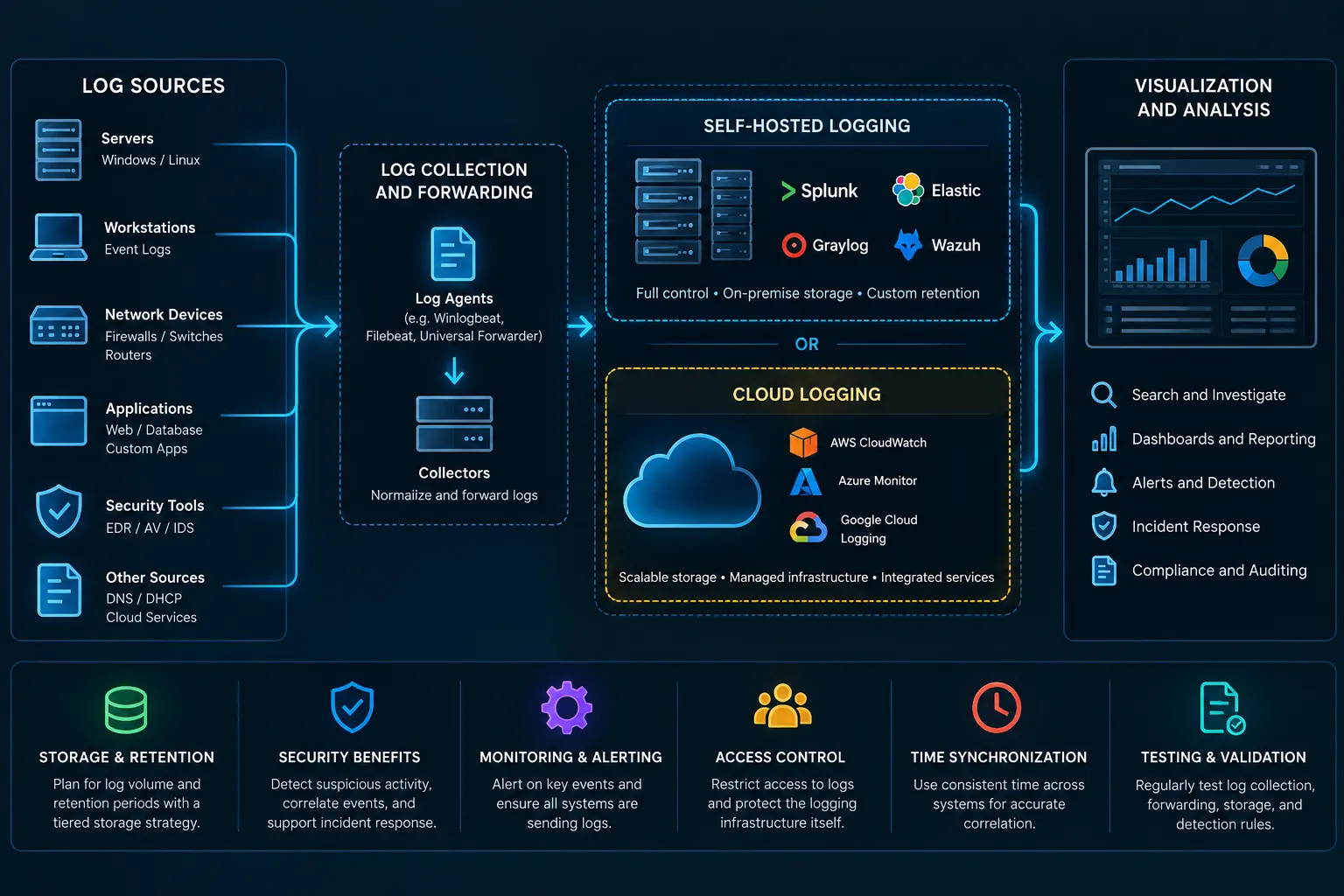
Centralized logging collects events from servers, workstations, network devices, applications, firewalls, and security tools into a single location. Instead of investigating each system individually, administrators can search and correlate activity across the environment. Platforms such as Splunk, Elastic, Graylog, and Wazuh can provide dashboards, searching, alerts, and security monitoring from collected logs.
Self-Hosted Logging
Self-hosted logging provides greater control over where data is stored, how long it is retained, and who can access it. It can also be useful when sensitive logs should remain within the organization's infrastructure. However, the organization is responsible for maintaining the servers, storage, backups, updates, availability, and security of the logging platform.
Cloud Logging
Cloud logging reduces the amount of infrastructure that needs to be maintained internally and can scale more easily as log volume increases. Cloud services can provide centralized storage, searching, alerting, and integration with other services. Organizations should still consider ingestion costs, long-term storage expenses, Internet connectivity, access controls, and whether certain logs contain information that should remain internal.
Storage and Retention
Storage requirements depend heavily on the number of systems, the amount of data they generate, and how long the logs must be retained. For example, collecting 50 GB of logs per day produces roughly 1.5 TB every 30 days before considering compression, indexing, backups, and replication. Recent logs can remain in fast storage while older information is moved into cheaper archival storage according to an established retention policy.
Security and Incident Response
Logs provide important visibility into failed logins, account changes, privilege escalation, suspicious processes, PowerShell activity, firewall changes, malware, and unusual network connections. Centralizing this information allows activity from multiple systems to be correlated, making suspicious patterns easier to identify. During an incident, historical logs can also help establish a timeline, identify affected systems, and determine what actions occurred.
Maintaining Effective Logging
Logging should focus on collecting useful information rather than simply collecting everything. Systems should use synchronized time, access to centralized logs should be restricted, and alerts should identify important events or systems that unexpectedly stop sending logs. Organizations should periodically test their logging pipeline to ensure events are successfully generated, forwarded, stored, searchable, and detected by the appropriate monitoring rules.
Enjoyed reading this content? Let the author know!
Your likes, comments, shares, and saves help creators reach more builders.

Loading recommendations
Loading article