
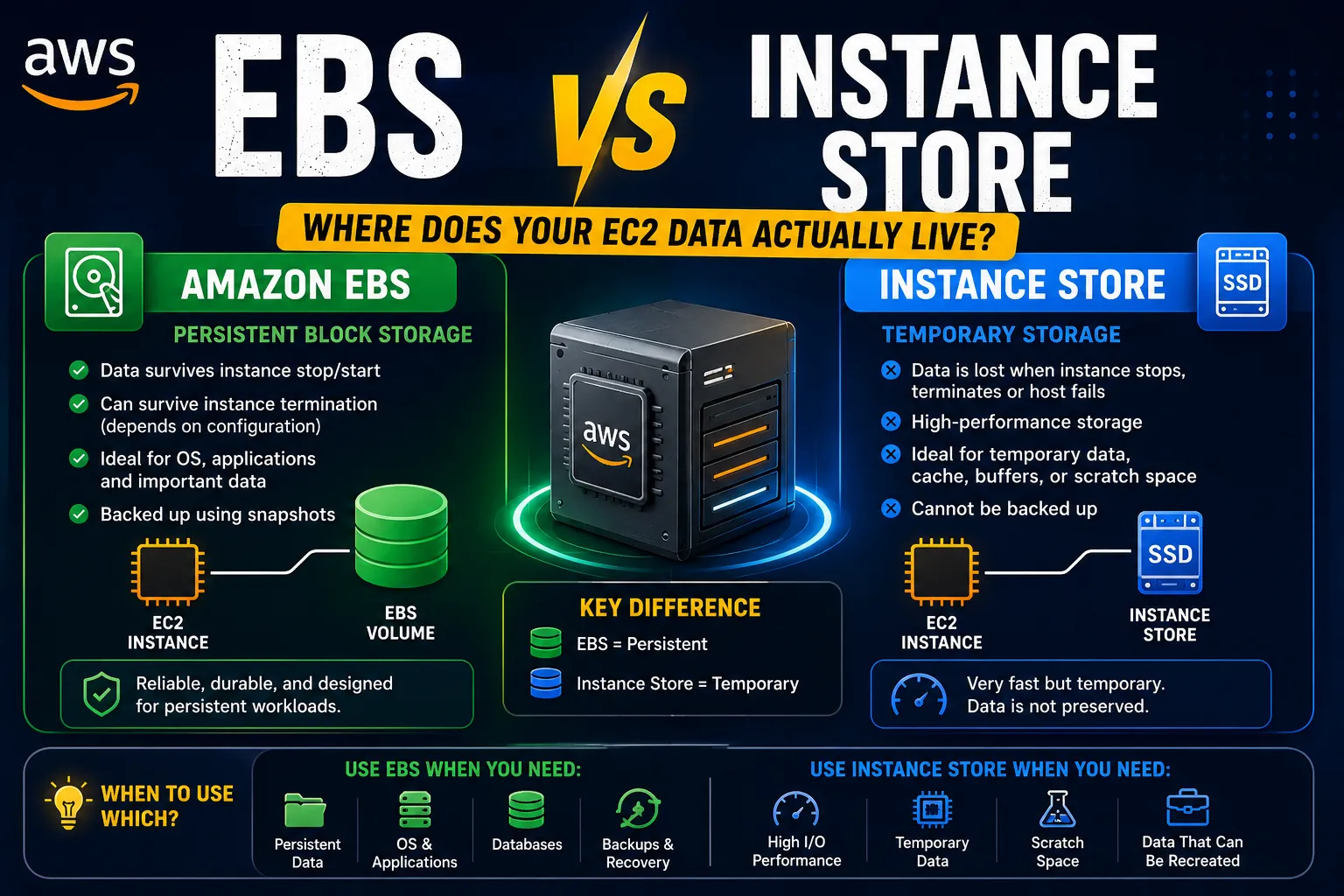
EBS vs Instance Store: Where Does Your EC2 Data Actually Live?
A beginner-friendly guide to AWS storage for EC2, explaining Amazon EBS and Instance Store, how they differ, when to use each, and what happens to your data when an EC2 instance stops or terminates.


💾 EBS vs Instance Store: Where Does Your EC2 Data Actually Live?
After learning how to launch an EC2 instance, I came across another important question:
Where does my EC2 server actually store its data?
At first, I thought an EC2 instance simply came with a hard drive.
But AWS gives us different storage options, and understanding the difference is important when designing applications.
The two concepts I wanted to understand are:
Amazon EBS
EC2 Instance Store
EC2 Instance Store
The basic idea is:
1
2
3
4
5
6
7
8
                     EC2
                      │
             ┌────────┴────────┐
             │                 │
             ▼                 ▼
          Amazon EBS      Instance Store
          Persistent       Temporary
           Storage          Storage
Let's break down the difference.
🧠 What Is Amazon EBS?
Amazon Elastic Block Store (EBS) provides block storage volumes that can be used with EC2 instances.
A simple way to think about EBS is:
A virtual disk attached to my EC2 instance.
The architecture looks like:
1
2
3
4
5
6
7
             EC2 Instance
                  │
                  │
              ┌───▼───┐
              │  EBS  │
              │Volume │
              └───────┘
EBS can store things such as:
- Operating system files
- Applications
- Logs
- Configuration
- Application data
For many EC2 workloads, EBS is the primary storage option.
💽 Why Is EBS Important?
Imagine I have an EC2 instance running a web application.
The application creates:
1
2
3
4
application files
logs
configuration
data
I don't want that data to disappear simply because the compute instance is stopped.
This is where persistent storage becomes important.
The mental model I use is:
1
2
EC2 = Compute
EBS = Persistent Block Storage
The two work together, but they aren't the same thing.
🧊 What Happens When I Stop an EC2 Instance?
Suppose I have:
1
2
3
EC2
 │
 └── EBS Volume
If I stop the instance, the EBS volume can remain available.
I can later start the instance again and continue using the attached storage, subject to the instance and volume configuration.
This is one reason EBS is useful for workloads that need persistent storage.
🗑️ What About Terminating the Instance?
This is where I need to be careful.
When terminating an EC2 instance, the behavior of attached EBS volumes depends on their configuration.
Some EBS volumes can be configured to be deleted when the instance is terminated.
Others can be preserved.
So I shouldn't simply assume:
"EBS always survives."
Instead, I should check the volume's configuration before terminating an important instance.
⚡ What Is Instance Store?
Now let's look at the other option.
Instance Store provides temporary block-level storage physically associated with the host running the EC2 instance.
A simplified architecture is:
1
2
3
4
5
6
7
          EC2 Host
             │
      ┌──────┴──────┐
      │             │
      ▼             ▼
    EC2           Instance
  Instance          Store
The major difference is:
Instance Store is temporary storage.
If the instance is stopped, terminated, or experiences certain underlying host events, data stored on Instance Store can be lost.
Therefore, Instance Store should not be treated as the primary location for important persistent data.
⚔️ EBS vs Instance Store
Here's the comparison that helped me remember the difference:
| Feature | Amazon EBS | Instance Store |
|---|---|---|
| Type | Block storage | Temporary block storage |
| Persistence | Designed for persistent storage | Temporary |
| Independent storage resource | Yes | No |
| Data survives instance stop? | Generally yes | No |
| Data survives instance termination? | Depends on configuration | No |
| Best for | OS, applications, persistent data | Temporary/high-speed workloads |
| Attached to | EC2 instance | EC2 host |
The exact behavior can depend on the EC2 instance type and storage configuration, but the key mental model is:
1
2
3
4
5
EBS
→ Persistent

Instance Store
→ Temporary
🚀 When Would I Use Instance Store?
If the data can be recreated, temporary storage can be useful.
For example:
1
2
3
4
Temporary files
Cache
Scratch data
Temporary processing data
Imagine an application processing a large dataset.
It could download the source data, process it using temporary local storage, and then write the important results to persistent storage such as EBS or Amazon S3.
The architecture might look like:
1
2
3
4
5
6
7
8
9
10
11
              S3
               │
               ▼
              EC2
               │
        Instance Store
               │
          Processing
               │
               ▼
              S3
The temporary working data doesn't need to survive forever.
The final result does.
🗄️ When Would I Use EBS?
EBS is a better fit when the data needs to remain available beyond the lifetime of a particular running process.
For example:
1
2
3
4
5
6
7
EC2
 │
 └── EBS
      │
      ├── Application
      ├── Logs
      └── Persistent files
Common workloads include:
- Operating system volumes
- Application servers
- Persistent application files
- Databases running on EC2
- Development environments
🔥 A Simple Real-World Example
Imagine I'm running a web application on EC2.
The application needs:
1
2
3
4
5
1. Operating System
2. Application code
3. Configuration
4. Logs
5. Temporary cache
I might think about storage like this:
1
2
3
4
5
6
7
8
9
10
11
                  EC2
                   │
          ┌────────┴─────────┐
          │                  │
          ▼                  ▼
        EBS            Instance Store
          │                  │
     Persistent           Temporary
          │                  │
     Application          Cache
        files
This makes the roles much clearer.
📦 EBS and Snapshots
Another important EBS concept is the snapshot.
A snapshot is a point-in-time backup of an EBS volume.
Conceptually:
1
2
3
4
5
6
7
             EBS Volume
                  │
                  ▼
              Snapshot
                  │
                  ▼
            Backup / Restore
This can be useful for:
- Backups
- Disaster recovery
- Creating new volumes
- Preserving data before making major changes
This also introduced me to another important cloud principle:
Storage and backup are related, but they are not the same thing.
Having an EBS volume doesn't automatically mean I have a complete backup strategy.
🔄 EBS vs S3
Another question I had was:
If EBS stores data, why do I need Amazon S3?
Because they solve different problems.
EBS
1
2
3
EC2
 │
 └── EBS
Designed as block storage for EC2 workloads.
S3
1
2
3
4
5
6
Application
     │
     ▼
    S3
     │
     └── Objects
S3 is object storage designed for storing and retrieving objects.
For example:
1
2
3
4
5
6
Images
Videos
Documents
Backups
Logs
Data files
So I now think:
1
2
EC2 → EBS
Files/Objects → S3
This isn't a rule for every architecture, but it's a useful starting mental model.
🧠 The Storage Question I Now Ask
Whenever I need to choose AWS storage, I ask:
1️⃣ Does the data need to survive?
If yes, I need persistent storage.
2️⃣ Does the application need block storage?
If yes, EBS may be appropriate.
3️⃣ Is the data temporary?
If yes, Instance Store may be useful depending on the workload.
4️⃣ Is the data an object such as an image or document?
S3 may be a better fit.
5️⃣ Do I need backups?
Then I need to think about snapshots or another appropriate backup strategy.
⚠️ Common Beginner Mistakes
❌ Mistake 1: Treating Instance Store like permanent storage
Instance Store is temporary.
Important data shouldn't depend on it surviving an instance lifecycle event.
❌ Mistake 2: Assuming all EBS data is automatically protected
EBS provides persistent storage, but backups and recovery still need to be planned.
❌ Mistake 3: Confusing EBS with S3
EBS is block storage.
S3 is object storage.
They are designed for different use cases.
❌ Mistake 4: Ignoring storage costs
Storage resources can continue to incur charges even when I am not actively using the application.
❌ Mistake 5: Forgetting cleanup
When experimenting with AWS, I should check unused volumes and snapshots.
🏗️ My Updated EC2 Mental Model
After learning about EBS and Instance Store, my EC2 architecture now looks like this:
1
2
3
4
5
6
7
8
9
10
11
                         EC2
                          │
              ┌───────────┴───────────┐
              │                       │
              ▼                       ▼
          Amazon EBS            Instance Store
          Persistent              Temporary
              │                       │
              ▼                       ▼
       Important data          Cache / Scratch
       OS / Application          Processing
And if I need object storage:
1
2
3
4
5
6
                    Application
                         │
              ┌──────────┴──────────┐
              ▼                     ▼
            EBS                    S3
          Block Data          Object Storage
This is helping me understand that AWS doesn't have one universal "storage" service.
Different storage services exist because applications have different requirements.
🎯 Final Takeaway
The biggest lesson I learned is:
Compute and storage are separate concepts.
EC2 provides the compute environment.
EBS provides persistent block storage.
Instance Store provides temporary local storage.
S3 provides object storage.
My simplified mental model is:
1
2
3
4
5
6
7
8
9
10
EC2
 │
 ├── EBS
 │    └── Persistent block storage
 │
 └── Instance Store
      └── Temporary local storage

S3
 └── Object storage
Understanding this distinction makes it much easier to design AWS architectures.
I'm continuing to build my AWS knowledge one concept at a time. 🚀☁️
Enjoyed reading this content? Let the author know!
Your likes, comments, shares, and saves help creators reach more builders.

Loading recommendations
Loading article