
AWS Serverless Architecture: Building Scalable Applications Without Managing Servers
This article explains AWS Serverless Architecture and how services like Lambda, API Gateway, DynamoDB, S3, and CloudFront work together to build scalable applications. It also covers the key benefits, real-world architecture, and use cases of serverless computing.

AWS Serverless Architecture: Building Scalable Applications Without Managing Servers
Introduction
Building a modern application often requires managing servers, operating systems, networking, scaling, and infrastructure. AWS provides a different approach through serverless computing, where developers can focus primarily on application logic instead of managing servers.
AWS serverless services allow applications to automatically scale based on demand while charging primarily for the resources consumed.
In this article, we’ll understand AWS serverless architecture, its key services, benefits, and how these services work together to build a real-world application.
What is Serverless Computing?
Serverless computing does not mean that servers are completely absent. Servers are still used behind the scenes, but AWS manages the underlying infrastructure for you.
With serverless architecture, AWS takes care of tasks such as:
- Server provisioning
- Infrastructure maintenance
- Automatic scaling
- Availability
- Operating system management
- Capacity planning
This allows developers to spend more time writing and improving application code.
Key AWS Serverless Services
1. AWS Lambda
Amazon Web Services Lambda is a serverless compute service that executes code in response to events.
For example, a Lambda function can be triggered when:
- A file is uploaded to S3
- An API request is received
- A message arrives in a queue
- A scheduled event occurs
- A database record changes
You don't need to provision or manage EC2 servers.
A typical flow can look like:
User Request → API Gateway → Lambda → Database
2. Amazon API Gateway
API Gateway allows developers to create and manage APIs for applications.
It can receive HTTP requests from a frontend application and forward them to Lambda functions.
For example:
1
2
3
4
5
6
7
React Application
       ↓
   API Gateway
       ↓
     Lambda
       ↓
   DynamoDB
This architecture is particularly useful for building REST APIs and backend services.
3. Amazon DynamoDB
DynamoDB is a fully managed NoSQL database designed for applications that require low-latency performance and automatic scaling.
It can be used with Lambda to create a completely serverless backend.
For example, an e-commerce application could store:
- Users
- Products
- Orders
- Shopping carts
in DynamoDB.
4. Amazon S3
Amazon S3 provides object storage and is commonly used for storing:
- Images
- Videos
- Documents
- Backups
- Static website files
- Dataset files
S3 can also trigger Lambda functions when objects are uploaded.
For example:
1
2
3
4
5
6
7
User uploads image
        ↓
       S3
        ↓
     Lambda
        ↓
Image processing
5. Amazon CloudFront
CloudFront is AWS's content delivery network (CDN).
It distributes content through geographically distributed edge locations, helping reduce latency for users.
A common architecture is:
1
2
3
4
5
User
  ↓
CloudFront
  ↓
S3
This is useful for hosting static websites and delivering assets such as JavaScript, CSS, images, and videos.
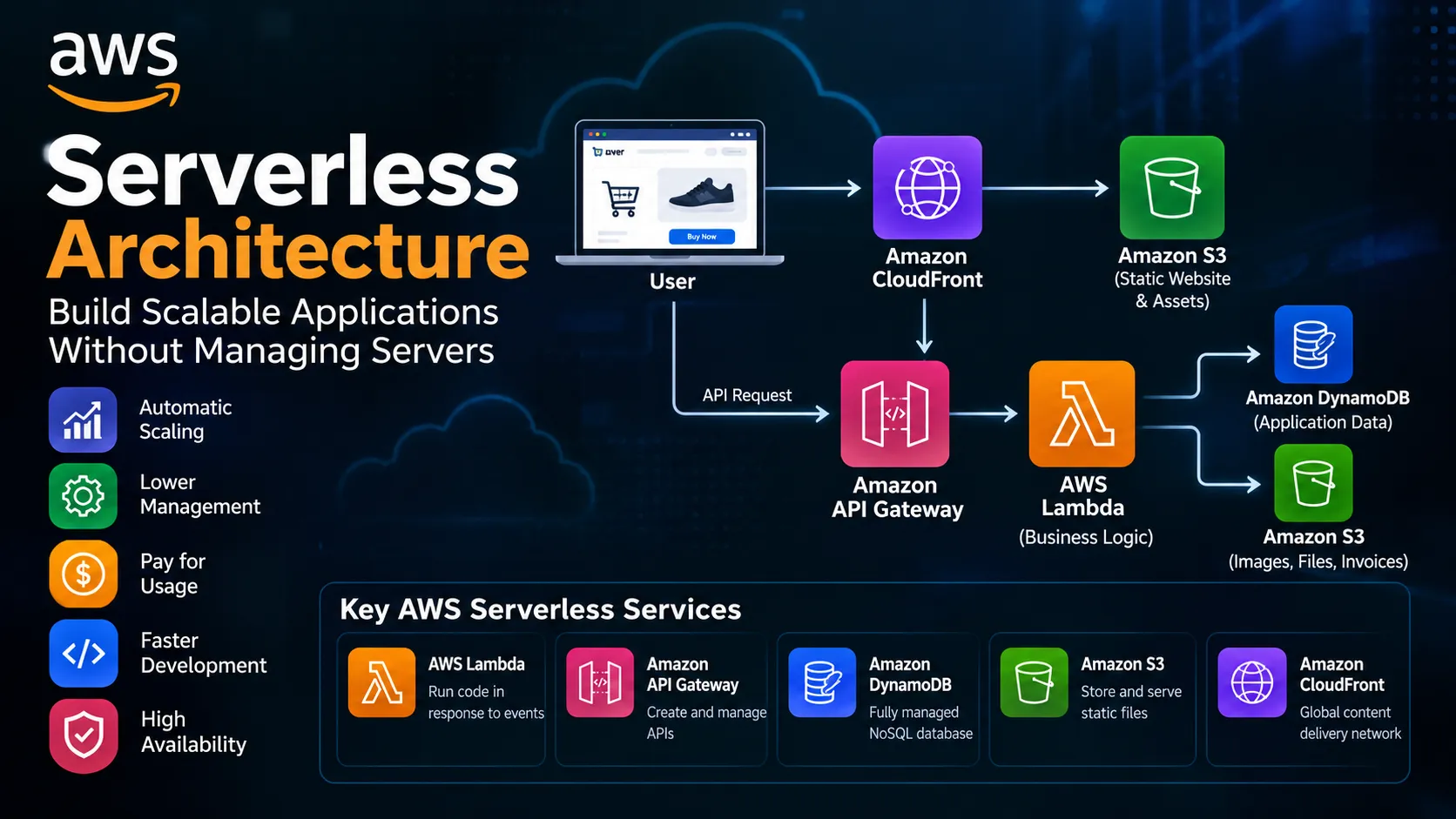
Example: Serverless E-Commerce Application
Let's consider a simple e-commerce application.
The frontend can be hosted using S3 and delivered through CloudFront.
When a user places an order:
1
2
3
4
5
6
7
8
9
10
11
12
13
14
15
                User
                  |
                  v
             CloudFront
                  |
                  v
             API Gateway
                  |
                  v
               Lambda
                  |
          +-------+-------+
          |               |
          v               v
      DynamoDB           S3
How it works
- The user opens the website.
- CloudFront delivers the frontend application.
- The frontend sends an API request.
- API Gateway receives the request.
- Lambda executes the backend logic.
- Lambda stores or retrieves information from DynamoDB.
- S3 stores objects such as product images or invoices.
The entire architecture can operate without directly managing traditional servers.
Benefits of AWS Serverless
Automatic Scaling
Serverless applications can automatically scale according to incoming workload.
If traffic increases, AWS can handle additional requests without requiring you to manually provision servers.
Lower Infrastructure Management
Developers don't have to spend time maintaining operating systems, patching servers, or managing server capacity.
Pay for Usage
With many serverless services, costs are closely tied to actual usage rather than continuously running infrastructure.
Faster Development
Developers can focus on application functionality instead of infrastructure management.
High Availability
AWS managed services are designed to provide highly available infrastructure when configured appropriately.
Serverless vs Traditional Architecture
| Feature | Traditional | Serverless |
|---|---|---|
| Server management | Required | AWS managed |
| Scaling | Often manual/configured | Automatic |
| Infrastructure maintenance | Required | Minimal |
| Pricing model | Often instance-based | Usage-based |
| Deployment | Server/application deployment | Function/service deployment |
| Development focus | Infrastructure + code | Primarily application logic |
When Should You Use Serverless?
Serverless architecture is a strong choice for applications such as:
- REST APIs
- Mobile backends
- Web applications
- Event-driven systems
- Image processing
- Data processing pipelines
- Automation workflows
- IoT applications
However, serverless isn't always the best solution. Applications requiring long-running processes, specialized infrastructure, or very predictable workloads may sometimes be better suited to containers or traditional compute services.
Conclusion
AWS serverless architecture provides developers with a powerful way to build scalable applications without directly managing traditional servers.
By combining services such as Lambda, API Gateway, DynamoDB, S3, and CloudFront, developers can create highly scalable and event-driven applications while reducing infrastructure management.
For students and developers learning AWS, understanding serverless architecture is particularly valuable because it demonstrates how individual cloud services can be combined to build complete real-world systems.
The key idea is simple: focus on building the application, while AWS manages much of the underlying infrastructure.
# aws-dms-serverless# aws-serverless-application-repository# serverless# aws-skill-builder# aws-community-builders
Any opinions in this article are those of the individual author and may not reflect the opinions of AWS.Enjoyed reading this content? Let the author know!
Your likes, comments, shares, and saves help creators reach more builders.

Loading recommendations
Loading article