
Building a Serverless Parcel Tracking System with AWS Lambda, API Gateway, and DynamoDB
Learn how to design a simple serverless parcel tracking backend using Amazon API Gateway, AWS Lambda, and Amazon DynamoDB. This tutorial explains the architecture, database design, API flow, security considerations, and implementation approach for a scalable tracking system.

Building a Serverless Parcel Tracking System with AWS Lambda, API Gateway, and DynamoDB
Tracking a parcel usually looks simple from the user's perspective: enter a tracking ID and receive the latest delivery status.
Behind that simple interface, however, the system needs to store tracking information, process requests, update parcel statuses, and return data reliably.
In this article, we will design a simple serverless parcel tracking backend using:
- Amazon API Gateway
- AWS Lambda
- Amazon DynamoDB
The goal is to understand how these services can work together to build a lightweight and scalable tracking system without managing traditional servers.
Architecture
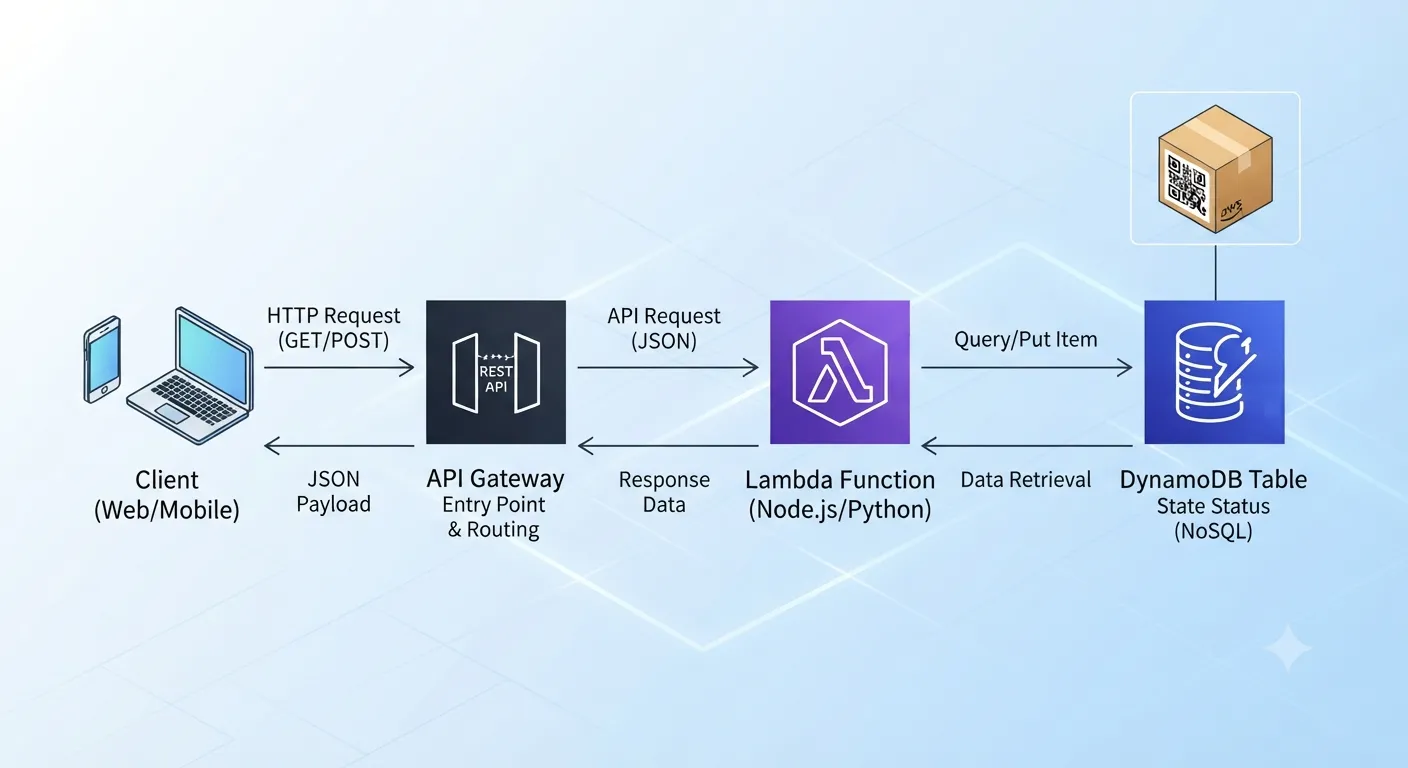
The basic request flow is:
Client → API Gateway → AWS Lambda → DynamoDB
When a user searches for a tracking ID:
- The client sends an HTTP request.
- Amazon API Gateway receives the request.
- API Gateway invokes an AWS Lambda function.
- Lambda validates the tracking ID.
- Lambda retrieves the parcel information from DynamoDB.
- Lambda returns the result to API Gateway.
- API Gateway sends the response back to the client.
This architecture keeps the application simple while separating the API, application logic, and database layers.
Why Serverless?
A traditional application may require developers to provision and maintain servers, configure operating systems, manage scaling, and monitor infrastructure.
With a serverless architecture, these infrastructure-management responsibilities are reduced.
AWS Lambda runs application code in response to events, while API Gateway provides HTTP endpoints and DynamoDB provides a managed NoSQL database.
This makes the architecture suitable for applications where request traffic can vary over time.
Designing the DynamoDB Table
For this example, create a DynamoDB table called:
ParcelTrackingUse:
trackingIdas the partition key.
A sample item could look like this:
1
2
3
4
5
6
7
8
{

  "trackingId": "PKG10001",

  "sender": "ABC Store",

  "receiver": "Customer",

  "currentStatus": "Out for Delivery",

  "location": "Nagpur",

  "lastUpdated": "2026-10-05T10:30:00Z"

}Enjoyed reading this content? Let the author know!
Your likes, comments, shares, and saves help creators reach more builders.

Loading recommendations
Loading article