
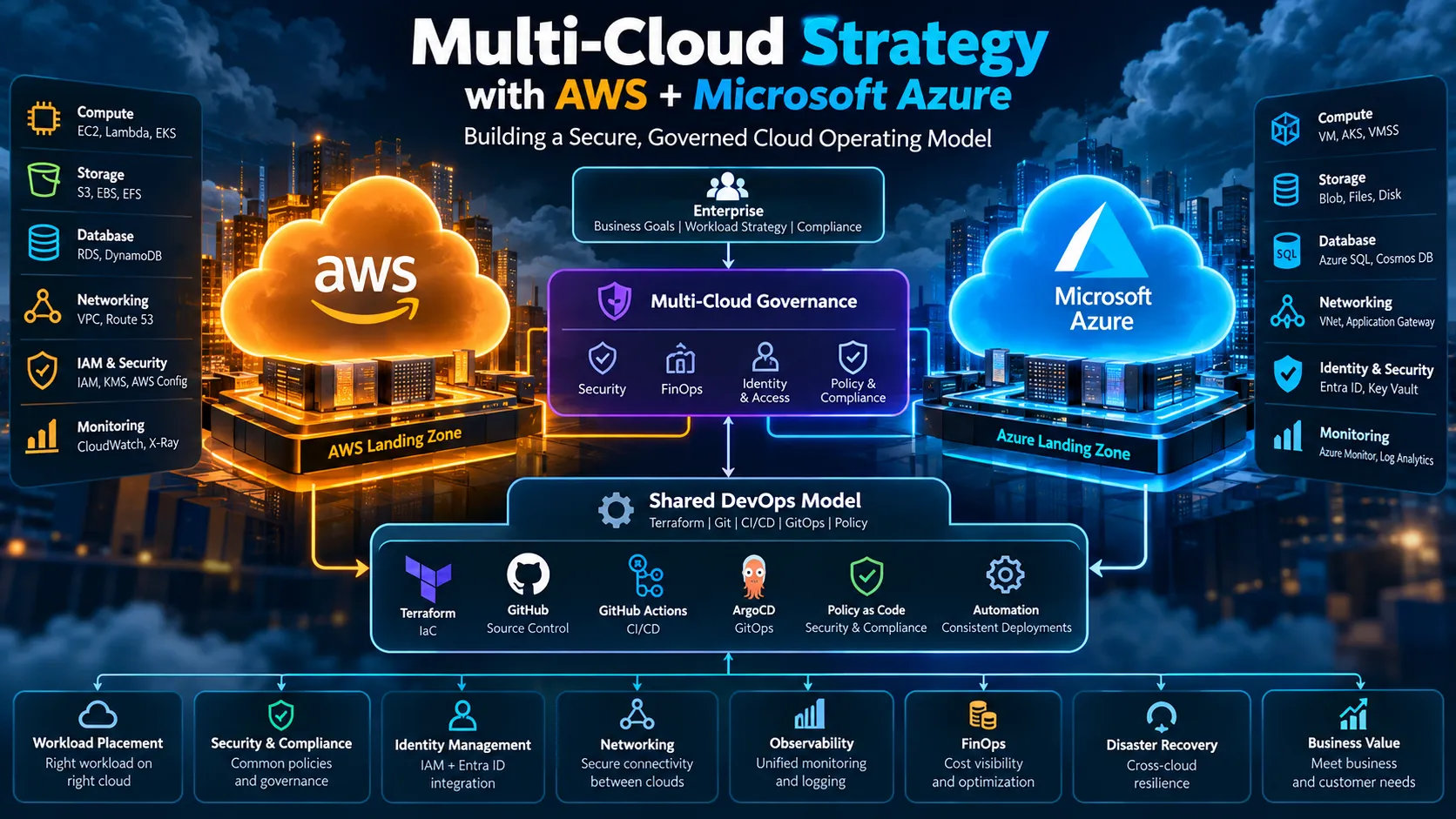
Multi-Cloud Strategy with AWS + Microsoft Azure
Explore how to build a secure and governed multi-cloud operating model across AWS and Microsoft Azure. This guide covers workload placement, identity, networking, Kubernetes, Terraform, CI/CD, GitOps, security, observability, FinOps, disaster recovery, and practical AWS + Azure DevOps architecture.

Building a Secure, Governed Cloud Operating Model

Introduction
Multi-cloud is often misunderstood.
It does not mean deploying the same application on AWS and Azure simply because both clouds are available.
A good multi-cloud strategy starts with a business or technical reason, defines which workloads belong on which provider, standardizes the controls that must be consistent, and allows each cloud to use its native strengths where that creates value.
A practical AWS + Azure model is:
1
2
3
4
5
6
7
8
9
10
11
12
13
14
15
16
17
18
19
20
21
22
23
24
25
26
27
28
                         ENTERPRISE
                             |
                             v
                 +------------------------+
                 | Multi-Cloud Governance |
                 | Security / FinOps / IAM|
                 +-----------+------------+
                             |
              +--------------+--------------+
              |                             |
              v                             v
       +-------------+               +-------------+
       |    AWS      |               |    Azure    |
       |             |               |             |
       | VPC         |               | VNet        |
       | EKS         |               | AKS         |
       | EC2         |               | VMSS        |
       | RDS         |               | Azure SQL   |
       | S3          |               | Blob        |
       | CloudWatch  |               | Azure       |
       | IAM         |               | Monitor     |
       +------+------+               +------+------+
              |                             |
              +-------------+---------------+
                            |
                            v
                    Shared DevOps Model
               Terraform / Git / CI/CD / Policy
The goal is not to make AWS and Azure identical.
The goal is to make the operating model consistent while allowing the infrastructure to remain cloud-native.
1. What Is Multi-Cloud?
Multi-cloud means using two or more cloud service providers for significant workloads.
For this article:
1
Multi-Cloud = AWS + Microsoft Azure
Common drivers include:
- Existing enterprise investments
- Microsoft ecosystem integration
- AWS-native capabilities
- Data sovereignty
- Business-unit requirements
- Specialized services
- Acquisitions
- Resilience requirements
- Customer requirements
- Geographic requirements
- Strategic workload placement
The important point is that the reason should be explicit.
2. Multi-Cloud vs Hybrid Cloud
Single Cloud
1
2
3
4
Company
   |
   v
 AWS
Hybrid Cloud
1
2
3
4
5
Company
   |
   +---- On-Premises
   |
   +---- AWS
Multi-Cloud
1
2
3
4
5
Company
   |
   +---- AWS
   |
   +---- Azure
Hybrid Multi-Cloud
1
2
3
4
5
6
                    Company
                       |
          +------------+------------+
          |            |            |
          v            v            v
     On-Premises      AWS         Azure
3. Why AWS + Azure?
A multi-cloud strategy should solve a real problem.
| Driver | Example |
|---|---|
| Existing investment | Company already operates on both clouds |
| Microsoft ecosystem | Entra ID, Microsoft 365, Windows |
| AWS ecosystem | EKS, S3, RDS, Lambda |
| Data sovereignty | Different regulatory requirements |
| Specialized capability | Provider-specific services |
| Acquisition | Acquired company already uses another CSP |
| Business autonomy | Different teams have different requirements |
| Resilience | Selected workloads need independent capacity |
| Contractual requirements | Customer requires a specific CSP |
The strategy should be driven by business value, not simply “avoid vendor lock-in.”
4. The Biggest Multi-Cloud Mistake
One of the biggest mistakes is:
1
"Let's use AWS and Azure everywhere."
This creates unnecessary complexity.
A better approach:
1
2
3
4
5
6
7
8
9
10
11
12
13
14
15
16
Business Requirement
        |
        v
Workload Analysis
        |
        v
Provider Selection
        |
        v
Architecture
        |
        v
Security + Governance
        |
        v
Deployment + Operations
5. Primary Cloud + Secondary Cloud
A strong enterprise model can define:
1
2
3
4
5
6
7
8
9
10
11
12
13
Primary Cloud
     |
     +--> Default landing zone
     +--> Default platform
     +--> Core governance
     +--> Main engineering skills

Secondary Cloud
     |
     +--> Specific workloads
     +--> Business requirements
     +--> Specialized capabilities
     +--> Regulatory / contractual needs
This is often easier to operate than pretending every workload must be equally distributed.
6. Workload Placement Strategy
Create a decision framework before deploying.
1
2
3
4
5
6
7
8
9
10
11
12
13
14
15
16
17
                    Workload
                       |
                       v
              Business requirements
                       |
          +------------+------------+
          |                         |
          v                         v
     AWS better?               Azure better?
          |                         |
          +------------+------------+
                       |
                       v
               Security / Cost
                       |
                       v
                Final Placement
Evaluate:
- Performance
- Security
- Compliance
- Cost
- Data gravity
- Latency
- Availability
- Existing skills
- Service maturity
- Operational complexity
- Exit requirements
7. AWS vs Azure Service Mapping
| Capability | AWS | Azure |
|---|---|---|
| Virtual network | VPC | VNet |
| Virtual machines | EC2 | Azure VM |
| Kubernetes | EKS | AKS |
| Object storage | S3 | Blob Storage |
| Managed relational DB | RDS / Aurora | Azure SQL / Azure Database services |
| Identity | IAM | Entra ID / Azure RBAC |
| Monitoring | CloudWatch | Azure Monitor |
| Secrets | Secrets Manager | Key Vault |
| Container registry | ECR | ACR |
| Serverless | Lambda | Azure Functions |
| Load balancing | ALB / NLB | Application Gateway / Load Balancer |
| IaC | CloudFormation / CDK / Terraform | ARM/Bicep / Terraform |
The objective is not to make the clouds identical.
Instead, define the capability and select the native implementation.
8. Multi-Cloud Architecture Principles
Principle 1 — Standardize Controls
Security, identity, tagging, logging, policy, CI/CD and incident management should be consistent.
Principle 2 — Keep Workloads Cloud-Native
Do not remove useful managed services just to make two clouds look identical.
Principle 3 — Avoid Unnecessary Cross-Cloud Dependencies
A workload should not constantly move data between AWS and Azure without a strong reason.
Principle 4 — Automate Everything
Use Infrastructure as Code, GitOps and policy automation.
Principle 5 — Make Placement Explicit
Every production workload should have an owner and documented placement rationale.
9. Landing Zones
AWS
1
2
3
4
5
6
7
8
AWS Organization
       |
       +-- Security Account
       +-- Log Archive
       +-- Network
       +-- Shared Services
       +-- Development
       +-- Production
Azure
1
2
3
4
5
6
7
8
9
10
11
12
Microsoft Entra ID
       |
       +-- Management Groups
             |
             +-- Platform
             |     +-- Identity
             |     +-- Connectivity
             |     +-- Management
             |
             +-- Landing Zones
                   +-- Development
                   +-- Production
The exact account/subscription structure depends on the organization, but the operating model should be deliberate.
10. Identity Strategy
Identity is one of the most important cross-cloud concerns.
A practical architecture can use Microsoft Entra ID as an enterprise identity layer while integrating authentication and authorization into AWS according to organizational requirements.
1
2
3
4
5
6
7
8
9
10
11
12
13
14
                         Enterprise Identity
                              |
                              v
                       Microsoft Entra ID
                              |
                  +-----------+-----------+
                  |                       |
                  v                       v
                AWS                    Azure
                  |                       |
             IAM / Roles            Azure RBAC
                  |                       |
                  v                       v
             AWS Resources          Azure Resources
Important concepts:
- SSO
- Federation
- MFA
- Conditional access
- RBAC
- Short-lived credentials
- Least privilege
- Privileged access management
Avoid permanent administrator credentials for automation.
11. AWS IAM vs Azure RBAC
Think in terms of capabilities rather than identical syntax.
1
2
3
4
5
6
7
8
9
10
11
AWS
IAM User / Role
Policies
STS
Resource Policies

Azure
Entra Identity
Service Principal / Managed Identity
Azure RBAC
Resource Policies
For automation, prefer short-lived or workload identities where supported.
12. Network Architecture
A common mistake is treating networking as an afterthought.
Define:
- Address space
- DNS
- Routing
- Egress
- Ingress
- Private connectivity
- Firewalling
- Inspection
- Cross-cloud connectivity
- Observability
Example:
1
2
3
4
5
6
7
8
9
10
                  Corporate Network
                         |
              +----------+----------+
              |                     |
              v                     v
          AWS Network          Azure Network
              |                     |
          VPC / TGW             VNet / Hub
              |                     |
          Workloads             Workloads
13. AWS + Azure Connectivity
For workloads that genuinely need private communication across providers, establish deliberate connectivity.
Possible options include:
- Dedicated connectivity providers
- Site-to-site VPN
- Cloud interconnect services
- Partner networking
- AWS Interconnect – multicloud
AWS announced Azure connectivity for AWS Interconnect – multicloud in public preview in August 2026.
The design still needs careful routing, DNS, security, availability and cost planning.
14. DNS Strategy
Cross-cloud DNS becomes important when applications communicate across providers.
1
2
3
4
5
6
7
8
9
                    Enterprise DNS
                         |
          +--------------+--------------+
          |                             |
          v                             v
       AWS DNS                       Azure DNS
          |                             |
          v                             v
       AWS Apps                      Azure Apps
Define:
- Internal domains
- Public domains
- Split-horizon DNS
- Service discovery
- Private endpoints
- DNS forwarding
- Disaster recovery records
15. Kubernetes Multi-Cloud
Kubernetes can provide a common application platform across clouds.
1
2
3
4
5
6
7
8
9
10
11
12
                 Git Repository
                       |
                       v
                 CI/CD Pipeline
                       |
             +---------+---------+
             |                   |
             v                   v
           AWS EKS             Azure AKS
             |                   |
             v                   v
        Application         Application
But Kubernetes does not magically remove multi-cloud complexity.
You still need to manage:
- Networking
- Storage
- IAM integration
- Ingress
- DNS
- Load balancing
- Cluster upgrades
- Observability
- Cost
- Cloud-specific controllers
16. Terraform for AWS + Azure
Terraform is useful when an organization wants one declarative workflow across providers.
1
2
3
4
5
6
7
8
9
10
11
12
13
14
terraform/
├── modules/
│   ├── aws-vpc/
│   ├── aws-eks/
│   ├── azure-vnet/
│   ├── azure-aks/
│   └── monitoring/
│
├── environments/
│   ├── dev/
│   ├── qa/
│   └── prod/
│
└── providers.tf
Example:
1
2
3
4
5
6
7
8
9
10
11
12
13
14
15
16
17
18
19
terraform {
  required_providers {
    aws = {
      source = "hashicorp/aws"
    }

    azurerm = {
      source = "hashicorp/azurerm"
    }
  }
}

provider "aws" {
  region = var.aws_region
}

provider "azurerm" {
  features {}
}
Use separate modules and state boundaries where appropriate instead of creating one giant Terraform configuration.
17. Terraform State Strategy
Define:
- Remote state storage
- State locking
- Access controls
- Encryption
- Backup
- State ownership
- Environment boundaries
- Recovery procedures
Avoid one massive state file for every cloud and application.
A better model:
1
2
3
4
5
6
7
AWS Network State
AWS EKS State
AWS Data State

Azure Network State
Azure AKS State
Azure Data State
with carefully managed dependencies.
18. CI/CD Strategy
Use a common software delivery model.
1
2
3
4
5
6
7
8
9
10
11
12
13
14
15
16
17
18
19
20
21
22
23
Developer
    |
    v
Git Repository
    |
    v
CI Pipeline
    |
    +--> Test
    +--> Security Scan
    +--> Build
    +--> Image Scan
    |
    v
Artifact Registry
    |
    +-------------------+
    |                   |
    v                   v
AWS Deployment     Azure Deployment
    |                   |
    v                   v
EKS / ECS / EC2     AKS / VM / Functions
The pipeline can remain consistent while deployment targets differ.
19. Container Strategy
1
2
3
4
5
6
7
8
9
10
11
Application Source
       |
       v
Docker Build
       |
       v
Container Image
       |
       +------> Amazon ECR
       |
       +------> Azure Container Registry
Define whether:
- Images are replicated
- Each cloud has its own registry
- One registry is the source of truth
- Image signing is required
- Vulnerability scanning is mandatory
- SBOMs are generated
20. GitOps Strategy
1
2
3
4
5
6
7
8
9
                  Git
                   |
          +--------+--------+
          |                 |
          v                 v
      AWS GitOps        Azure GitOps
          |                 |
          v                 v
         EKS               AKS
Application configuration remains version controlled.
Cloud-specific infrastructure remains cloud-specific.
21. Security Architecture
Multi-cloud security should use common control objectives.
1
2
3
4
5
6
7
8
9
10
                    Security Baseline
                           |
       +-------------------+-------------------+
       |                   |                   |
       v                   v                   v
    Identity            Network             Data
       |                   |                   |
       v                   v                   v
     AWS IAM           AWS VPC            KMS / S3
     Azure RBAC        Azure VNet         Key Vault
Common controls:
- MFA
- Least privilege
- Encryption
- Centralized logging
- Vulnerability management
- Secrets management
- Network segmentation
- Policy as code
- Incident response
22. Secrets Management
Do not manually copy secrets between cloud environments.
1
2
3
4
5
AWS
Secrets Manager / Parameter Store

Azure
Key Vault
Application identities should retrieve secrets at runtime where practical.
Never commit:
1
2
3
4
5
AWS_ACCESS_KEY_ID
AWS_SECRET_ACCESS_KEY
AZURE_CLIENT_SECRET
DATABASE_PASSWORD
API_KEY
to Git repositories.
23. Encryption Strategy
1
2
3
4
5
6
7
8
9
10
11
                    Enterprise Crypto Policy
                             |
              +--------------+--------------+
              |                             |
              v                             v
             AWS                           Azure
              |                             |
             KMS                         Key Vault
              |                             |
              v                             v
       AWS Data Stores             Azure Data Stores
Define:
- Key ownership
- Rotation
- Access policy
- Separation of duties
- Backup/recovery
- Audit requirements
24. Observability
A multi-cloud organization needs a unified operational view.
1
2
3
4
5
6
7
8
9
10
11
AWS Metrics / Logs                 Azure Metrics / Logs
        |                                   |
        +----------------+------------------+
                         |
                         v
                 Observability Layer
                         |
          +--------------+--------------+
          |              |              |
          v              v              v
       Metrics         Logs          Traces
Potential tooling:
- CloudWatch
- Azure Monitor
- OpenTelemetry
- Prometheus
- Grafana
- SIEM
- Incident management
The goal is not necessarily one dashboard.
The goal is consistent telemetry standards.
25. FinOps Across AWS + Azure
Define common dimensions:
1
2
3
4
5
6
7
Owner
Application
Environment
Business Unit
Cost Center
Project
Data Classification
Example:
1
2
3
4
5
Environment = production
Owner       = platform-team
Application = recruitment-platform
CostCenter  = CC-102
ManagedBy   = terraform
Compare:
| Metric | AWS | Azure |
|---|---|---|
| Compute | $X | $Y |
| Storage | $X | $Y |
| Network | $X | $Y |
| Managed DB | $X | $Y |
| Kubernetes | $X | $Y |
| Total | $X | $Y |
Do not optimize only for infrastructure price. Include engineering and operational cost.
26. Disaster Recovery
Multi-cloud does not automatically equal disaster recovery.
Ask:
- What failure are we protecting against?
- What is the RTO?
- What is the RPO?
- Where is the data?
- How is data replicated?
- Can DNS fail over?
- Can credentials work during a failure?
- Can the team actually operate the secondary environment?
For many applications, multi-region within one cloud can be simpler than active-active across two clouds.
27. Data Gravity
Data is often harder to move than compute.
1
2
3
4
5
6
7
8
9
10
11
AWS Application
      |
      v
AWS Database
      |
      X
Massive cross-cloud data transfer
      X
      |
      v
Azure Application
Cross-cloud data movement can introduce:
- Latency
- Egress cost
- Synchronization complexity
- Consistency challenges
- Security complexity
- Operational risk
Therefore:
Place compute close to the data whenever practical.
28. Avoid Cross-Cloud Chaining
Consider:
1
2
3
4
5
6
7
8
9
10
AWS API
   |
   v
Azure Service
   |
   v
AWS Database
   |
   v
Azure Analytics
Every cross-cloud hop increases operational complexity.
A better architecture is often:
1
2
3
AWS Workload ---> AWS Data

Azure Workload ---> Azure Data
Then integrate at deliberate boundaries such as APIs, events, or data products.
29. Policy as Code
Examples:
1
2
3
4
5
6
7
No public storage buckets
No unrestricted security groups
No unencrypted production databases
Mandatory owner tag
Mandatory environment tag
Approved regions only
No public Kubernetes API
Use cloud-native policy engines and tools such as OPA/Conftest or Terraform policy frameworks according to organizational standards.
30. Cloud Center of Excellence
A mature multi-cloud organization benefits from a CCoE.
1
2
3
4
5
6
7
8
9
10
11
12
13
                     CCoE
                      |
       +--------------+--------------+
       |              |              |
       v              v              v
   Architecture    Security       FinOps
       |              |              |
       +--------------+--------------+
                      |
                      v
                 Cloud Teams
                /           \
              AWS           Azure
A CCoE can define:
- Reference architectures
- Security guardrails
- Landing-zone standards
- Naming conventions
- Tagging
- Identity patterns
- Observability standards
- DR patterns
- Cost controls
- Training
31. Skills Strategy
Do not expect every engineer to become an expert in every cloud service.
1
2
3
4
5
6
7
8
9
10
11
12
13
Platform Team
   |
   +--> AWS specialists
   |
   +--> Azure specialists
   |
   +--> Network specialists
   |
   +--> Security specialists
   |
   +--> DevOps / SRE
   |
   +--> Cloud architecture
Engineers should understand cross-cloud architecture while maintaining deep expertise in their primary platform.
32. Practical Project: AWS + Azure Multi-Cloud DevOps Platform
Build a portfolio project using:
1
2
3
4
5
6
7
8
9
10
11
12
13
14
15
16
17
18
19
20
21
22
23
24
25
AWS
- VPC
- EKS
- ECR
- RDS MySQL
- ALB
- CloudWatch
- IAM

Azure
- VNet
- AKS
- ACR
- Azure Database service
- Application Gateway / Load Balancer
- Azure Monitor
- Entra ID

Shared
- Terraform
- GitHub Actions
- Docker
- Kubernetes
- OpenTelemetry
- GitOps
33. Project Architecture
1
2
3
4
5
6
7
8
9
10
11
12
13
14
15
16
17
18
19
20
21
22
23
24
25
26
                         Developer
                             |
                             v
                         GitHub
                             |
                             v
                     GitHub Actions
                             |
               +-------------+-------------+
               |                           |
               v                           v
          AWS Pipeline                Azure Pipeline
               |                           |
               v                           v
             ECR                         ACR
               |                           |
               v                           v
             EKS                         AKS
               |                           |
               v                           v
          AWS Services                Azure Services
               |                           |
               +-------------+-------------+
                             |
                             v
                    Unified Observability
34. GitHub Actions + OIDC
A strong automation pattern is:
1
2
3
4
5
6
7
8
9
10
11
12
13
14
15
GitHub Actions
       |
       v
OIDC Identity Token
       |
       +----------+----------+
       |                     |
       v                     v
AWS IAM Role          Azure Federated Identity
       |                     |
       v                     v
Terraform            Terraform
       |                     |
       v                     v
AWS Resources        Azure Resources
This reduces the need for long-lived cloud credentials in CI/CD.
35. Multi-Cloud Security Reference
1
2
3
4
5
6
7
8
9
10
11
12
13
14
15
16
17
                         Identity
                            |
             +--------------+--------------+
             |                             |
             v                             v
           AWS                           Azure
             |                             |
       +-----+-----+                 +-----+-----+
       |     |     |                 |     |     |
      IAM   KMS  Guardrails         RBAC KeyVault Policy
       |     |     |                 |     |     |
       +-----+-----+                 +-----+-----+
             |                             |
             +--------------+--------------+
                            |
                            v
                     SIEM / SOC / Audit
36. Common Multi-Cloud Mistakes
Mistake 1 — Using Two Clouds Just for Resume Value
Multi-cloud adds real complexity.
Mistake 2 — Copying Everything to Both Clouds
This increases cost without automatically increasing resilience.
Mistake 3 — No Workload Placement Rules
Teams choose clouds independently and create uncontrolled sprawl.
Mistake 4 — Ignoring Data Egress
Large cross-cloud transfers can become expensive and slow.
Mistake 5 — Different Security Standards
AWS and Azure should not have completely different enterprise security baselines.
Mistake 6 — Static Credentials Everywhere
Use federation and workload identity where practical.
Mistake 7 — One Giant Terraform State
Separate state boundaries by environment, platform and dependency.
Mistake 8 — Treating Kubernetes as a Magic Abstraction
EKS and AKS still have cloud-specific networking, identity, storage and operations.
Mistake 9 — No Exit Strategy
Know how data, applications and identities would move if requirements changed.
37. Production Checklist
Strategy
- Document why multiple clouds are required
- Define primary and secondary providers
- Define workload placement criteria
- Define exit requirements
Governance
- Establish CCoE or equivalent governance
- Standardize naming
- Standardize tagging
- Define ownership
- Define account/subscription strategy
Identity
- Central identity strategy
- MFA
- Least privilege
- Short-lived credentials
- Workload identity
Networking
- Address planning
- DNS strategy
- Private connectivity
- Routing controls
- Egress controls
Security
- Encryption
- Secrets management
- Vulnerability scanning
- Central logging
- Security monitoring
- Incident response
DevOps
- Terraform
- CI/CD
- GitOps
- Container registry strategy
- OIDC
- Policy as code
Operations
- Metrics
- Logs
- Traces
- Alerting
- Runbooks
- DR testing
FinOps
- Cost allocation
- Tags
- Budgets
- Rightsizing
- Egress analysis
- Unit economics
38. DevOps Career Perspective
For a DevOps or Cloud Engineer, multi-cloud teaches you to separate cloud concepts from cloud implementations.
1
2
3
4
5
6
7
8
9
Concept              AWS              Azure
-------------------------------------------------
Virtual Network      VPC              VNet
Kubernetes           EKS              AKS
Object Storage       S3               Blob
Identity             IAM              Entra/RBAC
Secrets              Secrets Manager  Key Vault
Monitoring           CloudWatch       Azure Monitor
Container Registry   ECR              ACR
The real skill is not memorizing the table.
The real skill is understanding:
1
2
3
4
5
6
7
8
9
10
Networking
Identity
Security
Compute
Containers
Storage
Databases
Observability
Automation
Governance
and implementing those concepts correctly on each provider.
39. Final Architecture Mindset
1
2
3
4
5
6
7
8
9
10
11
12
13
14
15
16
17
18
19
20
21
22
23
24
25
26
27
28
29
30
31
32
33
                         BUSINESS
                            |
                            v
                    Cloud Strategy
                            |
             +--------------+--------------+
             |                             |
             v                             v
          AWS Strategy                 Azure Strategy
             |                             |
             v                             v
          Landing Zone                  Landing Zone
             |                             |
             v                             v
       Security + IAM               Security + IAM
             |                             |
             v                             v
          EKS / Apps                    AKS / Apps
             |                             |
             +--------------+--------------+
                            |
                            v
                  Shared Operating Model
                            |
        +-------------------+-------------------+
        |                   |                   |
        v                   v                   v
      DevOps             Security             FinOps
        |                   |                   |
        +-------------------+-------------------+
                            |
                            v
                    Business Outcomes
40. Key Takeaway
Multi-cloud is not about having two cloud consoles. It is about building a cloud operating model that can deliberately use more than one provider without losing security, governance, reliability, or engineering velocity.
AWS and Azure can coexist successfully when:
- Workload placement is intentional
- Identity is centralized and controlled
- Networking is designed before deployment
- Security policies are consistent
- Terraform and CI/CD automate delivery
- Kubernetes is used where it adds value
- Data stays close to the compute that needs it
- Observability spans the environment
- FinOps measures total cost
- A CCoE or platform team establishes standards
- Multi-cloud is used only where its benefits justify its complexity
The strongest architecture is not:
1
AWS + Azure = Better
It is:
1
2
3
4
5
6
7
8
9
10
11
12
13
14
15
Business Requirement
        +
Right Workload Placement
        +
Common Governance
        +
Cloud-Native Engineering
        +
Automation
        +
Security
        +
Observability
        =
Sustainable Multi-Cloud
Final Thought
Cloud is not the destination. The operating model is the advantage.
AWS and Azure give organizations different capabilities. The job of a modern DevOps, SRE, Cloud, or Platform Engineering team is to decide where each workload belongs, automate the path to production, and make the entire environment secure and observable.
That is the real meaning of a multi-cloud strategy.
Enjoyed reading this content? Let the author know!
Your likes, comments, shares, and saves help creators reach more builders.

Loading recommendations
Loading article